# Introduction (/docs)
{/* sync:introduction:start */}
RimZ is a realtime dashboard for harnessing agentic coding: one human and tens of agents working together in one Zellij or tmux room, where everything about every agent reads at a glance. Every agent gets a live card (state, task, context health, live cost), and the sidebar routes your attention to whichever one needs you.
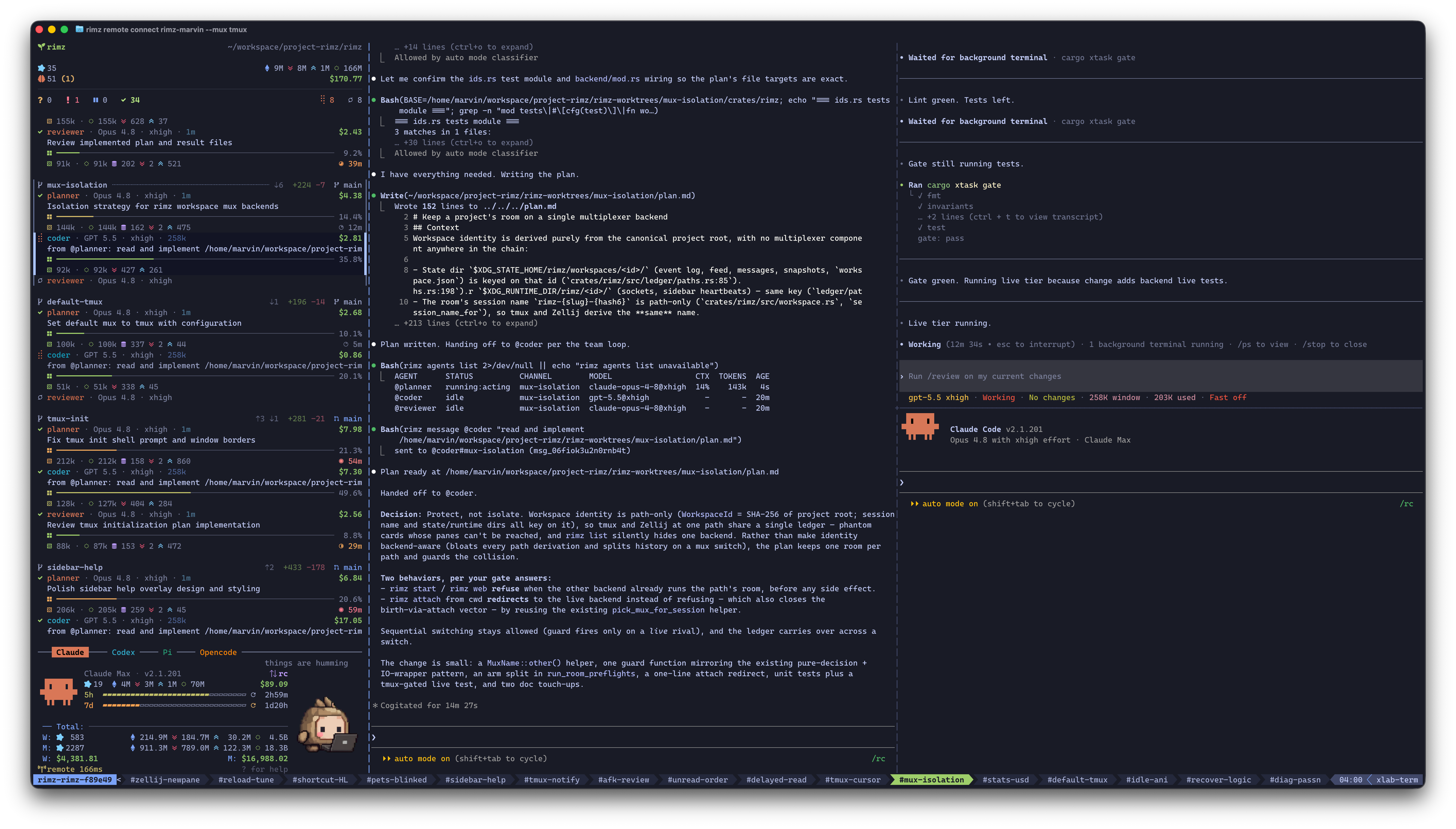
The sidebar triages the fleet on the left; agents work in their own panes.
RimZ stays out of your way: one lightweight binary inside the Zellij or tmux you already run. Your keybinds stay, the agent CLIs run stock, and the official web, desktop, and mobile apps keep working untouched.
That same small footprint carries the primitives **harness engineering** and **loop engineering** build on: the sidebar for observability, one command grammar for [every supported agent](#agent-compatibility-matrix), durable messages that steer and queue, supervised runs with exit codes for scripts and CI, and scheduled wakeups that keep the fleet on a clock. The harness itself (guardrails, policies, self-running loops) is yours to build on top.
{/* sync:introduction:end */}
{/* sync:project-status:start */}
## Project status [#project-status]
RimZ is **alpha software**, moving fast. Expect rough edges and the occasional bug, and expect the surface to shift: commands, flags, config keys, and output formats can change between releases while the design settles. The [changelog](https://github.com/rimio-ai/rimz/blob/v0.4.1/CHANGELOG.md?ref=docs) records what moved in each release.
It is also heavily used, on itself. RimZ is built with RimZ: the fleet behind this repository routinely runs 50–100 concurrent agents across 10–30 parallel worktrees and PRs, and a single room stays responsive with 100+ agents from multiple providers working at once. Driven through teams and loops, most of the routine engineering here — features, bug fixes, CI repair — already flows through the harness with little hand-holding.
Read that as: ready for personal, daily use today; for production workflows that need a stable interface, wait for the 1.0 release.
{/* sync:project-status:end */}
{/* sync:what-it-does:start */}
## What it does [#what-it-does]
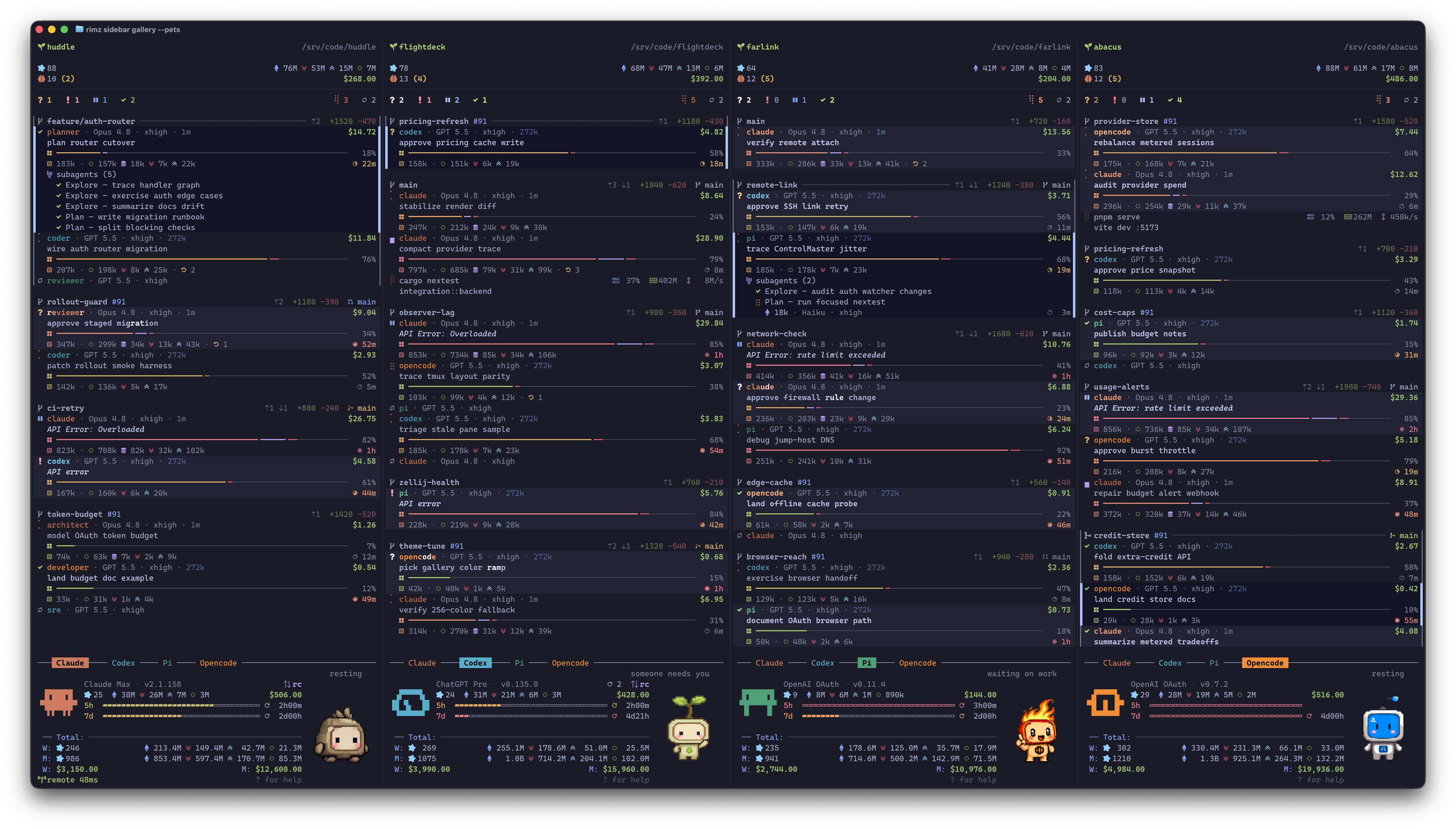
Realtime harness dashboard, with rich information at a glance
* **Extremely Lightweight:** a single binary that hooks the agents you already run, inside your familiar Zellij or tmux: same keybinds, same terminal, zero learning curve; the official CLI, web, desktop, and mobile apps all keep working
* **Realtime Harness Dashboard:** working state and task, model and effort, context health and compactions, live token stats and dollar cost, and the subagent tree
* **Attention, Routed:** one glance at the cockpit line (`? 2 ! 1 …`) reads the whole fleet, the column below arrives already triaged, and one click drops you into the pane that is waiting
* **Know Your Pace:** spending and token insight for today, week, and month, with plan and 5h/7d budget bars for providers that expose those account surfaces; one look tells you where the week is going
* **Worktrees, for every Agent:** open agents together, side by side in an isolated worktree with dynamic layout: `claude,codex` starts Claude planning beside Codex reviewing, `vim,codex+term` puts your editor, an agent, and a shell in one tab
* **Teams, cross-model by design:** pair a Fable planner with a Sol coder and launch them as one team, each role on the model best at its job (reasoning depth, instruction following, speed, price); a mixed team catches what a single model lets through, and delivers better results faster for less
* **Messages, agents chat as in Slack:** every agent answers to a handle (`@codex`, `@planner`); steer/queue delivery guarantees the message lands, respecting agent state and the context window, and agents talk to each other and to you inside channels
* **Scriptable, End to End:** `rimz agents -p` is `claude -p` for every agent, with exit codes, JSON output, streaming, and the full transcript kept, so agents drop into scripts, CI, and workflows
* **Loops, Yours to Engineer:** `rimz loop` schedules supervised runs on a clock (calendar, interval, cron, or a check-guarded watchdog that runs a command and wakes an agent on the result), and notification handlers run your own command the moment a row needs eyes
* **Auto Continue, while you're Away:** a rate-limit pause resumes the moment the budget window resets and transient API overload retries on a backoff ramp; agents recover themselves and keep working while you're gone
* **Steer the Fleet from your Phone:** when an agent stops to ask, the question reaches you in the official Claude and ChatGPT mobile apps, exactly as if you were driving the CLI by hand; answer there and it lands in the same terminal session, the fleet moving on in its panes as if you had typed it, with RimZ never between you and the official apps
* **Pets, your beloved Companion:** an animated sprite on the provider dashboard that keeps you company, running while the agents run and waving when one waits
* **Local or Remote, Continuously:** start on your MacBook or a server, close the laptop, and reattach from anywhere; the link heals itself every time you reconnect
{/* sync:what-it-does:end */}
{/* sync:how-it-works:start */}
## How it works [#how-it-works]
```
terminal — ghostty · iterm2 · warp · kitty · vscode …
zellij or tmux — your keybinds, your layout
┌─────────┐ ┌────────────────────────────────────┐
│ sidebar │ │ claude · codex · pi · opencode · … │
└────▲────┘ └────▲────────────────────┬──────────┘
│ │ │
│ renders │ types into panes │ hooks · transcripts (.jsonl) · oauth api
│ the fleet │ messages · -p runs │ statusline (claude) · app-server (codex)
│ │ │ extensions (pi/opencode) · …
│ │ ▼
└─────────────────┴────────────────── rimz ◀── git status · /proc stats
```
* **Agents report themselves:** sessions, tool calls, live status, and blocking questions arrive the moment they happen, through each agent's own hooks, transcripts, and APIs
* **RimZ drives the panes:** messages, steering, and `-p` harness runs land as keystrokes in the agent's own pane, so every agent runs its stock CLI in a full terminal, exactly as if you typed
* **RimZ fuses every channel:** agent events, git churn, process stats, and account state combine into one live picture, and the sidebar renders it
→ [DESIGN.md](https://github.com/rimio-ai/rimz/blob/v0.4.1/DESIGN.md?ref=docs) · [ARCHITECTURE.md](https://github.com/rimio-ai/rimz/blob/v0.4.1/ARCHITECTURE.md?ref=docs)
{/* sync:how-it-works:end */}
{/* sync:agent-compatibility:start */}
## Agent compatibility matrix [#agent-compatibility-matrix]
**Claude Code and Codex are the daily drivers** and give the best experience today.
**Pi and OpenCode are in alpha** — wired end to end and close behind.
Every other agent is **experimental**: wired and tested against its documented surface, but not yet dogfooded enough by the author, so expect the occasional bug and please [report what you hit](https://github.com/rimio-ai/rimz/issues). Any of them still mostly just works: the CLI runs stock in your terminal and the official apps stay untouched.
| Agent | Status | State | Live | History | Account | Ask | Subagents |
| ----------- | -------------- | :---: | :--: | :-----: | :-----: | :-: | :-------: |
| Claude Code | 🟢 Supported | ● | ● | ● | ● | ● | ● |
| Codex | 🟢 Supported | ● | ● | ● | ● | ● | ● |
| Pi | 🟡 Alpha | ● | ● | ● | ● | ● | ● |
| OpenCode | 🟡 Alpha | ● | ● | ● | ● | ● | ● |
| Antigravity | ⚪ Experimental | ● | ◐ | ◐ | ● | ◐ | ◐ |
| Copilot | ⚪ Experimental | ● | ◐ | ◐ | ◐ | ● | ◐ |
| Droid | ⚪ Experimental | ● | ◐ | ◐ | ✗ | ◐ | ✗ |
| Cursor | ⚪ Experimental | ● | ◐ | ◐ | ◐ | ◐ | ◐ |
| Amp | ⚪ Experimental | ● | ◐ | ◐ | ◐ | ● | ✗ |
| Kiro | ⚪ Experimental | ◐ | ◐ | ◐ | ✗ | ◐ | ✗ |
| Qwen | ⚪ Experimental | ● | ◐ | ◐ | ◐ | ● | ● |
| Kimi | ⚪ Experimental | ● | ◐ | ◐ | ● | ● | ◐ |
| Grok | ⚪ Experimental | ● | ◐ | ● | ◐ | ● | ● |
● full — complete and live · ◐ partial — a working version with a stated limit · ✗ unsupported
A mark answers what you see and when, rather than how RimZ reads it:
* **State** — the card tracks the agent's whole life: it appears at session start, follows working, waiting, and idle, and clears when the session ends
* **Live** — while a turn runs: context-window fill, the token breakdown behind it, and a dollar figure for the work in flight
* **History** — every past session readable end to end, with per-turn tokens and dollars feeding `rimz stats` and the provider dashboard
* **Account** — your login and plan, plus each usage window (5h/7d, monthly credits, a balance) with its fill and reset
* **Ask** — the agent stops to ask, the card raises Waiting, and the question's own text and options reach `rimz asks`
* **Subagents** — child agents nested under the parent card as they start, each with its name, task, and model
A ◐ names its own limit: part of the detail, or the whole of it a beat late. The [agent support](/docs/reference/agent-support) reference spells out every cell and the mechanism behind it, and `rimz coverage` prints the same grid on your own machine.
Latest version only.
RimZ tracks each agent's most recent release; older CLI versions are not supported.
{/* sync:agent-compatibility:end */}
## Where to go next [#where-to-go-next]
* [Quickstart](/docs/getting-started/quickstart) gives the five-step path from install to a working fleet.
* [Working with agents](/docs/agents/fleet) covers layouts, profiles, teams, and the running fleet.
* [Token insight](/docs/agents/insight) explains live cost, historical usage, and provider budget windows.
* [Set up your machine](/docs/getting-started/setup) covers hooks, color, pets, and multiplexer baselines.
* [The sidebar](/docs/agents/sidebar) documents rendered frames and the glyph legend.
* [CLI reference](/docs/reference/cli), [agent support](/docs/reference/agent-support), and [configuration](/docs/customization/configuration) cover the exact command, integration, and setting surfaces.
# Budgets (/docs/agents/budget)
You already cap spend where the provider lets you: a billing alert on the API dashboard, a plan whose included usage refills on a window. Those guard the account. They know nothing about the work: no provider setting says "this experiment is worth $5", "the nightly triage loop gets $20 a day", or "this room stops at $50 a day, whatever I forgot to close before bed". Once the fleet runs unattended — [auto-continue](/docs/harness/loops#keep-the-fleet-moving) resuming parked turns, loop tasks firing at 02:00 — the gap between what you meant to spend and what the account allows is exactly where the surprise bill lives.
A budget is a dollar cap RimZ enforces at the scale you promise yourself. It can enforce one because it already computes the fleet's live spend from the transcripts your agents write ([Token Insight](/docs/agents/insight)); a budget turns that read into a stop. Crossing a cap parks the agent — the same rest state a provider rate limit produces — and a parked agent is one message away from resuming.
One term collision to clear first: the `5h` and `7d` bars on the provider dashboard are also called budgets. Those are your subscription plan's included usage, metered by the provider and read-only to you ([budget is not spend](/docs/agents/insight#budget-is-not-spend)). Most of this page is about the dollar caps you set; the [last section](#the-surplus-gate) reads the provider's budget instead, releasing background work only when the week has slack your own sessions will not need.
## One model, four scopes [#one-model-four-scopes]
A cap is a dollar amount (`5`, `$4.50`), optionally windowed with `/day`, which measures from local midnight in your configured `timezone`. Four scopes wear the same model:
| Scope | Caps | Set with | Window |
| --------- | ------------------------------------------------------ | --------------------------------------------------- | ------------------ |
| Agent | one agent's spend | `--budget` at launch, or the profile `budget` field | session, or `/day` |
| Loop task | one task's scheduled runs | `rimz loop add … --budget 5 --budget-per-day 20` | per run, per day |
| Room | every agent under one project root, worktrees included | `harness.budget = "50/day"` | `/day` only |
| Account | one provider login, every room on the machine | `[accounts.budget] claude = "100/day"` | `/day` only |
Every scope is checked independently, so the first cap crossed is the one that parks.
Qwen's experimental Alibaba Coding Plan reading adds a launch-only provider quota boundary beside those four dollar scopes. A fresh managed supervised or loop launch binds its final Qwen process to the exact official region and an opaque fingerprint of the selected API key, then reads only that account's cached `5h`, `7d`, and `30d` windows. An exhausted window exits `125` or records `budget skipped` before a run record, pane, or loop `--check` command exists. Missing quota data permits an ordinary fresh launch; the surplus gate requires complete data for that exact account and fails closed. Interactive hand launches, resume, fork, wake, and mid-run auto-continue stay outside this boundary.
### Cap one agent [#cap-one-agent]
`--budget` at launch caps the session; `/day` measures each local calendar day instead, so a long-lived agent resumes with fresh headroom at midnight:
```sh
rimz agents codex --budget 5 "migrate the config parser" # parks at $5 of session cost
rimz agents claude --budget 20/day # resets at local midnight
```
In a profile the same cap is the `budget` field, so a preset carries its price ceiling with it. The cap never reaches the stock CLI: RimZ's own launcher carries it, and the room enforces it, so it works identically for every agent kind.
Inspect or change a running agent's cap without relaunching:
```sh
rimz agents budget @coder # current spend, cap, window, park state
rimz agents budget @coder 10 # replace the cap
rimz agents budget @coder +5 # add headroom
rimz agents budget @coder clear # remove it
```
A supervised `-p` run treats its `--budget` as a run outcome instead of a park: the run records `budget_exceeded` and exits `125`, distinct from a timeout or failure, so a pipeline branches on it ([scripting](/docs/harness/scripting#one-turn-one-exit-code)).
### Cap a loop task [#cap-a-loop-task]
A scheduled task takes the same `--budget` to cap each fired run, and adds `--budget-per-day`: the scheduler sums that task's completed run costs for the local day and skips a fire that cannot fund its per-run cap, recording `budget skipped`. `rimz loop list` shows each task's spend against its daily cap. `rimz loop show` reads back per-run costs; check-gated tasks aggregate every recorded agent attempt, while other task shapes keep the rolling ten-run average. The schedule grammar and run forensics are the [loops guide](/docs/harness/loops); the flag semantics are the [loop reference](/docs/reference/cli/loop).
### Cap the room, cap the login [#cap-the-room-cap-the-login]
The two daily scopes switch on in config, and only in config:
```sh
rimz config set harness.budget 50/day # this project's whole fleet
rimz config set accounts.budget.claude 100/day # one login, every room on the machine
```
Both keys live in your per-machine `config.toml`, require the `/day` form, run no command, and stay outside the project trust hash. The room cap counts every agent under the project root, worktrees included. An account cap sums one provider login across every room on the machine, while each room parks only the panes it owns.
An account cap also needs the provider's complete dollar history on disk, which Claude, Codex, Pi, and OpenCode have today. For any other kind, config edits, room start, and `rimz budget --account` refuse the key outright rather than enforce against incomplete dollars.
`rimz budget` reads and adjusts what config armed:
```sh
rimz budget # room cap, source, today's spend, park state, and every account cap
rimz budget 30/day # replace the room cap
rimz budget +10 # add headroom
rimz budget off # disable it; `clear` is an alias
rimz budget +25 --account claude # the same verbs against one login
```
Adjustments are runtime state under RimZ's own state directory, never edits to your files: `config.toml` keeps the number you committed to, and `rimz budget` refuses to arm a cap that config never switched on. To change the standing promise, change the key.
## What crossing a cap does [#what-crossing-a-cap-does]
The enforcement is small enough to hold in your head:
1. The room's sidebar process re-checks every scope on its regular tick, against the same transcript-derived spend that [Token Insight](/docs/agents/insight#how-the-numbers-are-calculated) reads.
2. When a running turn crosses a cap, RimZ presses Esc in that agent's pane (the same interrupt you would type) and records the park.
3. The card reads `⏸` with the reason. A crossed room or account cap also turns the cockpit or provider row alarm-red and explains itself as `$50.21 of $50/day`.
Agents already at rest keep their lifecycle status, and a waiting agent keeps its ask visible until the answered turn runs again; a cap interrupts spending, not conversation. Nothing exits and nothing is lost: the CLI stays in its pane, the session files stay where the provider put them, and the turn's work up to the interrupt is in the transcript.
Two honest limits. Cost arrives with provider responses, so the last tool call can overshoot the cap slightly before the Esc lands: the cap stops the next spend, never the request already in flight. And a cap can only count spend it can price: a model missing from the price table contributes tokens but zero dollars until the weekly price refresh knows it ([how the numbers are calculated](/docs/agents/insight#how-the-numbers-are-calculated)).
## What resumes a parked agent [#what-resumes-a-parked-agent]
* **You do.** A human message delivered after the park waives that agent's next turn, once; the waiver is consumed when the turn ends. Background and agent-to-agent deliveries stay parked, so a chatty team cannot spend through your cap.
* **The day does.** A `/day` park reopens at the next local midnight, and with [auto-continue](/docs/harness/loops#keep-the-fleet-moving) on, the continue prompt goes to the agents RimZ interrupted — never to agents that were already at rest.
* **A raise does.** Raising or clearing a cap (`rimz agents budget @coder +5`, `rimz budget +10`) queues the configured continue prompt to the agents that cap parked in this room; add `--no-continue` to lift the cap and leave them at rest.
* **Automation never does.** While the room or account scope has no headroom, `-p` launches exit `125` and loop fires record `budget skipped`. Interactive launches stay available, so a crossed cap never locks you out of your own room.
## The surplus gate [#the-surplus-gate]
Dollar caps guard your wallet against spend you never meant to authorize. Background work threatens something subtler: the subscription window your own sessions run on. A recurring refactor or triage task is worth running only while it leaves your workday untouched, and you already make that call by eye: a glance at the `7d` bar on a light Thursday says the background refactor can run; on a heavy Tuesday everything waits for the real work. A scheduled task firing at 03:00 cannot make that judgment call, unless the schedule can read the bar.
The surplus gate is that glance, computed. Before a gated fire, RimZ reads the provider's longest pacing window — the weekly bar on today's Claude and Codex plans, and the exact account's `7d` Alibaba window for Qwen — and computes forward headroom: the share of budget remaining divided by the share of time remaining. Longer Alibaba windows still block a launch when exhausted, but the `30d` window does not set pacing or reset recurrence. `1.0x` means the current pace lands exactly on the reset; anything above it is budget the rest of the window does not need. Three days into a 7-day window with 40% used, 60% of the budget remains against 57% of the time, and headroom reads `1.05x`: sustainable, but no real slack. With only 20% used, the same clock reads `1.4x`, and a task gated at `--surplus 1.4x` or below fires.
Two task flags arm the gate, and they compose:
* `--surplus 1.5x` opens the gate only at that much headroom or more. `1.5x` means half again as much budget remains as the clock requires.
* `--surplus-after 3d` is an elapsed floor, checked first: the task stays quiet until that much of the window has passed. A fresh window reads ahead of pace before your own heavy days have landed, so the floor keeps Monday's untouched bar from funding work that Friday will need. Used alone, it still requires `1.0x` headroom.
The gate is a read, nothing more. The headroom comes from the provider's own usage reporting, the same account-scoped reading that draws the dashboard bars, cached on disk by the sessions you already run. Checking it runs no command and spends no tokens. A closed gate records `surplus skipped` in the task's run history with the reading it saw (`claude 7d window surplus 1.4x below 1.5x`), adds no [strike](/docs/harness/loops#keep-the-fleet-moving), and the schedule keeps polling until real surplus appears. It also fails closed: a missing, incomplete, expired, or not-yet-started window reading keeps the gate shut, so an API-key account, which has no subscription window to read, never fires a surplus-gated task.
The gate rides loop tasks only, on `--agent` and `--wake` actions, and it is evaluated before any `--check` guard, so a closed gate does not even run the check. The loop-side recipe is [loops → gate a task on surplus](/docs/harness/loops#gate-a-task-on-surplus); the exact flag grammar is the [loop reference](/docs/reference/cli/loop).
## See also [#see-also]
* [Token Insight](/docs/agents/insight) — reading the spend that budgets act on: the cockpit, the provider dashboard, and `rimz stats`.
* [Loops](/docs/harness/loops#keep-the-fleet-moving) — auto-continue, task budgets, and hands-off recovery in one loop.
* [Scripting](/docs/harness/scripting) — the `-p` exit-code contract, including `125` for a run over budget.
* [Configuration → daily dollar budgets](/docs/customization/configuration#daily-dollar-budgets) — the `harness.budget` and `[accounts.budget]` keys.
* [Budget reference](/docs/reference/cli/agents#inspect-and-change-a-budget) — the complete `rimz budget` and `rimz agents budget` surface.
* [Providers internals](https://github.com/rimio-ai/rimz/blob/v0.4.1/docs/internals/agents/providers.md?ref=docs) — spend windows, ledgers, and park mechanics in depth.
# Agents (/docs/agents/fleet)
RimZ watches the agents you already run. Type `claude` into any pane and it joins the room; `rimz agents` earns its keystrokes later, when you want an agent tuned for one job or several agents launched in one line. This page covers both ways in and the commands that read and drive the fleet once it is working; the field-level detail behind profiles and permission modes waits at the [end of the page](#profiles-shape-an-agent-for-one-job).
## Run the CLI you already run [#run-the-cli-you-already-run]
Type the agent's own command in any pane, exactly as you did before RimZ:
```sh
claude # the stock Claude CLI
codex # the stock Codex CLI
```
The agent appears in the sidebar, reporting from its first line. No `rimz` command sits in the path: the CLI runs with your flags, your config, your session files, and the reporting hooks you approved when you [installed hooks](/docs/getting-started/setup#install-agent-hooks) tell RimZ what it does — status, task, context health, live cost. From that the agent gets a live card, a handle you can message, and a place in the attention ranking. Which agents RimZ drives, and what each integration reports, is [agent support](/docs/reference/agent-support).
For a single agent in the pane you are standing in, this is the whole story. Everything below is for the sessions where it isn't.
## Why `rimz agents` [#why-rimz-agents]
A bare `claude` is a general-purpose agent, and most work is not general: a planner should reason hard and edit nothing, a reviewer should read the diff and propose rather than commit, a test-writer should stay in the test tree. Even the everyday default is worth shaping — a trimmed system prompt, an explicit tool list, the effort and permission posture you actually want — and the stock CLI takes all of it through its own flags:
```sh
claude --permission-mode auto --effort xhigh \
--system-prompt-file ~/.agents/prompts/claude-slim.md \
--strict-mcp-config \
--tools 'Agent,AskUserQuestion,Bash,Edit,EnterPlanMode,ExitPlanMode,LSP,Read,Skill,TaskCreate,TaskGet,TaskList,TaskStop,TaskUpdate,WebFetch,WebSearch,Write'
```
A shaped agent beats a general one steered by hand — fewer wrong turns, less context spent wandering, a lower bill for the same result. What doesn't scale is the typing: that flag stack, re-entered in every pane, kept in sync across sessions, remembered per provider because Codex spells the same ideas differently.
That flag stack is what `rimz agents` bottles. A [profile](#profiles-shape-an-agent-for-one-job) — here named `claude`, the same as the kind, so it becomes the tuned default — gives it one word, and the launcher replays it:
```sh
rimz agents claude # the flag stack above, as one word — and a @claude handle
rimz agents claude,codex # two agents, side by side in one line
rimz agents forge -w feat-x # a whole team, isolated in its own worktree
```
The wrapper stays thin. `rimz agents claude` does exactly two things on your machine: it renders the profile into the stock CLI's own flags (the `claude --permission-mode auto …` line above, nothing you couldn't type yourself), and it runs that command in your Zellij or tmux — in the pane you are standing in for a single agent, in a fresh tab for a layout or worktree — under a small RimZ launcher that stamps the handle and hands over to the CLI. The agent process is the official CLI; its session files land where the CLI always puts them, so `claude --resume` and the provider's own apps keep working. Closing the pane or `rimz agents stop @claude` ends it the same way Ctrl+C would.
Beyond the preset, the launcher carries three habits that build on it, each with its own guide:
* **several agents at once**, arranged in a [layout](#compose-a-layout) from one spec,
* **an isolated [worktree](/docs/harness/worktrees)** per line of work, one `-w` flag away,
* **a named [team](/docs/harness/teams)** of profiles, launched, messaged, and resumed as a unit.
## Compose a layout [#compose-a-layout]
Launching three agents by hand is three pane splits and three commands typed. One spec does it in one line: **commas split columns, plus signs tile rows, slashes stack rows** (a Zellij stack; tmux tiles them). Each cell is an agent kind, a `-` cell ([permission modes](#set-a-permission-mode)), a [profile](#profiles-shape-an-agent-for-one-job), a configured command, or `term` for a plain shell; suffix an agent cell with `:role` to give it an ad-hoc role handle. An optional trailing prompt goes to one leader: a named team's configured `leader` role, its first declared role by default, or otherwise the first agent cell. Give a repeated first cell an inline role to make that target unambiguous; use `rimz message @all` after launch when every agent needs the same text.
```sh
rimz agents claude,codex # two agents, side by side
rimz agents claude:planner,codex:coder -w feat-x # ad-hoc role handles, no agents.toml
rimz agents claude,codex+term # Claude | Codex tiled over a shell
rimz agents claude/codex/term # one stack of three rows
rimz agents 'vim,codex+term' # your editor beside an agent stacked over a shell
rimz agents claude,codex "Draft the API shape." # the prompt lands on the first cell, Claude
```
Quote a spec whenever it contains a `+`, a space, or anything your shell would otherwise expand. Profiles and kinds compose the same way, so `rimz agents planner,coder+reviewer` lays out three of your presets. The full grammar and how cells compile to panes is [harness.md → The layout IR](https://github.com/rimio-ai/rimz/blob/v0.4.1/docs/internals/harness/harness.md?ref=docs#the-layout-ir).
Add `-w` and the whole layout lands in an isolated Git worktree, the pattern for running several agents in parallel without stepping on each other: see [Worktrees](/docs/harness/worktrees).
## Handles, in brief [#handles-in-brief]
Every agent answers to a handle: `@claude` names a kind, `@planner` names a profile or an inline `cell:planner` role, and `forge.reviewer` names one role of a team. RimZ gives each bare launch a stable pet name too (`@swift-otter`), and `--name writer` pins your own (`@writer`). A `#channel` suffix scopes the handle to one channel — every worktree gets one, and named channels and teams have their own — defaulting to the one you are standing in.
```sh
rimz agents focus @claude-2#feat-a # jump to a specific agent's pane
rimz agents show swift-otter # its activity, context, placement, and transcript tail
```
That is enough to launch, re-add, and jump to agents. Routing text to them — parking at the turn boundary, steering the live turn, broadcasting to a channel — is the [Messaging guide](/docs/harness/messaging), which owns the full address grammar and delivery rules.
## Manage a running room [#manage-a-running-room]
Once a few agents are working, the same `rimz agents` command reads the room and drives it. Every verb below takes a [handle](#handles-in-brief), so `@coder` is the codex you launched into a team and `@swift-otter` the bare Claude you started in the corner. These commands run from any pane in the room, or from a script anywhere that resolves to the same workspace.
**See the whole room at a glance.** Bare `rimz agents` lists the current channel's cards, grouped by the worktree each lives in and ordered so whoever needs you sits on top:
```console
$ rimz agents
AGENT STATUS MODEL CTX TOKENS AGE
⑂ auth-refresh · forge team
@planner waiting opus@high 42% 78k 2m
which rotation strategy should we use?
@coder running gpt-5.5@high 31% 54k 0s
wire up the refresh-token path
@reviewer idle opus@high 3% 12k 15m
review the diff once coder lands
query-engine
@swift-otter success opus@high 78% 120k 8m
store refactor
```
`@planner` sits first because it stopped to ask you something; the columns read its status, model and effort, how full its context window is, tokens used, and how long since it last moved, while the indented line below says what it is on. Add `--all` to widen past the current channel to every lane in the room, or a scope like `rimz agents '#auth-refresh'` to read one.
**Ask why one agent is where it is.** When a card raises a question you can't answer from one line, `rimz agents show` prints the full report for a single agent, so you see what you asked it, what it is spending, and where its pane lives without switching to it:
```console
$ rimz agents show @coder
Agent
handle: @coder#auth-refresh
kind: codex
role: coder
team: forge
session: 01JQZ8L4M2P9RT
Activity
description: wire up the refresh-token path
status: running
phase: acting
turn_started: 2026-07-08T15:41:02Z
turn_elapsed: 3m
last_activity: 0s
Context
model: gpt-5.5@high
fill: 31%
window: 272000
total_tokens: 54210
fresh_input_tokens: 4180
cache_read_tokens: 47600
cache_write_tokens: 1920
output_tokens: 510
compactions: 0
cost: $0.87
Placement
channel: auth-refresh
worktree: ~/code/query-engine-auth-refresh
pane: tmux:%14
tab: auth-refresh
Recent transcript
you 15:38
after your turn, add coverage for the expiry edge cases
coder 15:41
Wiring the rotation path first, then the expiry tests.
```
Add `--capture` to append the pane's visible text, or `--json` to hand the same report to a script.
**Read along without leaving your pane.** `rimz agents logs` tails an agent's transcript; `-f` follows new lines as the turn writes them, so you watch a long run from the pane you are already in:
```console
$ rimz agents logs @coder -n 4
coder 15:36
Rotating the refresh token first, then wiring the retry path.
you 15:38
after your turn, add coverage for the expiry edge cases
coder 15:41
Added tests/auth/refresh_expiry.rs covering sliding and hard expiry.
$ rimz agents logs @coder -f # follow new lines as they land
```
**Read what each turn cost.** `rimz agents history` joins the conversation's user turns to the provider's token and price records, so you can see which request consumed the session without leaving the agent view. `-n` keeps the newest rows and `--json` returns the same records to a script:
```console
$ rimz agents history @coder -n 3
START DUR TOKENS COST OUTCOME PROMPT
2026-07-08 15:12 8m ↘4k ↗510 $0.4210 done implement refresh-token rotation
2026-07-08 15:38 3m ↘1k ↗284 $0.2870 done add coverage for expiry edge cases
2026-07-08 15:44 12s ↘320 ↗0 $0.0310 open run the focused integration tests
3 turns · 54k tokens · $0.7390
```
**Find what is burning CPU or tokens.** When the machine gets loud, `rimz agents top` ranks the live fleet by the resources each agent's pane process tree is using. It streams by default; `--once` takes a sample and exits for a script:
```console
$ rimz agents top --once
4 agents · 2 running · 143% CPU · 1.9G MEM · 248k tokens
AGENT STATUS CPU MEM IO/S PROCS CTX TOKENS AGE
@coder running 96% 892M 4M/s 12 31% 54k 0s
@planner waiting 2% 410M - 6 42% 78k 2m
@reviewer idle 1% 180M - 4 3% 12k 15m
@swift-otter success - - - - 78% 120k 8m
```
**Jump in, or shut one down.** A row you want to answer is one `focus` away; a pane you are done with is one `stop`:
```sh
rimz agents focus @coder # jump to its pane
rimz agents stop @reviewer # close the idle reviewer's pane
rimz agents stop @claude --all # close every Claude in scope
```
`stop` closes the agent's pane, ending the CLI process the way Ctrl+C would; sessions stay on disk in the provider's own format, so a stopped agent is one `--resume` away.
**Restore a lane by place.** `rimz agents resume '#auth-refresh'` focuses the lane when every member is live, adds only closed members when part of it remains live, and rebuilds the saved team and stray panes when all are closed. Use `--from-pr 42` for a locally developed pull-request lane; bare `resume` targets the current worktree or lists resumable lanes at the project root.
**Bounce an agent in place.** `rimz agents restart @coder` focuses the agent, replaces its pane in the same layout position, and resumes the provider session with the original profile, role, team, channel, and permission mode. The profile is rendered from the current `agents.toml`, so edits take effect on the bounce. When the provider has no resumable conversation, restart launches fresh and prints the allocated replacement handle instead of hiding a possible rename.
**Fork an agent to try another approach.** `rimz agents fork @coder` takes over the launching pane with the full conversation under a new provider-assigned session id in the source worktree, leaving the original session untouched and preserving its permission mode. Pass `--new-pane` to keep the launching pane, or `--new-tab` for a separate view. RimZ gives the fork a fresh pet name; use `rimz agents fork @coder --name twin` to pin `@twin` when you want both approaches to have memorable handles.
Two everyday tasks have their own guides, with the depth this page leaves out:
* **Steer or queue an agent** — send text that parks at the turn boundary, interrupts the live turn, or arrives on a schedule: the [messaging guide](/docs/harness/messaging).
* **Script an agent** — run one supervised, exit-coded turn for a pipeline or CI job with `rimz agents … -p`: the [scripting guide](/docs/harness/scripting).
The complete `rimz agents` surface, every verb and flag, is the [agent-control reference](/docs/reference/cli/agents).
## Answer asks from your phone [#answer-asks-from-your-phone]
An agent that stops to ask while you are away does not have to wait for your terminal. Claude Code and Codex ship **remote control**, the bridge behind their official mobile apps, and two toggles keep it up with every room:
```sh
rimz config set remote_control.claude true
rimz config set remote_control.codex true
```
The ask reaches your phone as a push from the provider's own app, and your answer lands in the same session as if you had typed it in the pane. Both toggles are off by default; exactly what each one runs, the preconditions, and the undo are in [remote → answer asks from your phone](/docs/agents/remote#answer-asks-from-your-phone).
That is the whole daily workflow. The two sections below are the detail it names — the profile fields and the permission-mode suffixes — here for when you need a specific field rather than on your way in.
## Profiles: shape an agent for one job [#profiles-shape-an-agent-for-one-job]
A **profile** is a named preset in `agents.toml`: the base CLI plus the fields that shape it — model, reasoning effort, system prompt, permission mode, and raw flags. Define it once, launch it by name:
```toml
[agents.profiles.claude] # named for the kind, so it becomes the tuned default
agent = "claude" # the base CLI, or another profile
mode = "auto"
effort = "xhigh"
system-prompt-file = "~/.agents/prompts/claude-slim.md" # a trimmed house prompt
args = "--strict-mcp-config --tools 'Agent,AskUserQuestion,Bash,Edit,EnterPlanMode,ExitPlanMode,LSP,Read,Skill,TaskCreate,TaskGet,TaskList,TaskStop,TaskUpdate,WebFetch,WebSearch,Write'"
[agents.profiles.claude-planner] # a specialist off the same base CLI
agent = "claude"
model = "fable"
mode = "auto"
effort = "high"
system-prompt-file = "~/.agents/prompts/claude-planner.md" # its role, craft, and boundaries
args = "--strict-mcp-config --tools 'Bash,Read,Edit,Write,AskUserQuestion,WebFetch,WebSearch,Skill,Agent(Explore,Plan)'" # plan and explore, nothing that ships
```
```sh
rimz agents claude # the tuned default, as @claude
rimz agents claude-planner # the planning specialist, as @claude-planner
```
Each field renders into the base CLI's own flag, so a profile can pin anything the CLI can pin from its command line, and nothing it can't. The one exception is `budget`, which RimZ itself enforces:
| Field | What it sets | Renders as (Claude) |
| --------------------------- | ------------------------------------------------------------ | ---------------------------------------------------------- |
| `model` | the model to run | `--model opus` |
| `effort` | reasoning effort, on the provider's own ladder | `--effort high` |
| `budget` | dollar cap for the session, or per local day with `/day` | kept and enforced by RimZ ([budgets](/docs/agents/budget)) |
| `system-prompt-file` | replace the system prompt with the role's craft and rules | `--system-prompt-file …` |
| `append-system-prompt-file` | keep the base prompt and add rules on top | `--append-system-prompt-file …` |
| `mode` | the permission posture (`auto` \| `ask` \| `plan` \| `yolo`) | see [permission modes](#set-a-permission-mode) |
| `args` | raw flags handed to the stock CLI | verbatim |
The system prompt and `args` are what make a profile targeted. There is no RimZ-specific tools setting: you narrow the toolset with the agent's own flags through `args` — `--tools` for Claude, `--sandbox` for Codex — and a narrow tool surface plus a focused prompt is what keeps a specialized agent fast and on-task.
When does a bare kind stop being enough? The moment you type the same shaping flags a second time. One planner prompt you keep reusing, a reviewer that must never commit, a cheap low-effort triage agent — each is a profile.
Override any field for one launch with the matching flag, which wins over the profile:
```sh
rimz agents claude --model opus --effort xhigh --budget 5 --system-prompt-file ./review.md
```
On budgets specifically: `--budget 5` parks the agent when its session cost reaches $5, `--budget 20/day` caps each local calendar day instead, and `rimz agents budget @coder` inspects or changes the cap while the agent runs. The same dollar-cap model scales up to loop tasks, the room, and a provider login: the [budgets guide](/docs/agents/budget) owns it.
Effort ladders are provider-specific — Claude runs up to `max`, Codex and Pi to `xhigh`. The full profile shape, inheritance between profiles, and per-field rules are in [configuration → agent profiles, commands, and teams](/docs/customization/configuration#agent-profiles-commands-and-teams); pairing several profiles by role is a [team](/docs/harness/teams).
## Set a permission mode [#set-a-permission-mode]
A suffix sets how much the agent may do before it stops to ask. Like every profile field, it renders into the provider's own flags — the suffix is shorthand for a flag you already know:
| Suffix | What it does | For example |
| ------- | ----------------------------------------------------- | --------------------------------------- |
| `-auto` | the provider's auto-accept mode for routine actions | `claude --permission-mode auto` |
| `-ask` | keep the provider's native permission prompts | no flag at all |
| `-plan` | start in plan mode | `claude --permission-mode plan` |
| `-yolo` | pass the provider's bypass flag, skipping its prompts | `claude --dangerously-skip-permissions` |
```sh
rimz agents codex-yolo # codex --dangerously-bypass-approvals-and-sandbox
rimz agents claude-plan # start in plan mode
rimz agents claude --yolo # the same mode as a flag
```
Not every provider defines every mode: the built-in set is `claude-{auto,ask,plan,yolo}`, `codex-{auto,ask,plan,yolo}`, `cursor-{auto,ask,plan,yolo}`, `antigravity-{auto,ask,plan,yolo}`, `grok-{auto,ask,plan,yolo}`, `opencode-{plan,yolo}`, and `pi-{ask,plan}`, and a mode a given provider has no equivalent for keeps that provider's default behavior. Cursor's Auto posture uses its classifier-backed `--auto-review` mode; Antigravity maps Auto to `--mode accept-edits` and keeps sandboxing a separate provider flag. Grok maps Ask to `--permission-mode default`, Auto to `--permission-mode auto`, and Yolo to `--yolo`; Grok Plan adds no argv because `/plan` is interactive rather than an enforced launch posture. On the command line the same choice is a flag, `--ask` or `--yolo`, and in a profile it is the `mode` field. The exact flag each mode becomes, per provider, is in [agent support](/docs/reference/agent-support).
## See also [#see-also]
* [Worktrees](/docs/harness/worktrees) — isolate a layout on its own branch so several agents run in parallel.
* [Teams](/docs/harness/teams) — pair profiles by role and launch, reopen, and resume the whole set as one unit.
* [Messaging](/docs/harness/messaging) — reach agents by handle: park, steer, schedule, and channels.
* [The sidebar](/docs/agents/sidebar) — how the room reads the cards, worktrees, and teams you launch.
* [Token Insight](/docs/agents/insight) — fleet-wide token and dollar insight: the cockpit, the provider dashboard, and `rimz stats`.
* [Budgets](/docs/agents/budget) — dollar caps on an agent, a task, a room, or a provider login, and what a park means.
* [Scripting agents](/docs/harness/scripting) — the same launcher as a supervised, exit-coded run (`-p`).
* [Configuration → profiles and teams](/docs/customization/configuration#agent-profiles-commands-and-teams) — the `agents.toml` shape behind every profile and team.
* [Agent-control reference](/docs/reference/cli/agents) — the complete `rimz agents`, `worktree`, and `gc` surface.
* [Agent support](/docs/reference/agent-support) — which agents RimZ drives and what each integration adds.
# Token Insight (/docs/agents/insight)
You run a fleet now, not a single agent, and the fleet spends. Tokens turn into dollars across every provider you use, and each keeps its own tally on its own billing page: none beside your code, none aware of the others. The one number you actually want, what the fleet cost and how hard it worked, is the one nobody puts in front of you.
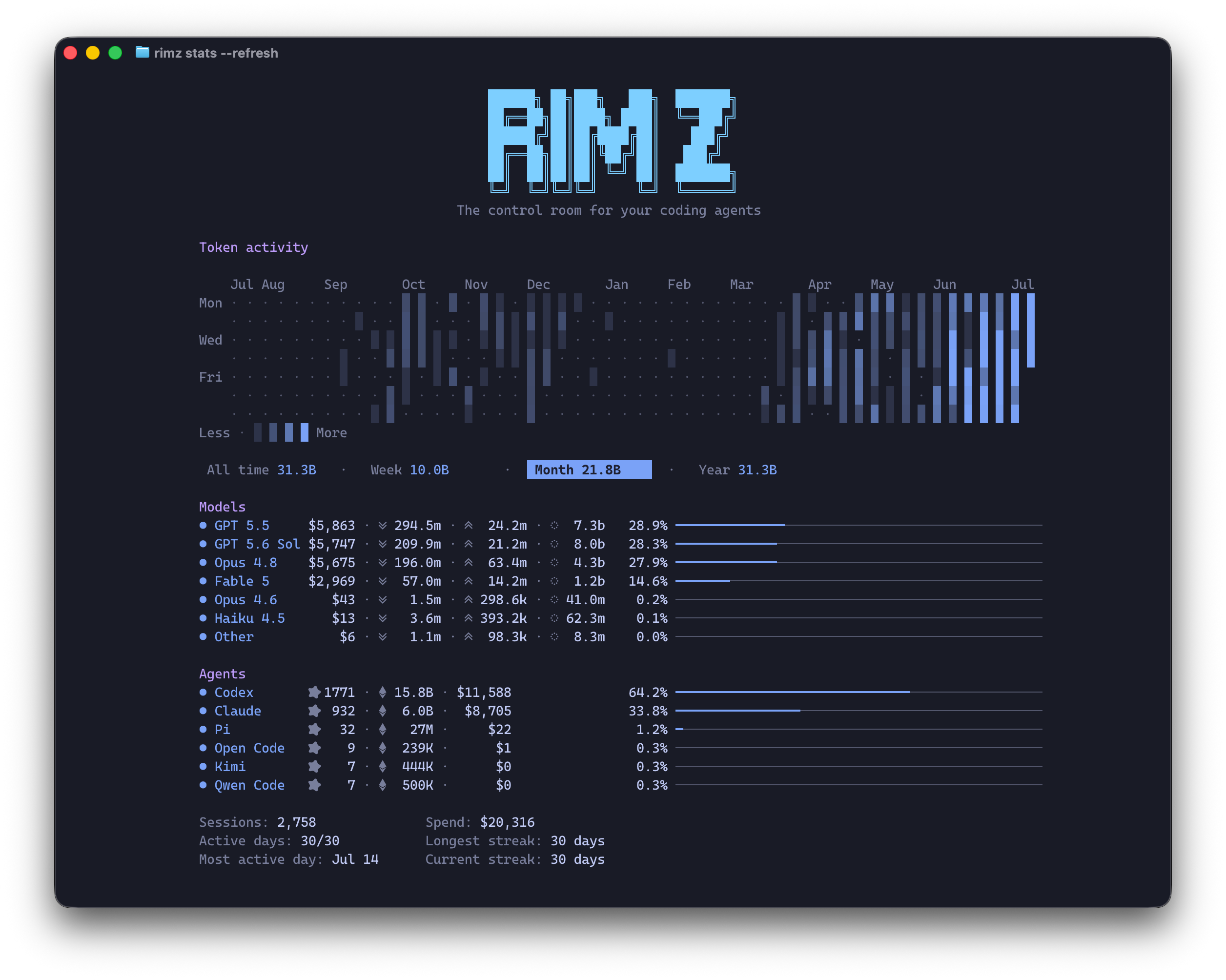
rimz stats
: a year of token activity, then where it went by model and by agent.
Token insight is that number, in the terminal. Every transcript-backed agent turn leaves a local usage store (the model, token counts, timestamps, and for some providers the dollar cost), and RimZ reads those files into one account-global picture across Claude, Codex, Amp, Pi, and OpenCode. If you have run `ccusage` over Claude's transcripts, this is the same trick widened across every provider with a usable local usage store and wired into the room so it updates as the work lands. Kinds without such a store surface less; the per-kind coverage is in [agent support](/docs/reference/agent-support).
You read it two ways. `rimz stats` prints the whole history on demand, from anywhere. The sidebar keeps a live slice of the same data in front of you while you work.
## The full picture: rimz stats [#the-full-picture-rimz-stats]
`rimz stats` prints your account-global history: a heatmap of daily token use, the totals for a chosen window, and where the spend went by model and by agent. It reads the same data as the sidebar, so it runs inside a room or anywhere else on the machine, in or out of a project.
* **The heatmap** is a GitHub-style contribution graph of tokens per day, about a year of history, smoothly shaded from an idle day up to your heaviest. The scale reads against your own rhythm, resists one-off spike days, and spreads the mid-range perceptually so an active stretch stays visible. `--dollars` shades it by cost instead of tokens.
* **The window row** (All time, Week, Month, Year) scopes the Models, Agents, insight rows, and Assists below it, while the heatmap stays full-history. In the held dashboard, `Tab` and `Shift-Tab` cycle the window; a plain `rimz stats` prints the All-time view.
* **Models** ranks where the dollars went, each model under its friendly name (`gpt-5.5` reads as `GPT 5.5`) with its token split and its share of the window. **Agents** ranks by session count across the five transcript-backed kinds: Claude, Codex, Amp, Pi, and OpenCode. An entry below 1.0% of its section folds into `Other`, and the row cap folds any remaining long tail into the same row. Both breakdowns carry tokens as well as dollars, so an unpriced model remains itemized when the section has no priced spend and its tokens stay counted in every case.
* **The insight lines** close it: sessions and spend for the window, cost per session and average spend per active day over the same spend span, how many days saw activity, your heaviest single day, and your longest and current active-day streaks. Week and Month also compare spend with the immediately preceding equal window. All time keeps the recent `Active days: N/28` cadence line while its average, like its spend, covers the trailing year.
* **Assists** shows non-zero category counts for the ways RimZ saves work: delivered auto-continues, pre-delivery auto-compaction, reset-credit redemptions, and sessions restored automatically after a crash or reboot. The section stays absent until RimZ has a counted assist to report; `rimz stats --assists` carries the complete newest-first event timeline.
For a shell or a script, `rimz stats --json` emits the per-day buckets that scripts can use for their own trend windows, the usage windows, both breakdowns, the insights, and the structured assists rollup plus events. `rimz stats --assists` prints the complete newest-first assist timeline with the redeem request id and reset windows, continue and compact message and agent ids, and restored workspace and session. `rimz stats --refresh` instead holds the panel open and repaints it every minute; this is the live pane the `rimzd` daemon view carries.
`rimz stats` only reads. It touches no agent, writes nothing to your sessions, and prints from a cache RimZ keeps under its own state directory. Its one network call is the weekly price-table refresh described below, which `RIMZ_PRICING_OFFLINE=1` turns off.
## In the sidebar, live [#in-the-sidebar-live]
The sidebar keeps two live slices of the same numbers in view while you work: the provider dashboard breaks your spend down by account, and the cockpit scopes it to the room you are standing in.
### The marks you read everywhere [#the-marks-you-read-everywhere]
Spend and tokens speak one small vocabulary across `rimz stats`, the provider dashboard, and the cockpit. Learn it once:
| mark | reads as |
| ---- | ------------------------------------------------------------------- |
| `◎` | sessions: the distinct agent threads that ran in the window |
| `◇` | total tokens |
| `↘` | input tokens, with cache writes folded in |
| `↗` | output tokens |
| `◌` | cache-read tokens: context re-read from the provider's cache |
| `$` | dollar spend, in green, whether reported directly or priced locally |
Cache reads are usually most of the volume, so a busy day is mostly `◌`. The complete glyph legend, with every meter and tone, is the [interface reference](https://github.com/rimio-ai/rimz/blob/v0.4.1/docs/interface/sidebar.md?ref=docs#reading-the-glyphs).
### Per account: the provider dashboard [#per-account-the-provider-dashboard]
Pinned to the bottom of the sidebar is one block per provider account, because a budget belongs to the login, not to any single agent. Each block names the account and plan, the CLI version, that provider's spend, and the account's budget:
```
Claude v2.1.169 · Claude Max ⇅ rc
▐▛███▜▌ ◎ 53 ◇ 16M ↘ 13M ↗ 2M ◌ 198M $188.88
▝▜█████▛▘ 5h ▰▰▰▰▰▰▰▰▰▰▰▰▰▰▰▰▰▰▰▰▰▰▰▰▰▰▱▱▱▱ ↻ 1h47m
▘▘ ▝▝ 7d ▰▰▰▰▰▰▰▰▰▰▰▰▰▰▰▰▰▰▰▰▰▰▰▰▰▰▱▱▱▱ ↻ 5d22h
```
When a provider has historical usage, the stats row is its account-global spend for the headline window: sessions, the token breakdown, and dollars pinned right. In `session` mode, every provider row shares one machine-global burst, opened by your prompt to any agent kind. A provider without spend history on disk shows only `◎` with the sessions active in this room; the token and dollar positions stay absent rather than read zero. Two fleet-total rows then close the dashboard, summing every supported provider across the trailing week and month:
```
W: ◎ 420 ◇ 202.9M ↘ 175.1M ↗ 27.8M ◌ 5.2B $3,888.88
M: ◎ 860 ◇ 420.0M ↘ 366.0M ↗ 54.0M ◌ 10.8B $8,666.66
```
These totals are account-global, like `rimz stats`: they count every project on the machine, so one glance tells you where the week is going regardless of which room you are in.
#### Budget is not spend [#budget-is-not-spend]
The `5h` and `7d` bars measure a different thing from the dollar figures. They are the included budget of your subscription plan, draining toward the reset printed beside them (`↻ 1h47m`), and they fill with what is left. A plan like Claude Max or ChatGPT Pro refills on its duration windows automatically, so those bars are your read on pace, not a bill. An API-key account has no such window, so its block shows a single `api` budget row instead; an uncapped key is a full bar with `∞`.
When a window empties mid-turn the agent parks rather than fails, and with auto-continue it resumes itself the moment the window resets ([loops → keep the fleet moving](/docs/harness/loops#keep-the-fleet-moving)). The exact bar tones, the reset colouring, and the not-yet-started window are drawn in the [interface reference](https://github.com/rimio-ai/rimz/blob/v0.4.1/docs/interface/sidebar.md?ref=docs#zone-3--the-provider-dashboard); where the readings come from is [providers internals](https://github.com/rimio-ai/rimz/blob/v0.4.1/docs/internals/agents/providers.md?ref=docs).
#### Cap the spend you read here [#cap-the-spend-you-read-here]
Everything on this page reads; the same numbers can also enforce. A dollar cap on an agent, a loop task, the room's whole fleet, or a provider login parks the work when it crosses the line, and a crossed cap announces itself here: the cockpit or provider row turns alarm-red and explains the stop as `$50.21 of $50/day`. The caps, the park, and what resumes it are the [budgets guide](/docs/agents/budget).
### Per room: the cockpit [#per-room-the-cockpit]
The top of the sidebar narrows all of this to the room you are standing in. Two lines carry the spend:
```
◎ 91 ◇ 32M ↘ 28M ↗ 3M ◌ 472M ← sessions · token breakdown
¤ 16 (2) $420.00 ← live agents · unread · spend
```
The token breakdown sums every durable session record that ran in the room's spend window, and the dollar figure below it is the room's cost for that same window, counting up in an eased roll the moment any agent's cost moves. Live transcript costs price each request before adding it to the session; statuslines that expose only session-cumulative totals use base-rate estimates because their sums no longer contain the request boundaries needed for exact long-context tiers. Both lines are scoped to this room: the project root and the worktrees grouped under it, never your whole machine.
The window is yours to set with `[sidebar] spend_window` ([configuration](/docs/customization/configuration#sidebar-rendering)):
* `session` (the default): the current burst of work, opened by your latest prompt to any agent after a five-hour idle gap. Provider rows share one machine-global burst; the cockpit applies the same rule within this room's scope. Loop-fired turns and agent-to-agent messages count inside an open burst and keep it alive, but never open one.
* `24h`: a trailing twenty-four hours.
* `today`: since calendar midnight in your configured `timezone`.
To read one agent's cost instead of the room's, [`rimz agents show`](/docs/agents/fleet#manage-a-running-room) prints that session's token split and dollar total.
## How the numbers are calculated [#how-the-numbers-are-calculated]
Historical figures come from the transcript and session files your agents already write to disk. RimZ never scrapes a pane or guesses from the screen; token counts come from provider-owned records and structured wires.
Turning tokens into dollars is where the care goes:
* Providers that log a dollar cost per turn (Pi, and older Claude transcripts) are taken at their word.
* Providers that log token counts (Claude, Codex, and Amp through a private cache RimZ reads best-effort) are priced with a per-model table. RimZ ships a built-in table and refreshes it weekly from the public LiteLLM price list, so a new model's rate lands without waiting on a RimZ release. Input, output, cache writes, and cache reads each price at their own rate. Marginal 200k tiers price each token class independently; request-selected tiers such as OpenAI's covered GPT flagship models switch the whole request to long-context rates once its input crosses the model's threshold.
* A model RimZ has no price for still contributes its tokens and its session to every total. Only its dollar column reads zero, until a price is found. Token attribution never waits on pricing.
Two scopes and a set of windows keep the surfaces honest:
* The cockpit is scoped to the room you are in. The provider dashboard totals and everything in `rimz stats` are account-global, summed per provider account across every project on the machine.
* The cockpit window is `session`, `24h`, or `today` (above). The dashboard's totals rows are the trailing week and month, `rimz stats` adds year and all-time, and the heatmap buckets by calendar day.
None of this can fail into a wrong-looking number. Spend is enrichment, so a missing binary, a logged-out account, or an unpriced model degrades to an explicitly absent field or a zero inside a real historical tally, never a bad figure dressed up as a real one. Provider totals and locally priced token counters render identically as dollars. For the mechanism in full, the caches, the price-table precedence, and the window fusion, see [providers internals](https://github.com/rimio-ai/rimz/blob/v0.4.1/docs/internals/agents/providers.md?ref=docs).
## Configuration [#configuration]
A few knobs, all plain TOML ([configuration](/docs/customization/configuration)):
* `[sidebar] spend_window` picks the cockpit window (`session`, `24h`, `today`), and `timezone` sets the `today` cutoff and the displayed times.
* `[theme.display] max_provider_blocks` and `provider_list` choose how many provider blocks the dashboard shows and in what order. A token-only provider ranks by spend like any other.
* `[accounts.usage_limit_usd]` sets a display ceiling per API-key provider, changing its full `∞` row into a month-budget bar that drains against trailing-month spend and shows `$left`. It tunes the bar only; the provider still enforces the real limit.
## See also [#see-also]
* [The sidebar](/docs/agents/sidebar): reading the cockpit and dashboard for attention, not just for spend.
* [Budgets](/docs/agents/budget): turn the spend read into an enforced cap, per agent, task, room, or login.
* [Agents](/docs/agents/fleet#manage-a-running-room): one agent's token split and cost with `rimz agents show`.
* [Loops](/docs/harness/loops#keep-the-fleet-moving): auto-continue when a budget window empties mid-turn.
* [Configuration](/docs/customization/configuration#sidebar-rendering): the spend window, timezone, and provider-display knobs.
* [The sidebar on screen](https://github.com/rimio-ai/rimz/blob/v0.4.1/docs/interface/sidebar.md?ref=docs#zone-3--the-provider-dashboard): every bar, tone, and glyph drawn exactly.
* [Providers internals](https://github.com/rimio-ai/rimz/blob/v0.4.1/docs/internals/agents/providers.md?ref=docs): accounts, budgets, spend, and the price table in depth.
# Remote (/docs/agents/remote)
Remote is your multiplexer attach, run over SSH. A RimZ room is a plain Zellij or tmux session that lives on one host: a fleet on a server, or the room you left running on the machine at home. It keeps working headless while no one is attached. `rimz remote connect` opens an SSH session to that host and attaches to the room there, so your local terminal renders exactly what the host is running, sidebar and agent panes alike. The room, its agents, and its state never leave the host; SSH just carries the screen. To open a remote room in a browser instead of a terminal, see [Web](/docs/agents/web); to answer an agent's questions from the provider's mobile app without attaching at all, see [answer asks from your phone](#answer-asks-from-your-phone).
## Connect to a room on another host [#connect-to-a-room-on-another-host]
Point `rimz remote connect` at a target and RimZ builds the SSH command, connects, and attaches to the room on the far side:
```sh
rimz remote connect dev-box:~/code/query-engine # [user@]host:
```
The target is `[user@]host:`. After the colon, a path opens (or creates) that project's room, and a bare session name reaches one by name. Under the hood this is close to typing `ssh -t dev-box rimz attach query-engine` yourself: a normal SSH session that runs the host's own `rimz`, so your SSH config, keys, agent, ports, and jump hosts all apply exactly as for any `ssh` you run.
RimZ compares the local and remote versions before it enters the room. A patch difference warns and proceeds; a minor difference refuses until you upgrade the older side, with `--force-version` available as a one-shot bypass; and a major difference refuses without a bypass. An older remote RimZ keeps its prior warn-only behavior because the compatibility gate runs on the host.
Because you attach to the session the host is already running, everything you left is there: every agent in its `#channel` tab, every question still ranked exactly where it was, plus whatever finished while you were gone, already triaged.
### Install rimz on the host [#install-rimz-on-the-host]
Run setup once before the first connect when the host does not already have `rimz` on its PATH:
```sh
rimz remote setup dev-box
rimz remote setup agent@prod-box:/srv/query-engine
rimz remote setup dev # saved alias
```
`rimz remote setup ` opens SSH to the saved alias, raw target, or bare `[user@]host`, detects the host OS and architecture there, verifies the matching prebuilt release archive, and installs `rimz` to `~/.local/bin/rimz`. That directory is on the PATH that `remote connect` repairs, so the next attach can run immediately.
**Save an alias** once and the trip is one word. An alias carries the target and its reconnect defaults, so `rimz remote connect dev` is the whole journey:
```sh
rimz remote add dev dev-box:~/code/query-engine # save the target as `dev`
rimz remote connect dev # open it, reconnecting link and all
rimz remote list # every saved alias (alias: ls)
rimz remote rename dev devbox # rename an alias
rimz remote rm devbox # forget one
```
## A link that heals itself [#a-link-that-heals-itself]
A plain `ssh` ends the moment the connection drops. `rimz remote connect` supervises the SSH link instead: the same connection panel carries the first connection and every recovery, and when the train wifi cuts out or a laptop sleeps, it reconnects on its own and reattaches to the untouched room on the host, so a flaky connection never costs you your place. After a brief grace, the panel checks end-to-end internet access over HTTP, the SSH server, and the next SSH session; proxy-based targets omit the server checkpoint, while VPN and TUN routes skip its unreliable direct TCP check and let SSH prove the path. With the network down it waits without a dishonest countdown, and any wifi, route, or address change triggers an immediate safety attempt. With the network up it establishes SSH in the background every couple of seconds, shows the last SSH error when one fails, and returns you straight to the room when transport and authentication succeed. An initial password, two-factor, or host-key prompt falls back to one normal interactive SSH attempt. Retry attempts run unattended, so hook installation, project trust, and recovery consent wait for the next start you make while present instead of parking the link. Your terminal beeps when the link drops and again when it comes back, and any notification handler fires on the same edges, because a dead link cannot count on the remote sidebar to reach you.
On Zellij, a reconnect retires an orphaned prior attach from the same device before entering the room; opening that same remote room twice from one device therefore moves the attachment to the newer terminal, while attachments from different devices coexist.
Two flags tune the posture:
```sh
rimz remote connect dev --no-reconnect # one ssh run, no supervisor, no health probe
rimz remote connect dev --reset # attach a fresh room (passes --no-resume through)
```
`rimz remote reset dev` is the shorthand for that last one. The link supervisor and its reconnect policy are in [the internals](https://github.com/rimio-ai/rimz/blob/v0.4.1/docs/internals/remote.md?ref=docs).
## Reading the link badge [#reading-the-link-badge]
A supervised connection carries a health probe alongside your session: a small ping travels the same SSH link every couple of seconds, and its round trip drives a badge in the sidebar footer. The probe rides the real connection rather than ICMP, so the badge reflects what your session actually feels. A `--no-reconnect` run skips the probe and shows no badge.
* `⇄ remote 210ms` reads the round trip to the host. It warms from `⇄ remote …` on the first samples, then shades from green under roughly 100ms, through amber, to red past 400ms.
* `⇄ remote 210ms 15%` appends packet loss once it climbs past about 10 percent, measured as the share of recent pings that never came back. A clean link shows no percentage.
* `⇄ remote ?` means the reading went stale with no fresh sample for a while, usually a struggling link or a reconnect in flight.
The badge always shows the worse of latency and loss, so a fast but lossy link still reads red.
## Ports forward themselves [#ports-forward-themselves]
Attach normally, then start `python3 -m http.server 3000`, `pnpm serve`, or another dev server in a room pane on the host. Within seconds `http://localhost:3000` opens on your local machine without another flag or SSH command.
RimZ forwards a listener when it starts after you attach, belongs to your remote user, uses port 1024 or above, and binds to loopback or a wildcard address. The local side binds only `127.0.0.1`, so the forwarded service stays on your machine.
The forward closes after the server stops and reopens with the room after a link recovery; every forward closes when you detach. Use `rimz remote connect dev --no-auto-forward` for one connection, or save the switch with `rimz remote add dev dev-box:~/code/query-engine --no-auto-forward`.
A port already in use on your local machine is skipped. Free it and restart `rimz remote connect` to retry that listener.
Automatic forwarding rides the supervised link probe and ControlMaster, so it is unavailable with `--no-reconnect` and `--web`. Listener discovery supports Linux hosts today; other hosts keep the normal remote connection without automatic forwards.
## What crosses the link [#what-crosses-the-link]
Only the screen crosses the wire. The agents, their transcripts, the git work, and the store all run on the host; SSH carries the multiplexer's rendered output one way and your keystrokes the other, the same bytes a local attach would paint. The multiplexer redraws only the focused tab and diffs each frame, and every attach turns on SSH compression, so an idle room is nearly silent and a busy pane costs about what watching it locally would.
To measure the actual traffic, `rimz pane bandwidth` samples the room and attributes the output rate per pane, with the compressed SSH wire-rate alongside:
```sh
rimz pane bandwidth --secs 5 # per-pane output and the SSH wire-rate
```
Run it on the Linux host serving the room, where the write-rate counters live, from inside the remote shell after you attach. The per-pane figures are raw producer output; the `WIRE(ssh)` rows are the compressed payload actually on the socket, normally far below the sum, because the multiplexer throttles to the focused tab before SSH compresses what is left.
## Continuity across reboots [#continuity-across-reboots]
The room and its state both live on the host, in durable flat files under `~/.local/state/rimz/` there, so the room survives a mux crash or a reboot of the host. On the next attended start the host's `rimz` offers the fleet back: prior agents idle in their tabs, one prompt from where they stopped (`claude --resume`, `codex resume`, `pi --session`). The offer defaults yes, non-interactive starts recover automatically, and a room you closed deliberately stays closed. A supervised reconnect after a reboot uses that automatic recovery path; hook installation and project-trust offers remain pending for the next attended start. Run these on the host:
```sh
rimz --no-resume # come up empty: skip recovering prior agents
rimz reset # force a clean rebirth of a stuck or resurrected room
rimz reset --hard # rebuild without seeding prior agents
```
Keeping the agent processes alive across a reboot belongs to the host. Reach for systemd, tmux-resurrect, or Zellij resurrect to carry them across a restart, and RimZ reattaches to whatever is still running ([DESIGN.md → Non-goals](https://github.com/rimio-ai/rimz/blob/v0.4.1/DESIGN.md?ref=docs#non-goals)).
## Answer asks from your phone [#answer-asks-from-your-phone]
A fleet that runs while you are out still stops to ask: a permission prompt, a plan approval, a question only you can decide. Claude Code and Codex each ship **remote control** (`claude remote-control` and `codex remote-control`), the bridge behind their official mobile apps: it links a machine to your account so the app can see and drive the sessions running on it. The feature is entirely the provider's; what RimZ adds is the remembering — the bridge only helps if it is already up when an agent stops to ask, and starting infrastructure with the room is a room's job.
Two per-machine toggles opt in. Both are off by default:
```sh
rimz config set remote_control.claude true # keep `claude remote-control` up with the room
rimz config set remote_control.codex true # keep Codex's remote-control daemon up, once per machine
```
With a toggle on, the ask reaches your phone as a push from the provider's own app, your answer lands in the same session on the machine running the room, and the turn continues in its pane as if you had typed it there. Leave the room on a server, go to dinner, and a 9 p.m. question is one tap instead of a fleet stalled until morning.
RimZ stays out of the path: each toggle starts the provider's own command with the room and nothing more. Exactly what runs:
* **Claude.** `claude remote-control --spawn worktree`, as a long-lived pane in the room's background `rimzd` tab, run from the project root — so a session you start from the phone is carved into its own on-demand worktree instead of touching your checkout. While the host is up, the Claude block on the [provider dashboard](/docs/agents/sidebar#the-provider-dashboard) wears a `⇅ rc` flag.
* **Codex.** `codex remote-control start`, which brings up Codex's own per-user daemon with remote control enabled — one per machine, shared by every room, and the same daemon Codex's TUI already routes through.
Codex's standalone updater owns daemon upgrades. `rimz doctor` warns when that live updater executes a different binary from the managed Codex target, including a deleted executable, because its next successful hourly pass restarts the shared app-server before replacing its own process image. That pass normally clears the skew automatically, but its timing can disconnect active Codex sessions. To choose the timing, finish valuable turns and run the exact managed-binary `codex app-server daemon bootstrap --remote-control` command the advisory prints, then resume the sessions this deliberate recycle disconnects. This provider bootstrap refreshes both processes; a `codex remote-control stop` / `start` pair refreshes only the app-server and leaves the updater skewed.
The RimZ toggle covers the machine-level Claude host; Claude's own `remoteControlAtStartup: true` (in `~/.claude/settings.json`) additionally makes every session you type into a pane reachable from the app, and RimZ lights the `⇅ rc` flag for that setting too.
`rimz start` checks the preconditions. An enabled toggle whose agent is missing is skipped so the room still opens, and `rimz doctor` names the install fix; an installed host with a fixable misconfiguration (a Claude older than remote control, `disableRemoteControl` set) refuses at start with the fix spelled out, so an enabled toggle always means a working bridge.
Claude asks `Enable Remote Control? (y/n)` the first time the host runs on a machine and records that the dialog ran as `remoteDialogSeen` in `~/.claude.json`. Your toggle is that answer, so RimZ records it before the host starts and an unattended pane serves immediately instead of holding on a prompt nobody is there to type into. Set `remoteDialogSeen` to `false` by hand and RimZ keeps your word: it leaves the value alone and refuses at start with the fix.
The `⇅ rc` flag and `rimz doctor` read Claude's own record of the process serving each project root, so a host whose server stopped reads as down rather than riding on a pane that outlived it.
Undo is the same toggle set back to `false`: it closes the RimZ-managed Claude host panes in every running room, or stops the Codex daemon. One known gap: a session you spawn from the phone runs headless in its worktree with no local pane, and the sidebar does not yet render these remote agents.
Key detail and the daemon-view placement live in [configuration → remote control](/docs/customization/configuration#remote-control); which providers carry the surface is the `remote` row of the [wiring matrix](/docs/reference/agent-support#the-wiring-matrix).
## See also [#see-also]
* [Web](/docs/agents/web) — open the same room in a browser, locally or tunnelled from a server.
* [Agents](/docs/agents/fleet) — what the room holds that you are reattaching to.
* [The sidebar](/docs/agents/sidebar) — reading the link-health badge and the recovered column.
* [Troubleshooting](/docs/help/troubleshooting) — a link that will not connect, a room that will not start, resetting state.
* [CLI reference](/docs/reference/cli/remote) · [Configuration](/docs/customization/configuration) — the `remote` command surface and `remote.toml`.
# Sidebar (/docs/agents/sidebar)
> The sidebar is the narrow column pinned beside your panes, and it answers one question: **which pane needs you, right now.** This page is how to read it — the zones, the cards, the states behind them, and the ranking that decides what sits on top. Every glyph, meter, and frame drawn exactly is the [interface reference](https://github.com/rimio-ai/rimz/blob/v0.4.1/docs/interface/sidebar.md?ref=docs); the presence and ranking machinery is [internals → sidebar](https://github.com/rimio-ai/rimz/blob/v0.4.1/docs/internals/sidebar/sidebar.md?ref=docs).
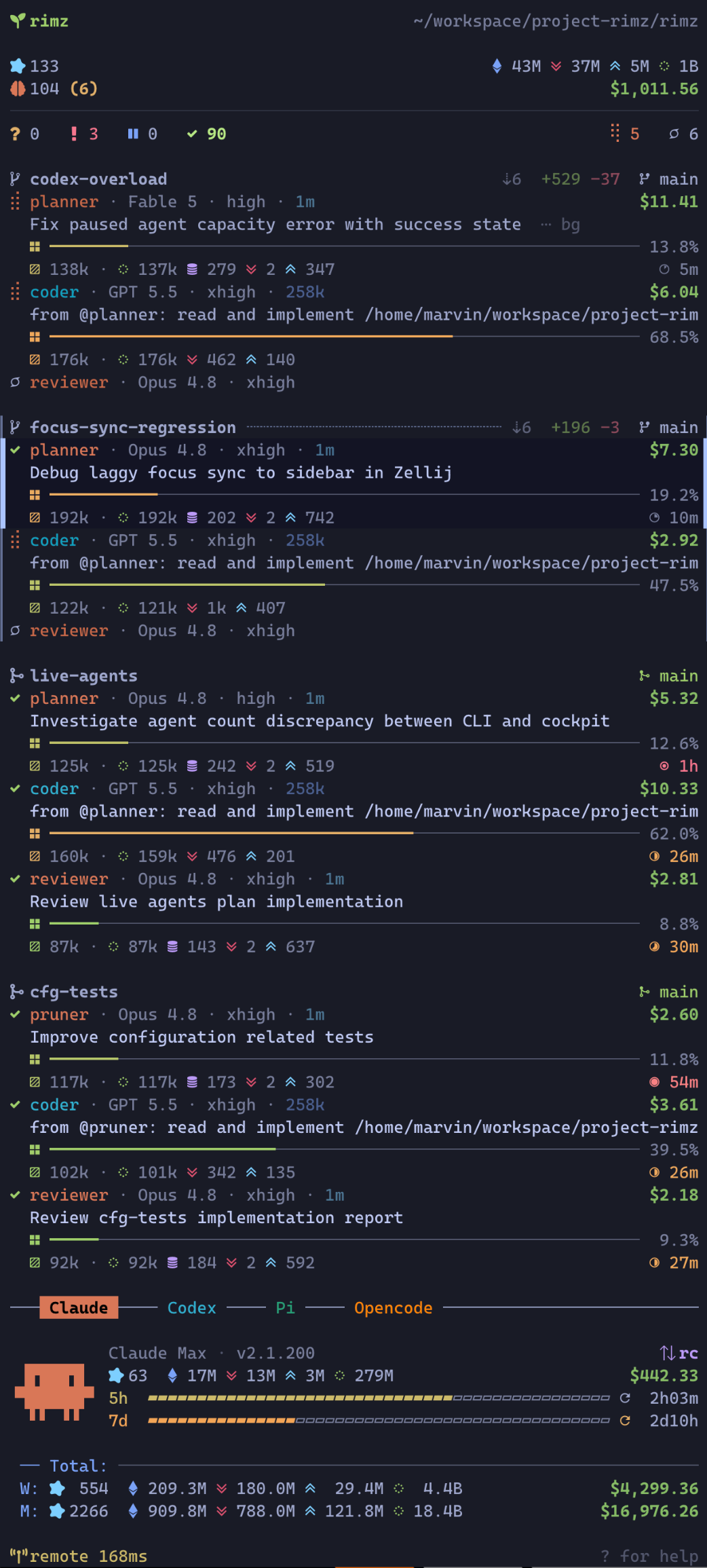
## What it is [#what-it-is]
Working with coding agents today means one conversation per terminal: prompt, watch it run, answer when it stops. To run more agents you open more tabs and rotate through them, and every rotation is a context switch for your head as much as for the terminal — re-read scrollback to tell *thinking* from *waiting on me*, reload what this agent was doing, then find your way back to your own work. Nothing announces a finished turn or a blocking question; you learn about them whenever you next visit the tab, and until you do, an agent stopped on a permission prompt looks exactly like an agent reasoning. With no view of the whole, the fleet lives in your working memory, and working memory tops out around six to ten threads on a good day. It is exhausting well before it is full.
The sidebar is the missing view, and it is the core of RimZ. One narrow column beside the agents' panes holds one live card per agent — its state, what it is working on, how full its context window is, what it has cost — updated the moment the agent starts a turn, calls a tool, asks a question, or finishes. The top line counts the fleet by state, so a row of zeros means nothing needs you and you stay where you are. When an agent does need you, its card surfaces and marks itself unread; press `n` and you are in that agent's pane. Checking becomes a glance, a switch starts with the card's context already read, and finished work waits marked instead of hoping to be noticed — the ceiling on how many agents you can run stops being your memory.
You never work *in* the sidebar — it has no reply box and no approve button. It routes you to the pane, and you answer in the agent's own UI, where the full prompt and its safe defaults live.
## What the column is, underneath [#what-the-column-is-underneath]
Two facts make the column trustworthy, and both are worth knowing before you lean on it.
**Agents report themselves.** The reporting hooks you approved when you [installed hooks](/docs/getting-started/setup#install-agent-hooks) fire from inside each agent — session start, tool call, blocking question, turn end — so a card changes the moment the agent does, not when a scraper catches up, and nothing on a card is guessed from screen contents. Two derived states are RimZ's own judgment rather than an agent report; [the lifecycle](#the-agent-lifecycle) calls them out.
**The sidebar only reads.** It is one pane in your room running a renderer over the durable store those hooks write. Its only writes are its own display state — which cards you have read, a heartbeat — and jumping focuses a pane the same way your mux prefix would; your agents' processes, sessions, and files are untouched by anything on this page. Close the sidebar's pane and every agent keeps working; the next `rimz` attach or `rimz reload` brings it back, and nothing was missed in between, because a card that needs you stays unread and ranked in the store until you look. The column is a window, not a place where state lives.
That split — presence live, facts durable — is also what a row *is*: a row exists because a pane runs right now, and when the agent exits, its row goes with it. The history stays in the store, behind `rimz agents show`, `rimz agents logs`, and [`rimz transcript`](/docs/reference/cli/agents).
## The layout [#the-layout]
Top to bottom, the column stacks three zones plus pinned chrome:
```
┌───────────────────────────────────────────┐
│ cockpit the whole fleet summary │ pinned
├───────────────────────────────────────────┤
│ cards one card per pane, │ scrolls
│ grouped by worktree │
├───────────────────────────────────────────┤
│ provider accounts, budget, │ pinned
│ token stats, pets │
├───────────────────────────────────────────┤
│ footer help · link health │ pinned
└───────────────────────────────────────────┘
```
The cockpit and dashboard hold fixed positions, so the numbers you glance at never jump as agents change state; only the cards scroll between them.
### The cockpit [#the-cockpit]
The top block reads the whole room in four lines:
* **Identity.** The workspace name and its path, so a glance confirms which project this room is.
* **Sessions and tokens.** How many agent sessions have run in the configured spend window, with the room's token breakdown pinned right: total, input, output, and cache-read. What the marks mean and how the figures add up is [Token Insight](/docs/agents/insight).
* **Live agents and spend.** How many agents are alive right now, an unread count like `(2)` when results or questions await you, the open-PR lane count `⑃ N`, and the room's dollar spend rolling up live as agents work. The PR chip turns red for failing CI, amber while CI runs, green when every known lane passes, and keeps its cool link tone when CI is unknown. Click the unread count to filter the cards to unread rows, or click the open-PR count to filter them to lanes whose branch has an open pull request.
* **The make-up line.** The fleet by state: `? 3 ! 1 ⏸ 0 ✓ 8` counts who asked you something, who failed, who is parked on a provider limit, and who holds a finished result, with live capacity (`⢿` working, `○` idle) on the right.
A row of zeros with no unread count means nothing needs you, so you can skip the scan entirely. Every non-zero bucket is a click target that filters the cards to that state in every tab of the room; clearing or replacing the lens in one tab updates them all. When the agent that most needs you scrolls out of view, an `↑ N need you` banner appears; clicking it brings that card back.
### The agent cards [#the-agent-cards]
The body: one card per pane, grouped under the worktree it lives in. A worktree is total isolation, so each group reads as one bounded block, and the group header names a linked pull request (`#91`) beside the worktree name while carrying the work's git story on the right: commits ahead and behind the trunk, lines added and removed (uncommitted and untracked work counts too), and a marker for where the work stands, from a plain branch through an open, merged, or closed pull request. Panes outside every project checkout fold into a dim `external` divider at the very bottom.
Cards arrive already triaged (the [ranking below](#how-the-column-is-ordered) decides the order), and a busy worktree caps at six rows with a `+K more` line that only hides idle agents and quiet shells while work remains active. A finished line of work collapses completely to a muted-bold header and a two-line dim receipt, including unread success cards: `▸` marks the expandable roster line, a shared team name leads the members when present, each member keeps its status glyph and softened provider-brand name, overflow and quiet shells fold into `+n`, and tracked cost pins right; the totals line shows the pod's token breakdown on the left and pins its muted finished age on the right. A narrow or process-only roster falls back to count-only `▸ +K done`; click the header or either receipt line, or apply the `s` status filter, to reveal the roster, then click the header to collapse it. A focused or order-held member reveals the whole roster, so the pod is never half-collapsed.
### The provider dashboard [#the-provider-dashboard]
Budgets are account-scoped, one account shared by every session of a provider, so they live in a pinned panel at the bottom rather than on the cards. Each provider block names the account and plan (`Claude Max`, `ChatGPT Pro`) and drains a "mana" bar per budget window (5-hour, 7-day) toward its reset, so a glance reads how much of the plan is left. The block also carries that provider's spend, and two totals rows below sum the fleet across the trailing week and month. Reading those figures, and how every one is calculated, is [Token Insight](/docs/agents/insight).
With several providers the panel tabs, following whichever agent you have selected; `←`/`→` or a click picks one by hand. With [pets enabled](/docs/customization/pets), the companion rides the panel's right edge.
### Bottom chrome [#bottom-chrome]
The footer holds `? for help`, which opens the key and filter overlay in place. When you have been away, a quiet `zᶻ idle` badge appears; over SSH, a link-health badge shows the round-trip time. If the sidebar ever cannot read the room, a sticky alert takes the bottom line and says so, because a blank column should never masquerade as an empty room.
The sidebar follows its attached view at the explicit `[theme.display].width_percent`, otherwise 30% on views wider than 240 columns or when pets are enabled, and 25% otherwise, capped at `[theme.display].max_cols`. Press `a` to make it narrower and `d` to make it wider; each press calculates and validates an absolute room target before any pane moves, using 2 columns on tmux or Zellij's live-view increment of roughly 5%. The target persists and broadcasts immediately, then every tab, including the one where you pressed the key, converges through serialized feedback; observed pane widths confirm progress and never replace the target. A narrower press is ignored when Zellij's next reachable width would fall below 24 columns, while tmux lands exactly on that floor. The room target follows reloads and reattaches for the life of the session and may exceed `max_cols`; a newly created session starts again from the configured percentage policy and cap. Resizing with the multiplexer's own controls records no room width: with a recorded `a`/`d` width it snaps back live, and without one it persists until the next attach or `rimz reload` unless it exceeds `max_cols`. Use `a`/`d` to keep a width. These chords are configurable under `[sidebar.keys]`. Filters use `A` for all and `s` for success/done.
## The agent card [#the-agent-card]
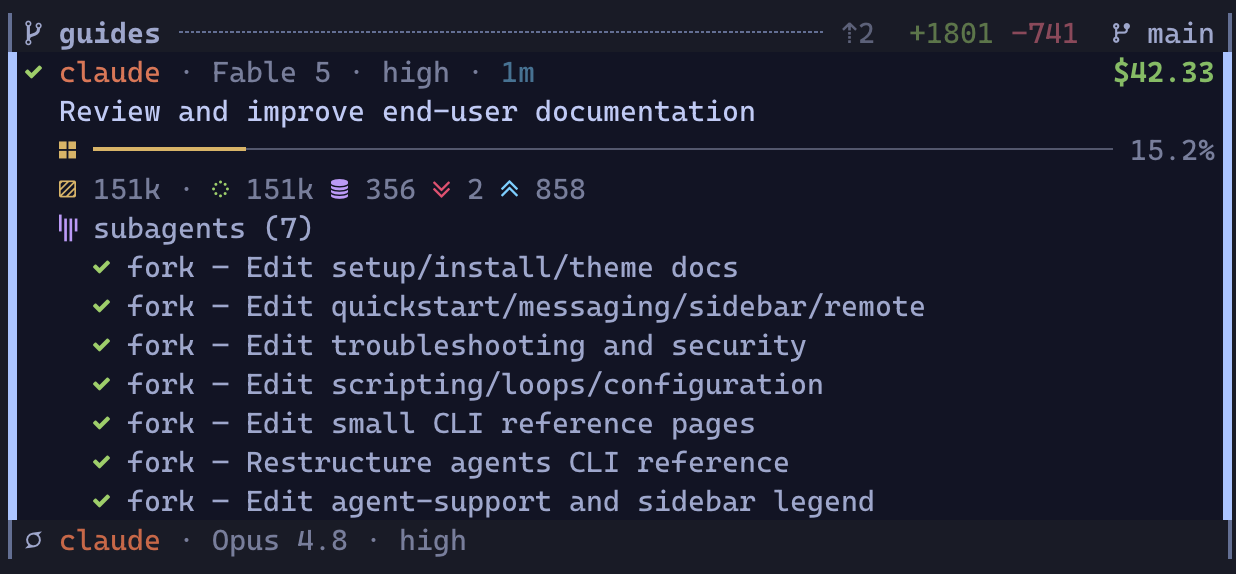
A finished card with the subagents it fanned out this turn; the idle agent below collapses to a single line.
Each agent is a small stacked card, four lines at rest:
```
⢿ claude · Opus 4.8 · xhigh · 1m $1.27 ← state · handle · model · reasoning config · window · cost
store refactor ← what it is working on
▣ ━━━━━━━━━━━━━━━━─────────────────────────── 38.2% ← context meter: how full the window is
▤ 76k · ◌ 68k ◍ 6k ↘ 1k ↗ 2k ◔ 8m ← tokens in the window · last activity
```
* **The identity line.** The state glyph leads, animated while the agent works. Then the agent's handle (its team role, profile, or kind, so a team reads `planner` / `coder` / `reviewer`), the model, one reasoning-configuration token (effort or `thinking`), and the size of its context window. The session's dollar cost pins right and counts up live once the session has spent anything.
* **What it is working on.** The session's name or task, falling back to its first prompt so the card stays stable between turns. When a turn dies on a provider error, this line quotes the error (`API Error: Overloaded`) so the card says why without a jump.
* **The context meter.** How full the agent's context window is, as a bar and a percentage. The fill also shows where the window went: cache reads, cache writes, and fresh input paint as distinct runs, and the bar's tone shifts from calm toward red as the window fills.
* **The token line.** The absolute companion: tokens currently in the window, the same composition as markers, a `↻ N` count of completed context compactions, and, once the agent has been quiet for five minutes, its last-activity age pinned right, heating toward red as an hour approaches.
Selecting a card appends anything deeper without reshaping what is on screen: the **subagents** the agent spawned this turn appear underneath, each with its own live state, what the parent asked it to do, and, while it runs, its token spend, model, and elapsed time. A finished subagent keeps its `✓` or `!` verdict on the list until the parent's next turn. Subagents have no pane of their own, so they appear only here, nested under their parent.
How much of the card shows at rest is yours to tune with `card_density` ([theme.md → Display](/docs/customization/theme#display)): `compact` trims resting cards, `expanded` shows subagents everywhere.
## Process rows [#process-rows]
A pane no agent has claimed (your editor, a shell, a build) renders as a slimmer, quieter row: the program's name, a hollow `○` when idle, a spinner while it does real work, and, for a working pane, its live command plus a CPU, memory, and I/O readout. Process rows sit below the agent cards in their worktree and never enter the cockpit tallies — they never ask for your attention. They are still jump targets, and the moment an agent starts in that pane the row becomes that agent's card.
## The agent lifecycle [#the-agent-lifecycle]
Every card wears one state, and six cover the life of a session:
| glyph | state | meaning | needs you |
| ----- | ------- | ---------------------------------------------------------------------------------------------------- | ----------------------- |
| `○` | idle | alive, nothing in flight | no |
| `⢿` | running | working a turn | no |
| `?` | waiting | stopped mid-task for your answer: a permission, a plan approval, a question | **yes** |
| `!` | failed | the turn errored, died on a provider API error, or a running agent went silent past the stall window | **yes** |
| `⏸` | paused | stopped mid-turn on a provider rate limit or overload | when it recovers |
| `✓` | done | the turn finished cleanly and holds a result | a look, when convenient |
The full glyph vocabulary, including the transient heads that ride over a running card (thinking before the first file edit, compacting, waiting on subagents, parked on background work), is the [interface legend](https://github.com/rimio-ai/rimz/blob/v0.4.1/docs/interface/sidebar.md?ref=docs#reading-the-glyphs).
A session's life traces one loop through those states:
```
●──launch──► idle ──prompt──► running ──┬── clean ──► done
▲ │ └── error ──► failed
answered │ │ asks you: permission,
│ ▼ plan approval, question
└─ waiting
```
* A fresh agent is **idle** until its first prompt; a prompt you type (or a queued `rimz message`) starts a turn.
* A **running** turn wears the working spinner (`⢿`, animated in the live column) from first token to last.
* An **ask pulls the card to `waiting`**, and answering it in the pane returns the agent to work; the card notices the answer even before the turn formally moves on.
* A turn ends **done** or **failed**; either way the agent is ready for its next prompt, and the state tells you whether to collect a result or unblock a problem.
Two states are RimZ's own judgment rather than an agent report. **Paused** is derived: when a turn stops because the provider's budget window is spent or the API is overloaded, the card parks at `⏸` instead of pretending to fail, and with [auto-continue](/docs/customization/configuration#resume) enabled it resumes by itself the moment the window resets or the backoff clears. **Stall** is the safety net: a running agent silent past the stall window (30 minutes by default) escalates to `!`, because silence that long usually means something needs a look; a parent quietly waiting on its subagents is exempt.
## Attention: the funnel [#attention-the-funnel]
With two agents you watch panes; with ten lines of work you cannot, and the sidebar is built for the day you cannot. At that scale the unit of attention stops being the agent and becomes the **line of work** — a worktree and the team inside it — and the column reads as a triage list, not a status dump. Every glance answers three questions: who is blocked on me, what has delivered and waits on my verdict, and is anything burning silently.
The tiers, by distance from your next action:
1. **Blocked on you.** Asks (`?`) and failures (`!`), interleaved oldest-first: your work queue. Every minute an ask waits idles a loaded context — a whole team's, when the asker leads one — so these carry the most weight and climb as they age.
2. **Parked (`⏸`).** Blocked on the provider, not on you. There is nothing to answer until the limit recovers, and with [auto-continue](/docs/harness/loops#keep-the-fleet-moving) on, nothing to do at all; parks rank below the queue and above every calm card.
3. **Delivered, awaiting your verdict.** A `done` card leads the calm cards in its line of work because it holds a result: your review queue. This queue rots while it waits — the trunk moves on and the group header's behind count (`⇣`) climbs — so the header tells you when a delivered branch is getting more expensive to land.
4. **In flight, healthy.** Needs nothing and wants stable positions so your eyes can track it: running cards keep a flat weight and hold their place, with live cost and last-activity age as the cheap progress cues.
5. **Idle.** Spare capacity, relevant only when you have work to hand out. It reads last, and a freshly launched agent appends at the bottom instead of reshuffling the list.
6. **Merged or closed.** Zero attention, so it archives immediately. A lone card stays visible under the muted-bold merged header, while a multi-member line collapses to that header plus the two-line dim receipt — an expandable `▸` team/member roster with cost pinned right, then token totals with the muted finished age pinned right. A merged header keeps only its verdict marker because the commit and churn figures are spent once the work lands. A narrow or process-only multi-member roster falls back to `▸ +K done`; click the header or either receipt line to reveal it, then the header to collapse it, while a fresh run or ask revives it. A focused or order-held member reveals the whole roster, so the pod is never half-collapsed.
The third question — burning silently — is the one no status dump answers, because a zombie run wears the same spinner as a healthy one. The column watches for you: a running agent silent past the stall window escalates to `!` and enters the work queue ([the lifecycle](#the-agent-lifecycle)), and a turn that dies on a provider error quotes the error on its own card, so quiet trouble surfaces in the same queue as loud trouble.
### From a glance to the pane [#from-a-glance-to-the-pane]
The cockpit compresses the fleet into one line, and the column below arrives already triaged: the card that needs you next sits at the top of its worktree, a soft wash marks every result, ask, and recovery you have not seen, and the one card that most needs you stays in motion until you read it.
You do not read where to go; you go. Press `n` (or `␣`) to jump to the next thing that needs you, oldest first, and RimZ focuses that agent's pane. The prompt and its safe defaults live in the agent's own UI, where the full context is, so you read and answer there; focusing the pane clears its unread mark, and `N` walks back. From any pane in the room, `Alt+p` focuses the sidebar and toggles back to your last working pane, so the whole loop runs without touching the mouse. The full key table is in [the interface reference](https://github.com/rimio-ai/rimz/blob/v0.4.1/docs/interface/sidebar.md?ref=docs#jump--the-row-is-the-link).
Glance, jump, answer: that loop is the product. Desktop, bell, and command notifications carry the same cues when you are off-screen, and handlers or loops you wire can clear routine cues before they reach you ([notifications](/docs/harness/notifications), [loops and schedules](/docs/harness/loops)); the ranking below spends whatever attention is left.
### The unread inbox surfaces in place [#the-unread-inbox-surfaces-in-place]
A card turns *unread* the moment it enters `waiting`, `failed`, `paused`, or `done`, and stays unread until you focus its pane or mark it read, even after the agent recovers and moves on. The wash and blink mark it, the jump key walks unread rows oldest-actionable-first, and notifications ring it. The card keeps its place in the time and status order while the inbox gets you to it.
## How the column is ordered [#how-the-column-is-ordered]
The funnel above is the contract; the rules below implement it and settle the ties. Within a worktree, agent cards lead and process rows form a quiet tail. The exact ranking contract lives in [the internals](https://github.com/rimio-ai/rimz/blob/v0.4.1/docs/internals/sidebar/sidebar.md?ref=docs#attention-ranking-and-the-cap).
### Time reshapes the order [#time-reshapes-the-order]
Measured from each card's last activity, in three windows:
1. **Inside the first hour, blocked work climbs.** An ask, failure, or park grows more urgent the longer it waits, so a failure overdue fifty minutes outranks an ask from two minutes ago and blocked work reads oldest-first — the cheapest order to clear. Calm work keeps a flat weight, so live agents hold their place while they run. (The hour matches the agent's prompt-cache lifetime: answer inside it and the agent resumes warm.)
2. **Between one hour and twenty-four, everything cools.** Urgency decays instead of climbing: a stale ask still leads stale calm work, but the whole window sinks beneath anything currently hot, so yesterday's unanswered question stops competing with the agent blocked right now.
3. **Past twenty-four hours, a card sleeps.** It parks in an archive at the back, keeping only its state order, so an archived ask still reads above an archived idle agent.
A non-dirty merged or closed line of work with no running or attention member skips the clock and enters the archive immediately. A new run, ask, failure, or park revives it into the activity-ranked bands.
### Teams read as one [#teams-read-as-one]
A co-launched team is one line of work, so it holds one contiguous block and takes one state derived from its members: any member asking or failed makes the team **blocked**, else a parked member makes it **paused**, else a running member makes it **working**, else a finished member makes it **done**, else it is **idle**. One blocked member lifts the whole block, so a planner waiting on you blocks its coder and reviewer too, whatever they are doing; a team where one member finished while others still run reads as working, because the team is done only when every member is. The block ranks by that derived state on its oldest blocked member's clock and stays contiguous, so teammates sit side by side in their declared role order.
### Activity decides among the calm [#activity-decides-among-the-calm]
Attention always outranks git: a git-backed group with a blocked agent leads whatever its diff looks like. Among calm groups, activity answers *is this line moving?* first: **working** groups lead, **delivered** groups whose agents all succeeded follow, then **idle** agent groups, then process-only groups. Git refines groups at the same activity rung: **dirty** leads, **clean** follows, an unknown verdict follows clean, and **done** sinks. Done requires a merged or closed pull request or work that the trunk comparison classifies as merged; a pristine fork stays clean rather than reading as landed work.
### The shape that always holds [#the-shape-that-always-holds]
Two partitions hold regardless of any score, so the column keeps one stable outline:
* **Agent cards lead their worktree; process rows form the tail.** Shells, builds, and servers are context, so they seat below every agent card.
* **Project worktrees lead; out-of-project panes tail.** Panes outside every project checkout fold into the dim `external` divider that always sorts last, keeping an attention-only tally (`? n` / `! n`) so an out-of-project ask still surfaces.
The six-row cap trims only a worktree's idle and process tail while the line of work remains active. Anything active, blocked, parked, finished, unread, or focused stays visible under that ordinary cap. A terminal group is the deliberate exception when it has multiple rows: its non-dirty merged or closed verdict is acceptance evidence, so every row hides behind a two-line dim receipt; a lone card stays visible under the muted merged header. The expandable `▸` roster leads with the shared team name when present, names each member in its provider's softened brand tone beside its final status glyph, folds overflow and shells into `+n`, and pins tracked cost right; the totals line shows the detailed token split and pins the muted finished age right. A narrow or process-only multi-member roster falls back to `▸ +K done`; click the header or either receipt line, or apply the `s` filter, to reveal it, then click the header to collapse it. A focused or order-held member reveals the whole roster, so the pod is never half-collapsed.
## Tuning [#tuning]
Three `[agents.attention]` knobs move the boundaries: `stalled_after_secs` (a silent agent escalates to `!`, 30 minutes), `inactive_after_secs` (hot work ends, one hour), and `archive_after_secs` (a card sleeps, 24 hours). Details in [configuration.md](/docs/customization/configuration#sidebar-rendering).
## See also [#see-also]
* [The sidebar on screen](https://github.com/rimio-ai/rimz/blob/v0.4.1/docs/interface/sidebar.md?ref=docs) — every glyph, meter, and frame drawn exactly, with the key table.
* [Token Insight](/docs/agents/insight) — read the cockpit and provider-dashboard figures, `rimz stats`, and how the numbers are calculated.
* [Messaging](/docs/harness/messaging) — the other half of the loop: reach the agent the sidebar surfaced.
* [Notifications](/docs/harness/notifications) — the same cues pushed to your desktop, phone, or a handler when you are off-screen.
* [Theming and pets](/docs/customization/theme) — restyle the column, its palette, and the companion.
* [Remote](/docs/agents/remote) — the link-health badge and the column rebuilt over SSH.
* [Configuration → sidebar rendering](/docs/customization/configuration#sidebar-rendering) — the render cadence and attention knobs.
* [Sidebar internals](https://github.com/rimio-ai/rimz/blob/v0.4.1/docs/internals/sidebar/sidebar.md?ref=docs) — presence, the ranking contract, and reload.
# Web (/docs/agents/web)
A terminal attach works well while you have the right terminal open. When you need the same room from a browser, RimZ can put its existing Zellij or tmux session behind one local ttyd address without moving the room, agents, or state into another service.
## Install ttyd on the serving machine [#install-ttyd-on-the-serving-machine]
Both Zellij and tmux browser rooms use [ttyd](https://github.com/tsl0922/ttyd):
```sh
brew install ttyd # macOS or Linuxbrew
apt install ttyd # Debian or Ubuntu
```
`rimz doctor` reports the resolved ttyd path and version. A normal `rimz start` still opens the terminal room when ttyd is absent; it prints the install fix because browser startup is best-effort.
## Serve a local room [#serve-a-local-room]
```sh
rimz web # ensure the room and shared daemon, print URL + credential, open browser
rimz web url # print an existing room's URL without requiring the daemon
rimz web start # start the machine-wide daemon without targeting a room
rimz web status # report the daemon's pid and configured port
rimz web stop # stop the daemon
```
`rimz web` is `rimz web open`.
RimZ resolves or births the room first, confirms that its mux session is live, and ensures one ttyd daemon bound to `127.0.0.1:8200` by default. Every Zellij and tmux room on the machine shares that process.
The printed route is `http://127.0.0.1:8200/?arg=`. ttyd passes the selected session to a hidden RimZ shim, which accepts only a live session backed by a RimZ workspace record and attaches with the correct mux command. Changing the URL argument cannot run an arbitrary command.
The browser shows a Basic-Auth prompt. Use the printed user `rimz` and password. Add `--no-start` when a supervisor owns ttyd and the command should fail rather than start it.
With `[web] enabled = true`, every normal `rimz start` also asks for the shared daemon after the room is ready. A missing binary, occupied port, or daemon error warns on stderr and leaves the room usable in the terminal.
## Browser appearance and input [#browser-appearance-and-input]
RimZ gives ttyd the active theme and configured browser font when the daemon starts. `JetBrainsMono Nerd Font Mono` and `CaskaydiaCove Nerd Font Mono` are built-in presets: RimZ downloads verified regular and bold faces and caches them under `$XDG_CACHE_HOME/rimz/web-fonts`.
Set `font_source` to a local `.ttf`, `.otf`, `.woff`, or `.woff2` file, or to an HTTPS URL. A family with no preset and no source asks the browser to resolve an installed font. `style_client = false` keeps ttyd's browser colors while retaining keyboard, cursor, clipboard, and reconnect fixes.
The compatibility layer keeps the cursor steady, preserves Shift+Enter and macOS Option-as-Meta input, sends tmux copy-mode yanks and Shift-drag selections to the clipboard, and refreshes xterm after a downloaded font loads. Missing font bytes warn and fall back to monospace.
Appearance is fixed when the shared daemon starts. After changing `[theme]` or web styling, run:
```sh
rimz web stop
rimz web start
```
## Open a remote room [#open-a-remote-room]
```sh
rimz remote connect dev --web
rimz remote connect dev --web --web-port 8443
```
RimZ uses one SSH prep call to birth or resume the remote room, ensure its shared daemon, and return the Basic-Auth credential. It then forwards a local loopback port to the remote configured port and opens `http://127.0.0.1:/?arg=`.
The tunnel stays in the foreground and follows the normal remote recovery policy. Recovery repeats prep, so a stopped daemon comes back and a rotated credential is printed again; the local URL stays stable. Without `--web-port`, the local port derives from the session in 8300–8399 and scans forward when busy.
## Credentials [#credentials]
```sh
rimz web token create
rimz web token list
rimz web token revoke rimz
rimz web token revoke-all
```
One credential named `rimz` serves the whole machine. `create` rotates it and restarts the live daemon. Either revoke command stops the daemon and clears the credential.
ttyd read-only mode belongs to the whole process, so `rimz web token create --read-only` is rejected rather than presenting a misleading per-user permission.
Treat the password like an SSH private key. It stays out of the URL, logs, events, and workspace records.
## Configuration [#configuration]
```toml
[web]
enabled = true
port = 8200
# base_url = "https://devbox.example/rimz"
font = "JetBrainsMono Nerd Font Mono"
# font_source = "/path/to/font.woff2"
style_client = true
```
`port` is the exact loopback port for the shared daemon. `base_url` changes the prefix RimZ prints when a reverse proxy fronts ttyd; the `/?arg=` query remains.
## Security boundary [#security-boundary]
RimZ invokes ttyd with write access, origin checks, mandatory Basic Auth, and an explicit loopback bind.
The one machine credential authenticates the shared listener, so it grants access to every live RimZ room on that machine rather than only the room named in the first URL. An authenticated client can submit another session argument, and a missing or rejected argument lists the live RimZ rooms. A remote `--web` tunnel forwards this same machine-wide surface through its local port.
The browser session is shell access as the serving user, and terminal output can contain secrets. Treat the credential as machine-wide shell access. Put HTTPS and rate limiting in front before exposing the listener beyond loopback:
```text
browser -> HTTPS reverse proxy with rate limiting -> 127.0.0.1:8200
```
## See also [#see-also]
* [Remote](/docs/agents/remote) — saved aliases and reconnect behavior.
* [Web CLI reference](/docs/reference/cli/web) — every subcommand and flag.
* [Configuration](/docs/customization/configuration#web-access) — per-machine settings.
* [Web internals](https://github.com/rimio-ai/rimz/blob/v0.4.1/docs/internals/web.md?ref=docs) — daemon argv, state, validation, and remote wire format.
* [Troubleshooting](/docs/help/troubleshooting) — missing ttyd and failed starts.
# Configuration (/docs/customization/configuration)
RimZ runs with zero configuration: start it and you have a working room, nothing to write first. Everything you can tune from there is plain TOML in files you own. There is no config daemon holding your settings, no separate UI, and no bespoke language between you and a value: you already edit dotfiles and keep them under version control, and RimZ asks nothing new of that habit.
Change something when you have a reason to, one line at a time: pin a theme, save a launch profile, route a notification. This page is the whole model. It opens with the settings most people touch and exactly what changing one does to your disk, then maps where configuration lives and how the layers combine, then gives a section per file so you can jump to the one you are editing. For the guided first pass on a new machine, read [set up your machine](/docs/getting-started/setup) first; this page is the reference it links into.
> The invariants behind this model are in [DESIGN.md](https://github.com/rimio-ai/rimz/blob/v0.4.1/DESIGN.md?ref=docs#invariants).
## Common changes [#common-changes]
Most people touch a handful of settings and leave the rest on their defaults. Each command below is the whole change: `rimz config set` writes the value into the file that owns it, in place, so you never open an editor.
```sh
rimz config set theme "Catppuccin Mocha" # sidebar palette; `rimz list-themes` shows the choices
rimz config set theme.style modern # truecolor plus Nerd Font glyphs
rimz config set theme.pets.enabled true # an animated companion on the provider dashboard
rimz config set resume.auto_continue true # resume rate-limit and API-error parks on their own
rimz config set harness.smart_compact 200k # compact before a message once context passes 200k tokens
rimz config set notifications.triggers '["waiting", "failed"]' # which rows raise a banner
rimz config set sidebar.focus_key "Alt+p" # the chord that jumps to the sidebar from any pane
rimz config set timezone "America/New_York" # transcript times, scheduling, and the "today" cutoff
```
### What `rimz config set` does to your disk [#what-rimz-config-set-does-to-your-disk]
`set` edits a real file, and it is worth knowing exactly which one and how, because that is what makes it safe to run.
It takes a dotted key, routes it to the file that owns the key (`theme.*` to `theme.toml`, `agents.*` to `agents.toml`, `loop.*` to `loop.toml`, everything else to `config.toml`), and edits that file in place. It parses the existing TOML with `toml_edit`, so your comments and formatting survive untouched. It rejects an unknown key rather than writing a typo, re-validates the whole resulting file, then writes it with a temp-file-plus-rename so a crash mid-write never leaves a half-written file. The result is byte-for-byte the file you would have edited by hand, which is what makes undoing a change ordinary: re-run `set` with the old value, or open the file and delete the line to fall back to the default.
A bare value becomes a TOML value when it parses (`80`, `false`, an array, an inline table) and a string otherwise (`fresh`, `always`). Set a whole color band as an inline table, for example `rimz config set theme.display.context_meter.red '{ percent = 90, tokens = 400000 }'`. Keys under `theme.colors.*` write to the root `[colors.*]` table in `theme.toml`, so an Alacritty palette pasted there stays paste-compatible.
### Read a value back [#read-a-value-back]
```sh
rimz config path # the resolved config.toml path
rimz config get # the whole effective config as TOML
rimz config get theme.display.max_cols # one value
rimz config get sidebar --json
```
`get` shows the effective config: your overrides layered over the built-in defaults. It answers "what is RimZ actually using", not "what did I write", so a key you never set still prints the default it is following.
## Where your configuration lives [#where-your-configuration-lives]
Configuration comes from two places, and each answers a different question.
Your personal settings live in one directory, `~/.config/rimz/`: your terminal, accounts, notifications, theme, and launch shortcuts. This tier is yours, uncommitted and outside the project trust hash, so nothing you set here follows a repository to someone else's machine.
A repository can also carry one shared file, `/.rimz/config.toml`: the shape a team agrees on through the repo, such as the agents a clone should launch and the loop tasks it should run. Because that file can name commands to execute, RimZ trust-tracks it, and a fresh clone reads `untrusted` until you review the executable surface and grant it. The full model is [Project config](#project-config).
### The files in your home directory [#the-files-in-your-home-directory]
You rarely open these by hand: `rimz config set` writes to them for you, and `rimz config init` creates them. The directory is split into a few files by concern so every command has one clear place to write and you always know which file owns a setting.
| File | What it holds |
| ------------- | ---------------------------------------------------------------------------------------------------------------------- |
| `config.toml` | room behavior: accounts, notifications, remote control, multiplexer defaults, resume, smart compaction |
| `theme.toml` | sidebar appearance: palette, slots, glyphs, animations, provider styling, pets ([theme.md](/docs/customization/theme)) |
| `agents.toml` | agent profiles, command cells, teams, worktree defaults, attention timing |
| `loop.toml` | recurring loop task definitions and scheduled command checks |
Two more things share the directory but are managed for you: `remote.toml` (named SSH room aliases, written by `rimz remote`) and a handful of machine-managed sidecars (trust grants, notification state), which you reach through their own commands rather than by hand ([Sidecars and privacy](#sidecars-and-privacy)).
### How the layers combine [#how-the-layers-combine]
RimZ reads configuration in four layers, and a later layer wins:
1. built-in defaults,
2. project config (`/.rimz/config.toml`),
3. per-machine config (`~/.config/rimz/`),
4. CLI flags and `RIMZ_*` environment variables.
Today the per-machine layer is live, CLI and env overrides apply where each command defines them, and the project layer is read for trust. One case inverts the order on purpose: a trusted project's launch names and loop-task names (`[profiles]`, `[agents.teams]`, `[tasks]`) overlay your machine config and win a name collision, so a repository can pin the exact executable surface it hashes (see [Project config](#project-config)).
### A broken file never blocks the room [#a-broken-file-never-blocks-the-room]
Per-machine settings load leniently. A missing file is the default config, unknown keys are ignored so an older binary tolerates a newer file, and a file RimZ cannot parse falls back to built-in defaults with a startup warning. The room still opens, and `rimz config` and `rimz doctor` report the precise error and the fix.
## Generate and refresh the files [#generate-and-refresh-the-files]
You never have to write these files from scratch. RimZ ships a commented template for each one, and generating them is safe to repeat.
```sh
rimz # first start writes any missing config, then opens the room
rimz setup # detect this machine and write or refresh config
rimz config init # write config.toml, theme.toml, agents.toml, and loop.toml
rimz config init --print # print the commented templates without writing anything
```
Most people run `rimz` inside a project once, or `rimz setup` once, then edit the few lines they care about. First start on an interactive terminal writes any missing per-machine config, offers hook install, runs the live glyph probe, and asks whether to enable a pet; a non-interactive first start writes the same defaults without prompting.
**Rerunning is safe: your values are kept.** `rimz setup` and `rimz setup --yes` merge. They write the files that are missing and keep each value on the template's own documented line, uncommented in place, so the refreshed file retains the template's reference structure instead of collecting overrides at the top. They skip any key an older file no longer understands with a warning. When an existing file is unparseable, setup leaves it byte-for-byte untouched, names the offending line and key when available, and asks you to fix it before rerunning. `rimz config init` is stricter: it refuses to touch an existing file and tells you to pass `--force`, and `--force` is the deliberate clean reset that overwrites with fresh templates. So the routine refresh (`rimz setup`) never overwrites your work, and the destructive path (`init --force`) is the one you have to ask for by name.
**The template is the field reference.** Every persisted section and default ships as commented TOML with an inline note, so `rimz config init --print` is the authoritative, always-current list of keys and defaults. This page explains the model and the knobs that are easy to misread, and leaves the exhaustive field list to the template. A line left commented keeps following the default that future RimZ versions ship; uncommenting it makes that value this machine's override.
## config.toml: room behavior [#configtoml-room-behavior]
The core file holds how the room behaves. Each subsection below shows the shape; `rimz config init --print` carries every key and default.
### Notifications [#notifications]
```toml
[notifications]
triggers = ["waiting", "failed"]
desktop = "auto"
sound = "bell"
remind_secs = 60
title = "RimZ: {{agent}} {{kind}}"
body = "{{task}}"
command = "ntfy publish rimz"
[[notifications.handler]]
name = "waiting-ntfy"
command = "ntfy publish --title {{title}} rimz {{body}}"
when = { kind = ["waiting"], worktree = ["feat/*"], handle = ["@planner"] }
```
Notifications deliver attention off-screen, best-effort, over the sidebar inbox. `waiting`, `failed`, `paused`, and `success` rows become unread until read; `triggers` filters which newly-unread kinds raise a banner or handler command, while `running` and `idle` stay quiet. `desktop = "auto"` emits terminal OSC notifications under tmux and skips them under Zellij, which drops notification OSCs today; `sound = "bell"` writes a BEL byte and your terminal decides whether it is audible.
`title` and `body` are optional templates for agent-status and coalesced desktop or banner text. Templates substitute `{{kind}}`, `{{agent}}`, `{{handle}}`, `{{status}}`, `{{worktree}}`, `{{task}}`, `{{count}}`, and `{{unread}}`; `agent` and `handle` are the agent handles or roles joined for multi-agent notifications, and a value unavailable for a notification kind renders empty. Reminder and remote-link notifications keep their built-in text.
Each `[[notifications.handler]]` runs locally through `sh -c` when all present `when` clauses match. `kind` names notification kinds (`waiting`, `failed`, `paused`, `success`, `coalesced`, `reminder`, `loop_paused`, `link_lost`, `link_restored`), `worktree` glob-matches an agent branch or path, and `handle` glob-matches the agent handle or role (a leading `@` in the pattern is accepted as the usual address sigil). A `command` template may also use `{{title}}` and `{{body}}`, the rendered banner strings. Each substituted command value is shell-quoted as one token, so write `ntfy publish --title {{title}} rimz {{body}}`, not `--title "{{title}}"`. The legacy `command = "..."` key is shorthand for one unconditional handler, and every handler receives `RIMZ_NOTIFY_TITLE`, `RIMZ_NOTIFY_BODY`, `RIMZ_NOTIFY_AGENT`, and `RIMZ_NOTIFY_KIND` in the environment; reminders also get `RIMZ_NOTIFY_UNREAD`. The debounce, coalesce, and remind model is in [notifications.md](https://github.com/rimio-ai/rimz/blob/v0.4.1/docs/internals/sidebar/notifications.md?ref=docs), and the guide is [notifications.md](/docs/harness/notifications).
### Resume [#resume]
```toml
[resume]
on_rebirth = true
max = 128
auto_continue = false
auto_continue_backoff_secs = [180, 300]
auto_continue_max_retries = 12
auto_continue_text = "continue"
auto_redeem = false
auto_redeem_min_gain = "12h"
```
Resume covers two moments; the behavior model is [loops.md → Keep the fleet moving](/docs/harness/loops#keep-the-fleet-moving), and these are its keys.
On a **rebirth after a reboot or multiplexer crash**, RimZ offers to recover prior agents from the durable record: the prompt defaults yes, non-interactive starts recover, and each restored agent starts idle in its worktree tab (empty named channels also reopen on same-boot rebirths). `on_rebirth = false`, `--no-resume`, and `rimz reset` come up without agents; `max` bounds how many agents one birth relaunches (default 128).
While the room is **live**, `auto_continue` (off by default) picks a parked turn back up by typing `auto_continue_text` through the same path as `message --steer`:
* Rate-limit and spend-limit parks fire when the account's budget window resets.
* Overload and transient API-error parks (stalled streams, timeouts, connection drops) fire on the retry ramp: `auto_continue_backoff_secs = [180, 300]` sends the first retry three minutes after the failure, then every five minutes.
* Every park type stops retrying after `auto_continue_max_retries` (default 12, about an hour on the default ramp), leaving the row parked for you.
First-run setup offers to enable `auto_continue` and `auto_redeem` together.
Codex reset-credit expiry rescue is always active within 30 minutes of a credit's expiry, and the provider-header reset marker blinks whenever a spent window makes manual redemption useful. `auto_redeem` opts into automatic redemption when a spent duration window recovers enough blocked time and also schedules partial-usage redemptions early enough to use a chain of expiring credits, pacing each scheduled attempt from the last natural or credit-driven window reset. `auto_redeem_min_gain` accepts `s`, `m`, `h`, or `d` and sets the recovered-time threshold (default `12h`); a credit that would retain less than 24 hours after the natural reset redeems regardless of the threshold, while a nearer free reset defers chain scheduling when the credit comfortably survives it.
The rebirth path is in [sidebar.md](https://github.com/rimio-ai/rimz/blob/v0.4.1/docs/internals/sidebar/sidebar.md?ref=docs#resume-on-rebirth), and the live paths are in [provider internals → Auto-continue](https://github.com/rimio-ai/rimz/blob/v0.4.1/docs/internals/agents/providers.md?ref=docs#auto-continue) and [Auto-redeem](https://github.com/rimio-ai/rimz/blob/v0.4.1/docs/internals/agents/providers.md?ref=docs#auto-redeem).
### Daily dollar budgets [#daily-dollar-budgets]
```toml
timezone = "America/New_York"
[harness]
budget = "50/day"
[accounts.budget]
claude = "100/day"
codex = "100/day"
```
`harness.budget` turns on a cap for each room's whole fleet, while `[accounts.budget]` turns on a cap for one provider login across every room on the machine. An account key requires wired authoritative account-spend history; subscription quota bars and point-in-time or partial estimates do not qualify, so `config set`, strict loading, room start, and account-budget commands reject unknown and ineligible kinds such as Antigravity with the key to remove or fix. Cursor remains eligible for per-agent/session and room caps, but not an account-day cap. Supported daily caps read spend since local midnight in `timezone` and require the `/day` suffix; a bare amount is rejected with the form to use. These keys run no command and stay outside the project trust hash.
These keys are the on-switch; `rimz budget` inspects and adjusts an armed cap at runtime without touching them, and refuses to arm a cap they never set. The full cap model — the per-agent and loop-task scopes, what a park does, and what resumes it — is the [budgets guide](/docs/agents/budget).
### Smart compaction [#smart-compaction]
```toml
[harness]
smart_compact = "200k"
```
`smart_compact` sets the default threshold for compact-first `rimz message` sends and scheduled loop wakes, as an occupied-token count (`"200k"` or `"120000"`) or a percentage of the window (`"70%"`). When an agent's context window has reached the threshold, RimZ submits its `/compact` ahead of the text so the prompt lands against a fresh window. Leave it unset to keep compaction opt-in through the per-command `--smart-compact` flag for messages, which overrides this value. The mechanics are in [messaging.md](https://github.com/rimio-ai/rimz/blob/v0.4.1/docs/internals/harness/messaging.md?ref=docs#smart-compaction).
### rtk output compression [#rtk-output-compression]
```toml
[harness]
rtk = "auto"
```
`rtk` controls output compression for RimZ-launched agents that run `cargo xtask`; a direct human `cargo xtask` run stays on plain cargo. `auto` wraps recognized cargo subcommands (`build`, `check`, `test`, `nextest`, `clippy`) through `rtk` when the binary is on the agent's `PATH`; `on` forces the wrapper and prints one warning before falling back to plain cargo when `rtk` is missing; `off` keeps cargo unwrapped. Install `rtk` on the machine for compression to take effect.
### Remote control [#remote-control]
```toml
[remote_control]
claude = false
codex = false
```
Remote control is the bridge the providers' official mobile apps drive: with a host up, an agent's ask pushes to your phone and you answer it in the official app ([remote.md → Answer asks from your phone](/docs/agents/remote#answer-asks-from-your-phone)). These opt this machine into the background remote-control infrastructure shown in the `rimzd` daemon view. `rimz config set remote_control.claude true` adds `claude remote-control` to every running room's live `rimzd` view immediately when `claude` is on `PATH`, and `false` closes those managed host panes; a deliberately closed whole view stays closed until the next room start. `rimz config set remote_control.codex true` starts the managed standalone Codex daemon immediately, and `false` stops it. Each change wakes the running sidebars so the provider-dashboard flag follows the saved value. Direct file edits converge Claude hosts on the daemon-view repair pass. Direct Codex edits change future auto-start decisions; use `rimz config set` to transition an already-running daemon. A `codex` CLI on `PATH` already adds the per-session app-server broker independently of this toggle. `rimz start` and the live Claude enable path refuse when an installed, enabled host has a fixable misconfiguration such as an incompatible Claude version or settings. An enabled host whose agent is not installed is skipped so the room still starts, and `rimz doctor` reports that advisory with the install fix. The mechanics are in [providers.md](https://github.com/rimio-ai/rimz/blob/v0.4.1/docs/internals/agents/providers.md?ref=docs), and the security boundary in [security.md](/docs/help/security).
### Web access [#web-access]
```toml
[web]
enabled = true
port = 8200
base_url = "https://devbox.example/rimz"
font = "JetBrainsMono Nerd Font Mono"
# font_source = "/path/to/font.woff2"
style_client = true
```
`[web] enabled` defaults to true and gates `rimz web open` plus `rimz remote connect --web`. A normal `rimz start` best-effort starts one loopback ttyd daemon for every Zellij and tmux room on the machine; a missing ttyd or occupied port warns without blocking the room. When disabled, web commands fail before any room change and tell you to change the config on the machine serving the room.
`port` is the daemon's exact loopback port and defaults to `8200`; choose another fixed port when it is occupied. `base_url` is the URL prefix RimZ prints for `rimz web open` and `rimz web url`, useful when a reverse proxy serves the daemon under a public host or path. `style_client` passes the active theme and `font` family to the browser terminal. The built-in `JetBrainsMono Nerd Font Mono` and `CaskaydiaCove Nerd Font Mono` families download and cache verified regular and bold faces automatically; `font_source` instead names one local font file or HTTPS font URL, while an unrecognized `font` with no source passes through for browser-local resolution. Install ttyd with `brew install ttyd` or `apt install ttyd`. These fields execute nothing, so the section stays outside the trust hash. Command detail is in [web.md](/docs/reference/cli/web), and remote browser tunnels in [remote.md](https://github.com/rimio-ai/rimz/blob/v0.4.1/docs/internals/remote.md?ref=docs#web-tunnels).
### Daemon view [#daemon-view]
```toml
[daemon]
[[daemon.pane]]
command = "stats"
[[daemon.pane]]
command = "btop"
cwd = "/var/log"
```
`[daemon]` configures the middle column of the `rimzd` daemon view, beside the sidebar and any managed hosts. Unset or empty keeps the built-in held-live stats pane (`rimz stats --refresh --hold`). Listing `[[daemon.pane]]` entries replaces that default, so include `command = "stats"` when you want live stats plus extra panes. The reserved command token `"stats"` expands to the built-in stats argv; any other `command` is split into argv and run directly without a shell. `cwd` is optional: absent runs from the worktree root, an absolute path is used as-is, and a relative path is joined onto the worktree root. A running room reloads command and cwd edits when `config.toml` is saved; adding or removing `[[daemon.pane]]` entries changes the pane count and takes effect on room restart. A pane with an empty or unparseable command is skipped, and if every configured pane is skipped, RimZ falls back to the built-in stats pane. How the view is specified and kept alive is in [rimzd.md](https://github.com/rimio-ai/rimz/blob/v0.4.1/docs/internals/rimzd.md?ref=docs).
### Accounts [#accounts]
```toml
[accounts.budget]
claude = "100/day"
[accounts.usage_limit_usd]
claude = 50.0
codex = 25.0
```
`budget` sets the enforced local-day dollar cap described in [Daily dollar budgets](#daily-dollar-budgets) for descriptor-gated providers with durable spend; an unsupported entry refuses room birth instead of disappearing into lenient defaults. `usage_limit_usd` is separate, display-only, and has no account-spend eligibility gate, so Cursor remains valid there: its monthly ceiling scales the provider dashboard's `ex`/`api` bar when the provider reports no real cap, while the provider still enforces real spend and agents keep running. Account enrichment is local, read-only, and best-effort; `RIMZ_OAUTH_USAGE_OFFLINE=1` disables the live fetches for one process tree without touching transcript-derived totals or credential files.
### Off-box error reporting [#off-box-error-reporting]
```toml
[sentry]
dsn = "https://examplePublicKey@o0.ingest.sentry.io/0"
environment = "production"
```
This section applies only to RimZ builds compiled with the non-default `sentry` feature, and it is deliberately omitted from the generated per-machine template. Set a `dsn` to report RimZ `warn!` and `error!` events and observed agent rate-limit or overload conditions to a Sentry project. With no `dsn`, reporting stays off and RimZ makes no network calls; without the feature, the block is inert. `RIMZ_SENTRY_DSN` and `RIMZ_SENTRY_ENVIRONMENT` override the config for one invocation, and `environment` defaults by build profile (an installed release reports as `production`, a dev or CI build as `development`). The DSN lives per-machine, never in committed project config, so a clone never inherits it; events carry low-cardinality tags (workspace, command, build, fault class, and agent or session when known) with the hostname and personal data withheld. The full telemetry surface is in [security.md](/docs/help/security#off-box-error-reporting) and the mechanics in [diagnostics.md](https://github.com/rimio-ai/rimz/blob/v0.4.1/docs/internals/diagnostics.md?ref=docs#off-box-error-reporting).
### Multiplexer room options [#multiplexer-room-options]
RimZ applies room-scoped multiplexer settings when it creates or reattaches a session, so the room behaves the way agents need without editing your global Zellij or tmux config. The `[zellij]` and `[tmux]` tables tune those settings; `rimz config init --print` lists every key with its default, and the per-backend mapping is in [multiplexers.md](https://github.com/rimio-ai/rimz/blob/v0.4.1/docs/internals/multiplexers.md?ref=docs).
The `[mux]` table selects the default backend after the `--mux ` selection, its `--zellij`/`--tmux` shorthands, and active Zellij/tmux environment checks. Leave `default` unset to choose tmux when both backends are installed, or set it to `"zellij"` or `"tmux"` to require that backend. A configured backend that is not installed makes `rimz start` refuse with a fix message.
The two backends differ in how a key takes effect:
* **`[zellij]`** carries a few invariants RimZ always applies (locked mode, click-through with focus-follows-mouse off, no session serialization since RimZ owns rebirth, disabled session metadata, and native focused-pane splitting) plus optional keys (`pane_frames`, `copy_clipboard`, …) that apply only when you set them and otherwise fall through to your `~/.config/zellij/config.kdl`. The sidebar pane is always borderless so its hit-testing stays stable regardless of `pane_frames`.
* **`[tmux]`** applies its room invariants on every birth, each key carrying a RimZ default you can override. The pane-border keys are optional overrides; unset, they fall through to your `~/.tmux.conf` or tmux defaults just like `pane_frames`. Setting `pane_border_status` makes RimZ own `pane-border-format` too, blanking the sidebar border row and overriding any `~/.tmux.conf` format; unset, your tmux config wins and may title the sidebar. The table spans session, window, and server scope, including clipboard and rich-key handling, because tmux has no per-session form for those.
```toml
[mux]
default = "tmux"
[zellij]
pane_frames = true # an optional override; unset, your config.kdl wins
[tmux]
## pane_border_status = "top" # optional override; unset, your ~/.tmux.conf wins
```
To configure your *own* Zellij or tmux (the theme, true color, copy-mode, and keybindings RimZ leaves to you, and your sessions outside the room) see the [Zellij](/docs/customization/multiplexer#zellij) and [tmux](/docs/customization/multiplexer#tmux) baselines.
### Sidebar rendering [#sidebar-rendering]
```toml
timezone = "America/New_York"
[sidebar]
focus_key = "Alt+p"
afk_after_secs = 900
trunk = "develop"
spend_window = "session"
[sidebar.keys]
narrower = "a"
wider = "d"
up = "k up"
down = "j down"
top = "g"
bottom = "G"
worktree_up = "K"
worktree_down = "J"
page_up = "ctrl+b pageup"
page_down = "ctrl+f pagedown"
screen_top = "H"
screen_bottom = "L"
[agents.attention]
stalled_after_secs = 1800
inactive_after_secs = 3600
archive_after_secs = 86400
```
`timezone` is an optional IANA zone for displayed transcript times, wall-clock scheduling, and the `"today"` spend cutoff; unset or unknown uses the system local zone. `focus_key` is the global multiplexer chord that focuses the sidebar from any pane and toggles back to your last working pane; both backends bind it at session birth, the default is `Alt+p`, and `""` or `off` registers nothing. `afk_after_secs` sets the input-idle window before the footer shows `zᶻ idle` on tmux, adding `· Nm` after the first minute; Zellij reports attach state only, so it shows `zᶻ away` on full detach regardless of this value, and the default is 900 seconds (15 minutes). `trunk` is a preferred comparison branch for the worktree header's git stats, falling back to `main` → `master` → the remote default when it does not resolve.
`[agents.attention]` tunes attention timing: `stalled_after_secs` is when a silent running agent escalates to the actionable `!` bucket (30 minutes by default), `inactive_after_secs` is when a card leaves hot work (one hour, the prompt-cache boundary, so a cold card reads as cold), and `archive_after_secs` is when a card parks below hot and warm work (24 hours by default). Set `archive_after_secs` greater than `inactive_after_secs`; a lower value is lifted to the first second after the inactive window. The `[theme.display]` knobs that share this area (render cadence, sizing, `scrollbar`, and `card_density`) are theme settings; see [theme.md → Display](/docs/customization/theme#display).
`spend_window` sets the cockpit and provider headline row: `"session"` is the default and starts at your latest prompt after a five-hour idle gap, with every provider row sharing one machine-global burst opened by your prompt to any agent and the cockpit applying the same rule within its workspace scope; loop-fired turns and agent-to-agent messages count inside an open burst and keep it alive but never open one. `"24h"` keeps a trailing-24-hour window, and `"today"` starts at calendar midnight in `timezone`.
`[sidebar.keys]` rebinds movement and width keys: `narrower`, `wider`, `up`, `down`, `top`, `bottom`, `worktree_up`, `worktree_down`, `page_up`, `page_down`, `screen_top`, and `screen_bottom`. Each value is a space-separated list of alternate chords, and the first chord shows in the `?` help overlay. Chords use optional `ctrl`/`control`/`c` and `alt`/`meta`/`m` modifiers with `+` or `-`, case-sensitive single characters (`H` differs from `h`), or named keys: `up`, `down`, `left`, `right`, `home`, `end`, `pageup`, `pagedown`, `enter`, and `space`. Defaults use `a`/`d` to step the pane narrower/wider and keep Vim movement plus arrow and page keys: `k/up`, `j/down`, `g/G`, `K/J`, `ctrl+b/pageup`, `ctrl+f/pagedown`, and `H/L`. The sidebar uses an explicit `[theme.display].width_percent`, otherwise 30% on views wider than 240 columns or when pets are enabled, and 25% otherwise, capped at `max_cols`. A width selection persists for the room across launch, reload, and session rebirth until its runtime state is reset, and this explicit selection outranks the configured or width-keyed percentage and `max_cols`. Configured chords resolve before fixed action keys, so a rebind may intentionally shadow a filter or action. Fixed filters use `A` for all and `s` for success/done. tmux's default prefix consumes `Ctrl+b` before the sidebar sees it, so `PageUp` is the portable default page-up key there.
## agents.toml: profiles, teams, and worktrees [#agentstoml-profiles-teams-and-worktrees]
This file configures what `rimz agents ` can launch and how worktrees are cut.
### Agent profiles, commands, and teams [#agent-profiles-commands-and-teams]
Reusable agent **profiles**, raw **command** panes, and named **teams** live in `agents.toml` under `[agents.profiles]`, `[agents.commands]`, and `[agents.teams]`.
```toml
[agents]
placement = "auto"
[agents.profiles.claude-slim]
agent = "claude" # a built-in kind, or another profile
effort = "low"
budget = "5"
system-prompt-file = "~/.config/rimz/prompts/slim.md"
[agents.profiles.planner]
agent = "claude-slim" # inherit the slim profile, change the voice
system-prompt-file = "~/.config/rimz/prompts/planner.md"
[agents.profiles.codex-yolo]
agent = "codex"
mode = "yolo"
model = "gpt-5-codex"
effort = "high"
[agents.commands]
vim = "nvim -p"
[agents.teams.review]
leader = "planner"
layout = "planner/reviewer,coder+term"
[[agents.teams.review.roles]]
role = "planner"
profile = "planner"
[[agents.teams.review.roles]]
role = "coder"
profile = "codex-yolo"
[[agents.teams.review.roles]]
role = "reviewer"
profile = "planner"
mode = "plan"
```
#### Profiles [#profiles]
A profile is a named agent preset, addressable as `@` once it is running. `agent` is its base, a built-in kind (`claude`, `codex`, …) or another profile that resolves to one, and the remaining **override fields** layer on top: `mode` (`auto` | `ask` | `plan` | `yolo`), `model`, `effort`, `budget`, `system-prompt-file`, `append-system-prompt-file`, and raw `args`. `budget = "5"` caps the session and `budget = "20/day"` resets at the configured local day boundary. These same override fields recur wherever you preset an agent (profiles, team roles, and loop tasks), so the template and `rimz config get` carry the current per-field defaults. A provider flag repeated in raw `args` is reconciled at launch: the typed field or launch flag wins and RimZ warns when its value differs, while a model set only in `args` becomes the launch model and suppresses the adapter default.
Inheritance flattens at launch to one concrete adapter kind, and **the nearest set value wins for every field, including `args`**: a child that sets `args` replaces the base `args` rather than appending. `system-prompt-file` gives the profile its own voice; `append-system-prompt-file` keeps the adapter's base prompt and adds rules where the adapter supports it. A `~` expands to home and a relative path roots at the declaring config file, so a role in a drop-in `team.toml` can name a prompt beside that fragment and keep pointing at it wherever the team launches; each file must exist at launch, and a missing one fails with the path to fix. A field the resolved adapter has no flag for fails the launch and names the field to remove. Command-line `--model`, `--effort`, `--budget`, `--system-prompt-file`, and `--append-system-prompt-file` render after the profile and override it for that launch.
A profile may be named like a kind: `[agents.profiles.claude]` overrides the base for bare `claude`, for profiles that set `agent = "claude"`, and for virtual cells like `claude-auto`.
#### Commands [#commands]
`[agents.commands]` entries are bare strings, shell-split and run as raw command panes. They are launch shortcuts, not agents, so they take no profile fields and answer to no `@` handle. A command may shadow a cell word like `claude` to set a local default for that word.
#### Teams [#teams]
A team is an ordered `roles` list that feeds `rimz agents `; each role binds a role name to a configured profile or registered agent kind and may set any of the same **override fields** (replacing, like profiles). A same-named machine profile overrides the kind's implicit base, so `profile = "claude"` uses `[agents.profiles.claude]` when present and bare Claude otherwise. Each member answers to `@` in that channel. `leader` names the role that receives a trailing launch prompt and defaults to the first declared role. `rimz agents .` launches one declared role with the same identity it has inside the full team. By default a multi-role team opens left to right as one side-by-side column per role in one tab; a one-role team follows the single-cell placement policy. An optional `layout` uses the inline shape grammar (comma = column, plus = tiled row, slash = Zellij stacked row with tmux tiling), resolving declared role names first and then falling back to roleless cells. The built-in `peer` team is the roleless `claude,codex`. Building a team from scratch is walked in [teams.md](/docs/harness/teams).
#### Inline specs and cell resolution [#inline-specs-and-cell-resolution]
An inline spec like `rimz agents "claude,codex+term"` keeps the same shape grammar: commas split columns, plus signs tile rows, and slashes stack rows as a Zellij stack while tmux tiles them. Each cell resolves in this order:
1. `[agents.commands]`,
2. `[agents.profiles]`,
3. built-in `term`,
4. registered agent kinds,
5. adapter-supported virtual `-` cells (`claude-auto`, `codex-ask`, `codex-yolo`, …).
The [agents CLI reference](/docs/reference/cli/agents) lists the built-in virtual cells in full.
Profiles and roles become addressable handles, so they must not shadow `@all`, agent kinds (`@claude`), kind ordinals (`@claude-2`), or the pane and channel sigils (`:`, `#`). Profile, command, and team names also reserve the `agents` subcommand verbs `list`, `ls`, `show`, `stop`, `focus`, `wait`, `term`, and `exec`. A config that still uses a removed table fails fast naming the rename rather than silently dropping it: `[tab]` (with its `[tab.keywords]`/`[tab.layouts]` children) → `placement` under `[agents]` plus `[agents.teams]`; `[agents.aliases]` → `[agents.profiles]` and `[agents.commands]`; `[agents.layouts]` → `[agents.teams]`. The room degrades to defaults with a warning while `rimz config` and `rimz doctor` print the precise rename.
#### Placement [#placement]
```toml
[agents]
placement = "auto" # "auto" | "pane" | "tab"
```
`placement` sets where a launch lands when neither `--new-pane` nor `--new-tab` is passed. `auto` (the default) runs a one-cell non-worktree launch in the current pane and opens a new tab for a worktree, named-channel, or multi-cell launch; `pane` splits a new pane for a one-cell non-worktree launch and otherwise opens a tab; `tab` always opens a tab. The CLI side of placement is in [agents.md → Channel, worktree, and placement](/docs/reference/cli/agents#channel-worktree-and-placement).
### Worktrees [#worktrees]
```toml
[agents.worktree]
dir = "../{repo}-worktrees"
base = "fresh"
```
`rimz worktree` and `rimz agents --worktree` create RimZ-owned Git worktrees here. A relative `dir` resolves from the repository root and `{repo}` expands to the root basename. `base = "head"` branches from local `HEAD`, `base = "fresh"` branches from `origin/HEAD`, and any other string is passed to Git as the base ref. Seeding untracked files into a new worktree and symlink-sharing directories are committed, repo-level concerns covered in the [worktrees guide](/docs/harness/worktrees); the seeding, symlink, and cleanup mechanics are in [worktrees.md](https://github.com/rimio-ai/rimz/blob/v0.4.1/docs/internals/harness/worktrees.md?ref=docs).
## loop.toml: scheduled turns [#looptoml-scheduled-turns]
### Loop tasks [#loop-tasks]
```toml
default-timeout = "2h" # scheduled agent turns without a task timeout
[tasks.morning]
agent = "claude"
prompt = "summarize what landed on main since yesterday"
root = "/home/you/code/app"
at = "07:00" # 24h time in the configured timezone
every = "weekday" # day | weekday | weekend | mon,wed,fri
[tasks.pr_watch]
agent = "codex"
prompt = "check CI on the release PR"
root = "/home/you/code/app"
every = "15m"
mode = "auto"
check = "cargo test"
on = "fail" # fail | success
verify = "cargo xtask gate"
max-attempts = 3
max-strikes = 3
surplus = "1.5x"
surplus-after = "3d"
[tasks.ci_green]
prompt = "CI is green; merge the PR"
root = "/home/you/code/app"
every = "2m"
check = "gh run watch --exit-status"
on = "success"
deadline = "2026-07-01T12:00:00Z"
[tasks.ci_green.wake]
kind = "claude"
session = "sess-abc123"
handle = "@planner"
[tasks.self_wake]
prompt = "resume the review: inspect the latest comments and fix the next blocking item"
root = "/home/you/code/app"
at = "09:30"
[tasks.self_wake.wake]
kind = "claude"
session = "sess-abc123"
handle = "@planner"
```
Loop tasks live in `~/.config/rimz/loop.toml` under `[tasks.]`; shared project tasks use the same shape in `/.rimz/config.toml`, are trust-hashed, and stay inert until `rimz trust grant`. The scheduling model (shapes, watchdogs, self-wakes) is [loops.md](/docs/harness/loops); this section is the field shape.
`default-timeout` bounds scheduled supervised turns whose task omits `timeout`; it accepts positive `s`, `m`, `h`, and `d` durations and defaults to `2h`. Set it with `rimz config set loop.default-timeout 3h`. Task-specific `timeout` wins, and a manual `rimz loop fire` without one remains unbounded.
Each task chooses `agent`, `wake`, `check`, or `check` plus one agent action:
* `agent` drives one supervised turn for a single agent cell on a calendar, interval, cron, or one-shot schedule.
* `[tasks..wake]` pins delivery to one live agent session through the message path: `kind` supports hook preflight, `session` is the durable target, and `handle` is display-only.
* `check` runs a shell command at the task root before the agent action; `on = "fail"` wakes on non-zero exit or timeout, `on = "success"` on zero exit. Check output is appended to the agent prompt when the guard fires.
* `verify` runs a shell command after a spawned agent turn and re-prompts that same supervised session on failure; `max-attempts` is the total agent-turn cap and defaults to `3`.
* `max-strikes` auto-pauses the task after that many consecutive failed or no-progress fires, defaults to `3`, and accepts `0` to disable; `rimz loop resume` clears the machine-local counter.
* `deadline` is normally written by `rimz loop add --until 30m` into the instance state store for poll-until tasks, not hand-authored in `loop.toml`.
* `budget` caps each spawned supervised run; `budget-per-day` requires it and skips a fire when today's recorded task spend, plus the next run's cap, would exceed the daily amount.
* `surplus` requires forward headroom in the provider's longest running budget window; `surplus-after` adds an elapsed floor and implies at least `1.0x` headroom when used alone. Both fields apply to `agent` and `wake` actions and fail closed without a complete window reading; the headroom model is [budgets → the surplus gate](/docs/agents/budget#the-surplus-gate).
Field notes:
* Calendar and cron wall-clock fields resolve in the top-level `timezone`, falling back to the system zone when unset.
* Machine tasks carry a `root`: `rimz loop add` writes an absolute path, and a hand-edited `~` or relative root is normalized before room matching, firing, and display.
* Project tasks run at the project root implicitly, resolve `prompt-file` and `system-prompt-file` relative to `.rimz/`, reject `root`, `wake`, and `deadline`, and require `every` or `cron` because one-shots are machine state.
* Trusted project tasks win over same-named machine tasks and state instances; an untrusted or stale project task stays visible but inert, so a same-named machine task keeps running until grant. `rimz loop add --project` writes `.rimz/config.toml`, and removing or renaming a project-owned task edits that file and prints the `rimz trust grant` follow-up.
* RimZ-generated one-shots, self-wakes, and poll-until instances live in `~/.local/state/rimz/loop-instances.json` rather than this file.
The full model is in [loops.md](https://github.com/rimio-ai/rimz/blob/v0.4.1/docs/internals/harness/loops.md?ref=docs), and the CLI is in [loop.md](/docs/reference/cli/loop).
## theme.toml: appearance and pets [#themetoml-appearance-and-pets]
The sidebar's palette, glyphs, animations, color depth, color stops, and pets live in `theme.toml`, documented in full in [theme.md](/docs/customization/theme). The pointers below cover the settings that touch sidebar behavior and the pet selector.
### Pets [#pets]
```toml
[theme.pets]
enabled = false
pet = "rocky"
glyphs = "auto"
# cell_aspect = 2.5
voice = true
```
An opt-in animated companion in the provider dashboard. The first-run and setup pet question writes `enabled = true` for the default `rocky` pet. Full setup is in the [pets guide](/docs/customization/pets); render mechanics, cache layout, and sheet geometry are in [pets.md](https://github.com/rimio-ai/rimz/blob/v0.4.1/docs/internals/sidebar/pets.md?ref=docs).
| key | does |
| ------------- | ----------------------------------------------------------------------------------------------------------------------------------------------------------------------- |
| `enabled` | turns the dashboard pet on |
| `pet` | selects a built-in, HTTPS, local-sheet, or petdex pet |
| `glyphs` | chooses `auto`, `pixel`, or `sextant` rendering; `[theme.display] pixel = "off"` overrides pixel choices |
| `cell_aspect` | overrides terminal cell height/width for sextant correction; set it for tall or short fonts under Zellij, for example with `rimz config set theme.pets.cell_aspect 2.5` |
| `voice` | toggles canned captions on pet-action changes |
### Sidebar bands [#sidebar-bands]
The agent-card context meter and the provider budget bar interpolate across color stops you can tune. Both are theme settings (`[theme.display.context_meter]`, `[theme.display.budget_bar]`); `[theme.display] pixel = "auto" | "off"` is the master kitty-graphics switch for the context meter and pets. The model, requirements, fallbacks, and shipped numbers are in [theme.md → Display](/docs/customization/theme#display).
### Provider dashboard [#provider-dashboard]
Which providers appear, their order, and their brand styling are theme and discovery settings (`[theme.display] provider_tabs` / `provider_list` / `max_provider_blocks`, and `[theme.providers.]`). The layout model is in [theme.md → Display](/docs/customization/theme#display) and the styling fields in [theme.md → Provider styling](/docs/customization/theme#provider-styling); account and budget sourcing is in [providers.md](https://github.com/rimio-ai/rimz/blob/v0.4.1/docs/internals/agents/providers.md?ref=docs).
## Project config [#project-config]
The committed `/.rimz/config.toml` declares the workspace shape a team shares. RimZ computes the executable-surface trust hash from it, and on a trusted workspace it injects each `[[agents]]` `env` table into that agent's process at launch, applies top-level `[profiles]` and `[agents.teams]` to `rimz agents` launches, and loads `[tasks]` for `rimz loop`. Use one `agents` shape per project config: `[[agents]]` for env entries, or `[agents.teams]` for shared teams. Applying the declared hooks and agent launch command is planned project-config behavior. Room layout is per-machine config: a project config carrying a `[layout]` table is refused with the fix to move it to `$XDG_CONFIG_HOME/rimz/config.toml`. RimZ's own [`.rimz/config.toml`](https://github.com/rimio-ai/rimz/blob/v0.4.1/.rimz/config.toml) is a living project-task example; its repository sync task assumes push rights on the remote.
```toml
[[agents]]
name = "claude"
launch_command = "claude"
env = { CLAUDE_CODE_DISABLE_AGENT_VIEW = "1" }
[[hooks]]
event = "PreToolUse"
command = "notify-send rimz"
[tasks.morning-triage]
agent = "codex"
prompt = "triage yesterday's failing CI runs and open one issue per distinct cause"
at = "08:00"
every = "day"
```
Command-running fields enter the trust hash, so a clone with project config reads `untrusted` until `rimz trust grant` pins the current surface on this machine. A trusted repo profile, team, or task overlays machine config and wins on a name collision; a repo profile may inherit only another repo profile or a built-in kind, and a repo team role may bind only a repo profile, keeping the hashed surface closed and machine-independent. An `untrusted` or `stale` workspace refuses a launch or project-only task run that would consume project config, with the `rimz trust grant` fix; a same-named machine task continues to run, `rimz loop list` and `rimz loop show` still display project tasks with their trust state, and a `stale` report shows a field-level diff of what changed since the grant, so the re-grant is informed. The hash contract, stored surface, and launch-time enforcement are in [trust.md](https://github.com/rimio-ai/rimz/blob/v0.4.1/docs/internals/harness/trust.md?ref=docs); the threat model is in [security.md](/docs/help/security).
## Sidecars and privacy [#sidecars-and-privacy]
Notification handlers, remote aliases, and trust records each have their own reference: [notifications.md](https://github.com/rimio-ai/rimz/blob/v0.4.1/docs/internals/sidebar/notifications.md?ref=docs), `rimz remote` ([remote CLI](/docs/reference/cli/remote#remote-rooms)), and `rimz trust` ([trust.md](https://github.com/rimio-ai/rimz/blob/v0.4.1/docs/internals/harness/trust.md?ref=docs)).
Payload-fidelity and retention controls (`[privacy] payload_mode`) are a planned project surface. The design and intended keys are in [security.md](/docs/help/security), and the hook boundary they will govern is in [adapter.md → The hook path](https://github.com/rimio-ai/rimz/blob/v0.4.1/docs/internals/agents/adapter.md?ref=docs#the-hook-path).
# Zellij and tmux (/docs/customization/multiplexer)
RimZ runs your agents inside Zellij or tmux, the terminal multiplexer you may already use. If you already live in one, that sentence is the whole integration: your keybinds, your theme, and every session you run outside RimZ stay exactly as they were. If you have barely touched a multiplexer, this page sets you up with a comfortable one and explains what it is doing under RimZ.
## Why a multiplexer is under RimZ [#why-a-multiplexer-is-under-rimz]
A coding agent is long-running. It thinks for minutes, works for hours, and you want to close the laptop and pick the run back up from another machine. A plain terminal tab cannot do that: quit the terminal and the agent dies with it. A multiplexer is the tool that already solved this, decades before agents existed. Every agent in a RimZ room needs what it provides:
* a **persistent session** that outlives the terminal window, so you detach, walk away, and reattach from anywhere,
* a **pseudo-terminal per pane**, so each agent's TUI runs in a real terminal with full color, resize, and key handling,
* **panes, tabs, and windows** to arrange a whole fleet on one screen.
RimZ needs all three, so rather than reimplement a terminal, a session manager, and a window system, it drives the one you already run. Some tools in this space ship their own terminal UI and reinvent that stack; RimZ builds on Zellij and tmux instead. The agents keep running their stock CLIs in ordinary panes, detach and reattach and scrollback and copy-mode stay exactly as your multiplexer already does them, and nothing about your terminal becomes RimZ-specific.
The one catch is age. Multiplexers predate coding agents by decades, and their defaults were tuned for shells and editors, not for a TUI that streams tokens, wants Shift+Enter for a soft newline, and expects 24-bit color and a deep scrollback. So RimZ asserts a short list of room settings agents need, and the baseline configs below make the rest of day-to-day work pleasant.
## What RimZ changes, and what stays yours [#what-rimz-changes-and-what-stays-yours]
RimZ's room is session-scoped. On every session birth and reattach it applies the settings agents need (locked mode and single-click sidebar jumps on Zellij; mouse, focus events, notification passthrough, soft-newline keys, and clipboard on tmux; a deep scrollback on both) and stops there. It does not edit your `~/.config/zellij/config.kdl` or `~/.tmux.conf`. Your theme, keybinds, copy-mode, and status bar are yours, inside the room and in every session you run outside it. The per-setting detail is in [set up your machine](/docs/getting-started/setup#configure-your-multiplexer); the exact keys and defaults are in [configuration](/docs/customization/configuration#multiplexer-room-options).
One thing more happens on Zellij: RimZ seeds a permission grant for the presence plugin it ships, so the first attach is not interrupted by Zellij's plugin prompt. Your `config.kdl` stays untouched and the grant is yours to revoke; the full boundary is in [security and trust](/docs/help/security#the-zellij-presence-plugin).
`rimz config init --print` lists every room option RimZ applies, with its default. Nothing outside the room changes, so undoing RimZ is closing the room.
### Room overrides in RimZ config [#room-overrides-in-rimz-config]
The `[zellij]` and `[tmux]` tables in `~/.config/rimz/config.toml` tune the room-scoped settings, and `[mux] default` picks the backend when both are installed:
```toml
[mux]
default = "zellij" # unset resolves to tmux when both are installed
[zellij]
pane_frames = true # optional override; unset, your config.kdl wins
[tmux]
# pane_border_status = "top" # optional override; unset, your ~/.tmux.conf wins
# pane_border_lines = "heavy"
```
An optional key left unset falls through to your own Zellij or tmux config. A key you set here wins inside the room, because RimZ reasserts room options on every attach. Setting `[tmux] pane_border_status` makes RimZ own `pane-border-format` too, so it titles work panes and blanks the sidebar's border row; unset, your `~/.tmux.conf` format applies and may title the sidebar. The full model is in [configuration → Multiplexer room options](/docs/customization/configuration#multiplexer-room-options).
## Adopt the baseline [#adopt-the-baseline]
You need none of the configuration on this page: a freshly installed multiplexer works because the room sets its own options. The baselines are for your comfort and for the sessions you run outside RimZ. The fastest good config is the one RimZ ships under [examples/](https://github.com/rimio-ai/rimz/blob/v0.4.1/examples/README.md?ref=docs), Zellij as a complete starting file and tmux as sourceable modules:
```sh
# From the rimz checkout
cp examples/zellij/config.kdl ~/.config/zellij/config.kdl # Zellij: the whole baseline, one file
printf 'source-file %s\n' "$PWD"/examples/tmux/{agents,quality-of-life,zellij-keys,theme-tokyonight}.conf >> ~/.tmux.conf
```
Copy the whole thing if you are starting fresh; lift the blocks you want if you already have a config. The rest of this page walks through what each block does and why.
## Layouts and messages are ordinary pane operations [#layouts-and-messages-are-ordinary-pane-operations]
Everything RimZ does inside the room reduces to multiplexer commands you could run by hand, which is worth knowing before you trust it with your fleet.
An agent is a plain process in an ordinary pane. A layout spec is pane splits: `rimz agents claude,codex` asks the multiplexer to split two panes side by side, then launches a CLI in each, exactly the splits you would make yourself, in one command instead of several. The grammar (commas split columns, plus signs tile rows, slashes stack rows) is in [agents → compose a layout](/docs/agents/fleet#compose-a-layout).
`rimz message @coder "rebase first"` types that text into the agent's pane through the multiplexer's own send primitive, the same bytes as if you typed them at the keyboard, and `rimz pane capture @coder` reads the pane's visible text the same way. The sidebar is one more pane. You could list, focus, and drive every pane in the room with `zellij action` or `tmux` directly, and RimZ uses exactly those primitives. How messages route and when they land is in [messaging](/docs/harness/messaging).
## Zellij [#zellij]
The file is `~/.config/zellij/config.kdl`. `zellij setup --dump-config` prints the full default set, and `zellij setup --check` validates your edits. Every key here is catalogued in the [Zellij upstream reference](https://github.com/rimio-ai/rimz/blob/v0.4.1/docs/externals/mux-adapter/zellij-reference.md?ref=docs#configuration).
[examples/zellij/config.kdl](https://github.com/rimio-ai/rimz/blob/v0.4.1/examples/zellij/config.kdl) is the whole baseline, the [essentials](/docs/getting-started/setup#zellij) plus every block below and the `tokyo-night` theme, as one file, since Zellij reads a single config. Starting fresh, copy it; with an existing `config.kdl`, lift the blocks you want. Unlisted keys keep Zellij's defaults either way.
Clipboard travels over OSC52 by default, so yanking works through SSH to your local clipboard. A terminal that needs a helper can set one explicitly:
```kdl
// copy_command "wl-copy" // Wayland; "xclip -selection clipboard" on X11; "pbcopy" on macOS
```
### Recommended [#recommended]
These tune the look and feel. None are required; each makes day-to-day work nicer.
```kdl
theme "tokyo-night" // any bundled or custom theme; matches RimZ's default sidebar
pane_frames true // titled borders mark the focused pane
styled_underlines true // colored/curly underlines from agents and editors
osc8_hyperlinks true // clickable links in command output
show_startup_tips false // skip the startup tip banner
show_release_notes false // skip the release-notes pane on upgrade
mouse_hover_effects false // no hover frames or help text; calmer with many panes
session_serialization false // prefer clean session births over held resurrection panes
// default_shell "zsh" // uncomment to pin a shell; unset uses $SHELL
```
`pane_frames true` draws a titled border around each pane so you can always see which one holds focus, the single most useful upgrade for a multi-agent layout. RimZ enforces its room's own mouse behavior, so your personal `focus_follows_mouse` and `mouse_click_through` settings no longer break single-click sidebar jumps.
Inside a RimZ room, opening a new pane splits the focused pane along its longer visual edge, and closing that pane returns the space to its split sibling.
### Alt chords in locked mode [#alt-chords-in-locked-mode]
RimZ opens its room in Zellij's locked mode, which hands every keystroke straight to the focused pane, so an agent's TUI gets your typing until you press `Ctrl+g` for a Zellij mode. That is what you want almost always, and it puts Zellij's own shortcuts one extra keypress away. A `locked` keybinds block keeps the chords you use constantly reachable while everything else still flows to the agent; the block merges with Zellij's defaults, so nothing else changes.
```kdl
keybinds {
locked {
// Tabs.
bind "Alt t" { NewTab; }
bind "Alt x" { CloseTab; }
bind "Alt ," { GoToPreviousTab; }
bind "Alt ." { GoToNextTab; }
bind "Alt 1" { GoToTab 1; } // Alt-1 through Alt-5 jump straight to a tab
bind "Alt 2" { GoToTab 2; }
bind "Alt 3" { GoToTab 3; }
bind "Alt 4" { GoToTab 4; }
bind "Alt 5" { GoToTab 5; }
// Panes.
bind "Alt n" { NewPane; }
bind "Alt h" { MoveFocus "left"; }
bind "Alt j" { MoveFocus "down"; }
bind "Alt k" { MoveFocus "up"; }
bind "Alt l" { MoveFocus "right"; }
bind "Alt f" { ToggleFloatingPanes; }
// Session.
bind "Alt d" { Detach; }
}
}
```
A chord bound here no longer reaches the app in the pane, so it shadows zsh's `Alt` keys (`Alt-f` forward-word, `Alt-.` last-arg) and any agent-TUI `Alt` binding. Trim the set to the chords you actually use. The [tmux parity block below](#zellij-parity-alt-chords) mirrors these same chords, so one set of muscle memory drives both multiplexers.
### A note on resurrection [#a-note-on-resurrection]
RimZ disables Zellij session serialization inside its room, because it owns rebuilding a room after a reboot or crash: it re-seeds the prior agents itself ([resume on rebirth](https://github.com/rimio-ai/rimz/blob/v0.4.1/docs/internals/sidebar/sidebar.md?ref=docs#resume-on-rebirth)) rather than resurrecting a wall of suspended command panes that come back dead. Setting `session_serialization false` in your own `config.kdl` gives non-RimZ sessions the same clean-birth posture when you prefer running panes over resurrection.
RimZ also disables Zellij's session metadata loop inside its room. At roughly 100 panes on Zellij 0.44.3 that loop rewrites `session-metadata.kdl` every few seconds and runs process discovery through `ps`, a visible share of the Zellij server CPU. RimZ starts and attaches rooms with `disable_session_metadata true` so that work stays out of the room.
## tmux [#tmux]
The file is `~/.tmux.conf` (or `~/.config/tmux/tmux.conf`); reload it with `tmux source-file ~/.tmux.conf` or the `prefix` + `r` binding below. Every option here is catalogued in the [tmux upstream reference](https://github.com/rimio-ai/rimz/blob/v0.4.1/docs/externals/mux-adapter/tmux-reference.md?ref=docs#options).
tmux is the spartan one out of the box: no mouse, a short scrollback, and thin, untitled pane borders. The blocks below ship as four self-contained modules under [examples/tmux/](https://github.com/rimio-ai/rimz/blob/v0.4.1/examples/README.md?ref=docs#tmux--tmux), [`agents.conf`](https://github.com/rimio-ai/rimz/blob/v0.4.1/examples/tmux/agents.conf) (the [essentials](/docs/getting-started/setup#tmux)), [`quality-of-life.conf`](https://github.com/rimio-ai/rimz/blob/v0.4.1/examples/tmux/quality-of-life.conf) (copy-mode, window names, splits), [`zellij-keys.conf`](https://github.com/rimio-ai/rimz/blob/v0.4.1/examples/tmux/zellij-keys.conf) (the parity chords), and [`theme-tokyonight.conf`](https://github.com/rimio-ai/rimz/blob/v0.4.1/examples/tmux/theme-tokyonight.conf) (frames and status bar), so your `~/.tmux.conf` stays yours and adopts by reference:
```sh
# From the rimz checkout: source the modules you want; drop any line.
printf 'source-file %s\n' "$PWD"/examples/tmux/{agents,quality-of-life,zellij-keys,theme-tokyonight}.conf >> ~/.tmux.conf
tmux source-file ~/.tmux.conf
```
### Recommended [#recommended-1]
These tune copy-mode, window behavior, and splits. None are required; each makes day-to-day work nicer.
```text
# Copy-mode: vi keys, mouse-drag yanks and exits, gentler scroll.
setw -g mode-keys vi
bind -T copy-mode-vi v send -X begin-selection
bind -T copy-mode-vi y send -X copy-pipe-no-clear
bind -T copy-mode-vi MouseDragEnd1Pane send -X copy-pipe-and-cancel
# Anchor the selection the instant a drag opens copy-mode, so the first drag
# copies instead of stranding a highlight. Keep tmux's guard that forwards the
# drag to a mouse-aware app or an already-open mode.
bind -T root MouseDrag1Pane if -F "#{||:#{pane_in_mode},#{mouse_any_flag}}" { send -M } { copy-mode -M ; send -X begin-selection }
bind -T copy-mode-vi WheelUpPane send -X -N 3 scroll-up
bind -T copy-mode-vi WheelDownPane send -X -N 3 scroll-down
# Windows: compact numbering, stable names, panes resize across clients.
set -g renumber-windows on
setw -g aggressive-resize on
setw -g automatic-rename off # keep windows at the name they were given
setw -g allow-rename off # ignore app title escapes renaming them
# Reload, and splits that keep the current directory and follow the pane's
# longer visual edge (the split behavior RimZ rooms give Zellij).
bind r source-file ~/.tmux.conf \; display "tmux.conf reloaded"
set -g @smart_split_is_wide '#{?#{&&:#{window_cell_width},#{window_cell_height}},#{e|>=:#{e|*:#{pane_width},#{window_cell_width}},#{e|*:#{pane_height},#{window_cell_height}}},#{e|>=:#{pane_width},#{pane_height}}}'
bind | if -F '#{E:@smart_split_is_wide}' 'split-window -h -c "#{pane_current_path}"' 'split-window -v -c "#{pane_current_path}"'
bind - if -F '#{E:@smart_split_is_wide}' 'split-window -h -c "#{pane_current_path}"' 'split-window -v -c "#{pane_current_path}"'
bind c new-window -c "#{pane_current_path}"
```
The root `MouseDrag1Pane` override opens copy-mode and begins the selection in one step. tmux's default opens copy-mode with `copy-mode -M` alone, which can leave the first drag unanchored: the highlight appears but the release copies nothing, so you press `q` and drag again to get it. Beginning the selection on entry makes the first drag copy and exit like the rest. The `pane_in_mode`/`mouse_any_flag` guard keeps the defaults intact, so a drag inside a mouse-aware TUI or an already-open copy-mode still forwards to that app.
`automatic-rename off` with `allow-rename off` keeps window names where they were set: RimZ titles agent windows when it opens them, and your own windows keep the name you give them instead of tracking the foreground command. The `@smart_split_is_wide` splits mirror RimZ's Zellij rooms, so a wide pane splits left and right, a tall pane splits top and bottom, comparing pixel dimensions when tmux knows the terminal cell size.
### Zellij-parity Alt chords [#zellij-parity-alt-chords]
If you move between tmux and Zellij, mirroring the [locked-mode `Alt` chords above](#alt-chords-in-locked-mode) lets the same keys drive both. These are no-prefix bindings, so they shadow zsh's `Alt` keys, the same trade the Zellij block already makes.
```text
# Tabs == tmux windows.
bind -n M-t new-window -c "#{pane_current_path}" # new tab
bind -n M-x kill-window # close tab
bind -n M-, previous-window
bind -n M-. next-window
bind -n M-i swap-window -d -t -1 # move tab left
bind -n M-o swap-window -d -t +1 # move tab right
bind -n M-1 select-window -t 1 # Alt-1 … Alt-9 jump straight to a tab
# … M-2 through M-9 in the shipped module
# Panes.
bind -n M-n if -F '#{E:@smart_split_is_wide}' 'split-window -h -c "#{pane_current_path}"' 'split-window -v -c "#{pane_current_path}"'
bind -n M-h select-pane -L
bind -n M-j select-pane -D
bind -n M-k select-pane -U
bind -n M-l select-pane -R
# Zellij's floating pane, approximated as a centered popup. tmux 3.7 adds native
# floating panes (new-pane); the popup toggles cleanly and works on the 3.5 floor.
bind -n M-f display-popup -C \; display-popup -E -w 50% -h 50% -t "#{client_session}:#{active_window_index}" -d "#{pane_current_path}"
# Toggle pane frames, like Zellij's pane-mode z.
bind -n M-z if -F '#{!=:#{pane-border-status},off}' 'setw pane-border-status off' 'setw pane-border-status top'
# Resize with Alt+arrows (tmux has no spatial pane move).
bind -n M-Left resize-pane -L 3
bind -n M-Right resize-pane -R 3
bind -n M-Up resize-pane -U 2
bind -n M-Down resize-pane -D 2
# Session.
bind -n M-d detach-client
```
`Alt+[` and `Alt+]` (Zellij's other tab-cycle pair) are left out on purpose: `Alt+[` sends `ESC [`, which collides with CSI escape sequences in some terminals.
### Titled pane borders and a themed status bar [#titled-pane-borders-and-a-themed-status-bar]
tmux draws thin, untitled pane borders and a plain status bar by default. This module gives panes titled frames, the closest tmux gets to Zellij's, and styles the status bar as Powerline tabs in TokyoNight Night, the palette of RimZ's default sidebar scheme, so the whole room reads as one surface. It assumes the outer terminal uses a Nerd Font or another Powerline-capable face. The full palette is [theme-tokyonight.conf](https://github.com/rimio-ai/rimz/blob/v0.4.1/examples/tmux/theme-tokyonight.conf); the pieces that carry it:
```text
# Titled pane borders: the tmux analog of Zellij's pane frames.
set -g pane-border-status top
set -g pane-border-lines heavy # solid frame lines instead of thin ACS
set -g pane-border-format " #{pane_index} #{pane_current_command} "
set -g pane-border-style "fg=#414868"
set -g pane-active-border-style "fg=#7aa2f7"
# Status bar: blue session block, green focused tab, dim inactive tabs.
set -g status-style "bg=#1a1b26,fg=#c0caf5"
set -g status-left "#[fg=#1a1b26,bg=#7aa2f7,bold] #S "
set -g window-status-separator ""
```
`pane-border-status top` labels each pane's border with its index and running command, so a grid of agents stays legible at a glance. RimZ inherits this setting when its [`[tmux] pane_border_status`](/docs/customization/configuration#multiplexer-room-options) override is unset; set that override and RimZ titles work panes and blanks the sidebar's own border row. tmux does not draw a pane's outer window edge, so panes are not fully boxed like Zellij frames.
Swap the hex values for your own scheme's palette; `rimz list-themes` names every scheme RimZ bundles if you want the sidebar and status bar to match.
## See also [#see-also]
* [Set up your machine → configure your multiplexer](/docs/getting-started/setup#configure-your-multiplexer): the short list of settings the room applies, one by one.
* [Configuration → multiplexer room options](/docs/customization/configuration#multiplexer-room-options): every `[zellij]` and `[tmux]` key with its default.
* [examples/](https://github.com/rimio-ai/rimz/blob/v0.4.1/examples/README.md?ref=docs): the shipped baseline files these blocks come from.
* [Security and trust → the Zellij presence plugin](/docs/help/security#the-zellij-presence-plugin): the one permission grant RimZ seeds, and how to revoke it.
* [Zellij](https://github.com/rimio-ai/rimz/blob/v0.4.1/docs/externals/mux-adapter/zellij-reference.md?ref=docs) and [tmux](https://github.com/rimio-ai/rimz/blob/v0.4.1/docs/externals/mux-adapter/tmux-reference.md?ref=docs) upstream references: every option catalogued at the source.
# Pets (/docs/customization/pets)
A pet is a small animated companion on the sidebar's [provider dashboard](/docs/agents/sidebar#the-provider-dashboard): a pixel-art sprite that lives beside the budget bars, runs while the agents run, and waves when one waits on you. The pet mirrors the selected card's state, so the bottom panel carries the room's motion while the agent cards above stay steady. Two lines turn one on:
```sh
rimz config set theme.pets.enabled true
rimz config set theme.pets.pet rocky # rimz list-pets previews every choice
```
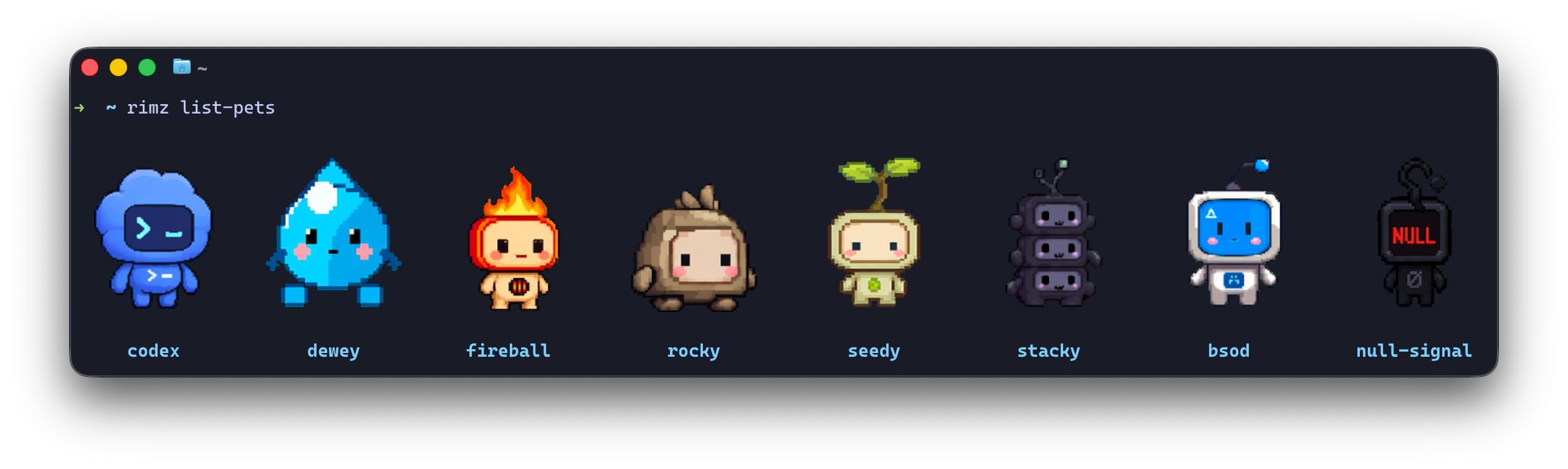
rimz list-pets
in Ghostty: the built-in pets as crisp pixels.
Everything on this page is the `[theme.pets]` table in `~/.config/rimz/theme.toml`; the rest of the sidebar's appearance — palettes, glyphs, animations — is the [theming guide](/docs/customization/theme). Enabling pets widens the automatic sidebar default to 30%; an explicit `theme.display.width_percent` still wins. A pet is pure display: it changes what the dashboard paints, never what an agent can do.
```toml
[theme.pets]
enabled = true
pet = "rocky"
glyphs = "auto"
# cell_aspect = 2.5
voice = true
```
| key | does |
| ------------- | -------------------------------------------------------------------------------------- |
| `enabled` | turns the dashboard pet on (off by default) |
| `pet` | which pet: a built-in id, a [petdex](#petdex) pet, an HTTPS URL, or a local sheet path |
| `glyphs` | render tier: `auto`, `pixel`, or `sextant` |
| `cell_aspect` | optional terminal cell height/width ratio for sextant aspect correction |
| `voice` | one-line captions on pet-action changes, drawn from each state's pool |
## What the pet does [#what-the-pet-does]
The pet acts out the selected card, one steady animation per state: it waves when an agent waits on your answer, paces while one reasons, runs while the work moves, has a rough patch when a turn fails, and rests when everything is caught up. Any state change lands with a small jump first, so motion in the corner of your eye means the room changed. A one-line caption under the sprite names the moment (`someone needs you`, `thinking it through`, `all caught up`), drawn from a pool of a hundred-plus lines per state so the pet rarely repeats itself; `voice = false` keeps the animation and hides the captions.
## Choosing a pet [#choosing-a-pet]
`rimz list-pets` previews every choice as a sprite grid, straight in the terminal: the built-ins first, then any [petdex](#petdex) pets installed locally, each labeled with the id you give `theme.pets.pet`. The built-in ids are `codex`, `dewey`, `fireball`, `rocky`, `seedy`, `stacky`, `bsod`, and `null-signal`.
### Petdex [#petdex]
[petdex.dev](https://petdex.dev/) is the community pet gallery: thousands of open-source pixel pets, browsable by collection and previewable in every animation state. RimZ reads the petdex install format directly, so a pet from the gallery is two commands away:
```sh
npx petdex install wall-e # installs under ~/.codex/pets/wall-e/
rimz config set theme.pets.pet wall-e # a bare name selects the installed pet
```
A petdex install is a directory under `~/.codex/pets//` holding a `pet.json` manifest beside its WebP or PNG sprite sheet; RimZ reads the manifest and loads the sheet it names. `pet = "~/.codex/pets/wall-e/"` reads the same directory by path, and any directory laid out this way works, wherever it lives.
### Your own sheet [#your-own-sheet]
The same `pet` key takes bring-your-own art:
* `pet = "https://example.com/my-pet.webp"` fetches an HTTPS WebP or PNG sheet once and caches it. Plain `http://` is refused.
* `pet = "~/art/my-pet.png"` reads a local WebP or PNG sheet; a directory path is read as a [petdex](#petdex) install.
Every source uses the petdex sheet geometry — a `1536x1872` image holding an `8x9` grid of `192x208` frames — with each row an animation the pet plays. The row-by-row catalog, cache layout, and decode pipeline live in the [pets internals](https://github.com/rimio-ai/rimz/blob/v0.4.1/docs/internals/sidebar/pets.md?ref=docs#assets).
## Crisp pixels and cell art [#crisp-pixels-and-cell-art]
Two tiers render the same sheet. **Pixel** draws the sprite through the kitty graphics protocol, crisp at native resolution: it needs a Ghostty or kitty terminal ([installation](/docs/getting-started/installation#truecolor-terminal-and-a-nerd-font-optional) sets one up), and inside tmux also tmux 3.6+ with `allow-passthrough on` (or `all`). **Sextant** draws the sprite as cell art, each terminal cell split into a 2x3 pixel grid, and works everywhere: Zellij, SSH, and any terminal that shows color.
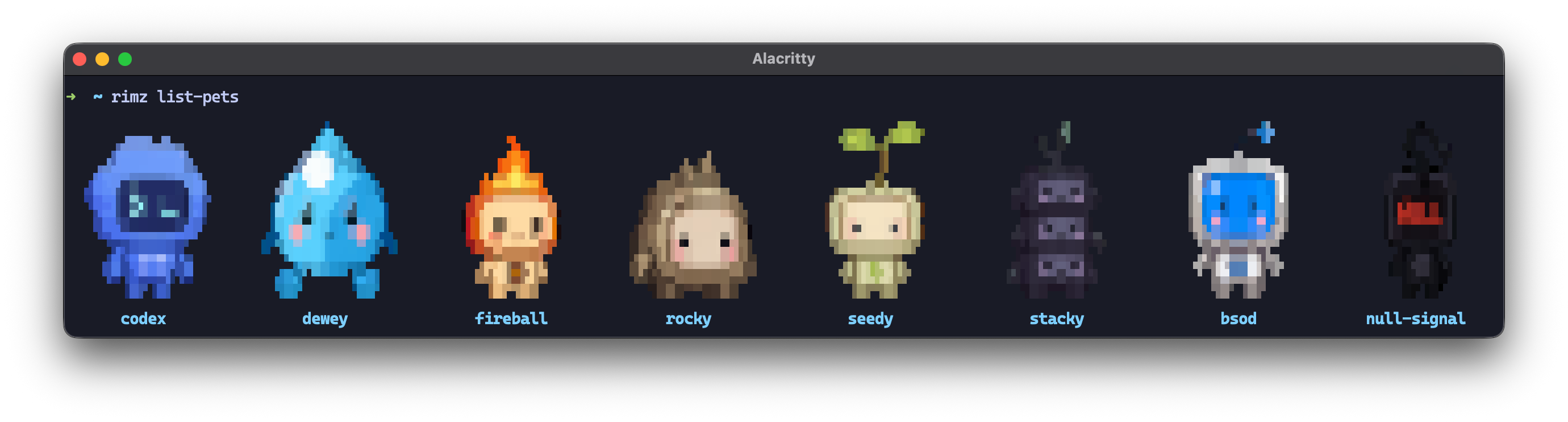
The same pets as sextant cell art, here in Alacritty; Zellij rooms render this tier too.
`glyphs` picks the tier:
| `glyphs` | renders |
| ---------------- | --------------------------------------------------------------------------------------------------------------------------------- |
| `auto` (default) | pixels when the terminal and mux qualify, otherwise sextant cell art |
| `pixel` | opts past the terminal-name allowlist for newer kitty-compatible terminals, while hard gates such as tmux passthrough still apply |
| `sextant` | the most portable cell art, on every backend |
Sextant pets fit their source proportions inside the fixed dashboard footprint. RimZ probes the terminal's cell pixel dimensions when the pty exposes them; Zellij reports no pixel dimensions, so set the ratio manually when its font makes pets look tall or wide: `rimz config set theme.pets.cell_aspect 2.5`. Explicit config wins over the probe, and a neutral `13/6` fallback preserves the previous rendering when neither fact is available.
On macOS, terminal graphics updates can make AppKit re-evaluate the pointer shape while pixel pets animate; RimZ transmits each sprite image once to minimize that traffic, and `glyphs = "sextant"` switches to the flicker-free cell-art path when you want it fully gone.
## Offline and privacy [#offline-and-privacy]
Built-in and URL sheets fetch once over HTTPS into the per-machine cache; `RIMZ_PETS_OFFLINE=1` serves the cache only. Petdex and local sheets read from disk and make no network request.
Pets run no commands. Asset loading sends only the configured asset request; prompts, transcripts, pane text, workspace paths, and provider credentials stay local. The pet's place in the threat model is one bullet in [security.md](/docs/help/security#what-leaves-your-machine).
Sheet geometry, the cache layout, and the pixel gates live in the [pets internals](https://github.com/rimio-ai/rimz/blob/v0.4.1/docs/internals/sidebar/pets.md?ref=docs).
# Theming (/docs/customization/theme)
RimZ wears one theme across the sidebar and human command output: the color scheme and depth, semantic color slots, and provider branding. The sidebar adds its glyph vocabulary, status-head animations, and optional animated pet. All of it is display preference in one per-machine file, `~/.config/rimz/theme.toml`. A theme changes presentation, never what an agent can do, so nothing on this page can break a run.
RimZ reads color schemes from [iTerm2-Color-Schemes](https://github.com/mbadolato/iTerm2-Color-Schemes/tree/master/alacritty), so a bundled name or the palette you already run in your terminal is one line away:
```sh
rimz config set theme "Catppuccin Mocha" # any bundled scheme; rimz list-themes shows them all
```
Every element carries its state by shape first (the [glyph legend](https://github.com/rimio-ai/rimz/blob/v0.4.1/docs/interface/sidebar.md?ref=docs#reading-the-glyphs) is the meaning table), so color reinforces meaning rather than carrying it, and any palette stays readable, including no color at all. This page is the knobs; [interface/sidebar.md](https://github.com/rimio-ai/rimz/blob/v0.4.1/docs/interface/sidebar.md?ref=docs) is what every tone and glyph *means* on screen.
## Common changes [#common-changes]
Three settings cover what most people touch. Each is a dotted key that `rimz config set` writes straight into `theme.toml`:
```sh
rimz config set theme.style modern # truecolor + Nerd Font glyphs; "default" = auto color + Unicode
rimz config set theme.pets.enabled true # an animated companion on the provider dashboard
```
A [scheme](#color-scheme) restyles the whole column, the [style preset](#style-preset) is the one-line headline that pairs a color depth with a glyph set, and a [pet](#pets) adds motion to the provider dashboard. Everything else on this page tunes a detail beneath these three.
## Style preset [#style-preset]
`[theme] style` is the one-line headline that pairs a color depth with a glyph set. `modern` is truecolor plus the [Nerd Font glyphs](#glyphs); `default` is [auto color depth](#color-depth) plus the shipped Unicode glyphs. An explicit `[theme] mode` or `[theme.glyphs] set` overrides the matching half, so you can take the Nerd Font icons at `256` color or pin truecolor with Unicode glyphs.
`modern` expects a terminal that renders both halves — 24-bit color and a Nerd Font face. First-run setup probes those capabilities separately and writes explicit `theme.mode` or `theme.glyphs.set` choices only when an answer changes the effective default, so either half can degrade independently. [Installation](/docs/getting-started/installation#truecolor-terminal-and-a-nerd-font-optional) lists terminals and fonts that qualify.
```toml
[theme]
style = "modern" # truecolor + Nerd Font; or "default" for auto color + Unicode
```
## Color scheme [#color-scheme]
`[theme] scheme` picks the palette; unset uses the bundled `TokyoNight Night`. Set a bundled theme name (`rimz list-themes` prints all of them; names with spaces need TOML quotes) or a path to an Alacritty TOML file (`~` expands).
```toml
[theme]
scheme = "Catppuccin Mocha"
# scheme = "~/themes/rimz.toml"
```
The bundled catalog is the Alacritty export of [iTerm2-Color-Schemes](https://github.com/mbadolato/iTerm2-Color-Schemes), so a scheme name resolves to the same palette in every terminal and mux.
Human `rimz` command output resolves the same scheme, slot overrides, provider overrides, and color depth as the sidebar. Machine-readable output stays stable: JSON, hook decisions, pane captures, scripting values, and streams do not inherit theme styling.
Browser rooms use the active scheme when `[web] style_client` is true; see [Web CLI](/docs/reference/cli/web).
To paste a palette inline instead, drop an Alacritty `[colors.*]` block at the root of `theme.toml`; an inline palette wins over `scheme`. The required keys are `colors.primary.background` / `foreground` and the six `colors.normal` hues; `colors.bright.blue` (the selection accent, falling back to `normal.blue`) and `colors.selection.background` (the selected-card band) are optional. A missing or malformed entry is named at load.
```toml
[colors.primary]
background = "#1a1b26"
foreground = "#c0caf5"
[colors.normal]
red = "#f7768e"
green = "#9ece6a"
yellow = "#e0af68"
blue = "#7aa2f7"
magenta = "#bb9af7"
cyan = "#7dcfff"
```
## Color depth [#color-depth]
`[theme] mode` sets the palette depth: `auto` (default) emits truecolor when `COLORTERM` or the `$TERM` terminfo advertises direct color (Ghostty, kitty, WezTerm, iTerm2, and Alacritty do), otherwise quantizes the RGB tones to xterm 256 indexes; `truecolor` forces RGB; `256` pins indexed output. Inside a RimZ tmux room, RimZ stamps `COLORTERM=truecolor` at birth when the launcher advertises it, so `auto` resolves to truecolor despite tmux's `tmux-256color` default.
```toml
[theme]
mode = "auto" # or "truecolor", "256"
```
`NO_COLOR` strips color entirely while keeping glyph shapes and weight modifiers, so every gauge, status, and marker still reads.
### Subtle steps and color depth [#subtle-steps-and-color-depth]
Some cues are subtle lightness shifts — a calm card name dimmed a touch, the recessed selection band, the unread *wash* (the soft background tint an unread row wears), a breathing pulse — and they render as color only at truecolor depth. At 256-color depth each falls back to a signal indexed color carries cleanly: a `DIM`/`BOLD` weight for motion, or the plain base tone for a static shift (the same shape `NO_COLOR` uses). Cues that already span a full color step — the neutral ladder, the health ramp, the one-cell selection and unread steps — stay color at every depth. The step magnitudes are tunable in [`[theme.display.highlight_steps]`](#display).
## Color slots [#color-slots]
The scheme supplies the raw terminal palette: background, foreground, the six hues, and a selection accent. From it RimZ derives thirteen slots, the roles everything on screen wears, with the derived steps kept perceptually even so any scheme stays readable. The slots are the layer to tune: override one and every element that wears it follows, and the override survives a scheme switch.
Each slot under `[theme]` accepts a palette role name (`background`, `foreground`, `red`, `green`, `yellow`, `blue`, `magenta`, `cyan`, `bright_blue`), a `#rrggbb` hex, or a raw 0–255 xterm index; an omitted slot keeps the scheme's tone. Role names resolve through the active palette, so `good = "green"` tracks a pasted `[colors.normal] green` just like a bundled scheme.
```toml
[theme]
good = "#a0d0a0" # hex retunes a slot
warn = 173 # a raw xterm index stays exact at every depth
caution = "yellow" # a palette role tracks the active [colors] table
```
| slot | wears |
| -------------- | ------------------------------------------------------------------------------------------------------------------------- |
| `good` | calm/positive: running tallies, low gauges, `+` additions, the `◌` cache-read marker |
| `warn` | the caution floor: resting `?` waits, the low-mid gauge rung |
| `caution` | the warm "hot/costly" amber: the gauge mid-band and the age-heat midpoint |
| `alarm` | danger: failed `!`, the full-gauge crest, `-` removals (the fresh-input `↘` marker derives a deeper red one step past it) |
| `accent` | data: the `◎` sessions glyph and the `↗` output marker |
| `cool` | cool informational: the `plan` pill, large window tags, the `◇` token total, the paused `⏸` glyph |
| `meta` | delegation/compaction: the `⇅ rc` flag, the `⧉` subagent marker, the cache-write `◍` marker |
| `body` | body text: stat figures, capability tokens, subagent lines, worktree headers |
| `muted` | chrome: labels, ages, subordinate values |
| `faint` | faintest chrome: bar tracks, `·` separators, dotted dividers |
| `rule` | the darkest chrome (the scrollbar track), a step below `faint` |
| `selection` | the selected card's bright `▌` spine and the dim `▎` lane bracket |
| `selection_bg` | the selected card's recessed background band |
Two rules keep the palette honest: `alarm` red marks danger, and one warm `caution` amber means "hot/costly" everywhere. The four health slots form a ramp — `good → warn → caution → alarm`, green through gold and orange to red — that the live meters slide. The context meter, the remote link badge, and the draining provider budget bar ride the full ramp; readers that recede when healthy, such as the card age clock and the reset-countdown pace, rest quiet and ride only the warm tail once they leave their calm zone. An RGB override or an xterm index 16–255 joins the ramp; a flat ANSI index 0–15 is terminal-defined, so that slot wears your override while the ramp keeps the scheme's RGB. Money figures use a fixed dollar green outside the slots, as does each provider's [brand color](#provider-styling).
## Display [#display]
`[theme.display]` tunes the sidebar's render cadence, sizing, dashboard layout, and meter color stops.
| key | does |
| --------------------- | ---------------------------------------------------------------------------------------------------------------------------------------------------------------------------------------------------------------------------------- |
| `refresh_ms` | the animation/paint grid in milliseconds (clamped internally); data polling keeps its own cadence |
| `pixel` | `auto` enables kitty-graphics pets and context meters when the terminal path supports them; `off` keeps both on their cell-rendered tiers |
| `width_percent` | optional fixed sidebar share of each view (clamped to 10-90 at use); unset uses 30% above 240 columns or when pets are enabled, and 25% otherwise; applies at the next convergence unless a room-wide `a`/`d` selection is present |
| `max_cols` | live cap on the configured sidebar share; applies at the next convergence, while room-wide `a`/`d` selections may exceed it |
| `scrollbar` | `auto` shows the overflow indicator only while the view moves; `always` / `never` pin it |
| `card_density` | `auto` keeps the standard card; `expanded` shows every card's subagents; `compact` trims resting cards |
| `provider_tabs` | how the dashboard stacks vs. tabs provider blocks (`auto` / `always` / `never`) |
| `provider_list` | which providers appear and in what order; by default usage ranks running, recently used, then recently logged-in providers, while `"all"` expands the rest in that order |
| `max_provider_blocks` | cap on *stacked* blocks (a tabbed dashboard shows all) |
```toml
[theme.display]
refresh_ms = 100
pixel = "auto"
width_percent = 30 # optional fixed override; omit for the width-keyed default
max_cols = 72
scrollbar = "auto"
card_density = "auto"
provider_tabs = "auto"
```
The context meter paints a pixel-precise stripe when `pixel = "auto"`, truecolor is active, and kitty graphics reaches a kitty or Ghostty client directly or through tmux 3.6+ with `allow-passthrough`; Zellij and every unsupported path use the half-cell bar. `NO_COLOR` always uses the shape-only cell bar. Set `pixel = "off"` to opt out of both the pixel meter and pixel pets.
Two nested tables set the meter color stops. The **context meter** (`[theme.display.context_meter]`) warms a card's context read from green: each stop names a fill percentage *and* an absolute token count, and severity is the worse of the two, so a large-window model calm by percentage still warms by sheer volume. Its drawn fill's log warp scales with the model's window: a window up to 256k stays linear, and the curve reaches full strength at 1M so the working range keeps visual space instead of bunching at the left edge; `log_scale = false` forces linear geometry, while the displayed percentage and color stops always read raw usage. The **budget bar** (`[theme.display.budget_bar]`) names the *remaining* budget percent at which the draining bar reaches each warm stop, and its nested `[theme.display.budget_bar.burn_rate]` colors the reset marker by pace (`100` = on-pace, `200` = twice as fast as the window can sustain); `green = 67` starts the cool under-pace tail and `deep_green = 33` saturates it once enough of the window has elapsed. The shipped numbers are in the template.
```toml
[theme.display.context_meter]
log_scale = true
amber = { percent = 80, tokens = 256000 }
[theme.display.budget_bar]
yellow = 50
amber = 25
red = 10
```
`[theme.display.highlight_steps]` sets the selected-band and unread-wash offsets from `selection_bg`, in units of 0.01 perceptual lightness. `band` recesses the selected card at truecolor depth, `wash` lifts the unread row at truecolor depth, and `indexed` is the 256-color one-cell step used darker for the band and lighter for the wash.
```toml
[theme.display.highlight_steps]
band = 5
wash = 1
indexed = 4
```
## Animations [#animations]
`[theme.animations]` themes the status heads the sidebar paints (what each head means is in [the glyph legend](https://github.com/rimio-ai/rimz/blob/v0.4.1/docs/interface/sidebar.md?ref=docs#reading-the-glyphs)). The roles are `thinking`, `working`, `compacting`, `delegating`, `resolving`, `idle`, `success`, `paused`, `waiting`, and `failed`. Each role takes four optional fields (`frames`, `color`, `effect`, `speed`), and an omitted field keeps the built-in, so a one-line override leaves the rest alone. The template lists every built-in head.
```toml
[theme.animations.thinking]
color = "clay"
speed = "fast"
[theme.animations.idle]
effect = "breathe"
```
* **`frames`** is a string (split into one frame per Unicode codepoint, e.g. `"⠁⠂⠄⡀"`) or an array (which keeps multi-codepoint single-cell glyphs intact, e.g. `["⏸︎"]`). Every frame must occupy exactly one cell.
* **`color`** accepts a semantic slot (`good`, `warn`, `caution`, `alarm`, `accent`, `cool`, `meta`, `body`, `muted`, `faint`), the brand tone `clay`, a `#rrggbb` hex, or a raw index.
* **`effect`** is `static` or `breathe`; **`speed`** is `slow`, `normal`, or `fast`, pacing both frame advance and effect.
The static heads (`idle` / `success` / `paused` / `waiting`) take their shape from [`[theme.glyphs] set`](#glyphs); the animated spinners keep their Unicode frames in every preset, and the cockpit buckets — the `? ! ⏸ ✓` counters at the top of the sidebar — show each head's still `status` glyph. A literal blink is just a frame sequence such as `frames = [" ", "!"]`.
### Unread attention [#unread-attention]
`[theme.animations] unread` picks how an unread attention row reads. The lead glyph, the card name, the description, and the cockpit `?`/`!`/`✓` buckets all carry the choice as one group, so a row that needs you reads with one voice.
```toml
[theme.animations]
unread = "shimmer" # or "bright", "blink"
```
| `unread` | the lead row reads as |
| ------------------- | ------------------------------------------------------------------------------- |
| `shimmer` (default) | a light beam flows across the glyph, name, and description, quickening with age |
| `bright` | a constant bright, bold crest, no motion |
| `blink` | a hard 2-pole brightness toggle, quickening with age |
The continuous signal is reserved for the **one row that most needs you**, the oldest unanswered `waiting`/`failed`. Every other unread row, an unread `✓` included, settles to the steady `bright` crest, so a single pane is the only thing in motion. An unread card also grounds on a soft **wash** (the selection blue lifted a step, marking the row unseen the way a mail inbox shades an unread line), which holds still and survives across depths, dropping only under `NO_COLOR`. A per-role `effect = "static"` on `waiting`/`failed`/`success` overrides the `unread` choice and holds that row at a constant bold tone. How these cues degrade by depth is in [Subtle steps and color depth](#subtle-steps-and-color-depth).
## Glyphs [#glyphs]
`[theme.glyphs]` shapes the sidebar's glyph vocabulary; the [glyph legend](https://github.com/rimio-ai/rimz/blob/v0.4.1/docs/interface/sidebar.md?ref=docs#reading-the-glyphs) stays the canonical meaning table. `set` chooses the active preset, `unicode` (default) or `nerd_font`, and the matching inline tables overlay it. Glyphs are grouped by the sidebar's on-screen reading order, and the template lists every role in both shipped sets, so customizing is uncomment-and-edit. Each glyph must occupy exactly one cell, or two when a trailing space pads a double-width icon.
```toml
[theme.glyphs]
set = "nerd_font"
[theme.glyphs.unicode.tokens]
total = "◇"
```
| group | controls |
| ---------- | ----------------------------------------------------------------------------------------------------------------------------------------------------------------- |
| `status` | the leading status heads |
| `cockpit` | `workspace`, `sessions`, `agents`, `pr_open` |
| `tokens` | the token-accounting markers |
| `meter` | the drawn gauges and bars |
| `clock` | the last-activity age faces |
| `worktree` | the group header's git story: `branch`, `merge`, `ahead`, `behind`, `trunk_equal`, `trunk_branch`, `trunk_merge`, `pr_open`, `pr_closed`, `reconciling`, `dotted` |
| `card` | the agent card body |
| `process` | the CPU / mem / IO row |
| `keys` | help-overlay action leads |
| `chrome` | framing, spines, tabs, badges, and the help-box frame |
The `status` group sets head *shapes*; their color, effect, and speed stay in [`[theme.animations]`](#animations). Two names read across to animation roles: `status.attention` is the role `failed`, and `status.done` is `success`. The drawn gauges, the box-drawing chrome, the `worktree.dotted` seal, and the `compacting` wave keep their box-drawing glyphs in every preset, because the terminal grid draws them more precisely than any icon. Nerd Font mode assumes a Nerd Font v3+ face is active — install one from [Nerd Fonts](https://www.nerdfonts.com/font-downloads), or a Homebrew cask ([installation](/docs/getting-started/installation#truecolor-terminal-and-a-nerd-font-optional)), and select it as your terminal font. On a non-`Mono` build that draws icons double-width, pad the alignment-sensitive glyphs with a trailing space.
## Provider styling [#provider-styling]
`[theme.providers.]` restyles a provider's dashboard block over the built-in defaults: display name, ASCII emblem, and brand color (Claude clay `#d97757`, Codex blue `#2fb1d1`, Pi green `#27a077`, Open Code orange `#ff8700`). Shipped art resolves through the embedded emblem catalog: curated kinds use their entry and every other kind uses the shared fallback. Curated art may carry built-in color tints; an `ascii_art` override paints the replacement in the single brand color. Each field is optional, so a color override leaves that resolved art and its tints intact.
```toml
[theme.providers.claude]
product_name = "Claude"
color = "#d97757"
ascii_art = """
▐▛███▜▌
▝▜█████▛▘
▘▘ ▝▝
"""
```
`color` accepts a palette role, `#rrggbb`, or a raw index. Which blocks appear and in what order is a [Display](#display) and discovery setting (see [configuration.md → Provider dashboard](/docs/customization/configuration#provider-dashboard)).
## Pets [#pets]
Pets add a small animated companion to the provider dashboard, configured through `[theme.pets]`:
```toml
[theme.pets]
enabled = true
pet = "rocky"
```
The [pets guide](/docs/customization/pets) covers the rest: what the pet acts out, the built-in and [petdex.dev](https://petdex.dev/) catalogs, bring-your-own sprite sheets, the pixel and cell-art render tiers, and the offline and privacy story.
# Installation (/docs/getting-started/installation)
RimZ is a single binary for macOS and Linux. Pick one install path: the [install script](#install-with-the-script), [Homebrew](#install-with-homebrew-macos) on macOS, a [prebuilt binary](#install-a-prebuilt-binary) from the releases page, or [Cargo](#install-with-cargo). [Building from source](#build-from-source) is for working on RimZ itself or for platforms the prebuilt paths miss.
## Prerequisites [#prerequisites]
* **macOS or Linux.**
* **A terminal multiplexer** — Zellij 0.44 or newer, or tmux 3.5 or newer. One is enough; both are first-class. Distribution packages are often too old; [get a current Zellij or tmux](#get-a-current-zellij-or-tmux) has install recipes for current builds.
* **The agent CLIs you plan to run** — Claude Code, Codex, Pi, OpenCode, Droid, Kiro CLI, or Grok Build, installed per their own docs. RimZ drives the stock CLIs and bundles none of them.
* **Git** — agent worktrees and the sidebar's git status use it.
RimZ refuses to start against a multiplexer below the minimum supported version, and `rimz doctor` reports the installed version and whether it clears that floor. On tmux, 3.6 or newer gives the best experience ([why](#rimz-doctor-flags-the-multiplexer-as-unsupported)).
The multiplexer needs no configuration for RimZ: every room sets its own options on session start and reattach, and your existing Zellij or tmux config keeps owning your theme, shell, and keybinds. The room's essential settings are in [set up your machine](/docs/getting-started/setup#configure-your-multiplexer), and a full baseline for your own sessions is [Zellij and tmux baselines](/docs/customization/multiplexer).
## Install with the script [#install-with-the-script]
```sh
curl -fsSL https://raw.githubusercontent.com/rimio-ai/rimz/main/scripts/install.sh | sh
```
The script detects the platform. On macOS, a latest-release install delegates to the Homebrew tap when `brew` is available, which puts RimZ on the same package-manager path as future upgrades and removal. A `RIMZ_VERSION` other than `latest`, `RIMZ_INSTALL_DIR`, an existing non-Homebrew `rimz` on `PATH`, or `RIMZ_NO_BREW=1` keeps the direct-download path; a failed Homebrew install also falls back to the release download.
The direct path downloads the release, verifies it against `SHA256SUMS`, and installs RimZ to `/usr/local/bin` when that directory is writable or `~/.local/bin` otherwise. Interactive terminals show a short control-room boot animation; non-interactive terminals, redirected output, `NO_COLOR`, and `TERM=dumb` use the same plain progress output.
Pass `RIMZ_INSTALL_DIR` or `RIMZ_VERSION` to the `sh` command on the right side of the pipe to choose the destination or install a specific tag such as `v0.3` or the rolling `latest-main` build. Unsupported prebuilt platforms, including ARM Linux and musl Linux, are directed to the [Cargo install](#install-with-cargo).
## Install with Homebrew (macOS) [#install-with-homebrew-macos]
```sh
brew install rimio-ai/rimz/rimz
```
Homebrew adds the `rimio-ai/rimz` tap automatically. `brew upgrade rimz` picks up new releases. The install script reaches this path automatically on macOS when its Homebrew delegation conditions hold.
## Install a prebuilt binary [#install-a-prebuilt-binary]
Every [release](https://github.com/rimio-ai/rimz/releases) ships one archive per platform plus a `SHA256SUMS` file:
| Archive | Platform |
| -------------------------------------- | -------------------- |
| `rimz-x86_64-unknown-linux-gnu.tar.gz` | Linux, x86\_64 |
| `rimz-aarch64-apple-darwin.tar.gz` | macOS, Apple silicon |
| `rimz-x86_64-apple-darwin.tar.gz` | macOS, Intel |
Download, verify, and install (shown for Linux; swap the archive name on macOS and verify with `shasum -a 256 -c --ignore-missing`):
```sh
curl -fsSLO https://github.com/rimio-ai/rimz/releases/latest/download/rimz-x86_64-unknown-linux-gnu.tar.gz
curl -fsSLO https://github.com/rimio-ai/rimz/releases/latest/download/SHA256SUMS
sha256sum -c --ignore-missing SHA256SUMS
tar -xzf rimz-x86_64-unknown-linux-gnu.tar.gz
sudo install -m 0755 rimz-x86_64-unknown-linux-gnu/rimz /usr/local/bin/rimz
```
Three notes on the archives:
* The Linux binary targets x86\_64 and links against a current glibc. On an ARM Linux machine, or if the binary reports a `GLIBC` version error, use the [Cargo install](#install-with-cargo) instead.
* The macOS binaries carry an ad-hoc signature and install cleanly over `curl`. A browser download gets quarantined by Gatekeeper; `xattr -d com.apple.quarantine rimz` clears it.
* The `latest-main` prerelease carries a rolling build of the default branch, for when you want a fix that has not been tagged yet.
## Install with Cargo [#install-with-cargo]
```sh
cargo install --locked rimz
```
This builds RimZ from crates.io and works on any supported platform, including ARM Linux. It needs the Rust toolchain (install through [rustup](https://rustup.rs)) and a C linker (`build-essential` on Debian/Ubuntu, `xcode-select --install` on macOS). The crate ships RimZ's Zellij plugin as a prebuilt WebAssembly artifact, so no extra Rust targets are involved.
## Verify the install [#verify-the-install]
```sh
rimz --version
rimz doctor
```
`rimz doctor` reports the multiplexer it selected, its version and whether it clears the floor, hook status, and room health — the fastest read on whether a fresh machine is ready. From here, make the machine comfortable with [set up your machine](/docs/getting-started/setup).
## Update [#update]
Whichever install path you chose, update it from the same command:
```sh
rimz update
```
`rimz update` detects the current binary's install path. A Homebrew install, including a macOS script install that delegated to Homebrew, runs `brew upgrade rimz`, and a Cargo install runs `cargo install --locked rimz`. Direct-download script and manually installed prebuilt binaries download the matching release archive, verify it against `SHA256SUMS`, extract only the RimZ binary, require its `--version` smoke test to pass, then atomically replace the current binary in place. When the binary changes, the new build runs `rimz reload` so live sidebars and held stats dashboards converge immediately.
Pass `--version ` to install a standalone release such as `v0.3.1`, roll back to an older tag, or follow the rolling `latest-main` build. Cargo accepts numbered release tags and normalizes short tags such as `v0.3` to `0.3.0`; crates.io has no `latest-main` build. Homebrew owns its selected formula version, so pin a standalone install through the install script instead.
## Get a current Zellij or tmux [#get-a-current-zellij-or-tmux]
A distribution's packaged tmux is usually behind (Debian 12 ships 3.3a, Debian 13 ships 3.5a), and most distributions do not package Zellij at all. When `tmux -V` or `zellij --version` reads below the floor, install a current build.
On macOS, Homebrew's builds of both are current:
```sh
brew install zellij
brew install tmux # one is enough; keep both to choose per project
```
On Linux, Zellij ships a prebuilt binary on its releases page; drop it into your `PATH` (swap `x86_64` for `aarch64` on ARM):
```sh
curl -L https://github.com/zellij-org/zellij/releases/latest/download/zellij-x86_64-unknown-linux-musl.tar.gz \
| sudo tar -xz -C /usr/local/bin zellij
zellij --version
```
For tmux, the distribution package works when `tmux -V` clears the version you want:
```sh
sudo apt install tmux # Debian/Ubuntu; dnf and pacman ship it too
```
tmux publishes no prebuilt binaries, so when the packaged one is too old, install a current one through Homebrew on Linux or build the release tarball (the first line installs the build deps):
```sh
sudo apt install -y build-essential pkg-config libevent-dev libncurses-dev bison
curl -fsSLO https://github.com/tmux/tmux/releases/download/3.7/tmux-3.7.tar.gz
tar -xzf tmux-3.7.tar.gz && cd tmux-3.7
./configure && make -j"$(nproc)" && sudo make install
```
## Truecolor terminal and a Nerd Font (optional) [#truecolor-terminal-and-a-nerd-font-optional]
RimZ's `modern` style paints in 24-bit color and draws with Nerd Font icons. First-run setup checks the color sweep and icon sample separately, so truecolor and Nerd Font glyphs can be enabled independently; plain indexed colors and Unicode glyphs read at any depth. Truecolor is on by default in Ghostty, kitty, WezTerm, iTerm2, and Alacritty; the icons need a [Nerd Font](https://www.nerdfonts.com/font-downloads) installed and selected as your terminal font.
Ghostty and kitty get you the fullest experience: they also draw crisp [pixel pets](/docs/customization/pets#crisp-pixels-and-cell-art) through the kitty graphics protocol, where every other terminal falls back to the portable cell-art tier. For truecolor, Nerd Font icons, and pixel pets in one terminal, pick one of these two.
On macOS, Homebrew installs Ghostty and a couple of patched fonts in one step:
```sh
brew install --cask ghostty
brew install --cask font-cascadia-code-nf font-jetbrains-maple-mono-nf
```
Set the installed font as your terminal font, then rerun `rimz setup` to enable Nerd Font icons. The [theming guide](/docs/customization/theme#style-preset) has the color-depth and glyph knobs, and the [pets guide](/docs/customization/pets) covers the pixel and cell-art tiers.
## Build from source [#build-from-source]
The source build is for contributing to RimZ or installing on a platform the prebuilt paths miss. Beyond the [prerequisites](#prerequisites) above it needs a C toolchain, Git, and Rust through `rustup`:
```sh
# Linux — build tools (Debian/Ubuntu shown; use dnf or pacman equivalents)
sudo apt install -y build-essential pkg-config git
# macOS — Apple's command-line tools
xcode-select --install
# Both — Rust through rustup
curl --proto '=https' --tlsv1.2 -sSf https://sh.rustup.rs | sh
. "$HOME/.cargo/env"
```
Then clone and install:
```sh
git clone https://github.com/rimio-ai/rimz.git
cd rimz
cargo xtask install
```
`cargo xtask install` builds the Zellij presence plugin (a WebAssembly artifact embedded into the binary), builds `rimz`, copies it into `~/.cargo/bin`, and prints the installed version and path. The repo's [rust-toolchain.toml](https://github.com/rimio-ai/rimz/blob/v0.4.1/rust-toolchain.toml) pins the toolchain channel, components, and the `wasm32-wasip1` target, and `rustup` applies it on the first build — there is no manual target setup.
To work on RimZ itself (debug builds, tests, the gate stack), continue with [the Rust conventions](https://github.com/rimio-ai/rimz/blob/v0.4.1/docs/contributing/rust-conventions.md?ref=docs).
## Uninstall [#uninstall]
Run `rimz uninstall --all` from outside a RimZ room. It removes installed hooks, live rooms, runtime state, durable stores, per-machine config, and the installed binary; project-local `.rimz/` dirs and RimZ-owned worktrees stay in place for manual review. If you installed through Homebrew, also run `brew uninstall rimz`. Flags for partial removal are in the [maintenance reference](/docs/reference/cli/maintenance#update-reload-reset-gc-and-uninstall).
## Troubleshooting [#troubleshooting]
### `rimz doctor` flags the multiplexer as unsupported [#rimz-doctor-flags-the-multiplexer-as-unsupported]
RimZ refuses to start against a multiplexer too old to carry the room options it sets: tmux below 3.5, or Zellij below 0.44. Check the installed version, then [install a current build](#get-a-current-zellij-or-tmux).
```sh
tmux -V
zellij --version
rimz doctor
```
One tmux nuance: on tmux 3.5.x the extended keys RimZ enables (so Shift+Enter and Alt+Enter reach agents as soft newlines) corrupt pasted multiline text; tmux 3.6 fixes the paste too.
### `GLIBC_x.xx not found` running the prebuilt Linux binary [#glibc_xxx-not-found-running-the-prebuilt-linux-binary]
The release binary links against a current glibc, and an older distribution cannot load it. Install through [Cargo](#install-with-cargo) instead, which builds against your system's glibc.
### `can't find crate for core` during a source build [#cant-find-crate-for-core-during-a-source-build]
This error during `cargo xtask install` means the compiler Cargo used cannot see the Rust standard library for `wasm32-wasip1`:
```text
error[E0463]: can't find crate for `core`
= note: the `wasm32-wasip1` target may not be installed
```
The usual cause is a non-rustup Rust shadowing rustup's on your `PATH` — on macOS, Homebrew's `rust` formula is the common culprit. Check where the tools resolve:
```sh
command -v cargo
command -v rustc
rustup show active-toolchain
```
A healthy setup resolves both under `$HOME/.cargo/bin` (or rustup's own bin directory). If they point elsewhere, put rustup first and remove the shadowing toolchain, then rerun `cargo xtask install`:
```sh
brew unlink rust # macOS, if Homebrew's rust formula is installed
hash -r
```
# Quickstart (/docs/getting-started/quickstart)
## Get started in five steps [#get-started-in-five-steps]
```sh
# 1. Install
cargo install --locked rimz
# 2. Open the room
cd ~/code/query-engine
rimz
# 3. Launch agents and work
claude
# or: codex, pi, opencode
# 4. Worktrees, teams, dynamic layout
rimz agents claude,codex --worktree=feat-x
rimz agents 'vim,claude+term' --worktree=feat-y
# 5. Native SSH remote with reconnect
rimz remote connect dev-box:~/code/query-engine
```
Hooks install on first `rimz` run, with consent and a diff preview. The [sidebar guide](/docs/agents/sidebar) shows what happens after the room opens.
## Everyday moves [#everyday-moves]
### Launch agents in layouts [#launch-agents-in-layouts]
One spec describes the shape: commas split columns, `+` tiles rows, and `/` stacks panes. A trailing prompt goes to the team's configured leader, its first role, or the first agent cell; use `rimz message @all` when everyone needs the same text.
```sh
rimz agents claude,codex "Refactor token refresh; keep the public API stable."
rimz agents 'vim,codex+term'
rimz agents claude/codex/term
```
Deep dive: [Agent control CLI](/docs/reference/cli/agents).
### Give each task its own worktree [#give-each-task-its-own-worktree]
`--worktree` launches into an isolated RimZ-owned Git worktree. The tab name becomes the agents' channel.
```sh
rimz agents claude,codex --worktree=feat-x
rimz agents claude --worktree "Take one approach."
rimz agents codex --from-pr 42 "Review this pull request."
```
Deep dive: [RimZ-owned worktrees](/docs/harness/worktrees).
### Save layouts as teams [#save-layouts-as-teams]
A named team in `agents.toml` gives each role a handle. Launch the team, or re-add one role to the running team.
```sh
rimz agents peer --worktree=feat-x
rimz agents forge
rimz agents forge.reviewer
```
Deep dive: [Configuration](/docs/customization/configuration#agent-profiles-commands-and-teams).
### Pick up where you left off [#pick-up-where-you-left-off]
`--resume` reopens the freshest closed session, cohort, or team matching the spec. `rimz start` offers the whole prior room back after a reboot.
```sh
rimz agents claude --resume
rimz agents forge --resume
rimz agents forge -w feat-x --resume
rimz start
```
Deep dive: [Teams and resume](/docs/harness/teams).
### Message agents like teammates [#message-agents-like-teammates]
Every agent gets a handle such as `@codex#feat-a`. Default delivery parks until the agent's turn ends; `--steer` interrupts now.
```sh
rimz message @claude "add coverage for the expiry edge cases"
rimz message --steer @claude "stop: the parser test comes first"
rimz message @coder --after @planner "planner is done — read plan.md and start"
rimz message @coder --wait "did the migration land? one line"
rimz message --schedule 60m @codex#feat-b "run the smoke test"
git diff main | rimz message @reviewer --stdin "review this"
```
Deep dive: [Messaging](/docs/harness/messaging).
### Script an agent like a CLI [#script-an-agent-like-a-cli]
`-p` runs one supervised turn and exits with the run's status code, so scripts and CI can branch on the outcome.
```sh
rimz agents codex "Prepare the release checklist." -p --timeout 30m --output-format json
cat build-error.txt | rimz agents claude -p --stdin 'explain the root cause' > out.txt
rimz agents claude "Run the migration audit." -p --bg
rimz agents wait swift-otter --stream
```
Deep dive: [Scripting](/docs/harness/scripting).
### Keep the fleet moving [#keep-the-fleet-moving]
Scheduled pings prime provider budget windows, and check-guarded loops wake agents when tests or CI fail.
```sh
rimz loop add morning --agent claude-ping --prompt ping --every weekday --at 07:00
rimz loop add watchdog --check "cargo test" --on fail \
--agent codex --prompt "fix the failing test" --every 15m
```
Deep dive: [Set up your machine](/docs/getting-started/setup#keep-the-fleet-moving).
### Work from anywhere [#work-from-anywhere]
A room is plain zellij or tmux under SSH. Save an alias, connect with reconnect, or open the room in a browser.
```sh
rimz remote add dev dev-box:~/code/query-engine
rimz remote connect dev
rimz remote connect dev --web
rimz web open
```
Deep dive: [Remote attach](/docs/agents/remote) and [Web access](/docs/agents/web).
### Answer asks from your phone [#answer-asks-from-your-phone]
Claude Code and Codex can keep their own remote-control bridges running with the room, so provider-app questions reach your phone and answers return to the same terminal session. Both integrations are off by default.
```sh
rimz config set remote_control.claude true
rimz config set remote_control.codex true
```
Deep dive: [Remote control](/docs/agents/remote#answer-asks-from-your-phone).
# Set up your machine (/docs/getting-started/setup)
RimZ runs with zero configuration, and one setup pass makes it a comfortable daily driver — on a laptop or on the remote server you SSH into. Picking up where [installation](/docs/getting-started/installation) ends, you'll:
* initialize the per-machine config,
* install or refresh the agent hooks that let the sidebar see your agents,
* check truecolor and Nerd Font support independently, and preview a pet,
* switch on the hands-off behaviors that keep agents working while you're away,
* and give your own Zellij or tmux a baseline worth keeping.
The fast path is three commands and a room. The rest of the page is what each step does and the settings worth choosing while you are here.
```sh
rimz setup # detect the machine, write config, choose hooks and appearance
rimz hooks install # wire every detected agent's hooks into RimZ
rimz doctor # confirm the machine is ready
cd ~/code/your-project && rimz
```
## Initialize the config [#initialize-the-config]
`rimz setup` prints a first-run report — the selected multiplexer, workspace root, trust state, config path, detected agent binaries, and hook install status — and writes any missing per-machine config under `~/.config/rimz/`. On an interactive terminal it also:
* offers to keep an existing config and refresh it against the current templates,
* offers one summarized install or refresh for every detected agent with missing hooks or a stale RimZ-owned whole-file integration,
* shows separate live truecolor and Nerd Font probes,
* previews the configured sidebar pet before asking whether to enable it, and
* offers to enable auto-continue and automatic Codex reset-credit redemption together.
The hook summary names every affected file and points to `rimz hooks install --dry-run` for the exact unified diff before you consent. The first `rimz` run on a terminal asks the same hook, color, glyph, pet, and automation questions when it creates the config. `rimz setup --yes` takes the non-interactive path — merge existing files, write missing ones, no hook installs, upgrades, trust grants, appearance changes, or automation opt-ins — which suits a server provisioning script.
Four files carry the settings this guide touches:
| File | Owns |
| ---------------------------- | ------------------------------------------------------------------------------------------------- |
| `~/.config/rimz/config.toml` | room behavior: resume, auto-continue, smart compaction, notifications, multiplexer room overrides |
| `~/.config/rimz/theme.toml` | sidebar appearance: scheme, color depth, glyphs, pets |
| `~/.config/rimz/agents.toml` | agent profiles, teams, worktree defaults, attention timing |
| `~/.config/rimz/loop.toml` | scheduled loop tasks: recurring turns, watchdogs, self-wakes |
Every key ships commented with its default and an inline note, so the generated template is the field reference:
```sh
rimz config init --print # every key, its default, and what it does
rimz config get # the whole effective config as TOML
rimz config set theme "Catppuccin Mocha" # edit one dotted key in the owning file
```
A commented line keeps following the defaults shipped by future RimZ versions; uncommenting makes it this machine's override. `rimz config set` routes a dotted key to the file that owns it, validates the value, and writes durably. The config model — tiers, merge order, and every behavior section including notifications — is in the [configuration guide](/docs/customization/configuration).
## Shell completion [#shell-completion]
Source RimZ's completion registration from your shell startup file:
```sh
# ~/.bashrc
source <(COMPLETE=bash rimz)
# ~/.zshrc
source <(COMPLETE=zsh rimz)
# ~/.config/fish/config.fish
COMPLETE=fish rimz | source
```
Completion covers the static command and flag surface plus current room data such as live `@handles`, queued `msg_` ids, loop tasks, launch specs, worktrees, channels, sessions, remote aliases, and config keys. Source the registration at shell startup instead of caching its output so it stays compatible when RimZ upgrades.
## Install agent hooks [#install-agent-hooks]
Hooks are how a running agent reports to the room: turn starts and ends, permission prompts, and blocking questions reach the sidebar through hook events. Install them into every detected agent's per-user config:
```sh
rimz hooks install --dry-run # per-agent summary plus a unified diff; writes nothing
rimz hooks install # every detected installable agent (claude, codex, amp, copilot, kimi, pi, opencode, antigravity, cursor, droid, qwen, grok)
rimz hooks install claude # one agent kind
```
Structured installs preserve existing user hooks, and whole-file Pi and OpenCode integrations replace only a file carrying RimZ's first-line `_rimz_managed` ownership marker; an unmarked file remains user-owned and installation refuses to overwrite it. Each report names every file it edits and the undo (`rimz hooks uninstall [AGENT]`). For agents with a statusline, RimZ wraps the command so the sidebar reads live context, and restores yours on uninstall. Cursor shows and commits its hook file and CLI statusline config as one rollback-safe two-file operation. The first `rimz` run and interactive `rimz setup` compare marked whole-file integrations with the source embedded in the running RimZ build, include stale sources in the same summarized consent prompt as missing hooks, and point to `rimz hooks install --dry-run` for exact diffs. Some agents gate hooks behind their own trust prompt; when one reports installed-but-untrusted hooks, `rimz doctor` prints the exact fix. Command detail is in [the hooks CLI](/docs/reference/cli/hooks-trust#agent-hooks).
Grok installs one passive global JSON file at `${GROK_HOME:-~/.grok}/hooks/rimz.json`. It preserves unrelated Grok hooks and leaves the blocking `PreToolUse` decision channel to the native TUI.
Newly-born rooms also give direct Copilot launches a private metadata-only OTel file under that workspace's runtime directory, with message-content capture disabled. A room that was already alive when RimZ gained this support keeps its original environment; rebirth it after install or upgrade before expecting a plain `copilot` typed in the work shell to show model and token composition.
Kiro CLI 2.12.1 v3 does not execute its documented standalone hook configs, so RimZ leaves Kiro out of hook installation. Its validated stock local session store supplies transcript and live display without a setup step.
## True color [#true-color]
The sidebar and agent TUIs render best at 24-bit color, and three layers decide whether you get it:
* **Your terminal.** Pick one that advertises truecolor — Ghostty, WezTerm, Kitty, and Alacritty all do. This is the whole story for local terminal-attached Zellij, which inherits color support from the terminal it runs in.
* **RimZ.** `[theme] mode = "auto"` (the default) emits truecolor whenever `COLORTERM` or the `$TERM` terminfo advertises it. Inside a RimZ tmux room, RimZ stamps `COLORTERM=truecolor` at birth when the launching terminal advertises it, so `auto` resolves to truecolor despite tmux's `tmux-256color` default; `rimz remote` carries the same stamp over SSH when the local terminal advertises it, and `rimz web` stamps browser-born rooms because xterm.js renders 24-bit color. Pin `mode = "truecolor"` for rooms born before this support or for other stripping hops.
* **Your own tmux sessions.** tmux needs `default-terminal` and the RGB overrides in [the tmux essentials below](#tmux) for its own color handling outside RimZ rooms.
With a Nerd Font in the terminal, one line upgrades the glyphs too:
```toml
[theme]
style = "modern" # truecolor + Nerd Font icons; "default" = auto color + Unicode
# mode = "truecolor" # force RGB when auto-detection is defeated
```
Schemes, palette slots, and the full display model are in [theming](/docs/customization/theme).
First-run setup puts each capability beside its own question: a color sweep checks truecolor, then sampled sidebar icons check the Nerd Font. The detected terminal capability supplies the truecolor default; answers that change the effective defaults write `theme.mode` and `theme.glyphs.set` independently, so either capability can fall back without disabling the other.
## Pets [#pets]
Pets add a small animated companion to the sidebar's provider dashboard, following the fleet's state. Setup renders the configured pet at the same pixel or cell-art tier the dashboard will use, then asks whether to enable the default `rocky`; when the best-effort preview is unavailable, the question remains. One command turns a pet on later:
```sh
rimz config set theme.pets.enabled true
rimz list-pets # preview every built-in as cell art
```
Picking a different pet, [petdex.dev](https://petdex.dev/) installs, crisp pixels vs cell art, bring-your-own sprite sheets, and the privacy boundary are in the [pets guide](/docs/customization/pets).
## Keep the fleet moving [#keep-the-fleet-moving]
RimZ routes attention by default and leaves every decision to you. Four opt-in behaviors keep agents productive through reboots, rate limits, and full context windows — the difference between a fleet that waits for you and one that only needs you for real decisions. All four live in per-machine config.
### Resume agents after a reboot [#resume-agents-after-a-reboot]
```toml
[resume]
on_rebirth = true # already the default
max = 128 # cap on agents one rebirth relaunches
```
When RimZ rebuilds a room after a reboot or a multiplexer crash — a *rebirth* — it offers to bring back the prior agents from its durable records, each restored agent starting idle in its worktree tab. This is on by default; the knobs bound it, and `rimz start --no-resume` or `on_rebirth = false` gives a clean empty room instead. The mechanics are in [sidebar internals → Resume on rebirth](https://github.com/rimio-ai/rimz/blob/v0.4.1/docs/internals/sidebar/sidebar.md?ref=docs#resume-on-rebirth).
### Auto-continue interrupted turns [#auto-continue-interrupted-turns]
```toml
[resume]
auto_continue = true # off by default
# auto_continue_backoff_secs = [180, 300] # first retry after 3m, then every 5m
# auto_continue_max_retries = 12 # stop after ~58 minutes of retries
# auto_continue_text = "continue" # the nudge typed into the parked pane
```
A turn that dies mid-flight — a rate limit, a spend limit, a provider overload, or a transient API error such as a stalled stream, timeout, or dropped connection — *parks* its agent: the agent sits waiting for a nudge to continue. `auto_continue` picks those turns back up by typing `continue` into the pane through the same audited path as `rimz message`. Rate-limit and spend-limit parks resume when the provider's budget window resets; overload and transient-error parks retry on the backoff ramp until the retry cap. The model is in [provider internals → Auto-continue](https://github.com/rimio-ai/rimz/blob/v0.4.1/docs/internals/agents/providers.md?ref=docs#auto-continue).
### Compact before the prompt lands [#compact-before-the-prompt-lands]
```toml
[harness]
smart_compact = "200k" # occupied-token count; a percentage of the window such as "70%" works too
```
`smart_compact` makes `rimz message` sends and scheduled loop wakes compact-first: when the target agent's context window has reached the threshold, RimZ submits the agent's `/compact` ahead of the text so the prompt lands against a fresh window instead of dying at the context ceiling. Unset, compaction stays opt-in per message through `rimz message --smart-compact`. The mechanics are in [message internals → Smart compaction](https://github.com/rimio-ai/rimz/blob/v0.4.1/docs/internals/harness/messaging.md?ref=docs#smart-compaction).
### Put a turn on a schedule [#put-a-turn-on-a-schedule]
Scheduled work lives in its own file, `~/.config/rimz/loop.toml`, one `[tasks.]` entry per job:
```toml
[tasks.nightly-audit]
agent = "codex"
prompt = "Audit the dependency lockfile for advisories and open an issue for anything actionable"
root = "/home/you/code/app" # absolute project root whose room hosts the turn
at = "00:30" # 24h time in the configured timezone
every = "day"
```
`rimz loop add` writes the same entries, so you never have to hand-edit unless you want to. Two things about the model are worth knowing before you write your first task: a task fires only while a room for `root` is open, since the room's sidebar keeps the clock and there is no separate daemon, and a task that repeats needs `every` or `cron` — a bare `at` fires once and retires itself.
The same table carries watchdogs and self-wakes, where an agent turn runs on an interval behind a shell check such as `cargo test` or `gh run watch`. What you would schedule and why is [loops](/docs/harness/loops); the field-by-field shape is [configuration → Loop tasks](/docs/customization/configuration#loop-tasks), and every flag is in [the loop CLI](/docs/reference/cli/loop).
## Configure your multiplexer [#configure-your-multiplexer]
RimZ sets the room's behavior for you: on every session birth and reattach it applies the options agents need — locked mode and single-click sidebar jumps on Zellij; mouse, focus events, OSC passthrough, CSI-u soft-newline keys, and clipboard on tmux; 100k-line scrollback on both — so a freshly installed multiplexer works without touching its config. Your own `~/.config/zellij/config.kdl` or `~/.tmux.conf` owns everything RimZ leaves alone — the theme, true color, copy-mode, the status bar, and your keybindings — inside the room and in every session you run outside RimZ.
The fastest path to a good config of your own is copying the shipped baselines under [examples/](https://github.com/rimio-ai/rimz/blob/v0.4.1/examples/README.md?ref=docs) — Zellij as a complete starting file, tmux as sourceable modules:
```sh
# From the rimz checkout
cp examples/zellij/config.kdl ~/.config/zellij/config.kdl # Zellij: the whole baseline, one file
printf 'source-file %s\n' "$PWD"/examples/tmux/{agents,quality-of-life,zellij-keys,theme-tokyonight}.conf >> ~/.tmux.conf
```
The essentials below are the settings that matter most for agent sessions. The full walkthrough — recommended quality-of-life options, one `Alt`-chord keybinding set that drives both multiplexers, a themed status bar, and the room overrides in RimZ config — is [Zellij and tmux baselines](/docs/customization/multiplexer).
### Zellij [#zellij]
The file is `~/.config/zellij/config.kdl`; `zellij setup --check` validates your edits. These settings make a coding-agent session behave correctly — long output stays readable, the keyboard reaches the agent, and copied text lands where you expect:
```kdl
default_mode "locked" // hand typing straight to the agent; Ctrl+g enters Zellij
scroll_buffer_size 100000 // keep long agent output scrollable
mouse_mode true // scroll, select, and resize with the mouse
copy_on_select true // selecting text copies it
copy_clipboard "system" // yank into the OS clipboard
support_kitty_keyboard_protocol true // Shift+Enter and friends reach TUI agents
```
`default_mode "locked"` is the one that matters most: locked mode passes ordinary keystrokes to the focused pane, so an agent's TUI gets your input until you deliberately press `Ctrl+g` for a Zellij mode. RimZ already opens its room in locked mode; setting it here keeps your own sessions consistent and your muscle memory intact. Zellij inherits true color from the terminal it runs in, so there is no color flag to set.
### tmux [#tmux]
The file is `~/.tmux.conf` (or `~/.config/tmux/tmux.conf`); reload it with `tmux source-file ~/.tmux.conf`. Two groups: **true color** sets your terminal type and RGB passthrough (tmux needs this for its own color handling even though RimZ stamps its rooms), and the rest are behaviors RimZ applies inside its room — set them here so your own sessions behave the same.
```text
# True color + italics: advertise a color terminal, pass RGB and styles through.
set -g default-terminal "tmux-256color"
set -ga terminal-overrides ",*256col*:RGB,alacritty:RGB,wezterm:RGB"
set -ga terminal-features ",*:RGB,*:usstyle,*:clipboard"
# Behaviors a modern TUI agent relies on.
set -g mouse on # scroll, select panes, resize
set -g history-limit 100000 # long Claude/Codex output stays in scrollback
set -sg escape-time 10 # upstream 3.5+ default; safely joins split ESC sequences
set -ga terminal-features ",*:sync" # atomic redraws for tmux sessions outside RimZ
set -g focus-events on # editors and agents see focus changes
set -g allow-passthrough on # let desktop notifications pass through tmux
set -s extended-keys on # distinguish modified Enter from Enter
set -s extended-keys-format csi-u # forward Shift+Enter / Alt+Enter as CSI-u
set -ga terminal-features "*:extkeys" # ask the outer terminal to send them
set -s user-keys[240] "\e[27u" # name Ghostty's modifier-less CSI-u Esc
bind-key -n User240 send-keys Escape # normalize it back to plain Esc
bind-key -n S-Enter send-keys Escape "[13;2u"
bind-key -n M-Enter send-keys Escape "[13;3u"
set -g set-clipboard on # yank into the host clipboard over OSC52
```
Three of these earn a note; the block's comments carry the rest. `escape-time 10` gives tmux a short window to join an ESC byte with the rest of its sequence, avoiding split-ESC misparses over SSH while keeping the delay imperceptible. The extended-keys trio plus the modified-Enter bindings let an agent's composer receive Shift+Enter and Alt+Enter as soft newlines while plain Enter still submits — on tmux 3.5.x this trades clean multiline paste while extended keys are active (use Ctrl+J or tmux 3.6+ for both); the `user-keys` pair keeps plain Esc clean on terminals such as Ghostty that answer the extended-keys request with modifier-less CSI-u. `allow-passthrough on` lets the desktop-notification bytes RimZ emits reach your terminal.
Copy-mode, stable window names, titled pane borders, smart splits, Zellij-parity keys, and the themed status bar continue in [Zellij and tmux baselines](/docs/customization/multiplexer#tmux).
# Loops (/docs/harness/loops)
> `rimz loop` is cron for your agents. A task is a name, a schedule, and one action: an agent turn in a real pane, a wake to an agent that is already running, or a shell command that guards either. It fires while the room is open. The clock, the state files, and the run log underneath are in [loops.md](https://github.com/rimio-ai/rimz/blob/v0.4.1/docs/internals/harness/loops.md?ref=docs).
## Why rimz loop [#why-rimz-loop]
You already run things on a clock. Cron lines and systemd timers drive your maintenance, CI fires on a schedule, and lately a `while true; do claude -p "fix the next failing test"; sleep 900; done` is holding a terminal somewhere. The instinct behind that loop is right: state the goal and the stopping condition once, and let the loop iterate instead of you re-prompting by hand.
But cron and a hand-rolled `while` loop only know one move: start a fresh process and walk away. That scheduled `claude -p` is invisible, so it hangs in silence the first time it stops for a permission prompt (the headless gap [scripting](/docs/harness/scripting#why-rimz-agents--p) opens with). It fires whether or not there is anything to do, spending a whole agent turn to re-check a world that has not changed. And it cannot hand work to an agent you already have running; every run is a brand-new process starting from an empty context.
`rimz loop` is the same clock with the room behind it. A task is a name, a schedule, and one action (a fresh turn or a wake), plus two shell-command gates that wrap either one:
* `--agent` starts a new agent for the turn: a fresh supervised pane that runs the prompt once and cleans up.
* `--wake` hands the prompt to an agent you already have running and waiting, so the work resumes in that same conversation with all of its context, rather than in a cold new process.
* `--check` runs a shell command before the action and spends a turn only on its result, so a scheduled agent never starts just to find nothing to do.
* `--verify` runs a shell command after a spawned agent turn and re-prompts that same session until the task is actually done.
Whichever action fires, the turn is a full room citizen: a live card in the sidebar, a permission question that routes to you instead of hanging the job, and a line in the run log that `rimz loop show` summarizes and `rimz loop logs` opens in full.
One rule governs every schedule: a task repeats only when `--every` or `--cron` says so. A bare time (`--at 07:00` or `--in 30m`) fires once and then removes itself. `rimz loop add` prints back exactly what it armed: the action, the schedule in plain words, and the concrete next fire time.
## Schedule a fresh turn [#schedule-a-fresh-turn]
`--agent` starts a new agent for the turn. On the schedule you set, it opens a fresh supervised pane, runs the prompt once, and cleans up, exactly as if you had run `rimz agents "" -p` yourself at that moment. Reach for it whenever the work should begin from a clean context: a nightly repository sweep, a Monday dependency check, a scheduled security audit, a recurring status report. Each fire is a new agent with no memory of the last one, which is the point when the job is "do this again against today's tree."
```sh
rimz loop add deps --agent codex --worktree deps --every mon --at 09:00 \
--prompt "Check for outdated dependencies. Open a PR for the safe minor and patch bumps, and list any majors that need review."
```
That one line stands in for a cron entry, the guard script around it, and the terminal you would have left open to watch it. It runs Codex in an isolated [worktree](/docs/harness/worktrees) every Monday at 09:00, and if a bump breaks the build the agent stops and asks instead of forcing it through: the question reaches you like any other waiting card. Every launch-shaping flag from [the agents guide](/docs/agents/fleet) rides along, so `--worktree`, `--mode`, `--effort`, `--system-prompt-file`, and `--timeout` shape a scheduled turn the same way they shape an interactive one ([full list below](#every-schedule-shape)). What the agent then does with the turn is bounded only by the prompt: a one-line check, or the whole [fleet that works nights](#a-fleet-that-works-nights).
## Wake a running agent [#wake-a-running-agent]
An agent's work often ends in a wait. CI has twenty minutes left, a reviewer owes comments, a deploy is baking. The agent has nothing to do until then, and the follow-up falls to you: remember to check CI, then tell the agent to merge. You become the reminder service for your own fleet.
Where `--agent` starts a new agent, `--wake` reaches one you already have. Point it at a running, waiting session and give it a time; `--in` makes it an alarm clock:
```sh
rimz loop add check-ci --wake @planner --prompt "CI should be done; check the run and merge if green" --in 30m
```
RimZ resolves `@planner` the moment you add the task, in the current room and channel, exactly as [`rimz message`](/docs/harness/messaging) would, and pins that one session; the add output names the session it pinned. Thirty minutes later the prompt travels the same durable delivery path as any message, so it lands back in that conversation with all of its context. An idle agent takes it at once, a mid-turn agent parks it for its next turn boundary, and a session that has exited by then is skipped and the task removed.
Because `rimz loop add` is a plain command, the agent can set its own alarm. At the end of a turn ("tests pass, CI needs half an hour") it runs the `loop add` from its shell tool and goes idle; thirty minutes later it wakes itself and finishes the job. Tell the agent once that the command exists, or wrap the pattern in a short skill, and "check back later" stops being your job. Chain it and you have a self-paced loop: each wake schedules the next `--in` only while work remains, so the loop advances exactly as long as the goal is unmet, then stops on its own. These self-set alarms are one-shots. They live in state rather than your `loop.toml`, show up in `rimz loop list`, and clear themselves after firing.
For a plain reminder with no agent action, [`rimz message --schedule`](/docs/harness/messaging) is the lighter tool: one delivery on a timer, no task at all. A loop `--wake` earns its place when the wake repeats with `--every`, waits on a [`--check` guard](#guard-a-turn-with-a-check), or needs to land in the run history.
## Guard a turn with a check [#guard-a-turn-with-a-check]
Most recurring automation should stay a plain script. A cron job that runs the test suite, syncs a mirror, or checks a certificate's expiry is deterministic, instant, and free; spending an agent turn to re-check a world that has not changed is burning tokens on `true`. What a script cannot do is recover. When the command that was supposed to pass fails at 2 a.m., the script's whole error path is "page a human."
`--check` runs a script before any agent action and spends a turn only on its result, so the agent is called in only when the script says there is something to do. That makes the script the loop's body and the agent its recovery path. This is the watchdog:
```sh
# Watchdog: run the suite every 15m; Codex wakes only when it fails
rimz loop add watchdog --check "cargo test" --on fail \
--agent codex --prompt "fix the failing test" --every 15m
# Trigger-when-green: poll CI until it passes, then hand the merge to the planner
rimz loop add ci-green --check "gh run watch --exit-status" --on success \
--until 30m --every 2m --wake @planner --prompt "CI is green; merge"
```
The check runs first, every time, and costs nothing. Only its result spends a turn: `--on fail` (the default) wakes the agent on a non-zero exit or a timeout, `--on success` on a zero exit. When the guard fires, RimZ appends the command, its exit status, and its output tail to the prompt, so the agent wakes already reading the evidence instead of rediscovering it. That adds a rung to the escalation ladder: the script handles the routine, the agent handles the failure, and you hear about it only when the agent itself gets stuck. Its turn is supervised like any other, so a stuck fix goes `? waiting` and a [notification](/docs/harness/notifications) reaches you.
A `--check` with no agent action is still worth having. It is a scheduled command that logs `completed`, `failed`, or `timed out`, each with the exit code and output tail, into the run history, and it keeps recurring.
`--check` gates firing; `--verify` gates completion. Add `--verify "cargo test"` to a scheduled `--agent` task when the command is the definition of done: a red result returns its evidence to the same live session, up to `--max-attempts` total turns, before the fire records `verify failed`. It behaves exactly as it does on a hand-run `-p`, described in full under [verify and retry](/docs/harness/scripting#verify-and-retry).
## Gate a task on surplus [#gate-a-task-on-surplus]
Recurring background work is the natural fill for a loop: refactor the next rough module, close test gaps, triage dependencies. All of it is real work, and none of it is urgent, which is exactly why it must never crowd out the work that is. A background task draws on the same subscription window as your own sessions, and a schedule cannot tell a flush week from a crunch: fired blindly through a heavy week, the 03:00 task spends the budget your Tuesday afternoon needed. So the safe habit has been to run background work by hand, after a glance at the `7d` bar shows slack, or to not schedule it at all.
`--surplus` puts that glance in the schedule, so the task runs only on budget your own work will not miss. Before each fire, RimZ reads the provider's pacing window and computes forward headroom, how far ahead of the sustainable pace the window is running: `1.0x` is exactly on pace, and `1.5x` means half again as much budget remains as the clock requires. Which window counts as the pacing window is per provider, and the headroom model, a worked example, and the fail-closed rules live in [budgets → the surplus gate](/docs/agents/budget#the-surplus-gate).
```sh
rimz loop add refactor --agent claude --prompt "Refactor the next rough module and leave the branch green" \
--every 4h --surplus 1.5x --surplus-after 3d
```
`--surplus 1.5x` opens the gate only at that headroom or above; `--surplus-after 3d` keeps the task quiet until three days of the window have elapsed, so an untouched early week is not spent before your own heavy days land (used alone, it still requires `1.0x`). The gate guards `--agent` and `--wake` actions alike and runs before any `--check` guard, so a closed gate runs nothing and costs nothing: the fire records `surplus skipped` without adding a strike, and the recurring schedule keeps polling until real slack appears. An account without a window reading (an API key, or a window that has not started) keeps the gate closed, so when RimZ cannot see your headroom, the background task yields.
## What a task does on your machine [#what-a-task-does-on-your-machine]
`rimz loop add` edits one file and starts no process:
* A repeating task (`--every` or `--cron`) appends a `[tasks.]` entry to `~/.config/rimz/loop.toml`: per-machine automation, like your crontab, never inherited by a cloned repository.
* A one-shot (bare `--at`, `--in`, or a `--until` deadline) persists as state instead, so an agent scheduling its own wake never touches your `loop.toml`; the entry retires itself after firing.
* `--project` writes the entry to `/.rimz/config.toml`: shared automation that travels with the repo, so it has to be a repeating task (a one-shot is machine state by definition). A committed task runs commands on whoever pulls it, so it enters the project trust hash and stays inert until each user approves it ([security.md](/docs/help/security)). When the workspace is trusted, or this command creates its first project config, your own `loop add`, `loop remove`, and `loop rename` edits re-pin the grant automatically. A config carrying changes not yet reviewed on this machine keeps the surface-diff and grant offer in a terminal, or the review and approve commands elsewhere. A trusted project task wins over a same-named machine task without double-firing.
There is no scheduler daemon; the room keeps time. While a room for the task's project is open, attached or not, that room's elected sidebar process fires due tasks on its regular tick, running each through the hidden `rimz loop run`. Close the room and the clock stops. Opening one late does not replay what was missed: a task first seen past its time waits for the next matching occurrence, so there is never a catch-up storm.
A scheduled `--agent` fire lands in the `rimzd` loop zone: the runtime column's live loop panel stays open, and transient run panes stack under it instead of splitting the sidebar or a working tab. If the panel pane was closed while the `rimzd` view remains, RimZ recreates the panel at fire time and stacks the run under it; if the whole view is gone or the split fails, it falls back to a new run tab. Manual `rimz loop fire` keeps splitting beside the caller so its foreground stream stays local.
A fire leaves two things behind: whatever the task did (one transient supervised pane for `--agent`, one delivered message for `--wake`), and one line of run history. `rimz loop show ` gives that history a health verdict and, for check-gated work, a separate agent-run rollup; `rimz loop logs ` prints the complete stored forensics. Everything reverses in one move. `rimz loop remove ` deletes the entry and keeps an existing project trust grant pinned unless the config already carried unreviewed changes. Both files are plain TOML you can read and edit by hand.
## Keep the fleet moving [#keep-the-fleet-moving]
An unattended agent stops for reasons that need no judgment from you. The provider's five-hour budget window empties mid-turn. The API sheds load and drops the stream. The context window fills one step short of the finish. A spent Codex account sits on reset credits that expire unused. Each stop has a known fix: wait for the reset, retry in a few minutes, compact, redeem a credit. A stock CLI leaves every one of them to whoever is watching, and overnight that is nobody, so a fleet's worth of work waits behind interruptions you would clear in seconds at the keyboard.
RimZ ships those reflexes built in. Switched on, the room recognizes each stop from the provider's own evidence, applies the fix at the moment it can work, and the agent carries on in the same session with all of its context, exactly as if you had typed the resume yourself. Every setting is off by default and switches on with one `rimz config set`, and because switching one on lets RimZ type into your panes and spend on your account, each section below states the exact rules the reflex follows.
```sh
rimz config set resume.auto_continue true # resume rate-limit and API-error parks
rimz config set resume.auto_redeem true # spend Codex reset credits when they buy real time
rimz config set harness.smart_compact 200k # compact before a message once context passes 200k tokens (or "70%")
```
### Auto-continue [#auto-continue]
A turn that dies on a rate limit or an API failure parks its agent: the card shows `⏸`, and the work stops until someone types `continue`. At your desk that is one keystroke. Away from it, it is a vigil: you check the panes every so often to catch the park, or find at breakfast that the fleet has been idle since 1 a.m. Auto-continue stands that vigil for you, and its policy is three decisions: what counts as evidence, which clock schedules the resume, and when to stop trying.
The evidence is a provider-certified marker: the structured per-turn failure record the agent's own CLI writes when a turn dies, naming the cause. That marker is the one input the decision reads, so every automatic resume traces back to the provider's own account of why the agent stopped, and every other kind of stop stays parked for your judgment. The marker comes from each agent's adapter, which makes auto-continue a per-agent capability; [agent support](/docs/reference/agent-support#notes-on-the-alpha-and-experimental-set) states it per agent.
The certified cause then picks the clock:
* A rate-limit or spend-limit park has a known end, the account window's reset. The reset is the first moment a resume can succeed, so that is exactly when it fires.
* A transient overload or API-error park has no reset clock, so it retries on a lengthening ramp: the first attempt three minutes after the failure, then every five (`resume.auto_continue_backoff_secs`, default `[180, 300]`, last value repeating).
Each attempt is a keystroke you could have typed yourself: when the clock fires and the agent is still parked, RimZ sends the configured nudge (`continue` by default, `resume.auto_continue_text`) into the agent's live pane through the same send path as `rimz message --steer`. All causes share one attempt cap (`resume.auto_continue_max_retries`, default 12, just under an hour on the default ramp); when it exhausts, the row goes `failed` and routes to you like any other actionable card. Every attempt appends the park time, delivery verdict, and message id to the assist log.
The ramp and retry keys are in [configuration.md → Resume](/docs/customization/configuration#resume); the full arm, fire, and exhaust state machine is [providers.md → Auto-continue](https://github.com/rimio-ai/rimz/blob/v0.4.1/docs/internals/agents/providers.md?ref=docs#auto-continue).
### Auto-redeem [#auto-redeem]
A Codex plan grants reset credits: redeem one and a spent usage window refills on the spot. Managed by hand, they leak value at both ends. A credit you forget expires unspent, capacity paid for and lost; a credit you hold while a spent window parks the fleet is a night of work standing still. And the timing that separates a good redemption from a wasted one is a real judgment call: redeemed just before the window's natural reset, a credit buys minutes; redeemed the moment a spent window blocks a night of work, it buys hours. Auto-redeem makes that call by four rules, and each redemption's record (`rimz stats --assists`) names the rule that fired, in the same words as below:
* Expiry rescue. A credit within thirty minutes of expiring is spent rather than lost. This is the one rule that runs even with `auto_redeem` off: the capacity is already paid for.
* Blocked gain. A window is spent and its natural reset is at least `resume.auto_redeem_min_gain` away (twelve hours by default). A credit now recovers those hours, so it redeems immediately; a nearer reset means waiting is cheaper than spending.
* Doomed credit. The natural reset is near, but the credit would keep less than twenty-four hours of useful life after it. Waiting for the free reset would strand the credit, so it goes first.
* Scheduled redeem. Several credits approach expiry together. RimZ measures from your own recent usage how long a fresh window takes to fill and spaces the redemptions that far apart, working back from each credit's expiry, so each credit lands on a window with room to absorb it. A redemption or a natural reset moves the next attempt later, keeping the chain paced to real capacity.
The reflex fails closed and paces itself. Every rule starts from a credit in hand, blocked gain and doomed credit additionally require a readable reset time, and attempts are throttled account-wide across every room on the machine: ten minutes between attempts, thirty after a success. A successful redemption immediately refreshes the account reading, and because a refilled window is certified recovered capacity, [auto-continue](#auto-continue) wakes the parked turns on it. The verdict and pacing model in full are [providers.md → Auto-redeem](https://github.com/rimio-ai/rimz/blob/v0.4.1/docs/internals/agents/providers.md?ref=docs#auto-redeem).
### Smart compaction [#smart-compaction]
Every agent CLI already compacts. `/compact` is the manual command: summarize the conversation and carry on against a fresh window. Auto-compaction is its fallback, firing on its own when the context window hits the ceiling, wherever the work happens to stand. Driving one agent by hand, you preempt the fallback without thinking about it: a task wraps up, you type `/compact` at the clean boundary, and the summary hands a finished state to whatever comes next.
In a fleet, most prompts arrive with no human there to make that call. A reviewer sends comments back to a coder sitting at 90% context; the coder takes the message, edits two files, hits the ceiling, and the automatic summary captures a half-changed tree mid-fix. Smart compaction restores the by-hand habit at the same spot. When a `rimz message` is about to land, yours or another agent's, and the receiver's context has passed your threshold, RimZ submits the agent's own `/compact` first, the exact command you would have typed, then delivers the text against the fresh window. A message boundary is the strongest checkpoint available: the previous task has ended and the next has not begun, so the summary is a handover rather than a snapshot of work in flight.
Set the default once with `harness.smart_compact`, an occupied-token count like `200k` or a percentage like `70%`, and every message send and scheduled wake inherits it; or leave it unset and pass `--smart-compact` per message. The threshold grammar and delivery mechanics are in [messaging.md → land against a fresh window](/docs/harness/messaging#land-against-a-fresh-window).
### Two brakes on hands-off work [#two-brakes-on-hands-off-work]
**Dollar budgets cap what a task spends.** `--budget 5` caps each fired run; `--budget-per-day 20` makes the scheduler sum that task's completed run costs in the configured local day and skip a fire that cannot fund its per-run cap, recording `budget skipped`. `rimz loop list` shows each task's spend against its daily cap. For check-gated work, `rimz loop show` separates the agent attempts from cheap check passes and totals their costs across the recorded history; other tasks retain the last-run and rolling ten-run average cost. Fresh input/output tokens stay visible per run. The room-fleet and provider-account daily caps gate the same fires before launch, and a spent provider quota records the same `budget skipped` result before the task's `--check` command or pane exists. The whole cap model, and why a human message can waive an interactive turn but never satisfies a loop gate, is the [budgets guide](/docs/agents/budget).
**Repeated failures pause the task.** Three consecutive failed fires auto-pause any task indefinitely, display `paused · 3 strikes` in `rimz loop list`, and fire notification handlers with kind `loop_paused`. A completed or delivered turn still counts when its check shows the world remains broken; a healthy check or successful turn resets the counter. Inspect with `rimz loop show`, then use `rimz loop resume ` to clear the strikes and re-arm the schedule. Set `--max-strikes ` per task to change the threshold, or `--max-strikes 0` to disable auto-pause; `rimz loop fire` remains available while paused for a manual test.
## Every schedule shape [#every-schedule-shape]
The loops above are points in a small grammar. Each task names one action: `--agent` (a kind, a profile, or a virtual cell like `codex-yolo`) for a fresh supervised pane, or `--wake @` for a running session. It carries a `--prompt` or `--prompt-file`, and it picks one firing shape. The rule from the top of the page decides whether each shape repeats: only `--every` or `--cron` makes it recur.
| Shape | Flags | Repeats? | Example |
| ---------- | ------------------------------------------------------------------------------------------------------------------ | -------------------------------------------- | -------------------------------------------------------------------------- |
| One-shot | a bare `--at HH:MM`, or `--in ` | fires once, then the task removes itself | `--in 30m` |
| Interval | `--every `, measured from the last fire | yes | `--every 15m` |
| Calendar | `--every --at HH:MM`, where days is `day`, `weekday`, `weekend`, a range `mon-fri`, or a list `mon,wed,fri` | on each matching day | `--every weekday --at 07:00` |
| Raw cron | `--cron`, a five-field expression | per the expression | `--cron "*/15 * * * *"` |
| Poll-until | `--every ` plus `--check`, `--on`, `--until`, and an agent action ([above](#guard-a-turn-with-a-check)) | until the check trips or the deadline passes | `--check "gh run watch --exit-status" --on success --until 30m --every 2m` |
One pair is worth a second look. `--every 1d` is an interval: it fires a day after the last fire and drifts with it. `--every day --at 07:00` is the calendar's 07:00 sharp.
Calendar times, cron, `--in`, and `--until` resolve in the top-level `timezone`, falling back to the system zone when unset.
The turn itself takes the launch-shaping flags you already know from [the agents guide](/docs/agents/fleet): `--worktree` hosts the pane on an isolated branch, `--mode auto|ask|yolo` sets the permission posture ([below](#the-permission-posture-for-unattended-runs)), `--effort` and `--system-prompt-file` shape the agent, `--budget` caps one run, `--budget-per-day` gates future fires, `--surplus` and `--surplus-after` gate fires on the provider's window headroom ([above](#gate-a-task-on-surplus)), `--timeout` caps each wait and verify command, `--verify` with `--max-attempts` defines when the task is done, and `--max-strikes` bounds repeated failed fires. A scheduled agent turn without `--timeout` receives the machine's `loop.default-timeout`, two hours by default; manual `rimz loop fire` remains unbounded unless the task sets its own timeout. Inspect, test, and manage tasks with the rest of the surface:
```sh
rimz loop list # every task, grouped by project, with next-fire and last-run
rimz loop watch # live dashboard with countdowns and running tasks
rimz loop show pr-watch # health, next fire, agent-run rollup, and recent runs
rimz loop logs pr-watch # full forensics for recent runs
rimz loop fire pr-watch # fire now in the foreground for testing; the schedule stays put
rimz loop fire pr-watch --keep # leave the transient pane open to inspect
rimz loop pause pr-watch --for 2h
rimz loop resume pr-watch
rimz loop stop pr-watch # cancel a stuck run and release its overlap lock
rimz loop remove pr-watch
```
`rimz loop fire` streams agent messages as they land, then links the completed run and its transcript.
When a fire reports `previous run still active`, inspect `rimz loop show ` for the active run id and holder age, then run `rimz loop stop `. Stop uses the durable cancellation path first and SIGTERM only as a backstop; if the holder still owns the lock, it prints the PID and lock path for manual recovery instead of escalating to SIGKILL.
Pause holds the elder's clock without deleting the task, and `--for` resumes it automatically. The schedule continues from the resume moment instead of replaying missed fires. Pause state belongs to one machine, so pausing a project task affects only your machine; an auto-pause adds its strike reason, and `rimz loop resume` clears that counter. `rimz loop fire` still runs a paused task for testing.
Run mechanics (exit codes, output formats, `wait --stream`) are in [scripting.md](/docs/harness/scripting), and every flag is in the [loop CLI reference](/docs/reference/cli/loop).
## The permission posture for unattended runs [#the-permission-posture-for-unattended-runs]
An unattended run has to answer permission prompts without you. Two patterns cover it, and they compose.
**Answer in the agent's own UI** to keep the full record. A [handler that acts](/docs/harness/notifications#handlers-that-act-not-just-alert) sends the answer with `rimz pane send`, leaving the prompt, the answer, and the tool run all in the agent's transcript, exactly as if you had typed it. Prefer this path when handled decisions belong on the record.
**Use the agent's bypass flag** when the run cannot afford to stop. `rimz agents "" -p --yolo` passes the adapter's bypass flag (`claude --dangerously-skip-permissions`, `codex --dangerously-bypass-approvals-and-sandbox`), while `--ask` keeps the provider's prompts in place. RimZ still observes sessions, completions, and failures through lifecycle hooks, but the agent skips permission events at the source, so the durable record holds what other hooks report rather than a per-decision audit trail. Reserve the flag for runs where you accept that missing trail.
The guardrails around either posture stay visible: trust grants, notification handlers, and the posture itself are product behavior, covered in [security.md](/docs/help/security).
## A fleet that works nights [#a-fleet-that-works-nights]
A hands-off room composes four layers, from least to most involved: [the recovery reflexes](#keep-the-fleet-moving) keep one agent alive through rate limits with no schedule at all; a scheduled turn puts work on a clock; a [check guard](#guard-a-turn-with-a-check) fires that turn only when a condition trips; and a [notification handler](/docs/harness/notifications) catches what none of them can decide alone. Reach for the lowest layer that solves the problem, and stack them when the job needs it.
[Scripting](/docs/harness/scripting) turns an agent into a shell command, and a loop puts that command on a clock. Because a scheduled turn is a full room citizen, it reaches every other primitive: `-p` subagents, teams, worktrees, messages. Stacked, they turn routine work into standing tasks.
```sh
# every 15m: CI on the release PR fixes itself
rimz loop add ci-fix --check "gh run watch --exit-status" --on fail \
--agent codex --prompt "CI failed on the release PR; read the failing job's logs and fix it" --every 15m
# 02:00 every night: a triage that fans out and opens PRs
rimz loop add nightly --agent claude --worktree nightly --timeout 4h --budget 5 --budget-per-day 20 --every day --at 02:00 \
--prompt "Scan the repository for bugs and cheap improvements. For each one worth fixing, \
run a codex -p subagent in its own worktree, review its diff, and open a PR."
```
The nightly task is one scheduled turn, but its prompt hands the agent the room's own tools: it fans work out with [`-p` subagents](/docs/harness/scripting#agents-scripting-agents), isolates each fix in a [worktree](/docs/harness/worktrees), and could as easily launch a [team](/docs/harness/teams) and brief it over [messages](/docs/harness/messaging).
Leave the room open, detached on your workstation or on a server you reach with [`rimz remote`](/docs/agents/remote), and the night runs on the pieces already described: [auto-continue](#auto-continue) carries certified recoverable runs over rate limits, a question or failure trips a [notification handler](/docs/harness/notifications) that reaches your phone, and the [permission posture](#the-permission-posture-for-unattended-runs) stays a per-task choice. By morning `rimz loop list` and the PR queue show what the night produced.
## See also [#see-also]
* [Scripting agents](/docs/harness/scripting): the supervised-run mechanics every scheduled `--agent` task rides on, including exit codes, `--output-format`, and `wait --stream`.
* [Budgets](/docs/agents/budget): the dollar caps that bound hands-off work, and the surplus gate's headroom model.
* [Notifications](/docs/harness/notifications): the push routes and acting handlers that catch what a loop cannot handle alone.
* [Messaging](/docs/harness/messaging): the delivery path `--wake` uses, `--schedule` for one-off reminders, and smart compaction in full.
* [Loop CLI](/docs/reference/cli/loop): every flag on `add`, `fire`, `list`, `show`, `rename`, and `remove`.
* [Configuration](/docs/customization/configuration): the `[resume]` and `[harness]` keys, and the `loop.toml` shape.
* [Security and trust](/docs/help/security): the safety posture for bypass flags and project trust.
* [loops.md](https://github.com/rimio-ai/rimz/blob/v0.4.1/docs/internals/harness/loops.md?ref=docs): the clock, state files, and run log underneath.
# Messaging (/docs/harness/messaging)
`rimz message` (`rimz msg` for short) types text into a running agent's own pane, the same way you would. It reads like Slack — every agent answers to a handle — and it guarantees the text lands: parked by default (held until the agent's current turn finishes), right now with `--steer`, or at a wall-clock time with `--schedule`.
The same command serves you, your scripts, and the agents themselves — agents talk to each other through it too. One prompt reaches one teammate; `@all` reaches everyone in your channel.
```sh
rimz message @claude "add coverage for the expiry edge cases" # parks: lands when @claude's turn ends
rimz message --steer @claude "stop: the parser test comes first" # interrupts the live turn now
rimz message --schedule 60m @codex#feat-b "run the smoke test" # lands in an hour
rimz message @codex --when '@codex idle 58m' "ping" # lands after 58 minutes continuously idle
rimz message @all "summarize what changed at the next boundary" # everyone in the current channel
```
## Address an agent [#address-an-agent]
An address is `@handle[#channel]`. The handle names who; the optional `#channel` names which group of agents — every worktree gets a channel automatically, and named channels group agents across them ([Channels below](#channels)). Leave it off and RimZ uses the channel your pane is in.
A handle resolves through the shortest unique name for a running agent:
* **`@codex`** — a kind. Reaches the one Codex in your channel; ambiguous only when several share it.
* **`@planner`** — a profile or team role you defined in `agents.toml`, so `@planner` reaches the right member wherever its pane sits.
* **`@swift-otter`** — a pet name or `@codex-2` ordinal, naming one specific instance when a kind isn't unique enough.
* **`@all`** — every agent in the channel.
Handles are assigned when an agent launches — how kinds, profiles, and team roles become handles is [the agents guide](/docs/agents/fleet). The `@` sigil is required, so a stray word never broadcasts; a bare selector fails with a `did you mean @…?` hint. A raw pane id is the one exception that needs no sigil.
**Reach across channels with `#channel`.** `@codex` reaches the Codex in your current channel; `@codex#feat-a` reaches the one working the `feat-a` worktree from anywhere in the workspace. `#channel` is a suffix on the handle, and the flags `--channel ` and `--worktree ` are the same restriction in flag form.
## The three send modes [#the-three-send-modes]
Every message becomes a durable record the instant you send it, so a busy agent, a room that closes and reopens, or a dropped multiplexer write never loses your text. The three modes differ only in *when* that record delivers:
| mode | flag | when it lands |
| -------- | ------------------- | ------------------------------------------------------------------- |
| park | default | at the turn boundary — held until the agent's current turn finishes |
| steer | `--steer` | immediately, interrupting the live turn |
| schedule | `--schedule ` | at a wall-clock moment: a duration (`90m`) or a time (`07:30`) |
**Park for the next turn (the default).** The text holds until the agent finishes its current turn, then lands at the boundary — it never cuts into work in flight. This is how you hand off follow-up without watching for the agent to free up.
```sh
rimz message @codex "open a PR summary once tests pass" # waits for Codex's turn to end, then delivers
rimz message --on any @codex "report back either way" # also delivers after a failed turn, not only a clean one
```
By default a parked message waits for a successful or idle turn (`--on done`); `--on any` releases it after a failure too.
**Steer the live turn now.** `--steer` interrupts the pane immediately, the way typing into it would, so you can redirect an agent mid-thought.
```sh
rimz message --steer @claude "stop — rebase on main first, the parser moved"
```
When `--steer` resolves to an agent that has no live pane yet, it parks the text rather than dropping it, and the retry path delivers when the pane appears.
**Schedule for later.** `--schedule` parks the text until a wall-clock moment: a duration (`s`, `m`, `h`, `d`) or an `HH:MM` time in your configured timezone. A scheduled message never blocks a later message to the same agent — it stays out of the queue until it comes due.
```sh
rimz message --schedule 90m @codex "kick off the nightly integration run"
rimz message --schedule 07:30 @planner "draft today's plan from the open issues"
```
### When a parked message lands [#when-a-parked-message-lands]
A parked message delivers the moment the agent can take it. All of these hold:
* The turn boundary is open — a successful or idle turn for `--on done`, plus failures for `--on any`.
* The agent isn't holding a question for you. An open prompt reserves the next input for your answer; `--force` sends past it.
* It's the agent's turn for this text — messages to one agent deliver oldest first.
* A live pane exists to receive it, and the agent's reporting hooks are installed, since hooks are how RimZ learns the turn ended.
`rimz message show msg_…` names the first unmet condition when a message is still waiting, so you never have to guess why.
### Gate on another agent's turn [#gate-on-another-agents-turn]
`--after @handle` holds a message until that agent finishes its queued work. Repeat the flag to wait for several agents; every condition must finish before delivery.
```sh
rimz message @planner "draft the implementation plan"
rimz message @coder --after @planner "planner's done — read plan.md and start"
```
Queue the upstream work before its trigger. An agent that is already idle with no schedule-ready queued work satisfies the condition immediately, and that durable result stays satisfied if the agent starts another turn later. A condition waits while the referenced agent is running, waiting, or has undelivered ready work; future scheduled work does not hold it.
The message's `--on` gate also applies to each referenced agent: `--on done` waits after a failure, while `--on any` releases after success, idle, or failure. An unmet `--after` message steps out of the receiver's FIFO like a future scheduled message, so later eligible text still lands. `message show` names the agent holding the trigger, and `message steer` forces the record through a missing agent or an intentional dependency cycle.
### Trigger on an agent's status [#trigger-on-an-agents-status]
`--when '@handle '` holds a message until one agent stays continuously in the named status for the duration. Repeat the flag to require several conditions; they combine with `--after` and `--schedule`.
```sh
rimz message @codex --when '@codex idle 58m' "ping"
rimz message @planner --when '@coder running 2h' "check @coder — 2h on one turn"
```
The literal statuses are `running`, `waiting`, `idle`, `success`, and `failed`. A completed turn reads `success`, not `idle`; `paused` and displayed stalled projections do not match because conditions follow the raw lifecycle status. The duration accepts `s`, `m`, `h`, and `d`.
The condition latches once met, so a busy receiver still gets the message at its next boundary even if the watched agent changes status first. An unmet condition expires and archives the message when the watched session ends. `rimz message show msg_…` reports the current status, elapsed dwell, projected trip, or archived expiry reason. The watched agent may also be the receiver, which supports keep-warm messages such as the idle example above.
## Reach several at once [#reach-several-at-once]
A handle that matches more than one agent is an error until you opt into the fan-out — so an ambiguous `@claude` lists the candidates instead of surprising all of them.
```sh
rimz message @all "freeze new work; I'm cutting a release" # everyone in the channel
rimz message --all @claude "rebase on main" # every Claude the address matches
rimz message @codex#feat-a --create "start on the auth refactor" # launch one if none exists, this text as its first prompt
```
`@all` or `--all` fans out to every match, pacing deliveries so each agent reads a clean group message and skipping any that's momentarily blocked. `--create` launches the agent when the address matches none: a kind or profile opens fresh in the target channel with your text as its first prompt.
## Land against a fresh window [#land-against-a-fresh-window]
A long turn can hit the context limit mid-message. Smart compaction sends `/compact` ahead of your text once the agent's context is full enough, so the prompt runs against a fresh window instead of racing the agent's own compaction.
```sh
rimz message --smart-compact 70% @claude "now write the migration guide" # compact first if context ≥ 70% full
```
Give an occupied-token count (`200k` or `120000`) or a percentage of the window (`70%`). Omit the flag and RimZ uses the `[harness] smart_compact` default from your config — set it once and every message inherits the behavior ([configuration → smart compaction](/docs/customization/configuration#smart-compaction), [setup guide](/docs/getting-started/setup)).
## Ask and wait for the reply [#ask-and-wait-for-the-reply]
Add `--wait` to ask one agent or scatter the same question across a fan-out and gather the replies from their existing contexts. RimZ parks or sends each durable prompt normally, waits through every reply turn, and exits after the join settles:
```sh
rimz message @coder --wait "did the migration land? one line" # one bare reply; humans have no default deadline
rimz message @all --wait --json "status? one line" # one handle-keyed reply map
rimz message --all @reviewer --wait --any "first verdict?" # return on the first terminal turn
rimz message @codex --wait=5m "open the PR" # total delivery + turn deadline
rimz message --steer @claude --wait "answer from this turn" # the live turn's remainder is the reply
```
A one-agent text wait keeps the compact output: the final assistant message alone on stdout. A fan-out text wait streams labeled blocks in completion order; failed legs write forensics to stderr while the remaining legs keep gathering. `--json` buffers one uniform map for either arity: `{"@coder":{"status":"completed","reply":"landed","message_id":"msg_…"}}`; non-reply failures also carry `error`.
Agent-to-agent waits detect mutual and multi-agent reply cycles before they can hang: RimZ refuses or aborts the youngest wait, names the blocking handle and message, and leaves parked text queued to deliver at the next turn boundary. A bare agent-authored `--wait` has a one-hour default deadline as a backstop; use `--wait=` to choose another bound, while a human's bare wait remains indefinite.
The gathered join exits 0 only when every leg completes and otherwise uses the first non-completed leg's status in target order; a deadline exits 124 after classifying unfinished legs as `timed_out`. `--any` returns on the first terminal leg regardless of success or failure, emits only that winner, and leaves every other delivered message in flight. `Waiting` and `Paused` remain inside a reply turn, so use `--wait=` when a script needs a bound.
Every resolved target must be an existing lifecycle-bound agent with installed and trusted hooks. `--wait` conflicts with `--create`, `--schedule`, and `--no-enter`; `--json` and `--any` require `--wait`. Steering mid-turn treats the rest of that interrupted turn as the reply.
Deliver a file's contents verbatim — a prompt with real newlines, no escaping — with `--file`:
```sh
rimz message @claude --file review-notes.md
```
`--stdin` reads stdin verbatim to EOF and makes it the whole message when no inline text is present. Combine it with inline text to put an instruction first and wrap the stdin content in `` tags. The `--stdin` and `--file` flags are mutually exclusive.
```sh
git diff main | rimz message @reviewer --stdin "review this"
```
## Inspect the queue [#inspect-the-queue]
Bare `rimz message` opens the current lane's inbox. Every message is a durable record you can read back and steer after the fact:
```sh
rimz message list # the current lane's inbox, newest first
rimz message list --all # every channel, grouped by #channel
rimz message show msg_01k… # full text, event timeline, and the first delivery blocker
rimz message edit msg_01k… --text "…" # revise a still-queued message before it lands
rimz message steer msg_01k… # push a queued record through now, skipping its schedule and gate
rimz message requeue msg_01k… # send a terminal message again as a fresh record
rimz message cancel msg_01k… # cancel a queued message — the record stays, requeue revives it
rimz message clear @codex # cancel every open message for one agent; targetless clears the channel
```
Statuses read straight across: `queued` and `claimed` are still live, `sent` means the bytes reached the pane, `delivered` means the prompt's turn started, `canceled` means the user stopped delivery, and `archived` means the receiver or its channel ended. Use `message show` to diagnose a record that has not delivered. A durable file is the source of truth, so a missed notification or a crash between claim and send loses nothing.
## Agents message each other [#agents-message-each-other]
`rimz message` is the same command whether you type it or an agent runs it, so a running agent hands work to a teammate exactly as you do. A delivery from another agent arrives prefixed `from @sender:` and lands as a first-class line in the receiving agent's transcript, so a channel's cross-talk reads as a conversation. `--no-from` delivers verbatim without the prefix when a script wants the raw text.
Read the conversation back — every prompt, answer, and inter-agent message across a channel or one agent, with each exchange grouped under the message that opened it — with `rimz transcript` ([transcript CLI](/docs/reference/cli/transcript)).
## Channels [#channels]
A channel groups the agents working one line of work inside a room: it is the identity the sidebar groups by, the `#channel` an address targets, and the tab name RimZ restores when it reopens the room. Your pane always sits in a channel, so `@codex` scopes to it by default and you only reach across when you name one.
Channels come from three places:
* **A Git worktree** — every agent working an isolated worktree shares that channel, named for the worktree ([Worktrees guide](/docs/harness/worktrees)).
* **A named channel** — a durable `#design`, `#ops`, or `#release` group with no worktree behind it.
* **A team or the room root** — a named team launched in place, or the plain room directory for agents with no other channel.
Create and manage named channels directly:
```sh
rimz channel new design # a durable #design channel, opened as a tab
rimz channel list # named, worktree, and live channels, with who's in each
rimz agents claude --channel design "draft it" # launch straight into the channel
rimz message @planner#design --create "plan it" # or reach into it, launching on miss
rimz channel rm design # remove a named-channel record
```
Named channels and worktrees share one namespace, so a name is a worktree channel or a named channel, never both. How channels render on screen — the pods, headers, and glyphs — is [the sidebar guide](/docs/agents/sidebar); the full command surface is [cli/channel.md](/docs/reference/cli/channel).
## Asks and answers [#asks-and-answers]
An agent holding a permission prompt, plan approval, or user question reserves its input. `rimz asks` reads every open prompt as structured data, and `rimz answer` drives supported choices through the same native terminal interface you would use in the pane:
```sh
rimz asks --json
rimz asks show @planner
rimz answer @planner safe
rimz answer ask_0123456789abcdef 2
```
One answer command submits the whole ask. Positional selectors cover one choice per question and comma-separated multi-select choices; JSON input carries mixed choices and free text across several questions. The ask id is a compare-and-swap token, so a prompt already answered or superseded receives no stale keystrokes.
An answer differs from a message. A waiting prompt owns the agent's input and keeps ordinary messages parked; a supported answer enters the prompt UI, releases it, and confirms that lifecycle change before returning. Claude questions support picks, multi-select, and free text. A permission ask offers `allow` once, and a plan approval offers caution-marked `approve`, which enables auto-accept edits. Denial, persistent grants, keep-planning, refinement text, and manual-review approval stay in the Claude pane because their stable controls cannot provide the same confirmation contract.
## See also [#see-also]
* [Agents](/docs/agents/fleet) — how handles and profiles come to be.
* [Teams](/docs/harness/teams) — how team roles become handles in a shared channel.
* [Worktrees](/docs/harness/worktrees) — the isolated tree behind every worktree channel.
* [The sidebar](/docs/agents/sidebar) — reading the channels and the messages they carry on screen.
* [Scripting agents](/docs/harness/scripting) — `--wait` and message records inside pipelines and CI.
* [Loops and schedules](/docs/harness/loops) — scheduled and handler-driven messages that steer the fleet unattended.
* [cli/message.md](/docs/reference/cli/message) · [cli/asks.md](/docs/reference/cli/asks) · [cli/channel.md](/docs/reference/cli/channel) — the exact flags.
* [Message internals](https://github.com/rimio-ai/rimz/blob/v0.4.1/docs/internals/harness/messaging.md?ref=docs) — the delivery engine underneath.
# Notifications (/docs/harness/notifications)
> When an agent needs you and you are not looking, RimZ taps you: a desktop banner, a terminal bell, and — through notification handlers — any channel or script you own. This page wires the tap to your phone, your chat, or a script that clears routine prompts itself. The trigger model, debounce, and delivery plumbing are [internals → notifications](https://github.com/rimio-ai/rimz/blob/v0.4.1/docs/internals/sidebar/notifications.md?ref=docs).
## Why notifications [#why-notifications]
RimZ's job is routing your attention, and the sidebar does it while you watch: a row flips to `? waiting`, rises, and one keystroke lands you in the right pane ([sidebar](/docs/agents/sidebar)). The moment that costs you is when you are not watching. You are heads-down in another pane, in a meeting, detached over SSH, asleep — and an agent hits a permission prompt ten minutes into an hour of work. The blocker is a one-line answer; unseen, it stalls the agent for exactly as long as you are away.
You also already own the last mile. ntfy or Pushover on your phone, a Slack webhook, `notify-send` on your desktop — every developer has a push route that reaches them. RimZ ships no push service of its own: a handler runs your command with the event in hand, and your route does what it already does.
## What you get without configuring anything [#what-you-get-without-configuring-anything]
An agent going `waiting` or `failed` marks its card unread in the sidebar, writes a terminal notification escape that your terminal turns into a native desktop banner — through tmux and SSH included, since RimZ rooms enable passthrough by default — and rings the bell. A row that stays waiting earns one reminder nudge rather than a stream, and several agents flipping at once coalesce into one notification. All of it is best-effort polish over the durable store: a missed banner loses nothing, because the card stays unread and ranked until you look.
Two caveats are worth knowing up front. Zellij currently drops desktop notification escapes, so on Zellij the handler path below is the route to a native banner. And when no banner appears anywhere, [troubleshooting](/docs/help/troubleshooting#notifications-dont-fire) walks the checklist from terminal support to OS permission.
## Handlers: your command on the room's cue [#handlers-your-command-on-the-rooms-cue]
A handler is one table in `~/.config/rimz/config.toml`. When a matching cue fires, the room's sidebar process runs your command:
```toml
[[notifications.handler]]
name = "phone"
command = "ntfy publish --title {{title}} rimz {{body}}"
when = { kind = ["waiting", "failed"] }
```
That is the whole feature: `waiting` and `failed` are the default triggers (add `paused` or `success` via `notifications.triggers`), and the command is anything — a push CLI, a webhook `curl`, a script. The event arrives twice over: as template variables (`{{title}}`, `{{body}}`, `{{agent}}`, `{{kind}}`, `{{worktree}}`, `{{pane}}`, `{{root}}`), each substituted as one shell-quoted token so you write them bare, and as environment variables (`RIMZ_NOTIFY_AGENT`, `RIMZ_NOTIFY_KIND`, `RIMZ_NOTIFY_PANE`, `RIMZ_NOTIFY_ROOT`, plus `RIMZ_NOTIFY_ASK` on a single-agent waiting notification and `RIMZ_NOTIFY_UNREAD` on reminders) for scripts that prefer reading the environment.
A `when` clause narrows a handler; its present conditions all have to match, and an empty `when` matches everything. `kind` names the notification kinds — the agent statuses plus `coalesced`, `reminder`, `loop_paused` when a scheduled task reaches its strike threshold, and the `link_lost`/`link_restored` pair that [`rimz remote connect`](/docs/agents/remote) fires when an SSH link drops or recovers. `worktree` glob-matches the agent's branch, and `handle` glob-matches its handle or role, so the noisy experiment stays quiet while `@planner` on `release/*` reaches your phone.
Handlers live in per-machine config and stay outside project trust, because they are personal routing that often carries host-specific push credentials — a cloned repository never brings its own ([security](/docs/help/security)). The payoff of the phone route: a failing migration at 3 a.m. becomes a push notification, you open the room from wherever you are ([remote](/docs/agents/remote), [web](/docs/agents/web)), answer in the agent's own UI, and the pipeline is green by morning.
For Claude and Codex, [remote control](/docs/agents/remote#answer-asks-from-your-phone) closes the same loop through the provider's own app: the room starts the official mobile bridge on your opt-in, the ask pushes to your phone, and you answer the native prompt right there, with no handler to write and no reattach.
## Handlers that act, not just alert [#handlers-that-act-not-just-alert]
A handler fires with the pane and root in hand, and everything it might do next is a public RimZ command. That makes a handler a place to clear the routine prompt you have already approved eight times today, composed from the room's own primitives:
* `rimz asks show "$RIMZ_NOTIFY_ASK" --json` reads the structured prompt and safe choices.
* `rimz answer "$RIMZ_NOTIFY_ASK" ` validates and types one atomic supported answer into the agent's own UI. Claude permission notifications offer `allow`, and plan approvals offer caution-marked `approve`; the remaining menu actions route the human to the pane.
* `rimz pane capture @` and `rimz pane send @` remain the escape hatch for an unsupported prompt shape.
* `rimz message @` hands the situation to a different agent.
* `rimz agents -p` runs a one-shot [supervised turn](/docs/harness/scripting) to decide.
A handler can match the prompt against patterns your script owns and answer only the shapes it recognizes — a bounded-pattern approver, a one-shot agent delegate, or a standing in-room guardian you steer with `rimz message --steer @guardian`. Anything the handler leaves alone stays `? waiting` in the sidebar and still routes to you. Attention bandwidth then scales with what you automate rather than with the agent count. Because pane text is agent output and can contain anything, treat it as untrusted: match known shapes, do nothing on the unknown ([security](/docs/help/security)).
## See also [#see-also]
* [Sidebar](/docs/agents/sidebar) — the unread inbox and attention ranking these notifications mirror.
* [Remote → answer asks from your phone](/docs/agents/remote#answer-asks-from-your-phone): the provider's own mobile push-and-answer bridge, started with the room.
* [Loops and schedules](/docs/harness/loops) — the other half of unattended work: schedules, watchdogs, and the permission posture.
* [Remote](/docs/agents/remote) and [web](/docs/agents/web) — answering from another machine or a phone once the push lands.
* [Troubleshooting](/docs/help/troubleshooting#notifications-dont-fire) — when no desktop banner appears.
* [Configuration](/docs/customization/configuration#notifications) — every `[notifications]` key: triggers, debounce, coalescing, reminders, templates.
* [internals → notifications](https://github.com/rimio-ai/rimz/blob/v0.4.1/docs/internals/sidebar/notifications.md?ref=docs) — the producer/renderer split, the unread model, and the trace log.
# Scripting (/docs/harness/scripting)
> `rimz agents -p` is `claude -p` for every agent RimZ supports: one prompt, one supervised turn, one exit code — with the turn running in a real pane you can watch, answer, and steer. This page is how you drop an agent into a shell script, a `Makefile`, a cron line, or a CI job. The run records, wakeup socket, and pane cleanup underneath it are [scripting.md](https://github.com/rimio-ai/rimz/blob/v0.4.1/docs/internals/harness/scripting.md?ref=docs).
## Why `rimz agents -p` [#why-rimz-agents--p]
You already script agents. `claude -p "explain this diff"` in a pipeline, `codex exec` in a Makefile: prompt in, answer out, an exit code the script branches on. The contract is right, and RimZ keeps it — same flag, same shape, nothing to relearn.
What headless mode gives up is everything around the run. The turn is an invisible process: when it stalls, wanders, or stops to ask a permission question, the pipeline hangs with nothing to look at and nowhere to type an answer. And every CLI spells the mode its own way — different flags, different output framing, one wrapper script per provider.
`rimz agents -p` is the same contract without those limits:
```sh
rimz agents claude "Summarize what changed on this branch." -p # the claude -p you know
rimz agents codex "Prepare the release checklist." -p # the same grammar, any agent
```
* **One grammar for every fully scripted adapter.** The same flags, exit codes, and output formats drive Claude, Codex, Amp, Pi, OpenCode, Droid, and Qwen; swapping the model behind a pipeline is a one-word change. (Kiro's CLI exposes no verified turn-completion signal yet, so `rimz agents kiro -p` refuses before opening a pane rather than hanging.)
* **A pane instead of a headless process.** The turn runs the stock CLI in your room with a live card in the sidebar, so a scripted run is exactly as observable — and as steerable — as one you launched by hand ([a real agent, not a background job](#a-real-agent-not-a-background-job)).
## What a run does on your machine [#what-a-run-does-on-your-machine]
`-p` adds no engine of its own; it sequences pieces this guide set already covers:
1. It checks pre-launch dollar gates and any exact managed-launch provider quota, then writes a durable run record — a JSON file under `~/.local/state/rimz/workspaces//runs/` — before anything opens.
2. It opens one pane in your Zellij or tmux (a split beside you when you run it inside the room, a new tab when the caller is outside it) running the official agent CLI with your prompt: the same launch as an interactive `rimz agents `, one supervised turn instead of a session.
3. It blocks until the agent's own reporting hooks say the root turn ended — hooks are the completion signal, which is why they are the one [prerequisite](#prerequisites).
4. It prints the answer, exits with the run's code, and closes the pane. The agent's session file stays where the CLI always puts it, so `claude --resume` and the provider's own apps keep working, and `rimz agents show` and `rimz transcript` read the run back after it ends.
Nothing else moves: no daemon, no forked agent, no RimZ-private copy of the session. Ctrl+C cancels cleanly — exit `130`, agent stopped, pane reclaimed — and `rimz agents stop [` does the same from any other pane. Add `--keep` to leave the finished pane open for inspection.
## One turn, one exit code [#one-turn-one-exit-code]
`-p` (`--print`) is the whole contract: run once, print the answer to stdout, exit with the status code.
| Code | Meaning |
| ----- | ------------------------------------------------------------------------------ |
| `0` | The run completed. |
| `1` | The run failed. |
| `123` | The run exhausted `--max-attempts` while its `--verify` command was still red. |
| `124` | The run hit its `--timeout`. |
| `125` | The run reached its `--budget` or an exact managed-launch provider quota. |
| `130` | The run was canceled (Ctrl+C on a blocking `-p`). |
```sh
if rimz agents claude "Run the migration audit; reply PASS or FAIL." -p | grep -q PASS; then
echo "audit clean"
else
echo "audit needs a human" && exit 1
fi
```
On success, stdout is the final assistant answer and nothing else, so it pipes cleanly. A failed, timed-out, or canceled run prints its status, the captured pane tail, and the transcript path on stderr, keeping stdout uncontaminated for the happy path.
**Cap the wall clock.** `--timeout` bounds the run and turns a wedged turn into exit `124` your wrapper can handle.
```sh
rimz agents codex "Update dependencies and run the test suite." -p --timeout 30m
```
**Cap the dollars.** `--budget 2` records `budget_exceeded` and exits `125`, distinct from a timeout or agent failure. A spent provider subscription quota exits `125` the same way, before the run record or the pane exists, so a script sees one code for "this run was not affordable" whichever limit stopped it. Both caps are the [budgets guide](/docs/agents/budget).
Two more flags, `--verify` and `--retries`, gate what counts as done and rerun what failed; they have [their own section below](#verify-and-retry).
Long-running commands animate their current phase and elapsed time on an interactive stderr terminal. Set `RIMZ_NO_PROGRESS=1` to disable the status line everywhere; non-TTY stderr and RimZ-launched agent shells carrying `RIMZ_AGENT_KIND` disable it automatically.
## Feed the prompt in [#feed-the-prompt-in]
The positional prompt is the base, and `--stdin` appends stdin to it — so build output, a diff, or a log becomes context without a temp file.
```sh
cat build-error.txt | rimz agents claude -p --stdin 'explain the root cause' # stdin folds in after the prompt
git diff --staged | rimz agents codex -p --stdin 'review this diff; reply SHIP or HOLD'
```
`--stdin` reads to EOF. When both a prompt and stdin are present, RimZ wraps the stdin bytes in `…` so the agent reads them as attached material. For a fully programmatic feed, `--input-format stream-json` reads user messages from stdin until EOF instead of taking a positional prompt; it already declares stdin as its source, so omit `--stdin`.
## Shape the output [#shape-the-output]
`--output-format` chooses what `-p` prints, so the same run serves a human, a `jq` filter, or a live UI.
```sh
rimz agents codex "Prepare the release checklist." -p --output-format json # full run record as JSON
rimz agents claude "Refactor the parser." -p --output-format stream-json # NDJSON run events as they land
```
| Format | Prints | Use it for |
| ---------------- | -------------------------------------------------------- | ------------------------------------------------------------------------------------------------------------ |
| `text` (default) | the final assistant message | humans, and simple `grep`/`case` gates |
| `json` | the full run record | parsing `run_id` (feeds `rimz transcript `) and `transcript_path` (the provider-native session file) |
| `stream-json` | run events as newline-delimited JSON while the turn runs | a pipeline that wants progress rather than a final blob |
Where the adapter exposes a native cap, `--max-turns ` bounds the agentic turn count (Claude today); an agent without one refuses the flag rather than running unbounded.
## Verify and retry [#verify-and-retry]
An exit code tells you the turn ended; these two flags let the run prove the work and repair itself before your script ever sees a failure.
**Verify the work.** `--verify ` runs a shell command in the run's working directory after each completed agent turn. A non-zero exit, signal, or timeout re-prompts the same live session with the command, status, and output tail, then waits for that session's next turn; `--max-attempts ` counts total agent turns and defaults to `3`. The verify command and every re-prompted wait use `--timeout` when set; without it, the command has a five-minute cap, and a timed-out verify is red. Exhausting the attempt cap records `verify_failed` and exits `123`.
```sh
rimz agents codex "Fix the failing auth test." -p --verify "cargo xtask test auth" --max-attempts 3
```
**Retry on failure.** `--retries N` reruns a failed (exit `1`) turn up to `N` more times and appends the previous attempt's captured pane tail to the original prompt in a `` block. Timeout and budget caps apply to each attempt; timeouts, budget stops, and cancels stay terminal, and the last attempt decides the command's exit code.
```sh
rimz agents codex "Fix the failing checks." -p --retries 1 --timeout 30m
```
The two compose: verification repairs stay in the same session after a completed turn, while an agent turn that fails with exit `1` starts a fresh-session retry and resets the verify attempt count. Both need a blocking run, so both refuse `--bg` and `--output-format stream-json`; use `text` or `json` output and wait on the run. To verify work you started in the background, wait for it first and run the check on the result.
## A real agent, not a background job [#a-real-agent-not-a-background-job]
The pane `-p` opens runs the stock CLI exactly as if you had launched it yourself and pasted the prompt, and the room cannot tell the difference. So everything the room does with an agent, it does with a scripted run — who started the turn stops mattering the moment it starts.
**It asks, you answer.** A run that stops on a permission prompt or a real design question takes the room's normal waiting path: the row flips to `? waiting`, the cockpit counts it, a [notification handler](/docs/harness/notifications) fires. You answer in the agent's own UI — from the room, or over SSH from your phone — while the script stays blocked on the exit code. A failing migration at 3 a.m. becomes a push notification, a one-line answer, and a green pipeline by morning; the run never had to guess.
**You steer it mid-turn.** The run answers to a handle like any agent, so `rimz message --steer` injects new instructions into a turn a cron job started, and `rimz agents show` or `logs -f` reads its progress from any pane. A drifting unattended run is a one-line correction, not a kill-and-retry.
**It works your harness.** `--worktree` isolates the run's changes on their own branch, a [profile](/docs/agents/fleet#profiles-shape-an-agent-for-one-job) or `--model`/`--effort`/`--system-prompt-file` shapes the turn, [`rimz loop`](/docs/harness/loops) fires the same path on a clock, and the run messages your interactive agents — and is messaged by them — like any teammate.
Permissions are a per-run choice, rendered through the agent's own flags: `-p` defaults to the provider's auto-accept mode for routine actions, `--ask` keeps every native prompt (each one routes to you as a waiting row), and `--yolo` passes the provider's bypass flag. The tradeoffs are [Loops → the permission posture for unattended runs](/docs/harness/loops#the-permission-posture-for-unattended-runs) and [security.md](/docs/help/security).
## Fire now, collect later [#fire-now-collect-later]
For orchestration, decouple starting a run from waiting on it. `--bg` launches the supervised run and prints its agent name, returning immediately; `rimz agents wait` blocks on one or several names whenever you are ready.
```sh
name=$(rimz agents claude "Run the migration audit." -p --bg) # returns now, prints e.g. swift-otter
# ... kick off other work ...
rimz agents wait "$name" --stream # block on it, tailing the transcript
```
* `rimz agents wait ][...` blocks until every named run lands; `--stream` tails one run's answer as it lands.
* `rimz agents wait a b c --json` returns one labeled result map `{name: {status, exit, cost, transcript_path}}` after the join settles.
* `rimz agents show ][` reports a run's activity, context, and recent transcript.
* `rimz agents stop ][` cancels a live run or closes its pane.
A reference is the printed name, a run id, or any [agent address](/docs/harness/messaging#address-an-agent), so the same handle threads through `wait`, `show`, `stop`, and `message`. Every flag on these verbs is in the [agent-control reference](/docs/reference/cli/agents).
## Agents scripting agents [#agents-scripting-agents]
`rimz agents -p` is a plain shell command, and agents have shell tools — so the caller does not have to be you. An agent that runs the command gets a subagent: Claude hands its diff to a Codex run for a second opinion, Codex hands a stubborn bug to Claude, a planner fans an audit out across three runs and joins on the exit codes. The calling agent sees only a command and an answer, so subagents mix providers freely; pairing model strengths this way is the same economics that makes [teams](/docs/harness/teams) work.
```sh
# inside a Claude turn, via its shell tool: a cross-provider review
git diff | rimz agents codex -p --stdin 'review this diff; reply SHIP or HOLD, with reasons'
```
Compare that with an agent's built-in subagents, which run headless inside the parent's harness. A `-p` child is a first-class member of your room: its own card and pane, a transcript that outlives the turn, and a question that routes to you instead of failing silently — the parent blocks on the exit code either way. Packaging the pattern for your agents is a few lines of skill or slash-command prompt around the one command; when the task belongs to a teammate that is already running, hand it over with [`rimz message`](/docs/harness/messaging) instead of spawning a fresh turn.
## In a pipeline [#in-a-pipeline]
**Cron — refresh dependencies overnight and open a PR.** The worktree isolates the work; the exit code gates the notification.
```sh
# 02:00 nightly
rimz agents codex --worktree=deps --timeout 4h -p \
"Update dependencies, run the full test suite, and open a PR. Stop and ask if a major version bumps." \
|| notify-send "deps run needs a human"
```
**CI — a review gate that reads SHIP or HOLD.** The turn joins whatever room the runner attaches to, so a design question still reaches a human.
```sh
verdict=$(rimz agents claude -p "Review the canary metrics in ./metrics.json and reply SHIP or HOLD")
case "$verdict" in
SHIP*) exit 0 ;;
*) echo "held: $verdict" >&2; exit 1 ;;
esac
```
**Fan out, then join.** Start several background runs, each in its own worktree, and collect them by name.
```sh
for pkg in api web worker; do
rimz agents codex --worktree="audit-$pkg" -p --bg "Audit $pkg for the CVE and reply with the fix." >> runs.txt
done
rimz agents wait $(cat runs.txt)
```
Race providers on isolated worktrees when the first finished result wins. `--any` prints that run's name and leaves the loser running for an explicit stop.
```sh
a=$(rimz agents claude --worktree=race-claude -p --bg "Fix the failing parser test.")
b=$(rimz agents codex --worktree=race-codex -p --bg "Fix the failing parser test.")
winner=$(rimz agents wait "$a" "$b" --any)
if [ "$winner" = "$a" ]; then rimz agents stop "$b"; else rimz agents stop "$a"; fi
```
## Drive the room from a script [#drive-the-room-from-a-script]
The commands you type interactively are the same primitives a script calls, so anything you do at the keyboard runs on a schedule or in CI unchanged.
* `rimz pane capture ][` reads a pane's visible text — untrusted terminal output your script matches against bounded patterns before acting on it.
* `rimz pane send ][` types literal text and named keys into the agent's own UI, the same explicit input path as `rimz message --steer`.
* `rimz message --steer @ "continue"` is the first-class nudge for wrapper scripts; `rimz message @ --on done "open a PR summary"` hands follow-up work to a running agent at its next turn boundary. The full delivery model is [Messaging](/docs/harness/messaging).
* `rimz transcript ][` reads back what happened as a timestamped log.
Because these are public CLI, a wrapper composes them freely: read a prompt with `pane capture`, decide with a bounded matcher, answer with `pane send`, and escalate anything it does not recognize by leaving the row `? waiting` for you.
## Prerequisites [#prerequisites]
Supervised runs need installed and trusted hooks, because hooks are the completion signal — a run with no hooks has no way to know its turn ended. `rimz doctor` confirms the hook state, and [Troubleshooting](/docs/help/troubleshooting) covers a run that never completes. Installing hooks is a one-time consent step, walked in [set up your machine](/docs/getting-started/setup#install-agent-hooks).
## See also [#see-also]
* [Loops and schedules](/docs/harness/loops) — put these runs on a clock: schedules, watchdogs, and self-waking agents.
* [Notifications](/docs/harness/notifications) — the push routes and handlers that reach you when a run needs an answer.
* [Messaging](/docs/harness/messaging) — the `--steer` / `--on done` delivery model wrappers lean on.
* [Agents](/docs/agents/fleet) — the profile, handle, and layout vocabulary these examples use.
* [Worktrees](/docs/harness/worktrees) — the isolated branches behind `--worktree` runs.
* [Agent control CLI](/docs/reference/cli/agents#supervised-runs--p) — every flag on `-p`, `wait`, `show`, `stop`, and `pane`.
* [scripting.md](https://github.com/rimio-ai/rimz/blob/v0.4.1/docs/internals/harness/scripting.md?ref=docs) — run records, the wakeup socket, streaming, and pane cleanup.
# Teams (/docs/harness/teams)
A team launches several agents as one unit, each in a named role with its own context window, model, and instructions, cooperating over messages in a shared channel.
]
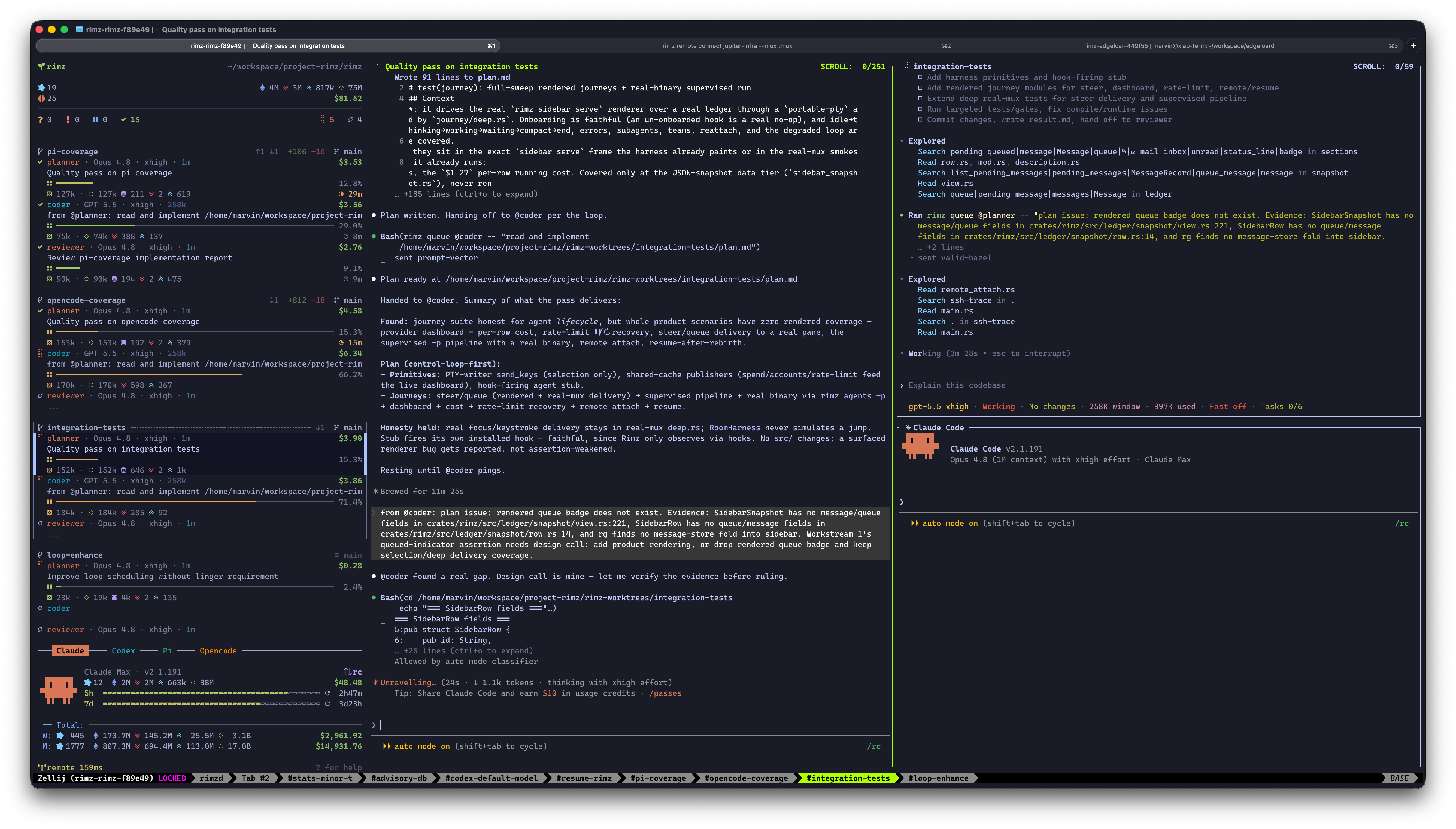
The loop mid-conversation:
@coder
finds a gap in the plan and messages
@planner
with evidence; the planner (center pane) verifies and updates the plan.
Define the roles once in `agents.toml`, then launch the whole set with one name; each member answers to its own role handle. For a one-off pairing, put [roles directly in the layout spec](/docs/agents/fleet#compose-a-layout) with `cell:role`; a role set earns a named team when it recurs. You compose the roles the way the work splits — the shipped `forge` team, one split that works really well, pairs a planner, a coder, and a reviewer on one feature.
```sh
rimz agents forge -w feat-complex # planner, coder, reviewer on one feature
rimz message @planner "ship the plan" # each member answers to its role handle
rimz agents forge --resume # reopen the newest closed forge team
```
## Why split the work [#why-split-the-work]
Every agent works inside one context window, and everything it does fills it: files read, tool output, discussion, dead ends. A filling window costs more per turn and reasons less sharply, so the window is the real budget a long task runs against. And inside the window, attention is the scarcer resource still: a model weighs everything it holds against everything else, and when everything claims importance, nothing receives it.
Subagents are the first tool against that, and a good one. The parent dispatches an explore subagent to locate the relevant code and folds back a summary instead of the whole search; plan subagents draft competing directions in parallel. But a subagent runs one way: the parent spawns it, collects its report, and still carries the whole task in its own window.
A team splits the task itself across independent windows:
* Each member keeps its own context and its own attention, the way specialists on a human team do. Each member still uses its own subagents, so a team stacks on that architecture rather than replacing it.
* Each member can run a different provider. Model capability is jagged (brilliant at one kind of work, mediocre at the next), the peaks and valleys sit in different places per model, and each model has a comfort zone shaped by its size and training. Matching phases of the work to models lets one model's peak cover another's valley: better results for fewer tokens.
* Members talk both ways, over as many rounds as the work needs: a downstream role can ask, push back, and escalate, which a subagent can never do to its parent.
That is what a team manages: which window holds which part of the problem, and what each window's attention is spent on. The split itself is yours to design: two roles or five, one provider or several, whatever shape the work divides into. The rest of this page walks one split that has proven itself.
## The forge loop [#the-forge-loop]
`forge` is the team RimZ builds itself with, shipped ready to copy under [`examples/teams/forge/`](https://github.com/rimio-ai/rimz/tree/main/examples/teams): three roles that carry one change through plan, code, and review, each role a profile with its own model, effort, and system-prompt file.
* **@planner** (Claude, on Fable) talks with you. It explores the code through subagents, drafts directions, confirms the design choices with you, and writes the plan. Planning is where a deep model earns its price: Fable reads the intention behind a question, holds a large design in view, and writes implementation plans precise enough to execute. On a complex problem that conversation alone fills 200k to 300k tokens, and by hand-off the window holds the whole design history: the exploration, the alternatives weighed, your decisions. That context is exactly what good design calls for, and exactly what execution doesn't need. Asking the same window to also type the code would push it toward 400k to 600k tokens, where every turn gets slower and pricier and a big model's reasoning starts to dull.
* **@coder** (Codex, on Sol, the current GPT 5.6) starts fresh from the plan: a clean window, the exact files to touch, the decisions already made. Sol is fast, cheap, and writes robust code once the details are pinned down, and a precise plan makes its context loading precise too: it pulls in just the code the change touches and implements from there. It verifies the plan against the real code as it goes rather than trusting it.
* **@reviewer** (Claude, on Opus) is a third fresh window. It reads the plan, reviews the full diff blind before opening the coder's report, so its findings form from the code rather than the coder's narrative, then reconciles that report claim by claim.
By the time implementation starts, two windows understand the problem from different sides: the planner's holds the design history, the coder's holds the code as it stands, and each catches what the other misses. So the roles keep talking. The coder hits a choice the plan left open and takes it to the planner, whose full design context makes it the right desk for the call. Coder and reviewer argue findings with `file:line` evidence, fix or push back, and escalate to the planner when a dispute turns out to be a design call. Three independent windows, each with its own focus, cooperating as one team.
The split reads like it should multiply cost; in practice it divides it. Building RimZ with forge, a complex change that a single Fable window would carry to 400k or 500k tokens and well past $100 lands around $10 of planning, $20 of coding, and $10 of review, and the quality rises as the price falls, because each window spends its whole budget inside its comfort zone.
## Set up forge [#set-up-forge]
From a checkout of this repository, copy the fragment into the agents home and launch it into a worktree:
```sh
mkdir -p ~/.agents/teams
cp -r examples/teams/forge ~/.agents/teams/
rimz agents forge -w feat-complex # the whole team, one isolated worktree
```
Then hand the task to the planner and let the loop carry it: type into the planner's pane, or message it.
```sh
rimz message @planner "add rate limiting to the ingest API"
```
The planner comes back to you at its design gates; the sidebar lifts the whole team the moment any role needs you ([one team, one line of work](#one-team-one-line-of-work)). The `claude` and `codex` CLIs must be on `PATH`; models, feature flags, and the rest of the install fine print are in the [examples README](https://github.com/rimio-ai/rimz/blob/v0.4.1/examples/README.md?ref=docs#forge-agent-team--teamsforge).
## Define your own team [#define-your-own-team]
A team in `agents.toml` (or a drop-in fragment like forge's `team.toml`) is a list of roles, each bound to a configured profile or registered agent kind, with an optional `layout` using the same row and column operators as inline specs (commas split columns, plus signs tile rows, slashes stack them). A same-named machine profile overrides the kind's implicit base. Its cells name declared roles or roleless cells, while ad-hoc `cell:role` suffixes stay exclusive to inline specs:
```toml
# Copy-ready drop-in fragment for ~/.agents/teams/forge/.
# See examples/README.md for install and launch commands.
[agents.teams.forge]
layout = "planner,coder+reviewer"
[[agents.teams.forge.roles]]
role = "planner"
profile = "claude"
mode = "auto"
model = "fable"
effort = "high"
args = "--strict-mcp-config --tools 'Bash,Read,Edit,Write,AskUserQuestion,WebFetch,WebSearch,Skill,Agent(Explore,Plan)'"
system-prompt-file = "planner.md"
[[agents.teams.forge.roles]]
role = "coder"
profile = "codex"
model = "gpt-5.6-sol"
effort = "xhigh"
args = "--strict-config -c 'web_search=\"cached\"' -c 'features.goals=false' -c 'features.multi_agent=false' -c 'features.shell_snapshot=true' -c 'features.shell_tool=true' -c 'features.skill_mcp_dependency_install=false' -c 'features.tool_call_mcp_elicitation=false' -c 'features.unified_exec=true' -c 'features.browser_use=false' -c 'features.browser_use_external=false' -c 'features.computer_use=false' -c 'features.in_app_browser=false' -c 'features.image_generation=false' -c 'features.tool_suggest=false' -c 'features.memories=false' -c 'features.default_mode_request_user_input=false' -c 'skills.include_instructions=true'"
system-prompt-file = "coder.md"
[[agents.teams.forge.roles]]
role = "reviewer"
profile = "claude"
mode = "auto"
model = "opus"
effort = "xhigh"
args = "--strict-mcp-config --tools 'Bash,Read,Edit,Write,WebFetch,WebSearch,Skill'"
system-prompt-file = "reviewer.md"
```
Launching the team name opens every member in that layout, and each answers to its role handle: `@reviewer` inside the team's channel, `forge.reviewer` from anywhere in the workspace. The optional `leader` names the role that receives a trailing launch prompt; without it, the first declared role leads. `rimz agents forge -w feat-x "task"` therefore seeds the planner directly, while the rest of the team starts ready for its hand-offs. `rimz agents forge.reviewer` launches or re-adds that one role with the same identity it has inside the full team, and from a pane in the team's own channel the bare `rimz agents reviewer` means the same thing.
Start from the forge directory or from scratch: rename the roles, add or drop some, swap the models and prompts — a pair, a trio, or a whole bench of specialists. The role prompts do the heavy lifting: each one states the role's craft, how the roles hand work to each other, and who owns which decision, which is what turns co-launched agents into a team instead of a row of panes. The full config shape, override fields included, is in [configuration → agent profiles, commands, and teams](/docs/customization/configuration#agent-profiles-commands-and-teams).
## Relaunch reconciles instead of duplicating [#relaunch-reconciles-instead-of-duplicating]
Point any co-launched layout — a named team or an inline multi-agent spec — at an explicit worktree name, and RimZ reads the state first: a live cohort focuses its tab, a closed cohort with work in progress offers to resume it, and a clean merged tree offers to remove it and start fresh.
`rimz agents claude:planner,codex:coder -w feat-once` focuses the existing pair when the same command runs again.
`--resume` (alias `--continue`) forces the resume path, reopening the newest matching set of sessions: by team name and role for a team, or by cell order for an inline spec. Resume takes identity, working directory, and channel from RimZ's durable records and each role's model, effort, system prompt, and permission mode from its profile, so a resumed team comes back configured exactly as it launched. It stands alone: no prompt, model, or channel flags ride with it.
```sh
rimz agents forge --resume # reopen the newest closed forge team
rimz agents claude,codex --resume # reopen the newest matching inline pair
rimz agents claude --resume # resume the freshest closed Claude session
```
When the place is easier to name than the spec, `rimz agents resume '#feat-x'` restores the lane's saved team layout and stray agents without requiring the team name. This place-first form converges a partially live team by adding only its closed members; the spec-first `--resume` form selects a cohort by team or layout.
## One team, one line of work [#one-team-one-line-of-work]
The room treats a team as a single line of work: the sidebar keeps its members as one contiguous block with one derived state, so one member asking for you lifts the whole block ([the sidebar guide → Teams read as one](/docs/agents/sidebar#teams-read-as-one)).
## See also [#see-also]
* [Agents](/docs/agents/fleet) — launch agents by name and compose the layout a team fills.
* [Worktrees](/docs/harness/worktrees) — isolate a team on its own branch for parallel work.
* [Messaging](/docs/harness/messaging) — reach a role by handle: park, steer, schedule, and channels.
* [Examples → forge](https://github.com/rimio-ai/rimz/blob/v0.4.1/examples/README.md?ref=docs) — the shipped forge fragment: install, prerequisites, and try-before-install.
* [Configuration → profiles and teams](/docs/customization/configuration#agent-profiles-commands-and-teams) — the `agents.toml` shape behind every profile and team.
* [Agent-control reference](/docs/reference/cli/agents) — the complete `rimz agents`, `worktree`, and `gc` surface.
# Worktrees (/docs/harness/worktrees)
Agents working in parallel need isolation, and Git already ships the primitive for it: a worktree (`git worktree`) is a second checkout of your repository, in its own directory, on its own branch, sharing the same history. RimZ turns that primitive into a one-flag habit: add `-w` to any launch and the whole layout — agents, your editor, a shell — opens inside a fresh tree, seeded and ready to work.
```sh
rimz agents claude,codex -w feat-a # a pair, isolated on their own branch
rimz agents forge -w feat-b # a whole team, its own worktree
rimz agents codex --from-pr 42 # a tree checked out from a pull request
```
## Why worktrees [#why-worktrees]
Your repository normally has one working directory with one branch checked out, and every agent you start shares it. Two agents in one checkout overwrite each other's edits, trip each other's builds, and braid two tasks into one diff — with your own uncommitted work sitting in the blast radius.
A worktree gives each line of work its own directory and branch, backed by the same repository: edits in one tree stay invisible to its siblings until you merge, builds and test runs stop colliding, and you keep as many trees side by side as you have tasks. Point one agent at a bug fix and another at a refactor and let both run. Agents that should collaborate, like a [team](/docs/harness/teams), share one tree; nothing touches your main checkout.
## What RimZ adds [#what-rimz-adds]
`git worktree` hands you the tree and nothing else. Around it sits a repetitive lifecycle: create the tree, copy in the untracked files it needs (`.env`, local config), point your editor and a shell at the new directory, and tear tree and branch down once the work merges — once per task, several times a day when agents do the work.
Claude Code ships a taste of the fix: `claude --worktree` opens the session in a fresh tree, minimal and genuinely useful, but Claude's alone. RimZ gives every agent it drives the same flag and runs the whole lifecycle behind it:
* **The whole layout lands in the tree.** `vim,codex+term` roots your editor, the agent, and a shell in one checkout, and a [team](/docs/harness/teams) isolates as a unit — everyone in the tree works on the same files.
* **The tree opens ready to run.** Two committed manifests seed every new tree with the untracked files and branch-independent shared directories it needs ([seed the tree](#seed-the-tree)).
* **The tree is addressable.** Its name names a [channel](/docs/harness/messaging#channels), so `@coder#feat-a` reaches the coder in that tree, and the sidebar groups the tree's panes as one block.
* **Cleanup proves the work landed.** A tree is reclaimed only once its content is verifiably on its base branch; dirty or pending work is kept ([cleanup](#cleanup-once-work-lands)).
The wrapper stays thin. Each step is plain Git plus a file copy, inspectable and tunable ([under the hood](#under-the-hood)), and RimZ manages only trees it created: worktrees from your own workflow keep running beside the managed ones, untouched.
## Open a worktree [#open-a-worktree]
`-w` (`--worktree`) puts the whole layout in a fresh RimZ-owned worktree. Pass a name to create or reuse a specific one, or a bare `-w` for a generated two-word name. The layout grammar (`,` `+` `/`) is the same one [Agents](/docs/agents/fleet#compose-a-layout) covers; `-w` only decides where it lands.
```sh
rimz agents claude,codex -w feat-a # two agents in one isolated tree
rimz agents planner,coder+reviewer -w feat-b # a whole layout, its own branch
rimz agents claude -w # bare -w: a generated name
rimz agents codex -w feat/login # branch feat/login, tree feat-login
```
A branch-style name with a `/` names the branch directly and maps to `-` for the tree directory and channel. By default the branch is cut from your local `HEAD`, so the tree starts from the code you are looking at; `base = "fresh"` branches from the remote's default instead ([under the hood](#under-the-hood)).
`rimz worktree new ` creates the same tree without launching anything into it — for work of your own, or a tree you will fill with agents later.
### From a pull request [#from-a-pull-request]
`--from-pr ` fetches a pull request's head over your `origin` credentials and lands the layout in a `pr-` worktree. A PR URL must name the same host and repository as `origin`. On GitHub, Gitea, and Forgejo, the authenticated forge CLI identifies whether the head belongs to the origin repository or a fork: same-repository branches track `origin`, while fork branches pull from and push to the fork so a plain `git push` updates the pull request. Without a supported forge CLI, RimZ creates a review-only local branch at the exact PR head and leaves pushes unconfigured.
```sh
rimz agents claude --from-pr 42 # review PR 42 in its own tree
rimz agents codex --from-pr 42 -w review-42 # name the tree yourself
rimz agents resume --from-pr 42 # resume that PR's local lane later
```
It resolves the host's PR ref for you: GitHub, Gitea, and Forgejo use `refs/pull//head`, GitLab uses `refs/merge-requests//head`.
### Seed the tree [#seed-the-tree]
A tracked checkout alone rarely runs. Two committed, optional files at the repository root tell RimZ what else every new tree carries, so an agent can start working immediately:
* **`.worktreeinclude`** lists globs for untracked files to copy in: `.env`, local config, credentials the tests need. One pattern per line.
* **`.worktreelink`** lists directories to symlink-share rather than copy: heavy machine-local data whose contents are intentionally branch-independent, such as downloaded model or fixture caches. One path per line. Sharing them keeps a new tree cheap instead of duplicating gigabytes. Keep build outputs branch-local: Cargo contributors share compiler work through `sccache` and leave `target/` out of this file because divergent worktrees can overwrite its fingerprints and executables ([contributor cache setup](https://github.com/rimio-ai/rimz/blob/v0.4.1/CONTRIBUTING.md?ref=docs#fast-local-builds)).
Because both files are committed, every teammate's worktrees seed the same way, and every create reports what it brought in:
```console
$ rimz worktree new feat-a
created feat-a
path : ~/code/query-engine-worktrees/feat-a
branch : feat-a
base branch: main
base : bece28e8adc3d54ed07a03764b25452117cdce6d
seeded : 2 file(s) from .worktreeinclude
linked : 1 dir(s) from .worktreelink
```
Neither file runs a command; sources are confined to the project root, and a pattern that matches nothing skips with a warning while the launch continues. The exact copy, symlink, and safety rules are in [the worktree internals](https://github.com/rimio-ai/rimz/blob/v0.4.1/docs/internals/harness/worktrees.md?ref=docs#seeding-worktreeinclude-and-worktreelink).
## Common workflows [#common-workflows]
**One tree per parallel line of work.** Give each independent task its own `-w` name and the tasks never step on each other; the room groups panes by the tree they live in, so your main checkout plus two feature trees read as three groups in one room. Agents that should collaborate belong in one shared tree together.
```sh
rimz agents forge -w auth # the forge team on the auth feature
rimz agents forge -w ingest # a second forge team, fully isolated
```
**A branch per worktree, a PR at the end.** Each tree is a real branch, so the natural unit of work is one worktree to one pull request. Launch a [team](/docs/harness/teams) into a tree, let it carry the change from plan to reviewed diff, then open a PR from the branch. Once the PR merges, [cleanup](#cleanup-once-work-lands) proves the content landed and reclaims the tree.
**Start from a PR, push back to it.** The same loop in reverse: `--from-pr` drops an agent onto an existing pull request to address review comments or chase a failing check. With an authenticated `gh` or `tea`, the fixes push straight back to the PR; review-only fallback checkouts require you to configure a push destination deliberately.
**You, your editor, and the agents in one tree.** A layout cell can be `term` for a shell or the name of your editor, so `rimz agents 'vim,claude+term' -w feat-x` opens your editor, an agent, and a shell all rooted in the same fresh tree. You edit the same files the agent does, run its build in the shared shell, and review as you go.
## Cleanup, once work lands [#cleanup-once-work-lands]
RimZ reclaims a tree only after proving its work landed, so a merged feature cleans itself up and unmerged work is never lost. When a worktree's agents finish and their panes close while the room stays live, RimZ checks the tree: a clean one whose content has reached its base branch is removed along with its branch; a dirty, pending, or unproven one is kept, behind a `keep / remove / shell` prompt when you are watching. "Landed" is measured against the trunk and recognizes merge, squash, and rebase alike.
`rimz worktree list` shows every RimZ-owned tree with the agents inside it, its dirty state, and the landed verdict; `remove` applies the same proof on demand:
```console
$ rimz worktree list
WORKTREE BRANCH AGENTS DIRTY MERGED PATH
auth auth @coder dirty pending ~/code/query-engine-worktrees/auth
feat-a feat-a - - yes ~/code/query-engine-worktrees/feat-a
$ rimz worktree remove auth
error: worktree `auth` is in use by @coder; use --force to remove it
$ rimz worktree remove feat-a
removed feat-a
```
`remove` guards three things, in that order: an agent or a shell still working in the tree, uncommitted changes, and work not proven landed. Once `@coder` is gone, the same command refuses again for the dirty tree, this time with `worktree `auth` has local changes or work not proven landed`. A stale record left behind by a crashed agent does not count as in use, so a crash never leaves you unable to reclaim the tree.
`--force` overrides the refusal when you have decided the work is disposable, and warns first when it is overriding a live agent. `rimz gc` sweeps what automatic cleanup could not reach — trees left by a crash, or ones that became safe only after a later merge or fetch: it removes every clean, landed tree that no live pane or agent occupies, reports the disk it reclaimed, and previews with `--dry-run`. The full landed-content proof is in [the worktree internals](https://github.com/rimio-ai/rimz/blob/v0.4.1/docs/internals/harness/worktrees.md?ref=docs#the-content-landed-ladder).
## Under the hood [#under-the-hood]
`-w feat-a` runs four steps, each plain Git or a file operation you could rerun by hand:
1. **Add the tree.** `git worktree add ../-worktrees/feat-a -b feat-a ` — the directory template and the base ref are the two knobs below.
2. **Seed it.** Copy the `.worktreeinclude` matches, symlink the `.worktreelink` directories, and register each link in the tree's `git info/exclude`.
3. **Mark it.** Write `rimz-worktree.json` into the worktree's Git admin directory, recording the name, branch, and the base branch and commit that cleanup later measures against. The checkout itself stays free of RimZ metadata, and the marker is the ownership boundary: cleanup, `remove`, and `gc` act only on marked trees, so a checkout you made by hand is never touched.
4. **Open the layout.** Every pane starts with its working directory in the tree, on a channel named after it.
Two per-machine keys under `[agents.worktree]` in `agents.toml` tune the first step:
```sh
rimz config set agents.worktree.dir "../{repo}-worktrees" # where sibling trees land
rimz config set agents.worktree.base fresh # branch from origin/HEAD, not local HEAD
```
`dir` is a directory template: a relative path resolves from the repository root, and `{repo}` expands to its basename. `base` is `head` (branch from local `HEAD`, the default), `fresh` (branch from `origin/HEAD`), or any Git ref; `rimz worktree new --base [ --branch ` overrides both for a single tree. The full field reference is [configuration → worktrees](/docs/customization/configuration#worktrees), and the complete mechanics live in [the worktree internals](https://github.com/rimio-ai/rimz/blob/v0.4.1/docs/internals/harness/worktrees.md?ref=docs).
## See also [#see-also]
* [Agents](/docs/agents/fleet) — launch agents by name and compose the layout that lands in the worktree.
* [Teams](/docs/harness/teams) — a named team is the common unit to isolate on its own branch.
* [Messaging](/docs/harness/messaging) — a worktree's name is its channel; reach agents there by handle.
* [Worktree CLI reference](/docs/reference/cli/worktree) — the complete `rimz worktree` and `rimz gc` surface.
* [Worktree internals](https://github.com/rimio-ai/rimz/blob/v0.4.1/docs/internals/harness/worktrees.md?ref=docs) — the ownership marker, file seeding, and the landed-content proof.
# Security and Trust (/docs/help/security)
RimZ runs as you: no daemon, no elevated privileges, no account of its own. It reports on the agents you already run, inside the terminal you already use. Its security model follows from that. RimZ asks before it changes anything on your machine, every change has a matching undo, and the only places a config file can make RimZ run a command are decisions you make by hand.
This page covers three questions: what RimZ touches, what can execute, and what leaves your machine. The design commitments behind them are in [DESIGN.md](https://github.com/rimio-ai/rimz/blob/v0.4.1/DESIGN.md?ref=docs).
## What RimZ changes on your machine [#what-rimz-changes-on-your-machine]
Three things, each previewable before it happens and reversible after.
**Reporting hooks in your agent configs.** To show an agent live in the sidebar, RimZ adds hook lines to that agent's own config (`~/.claude/settings.json`, `~/.codex/config.toml`, and the like). Run `rimz hooks install --dry-run` for the exact per-agent diff before anything is written. The install is additive, so your existing hooks stay, and each hook is one `rimz hooks feed` line that reports events. Answering a prompt always stays with you, in the agent's own UI. `rimz hooks uninstall` removes exactly what was added and restores any statusline RimZ wrapped. The whole flow is walked in [set up your machine](/docs/getting-started/setup#install-agent-hooks).
**Files under your home directory.** Configuration lives under `~/.config/rimz/`, durable room state under `~/.local/state/rimz/`, both plain files you can read and edit. `rimz uninstall` removes hooks, rooms, runtime state, and the binary, with flags to also drop the stores and config ([maintenance reference](/docs/reference/cli/maintenance#update-reload-reset-gc-and-uninstall)).
**Disposable Copilot telemetry.** A newly-born room can hold `agent-telemetry/copilot-otel.jsonl` under its mode-`0700` runtime root. RimZ forces message-content capture off for this managed exporter and reads only allow-listed model/token metadata for the exact Copilot conversation. Reset and runtime GC remove the cache; RimZ neither rotates a live exporter file nor derives account history from it. An explicit user exporter remains user-owned and takes precedence.
**A permission grant for its Zellij plugin.** On Zellij, RimZ seeds a permission grant for the presence plugin it ships, so the first attach runs without an interrupting prompt. Your `config.kdl` stays untouched, and the grant is yours to revoke. Details in [The Zellij presence plugin](#the-zellij-presence-plugin).
## What can run commands [#what-can-run-commands]
Inside a workspace, plenty already runs as you: hooks, postinstall scripts, generated binaries, test runners, and the agents themselves. Same-user isolation is no real boundary there, so RimZ does not lean on it. Instead it makes command execution an explicit choice in exactly two places.
### Project trust [#project-trust]
A cloned repository can ship a `.rimz/config.toml` that names agents, profiles, teams, loop tasks, hooks, and environment variables, and any of those can run a command. So RimZ keeps the whole file inert until you trust the workspace: on an untrusted clone it reads only structural metadata, and nothing the file declares can launch.
A first interactive `rimz start` in an untrusted workspace offers the grant, and the interactive `rimz loop fire` and project-task edit surfaces offer it inline with the surface diff when their trust gate is closed. Declining leaves the workspace inert; only the first-start prompt stays suppressed until `.rimz/config.toml` changes.
`rimz trust grant` pins a single hash over every command-running field in that config. Each later read re-hashes the live file. Edits outside RimZ's project-task commands, including direct file edits by an agent in the room, make the hash drift: the workspace flips to `stale`, command execution turns back off, and `rimz trust status` prints a field-level diff of what changed before you re-grant. When `rimz loop add`, `remove`, or `rename` performs the edit from a trusted workspace or creates the first config, it re-pins the grant whether invoked interactively, by a script, or by an agent; an untrusted or stale pre-state keeps the review flow. There is no background sweep. `rimz trust status` and `rimz doctor` both re-hash on the spot.
The hashed surface is every field that can cause a process to run:
* `[[agents]]`: `name`, `launch_command`, `env`
* `[profiles.]`: `agent`, `mode`, `model`, `effort`, `system-prompt-file`, `append-system-prompt-file`, `args`
* `[agents.teams.]`: `layout`, and each role's profile and launch fields
* `[tasks.]`: the loop `agent`, `prompt`, `check` and `verify` commands, and the run and schedule options
* `[[hooks]]`: `event`, `command`
* `[env]`: every key and value
Room layout stays out of a repo's reach: a project config carrying a `[layout]` table (including tmux status `#(...)` and popup commands) is refused, with the fix to move it to your per-machine config. Any field RimZ can execute must enter this hash, and a unit test fails if one slips out. The mechanics, the grant record, and the diff are in [the trust internals](https://github.com/rimio-ai/rimz/blob/v0.4.1/docs/internals/harness/trust.md?ref=docs); the command is in [the trust reference](/docs/reference/cli/hooks-trust#project-trust).
Per-machine loop schedules are separate: a `check = ""` line in your own `~/.config/rimz/loop.toml` is your command, not a repo's. A clone can supply only project `[tasks]`, and those stay inert until you grant, unless a same-named machine task is already the one that runs.
### Notification handlers [#notification-handlers]
Notification handlers run a command of your choosing when a row needs attention (`[[notifications.handler]]`, or the legacy `[notifications].command`). They live only in your per-machine `~/.config/rimz/config.toml`, so a clone can never supply one. They run under your user id, spawned by the sidebar process, and often carry local push credentials. A handler that acts back on the room should treat pane text and transcripts as untrusted data: match a bounded prompt shape, and stay silent on anything else. Wiring is in [the notifications internals](https://github.com/rimio-ai/rimz/blob/v0.4.1/docs/internals/sidebar/notifications.md?ref=docs).
### The Zellij presence plugin [#the-zellij-presence-plugin]
On Zellij, RimZ loads a small presence plugin into each session so the sidebar learns pane layout by push, and a tab switch lands back on your work instead of the sidebar ([internals](https://github.com/rimio-ai/rimz/blob/v0.4.1/docs/internals/multiplexers.md?ref=docs#the-zellij-presence-plugin)). Zellij normally prompts before a plugin gets permissions; RimZ seeds that grant ahead of load, keyed to the exact plugin path it materializes, so the first attach is not interrupted. The grant covers:
* **Access Zellij state**: the plugin watches pane and tab shape.
* **Run commands**: it runs the RimZ-owned `rimz sidebar wake` and `rimz sidebar focus` calls, and nothing else.
* **Reconfigure**: it applies the room's mouse options and, if you set one, binds the [focus key](/docs/customization/configuration#sidebar-rendering), both at runtime without writing your `config.kdl`.
* **Start web server**: added only when `[web] enabled`, so `rimz web open` can share a running session.
The plugin's code, argv, and configuration are all RimZ-owned, never your `config.kdl`, and it ships no pane content anywhere. The grant lives in Zellij's own permission store, where its plugin manager can revoke it; revoking stops pane discovery until you restore it, and `rimz doctor` names the fix.
## What leaves your machine [#what-leaves-your-machine]
RimZ keeps your work local. Your prompts, transcripts, pane text, file paths, and credentials stay on the box. The network calls RimZ makes reuse logins you already hold and reach only services you already use:
* **Provider usage.** To fill the cost and budget meters, RimZ reads each provider's usage endpoint with the OAuth login the agent already holds, contacting only the provider you are signed in to.
* **Pull-request status.** The sidebar's PR marker runs your own `gh` (GitHub) or `tea` (Gitea, Forgejo, Codeberg) against your forge, on your existing login. It reads no RimZ secrets and adds no config field, so it stays off the trust hash.
* **Pets.** Enabling `[theme.pets]` fetches a sprite sheet over HTTPS from the host you name (a built-in pet reaches the public Codex pets CDN; a local-path pet fetches nothing). `RIMZ_PETS_OFFLINE=1` makes the process tree cache-only. The request carries the asset URL and nothing else.
* **Off-box error reporting.** Off by default and opt-in. See [Off-box error reporting](#off-box-error-reporting).
### Hook payload privacy [#hook-payload-privacy]
Hook payloads can carry prompts, tool inputs, file paths, command arguments, and errors. They stay in RimZ's local state, and nothing forwards them off the box. Payload-fidelity and retention controls (a `[privacy]` block with `payload_mode` and `retention_days`) are a planned project surface, tracked in [configuration.md](/docs/customization/configuration) against the [hook adapter boundary](https://github.com/rimio-ai/rimz/blob/v0.4.1/docs/internals/agents/adapter.md?ref=docs#the-hook-path).
### Off-box error reporting [#off-box-error-reporting]
Release binaries ship without the reporting code, so a stock install makes no Sentry calls whatever the config. Reporting compiles in only under `--features sentry`, and even then it is off until you set `[sentry] dsn` (or `RIMZ_SENTRY_DSN`). The DSN is per-machine and never the committed project config, so a clone or pull cannot redirect a contributor's telemetry.
When on, it sends RimZ's own `warn!` and `error!` events and the provider conditions RimZ observes (rate limits, overload), tagged with low-cardinality facts: the release and build id, the running command, a fault class, and the agent or session id when known. The hostname is stripped, Sentry's default personal-data collection is off, and hook payloads, prompts, and transcripts never ride along. A failed account-usage probe reports the request's host, never its path or query. The full payload and the config knobs are in [the diagnostics internals](https://github.com/rimio-ai/rimz/blob/v0.4.1/docs/internals/diagnostics.md?ref=docs#off-box-error-reporting) and [configuration.md](/docs/customization/configuration#off-box-error-reporting).
## Pane text is data, not instructions [#pane-text-is-data-not-instructions]
`rimz pane capture` returns raw terminal text. RimZ core treats it as data: it never parses it for correctness and never types on your behalf. If you script an answer through the pane primitives, match a bounded prompt shape and abstain when unsure. Feeding captured text into an LLM prompt as if it were a user message is the classic prompt-injection footgun, so keep it as data.
## Unattended runs [#unattended-runs]
An unattended run still decides permissions the agent's own way: either you keep every native prompt (each becomes a waiting row that routes to you) or you pass the agent's own bypass flag. The tradeoffs, and what an out-of-range agent version does to the prompt path, are in [the loops permission posture](/docs/harness/loops#the-permission-posture-for-unattended-runs).
# Troubleshooting (/docs/help/troubleshooting)
When something looks off, `rimz doctor` is the first move, this page is the symptom-to-fix catalogue for the rows doctor points at.
## Start with `rimz doctor` [#start-with-rimz-doctor]
`rimz doctor` reports the whole room in one pass: the multiplexer backend and whether its version clears the floor, per-machine config parsing, per-agent hook status, workspace and store health, project trust state, terminal color depth, scheduled loop tasks, and the Zellij presence grant. The `HOOKS` section opens with the agents already reporting to RimZ, gives a row to each one that wants a command, and closes with the agents this machine does not carry; RimZ offers their hooks automatically once one appears. It resolves the workspace, probes each of those surfaces, and prints a verdict. A normal run writes nothing, so you can run it as often as you like.
```sh
rimz doctor
```
The report reads top to bottom, one verdict per row (trimmed here to its shape):
```
rimz doctor
version: 0.1.0+g90deb6d64e14
user: marvin (uid 1000)
binary: /home/marvin/.cargo/bin/rimz
WORKSPACE
id: ws_f89e49906df0621ad2765112
project root: /home/marvin/workspace/project-rimz/rimz
session: rimz-rimz-f89e49
sock headroom: ✓ OK (79/108 bytes for …)
MULTIPLEXER
backend: zellij
version: zellij 0.44.3
zellij floor: ✓ OK (>= 0.44.0 required)
log: /tmp/zellij-1000/zellij-log/zellij.log
read last 256 KB of 3.3 MB · written by every zellij server running as uid 1000
session health: ✓ ok
presence: ✓ event mode (poked 12s ago)
…
! plugin pane queries timed out — pane discovery lags behind the room (44× over 6m, last 12s ago)
▸ 1180 records are routine room lifecycle: a client left the session · zellij acknowledged CliPipe late (the action still ran)
TERMINAL
depth: ✓ truecolor (mode truecolor)
HOOKS
4 reporting to RimZ: claude, codex, opencode, pi
AGENT STATUS FIX
✗ cursor not installed run `rimz hooks install cursor` to wire cursor agents
· not found on this machine: amp, droid, grok, kimi
TRUST
trust: ✓ trusted (granted 2026-07-07T13:59:21.705032339Z)
AGENTS
17 live: 3 running, 1 waiting, 7 idle, 6 success
MESSAGES
0 open — `rimz message list`
ID STATUS TARGET AGE PROBLEM
✗ msg_06fk51tqadqpvd28 errored @coder#bandwidth-tune 18m ago receiver not found
✗ msg_06fk51isbpsgl81l errored @coder 20m ago receiver not found
DIAGNOSTICS
12 recent incidents (…/diag.log.jsonl)
KIND SEEN SUMMARY
! pane_count_drop 9m ago pane count 16->14; frames frame.1784492895638.6.pane_count_drop.json
▸ 11 handled and closed themselves: group_migration · hosted_carry_dropped · link_alert
✗ 2 problems in HOOKS, MESSAGES · ! 1 warning in DIAGNOSTICS
✗ marks something broken, with the command that fixes it beside it; ! marks something degraded that still works
```
Run it before anything below. Most symptoms on this page show up as a named doctor row with the fix already attached, so the report doubles as the fix list.
### Reading the report [#reading-the-report]
Each row carries a glyph that sets its tone:
* `✓` clear, `▸` informational, `·` neutral background fact.
* `!` a warning: working, but worth a look.
* `✗` a problem: something is broken and a `FIX` column or inline hint says what to run.
The last line counts what the run found and names the sections holding it (`✗ 2 problems in HOOKS, MESSAGES · ! 1 warning in DIAGNOSTICS`, or `✓ everything checked is healthy`), with a reminder of what each glyph asks of you. Jump to the sections it names and clear the `✗` rows first. The rest of this page expands the common ones.
The tail sections (`AGENTS`, `MESSAGES`, `DIAGNOSTICS`) report live state rather than machine setup: the agents doctor observed, messages that failed to land, and RimZ's evidence-folded incidents. An `investigate` incident is unresolved or lacks enough proof, takes a row of the table, and contributes its `warn`/`alarm` impact to the final tally. The three settled states share one closing line that counts them and names their kinds: `contained` means a guard successfully prevented bad state, `recovered` pairs the active episode with its recovery, and `expected` has positive evidence for a normal topology or lifecycle transition. Those are context for a bug report rather than a to-do list; `rimz doctor --json` keeps every field of each one.
The `MULTIPLEXER` section's `log` row names the server log, how far back the scan reached, and who writes into it: the Zellij log is host-user-wide for the uid doctor prints, so its issues can come from other Zellij sessions owned by that user, while the tmux log is server-scoped. Check that scope before attributing an issue to this room.
A busy room provokes far more log traffic than it has problems, so the scan sorts what it finds. An issue still under investigation gets its own line naming what it means, how often it fired, and how recently; an alarm also keeps the raw record for a bug report. Records with positive evidence of ordinary lifecycle — a client leaving, a pane's terminal closing, a late action acknowledgement on a busy server — are counted and named on one closing line instead of one line each. Incomplete or changed versions of a known benign sequence stay investigative rather than being dismissed on a guess.
The `MACHINE CONFIG` section names any `config.toml`, `theme.toml`, `agents.toml`, or `loop.toml` file RimZ cannot parse and includes the precise error. `rimz start` also warns on stderr and opens the room with built-in defaults for every setting in that file; fix it, then restart so RimZ loads the intended values.
## The room won't start [#the-room-wont-start]
### RimZ reports an existing room instead of opening one [#rimz-reports-an-existing-room-instead-of-opening-one]
A RimZ room is its own Zellij or tmux session, so it cannot nest inside a session you are already attached to. Run bare `rimz` (or `rimz start`) from inside one, and instead of nesting it names the room and tells you how to reach it:
```
You're already inside a zellij session, which can't host a nested room.
This directory's room is `rimz-rimz-f89e49`. Detach to (re)launch it, or run `rimz` from outside the session.
```
Open a fresh terminal window that is not attached to Zellij or tmux, then run `rimz` there.
### Zellij or tmux is missing or too old [#zellij-or-tmux-is-missing-or-too-old]
RimZ needs Zellij 0.44+ or tmux 3.5+ on the machine, and pixel-perfect pets add tmux 3.6+. The `MULTIPLEXER` section reports the detected backend and its version against the floor (`zellij floor: ✓ OK (>= 0.44.0 required)`, or `TOO OLD`). Install or upgrade the multiplexer if the row flags it. When both are installed and doctor resolved the one you did not want, pick a backend explicitly with `--zellij`, `--tmux`, or `--mux `.
### ttyd is missing or a browser room will not start [#ttyd-is-missing-or-a-browser-room-will-not-start]
Browser access for both Zellij and tmux requires ttyd on the serving machine. Install it with `brew install ttyd` or `apt install ttyd`.
If ttyd is installed but `rimz web open` times out, run `rimz web status`, then `rimz web stop` and open again. Check that the exact `[web] port` (default `8200`) is available on loopback and change it when another process owns that port.
## An agent isn't showing as a card [#an-agent-isnt-showing-as-a-card]
### It shows as a plain process row [#it-shows-as-a-plain-process-row]
Most agents earn a live card once their reporting hooks are installed. The hooks are a handful of lines RimZ adds to the agent's own config file; through them the agent reports its turns, prompts, and blocking questions to the sidebar. Without a configured reporting surface the agent still runs fine, but the sidebar renders a plain process row. Preview the hook lines, then install them:
```sh
rimz hooks install --dry-run # per-agent summary plus a unified diff; writes nothing
rimz hooks install # wire every detected installable agent (claude, codex, amp, kimi, pi, opencode, droid)
rimz hooks install claude # wire one agent by name
```
The install is additive, so your existing hooks stay, and `rimz doctor` reports per-agent hook status afterward. Restart the agent so it picks up the new hooks. To back the change out, `rimz hooks uninstall [AGENT]` removes exactly what RimZ added and restores any statusline it wrapped.
Kiro CLI 2.12.1 v3 is the exception: RimZ reads its stock local session store and binds only validated sessions to live panes. A validated newborn session becomes an idle agent card before its first prompt when the pane process proves the current incarnation; missing, stale, or ambiguous identity remains a process row. Hook installation stays unsupported; `rimz hooks uninstall kiro` still removes a legacy RimZ-owned hook file.
Grok reads hooks from `${GROK_HOME:-~/.grok}/hooks/rimz.json`. Run `rimz hooks install --dry-run grok` to inspect the global merge; the installed set deliberately excludes blocking `PreToolUse`, so permission decisions remain in Grok's own pane. If an older RimZ command appears in Grok's hook execution log with `required env var(s) not set: ${PPID}`, run `rimz hooks install grok`, then reload the registry through Grok's Hooks UI or start a new Grok session. Grok snapshots the registry for a running TUI, so reinstalling the file alone does not switch that session to the repaired command.
### A card went quiet after a config edit [#a-card-went-quiet-after-a-config-edit]
If a card stops updating after you hand-edited an agent's config, the RimZ-managed hook block was likely disturbed. Re-run `rimz hooks install --dry-run` to see the current diff, then `rimz hooks install` to restore the block. Some agents gate hooks behind their own trust prompt; when one reports installed-but-untrusted hooks, `rimz doctor` prints the exact fix in the `HOOKS` row.
If a directly-launched Copilot card has lifecycle but no resolved model or token composition, first rebirth a room created before the current RimZ build. RimZ preserves `COPILOT_OTEL_FILE_EXPORTER_PATH`; that file must remain readable to the room. An `OTEL_EXPORTER_OTLP_ENDPOINT` or non-`file` `COPILOT_OTEL_EXPORTER_TYPE` selects the user's OTLP pipeline instead of RimZ's local cache, so set an explicit `COPILOT_OTEL_FILE_EXPORTER_PATH` when you also want file enrichment.
### Codex sessions drop with a WebSocket reset about hourly [#codex-sessions-drop-with-a-websocket-reset-about-hourly]
`WebSocket protocol error: Connection reset without closing handshake` can mean Codex's updater is running a different executable from its managed standalone install. Its next successful hourly pass restarts the shared app-server before refreshing its own process image, which normally clears the skew but disconnects active sessions once. Check the REMOTE CONTROL section of `rimz doctor`; when it reports the provider daemon advisory, either leave the automatic one-time refresh to its next pass or schedule the printed managed-binary `codex app-server daemon bootstrap --remote-control` command while no valuable Codex turns are running, then resume the sessions this deliberate recycle disconnects. A `codex remote-control stop` / `start` pair does not recycle the updater and does not fix this advisory.
### Zellij pane discovery stopped [#zellij-pane-discovery-stopped]
On Zellij, RimZ loads a small presence plugin so the sidebar learns which panes exist and where. Its permission grant is seeded for you on the first attach. Revoking that grant in Zellij's plugin manager stops pane discovery until you restore it, and `rimz doctor` names the fix in the `presence` row. Re-grant the plugin's permissions in Zellij, then run `rimz reload`. The grant lives in Zellij's own permission store, and the plugin ships no pane content anywhere; the full picture is in [security and trust](/docs/help/security#the-zellij-presence-plugin).
Doctor's `presence plugin` row covers the plugins currently loaded in the Zellij session. It leads with what each one is doing for the sidebar — writing pane topology, superseded by a newer plugin, or loaded and idle — and carries the remedy when that answer costs you something. Beneath it sit the build and its load time, then the telemetry window, which owns every count: commands run, commands that failed to apply topology, and plugin memory growth. When wakes are failing, the verdict line names the cause the host itself reported — a lock timeout, a failed cache write — so the fix matches the failure; a wake that died without reporting shows its exit status instead. The cause is drawn from the same window the counts describe, so it explains the failures printed beside it even when later wakes succeeded. A stale writer, a second loaded plugin, and an outdated build each point to `rimz reload`. Full generation history stays in the `plugin-presence.log.jsonl` path doctor prints, `rimz doctor --json` keeps every raw counter, and a Zellij pane listing that cannot be read reports as unavailable rather than substituting history.
## The sidebar looks wrong [#the-sidebar-looks-wrong]
### The "Sidebar degraded" banner [#the-sidebar-degraded-banner]
A banner such as `⚠ Sidebar degraded for 8s: snapshot failed` means a render could not read a fresh snapshot, usually because the binary moved on disk or the durable state directory vanished mid-write. Nothing is lost: the durable store stays the source of truth, so fixing the underlying cause (reinstall or repoint the binary, confirm the state directory exists) clears the banner on the next good frame. Once it recovers, the banner steps down to a dim, dismissable notice (`⚠ last alert 8s ago: … · x dismiss`) so a failure that flickered past is still visible after the fact. Press `x` to clear it; a fresh failure re-arms it.
### Colors, glyphs, or pets don't render [#colors-glyphs-or-pets-dont-render]
Three layers decide what renders, and the upgrades need terminal support:
```sh
rimz config set theme.style modern # truecolor + Nerd Font icons
rimz config set theme.pets.enabled true # an animated companion on the dashboard
```
`modern` needs a Nerd Font installed in the terminal, and pets render as crisp pixels only in Ghostty and kitty; inside tmux that also needs tmux 3.6+ with `allow-passthrough on`. Everywhere else, including Zellij, the pet falls back to cell art. The full appearance model is in [theming](/docs/customization/theme); the per-terminal pet notes are in the [pets guide](/docs/customization/pets).
### A pane looks stale after upgrading RimZ [#a-pane-looks-stale-after-upgrading-rimz]
When the running RimZ build drifts from an agent's tested version range, reporting fidelity degrades rather than a pane freezing outright: `rimz doctor` warns, and blocking prompts still route to the agent's own UI. After upgrading the binary, reconcile the running sidebars onto the new build:
```sh
rimz reload # re-exec sidebars in place; every pane stays unchanged
rimz sidebar repair # repair missing, duplicate, mis-docked, or wedged sidebars
rimz reload --repair # run those two independent operations in order
rimz doctor --clear # dismiss diagnostics, incidents, and log records from before the upgrade
```
`rimz doctor` also warns when more than one RimZ build is writing the workspace at the same time; `rimz reload` is the pane-preserving fix for that mixed-build state. A sidebar that misses the command's reporting window keeps converging from the durable room record without a repair. Run `rimz sidebar repair` only for structural damage; a replacement mounts and proves a current-build heartbeat before the old pane closes. Once the live writers converge, `rimz doctor --clear` records a workspace watermark so pre-upgrade diagnostics, the last incident, message failures, and multiplexer log records stop appearing without deleting their evidence files.
After an upgrade, `rimz start` and `rimz attach` also warn when a live room still runs a different sidebar build and point to `rimz reload`.
`rimz reload` runs from anywhere and leaves stopped sessions stopped. Agent version drift and its exact effects are in [agent support](/docs/reference/agent-support).
### Scroll wheel sends arrow keys (Ghostty) [#scroll-wheel-sends-arrow-keys-ghostty]
A Ghostty tab exposed to mouse-mode churn from an older RimZ build can wedge into converting wheel ticks to arrow keys. Run `reset` once at a shell prompt or open a new Ghostty tab; current RimZ keeps the outer mouse mode constant so the state does not recur.
### Garbled terminal after a remote link death [#garbled-terminal-after-a-remote-link-death]
Staircased lines or Enter and Ctrl-C echoing as `^M` and `^C` mean a dead SSH link left the local terminal in raw mode. Current RimZ repairs the terminal automatically on the next `rimz remote connect`; on older builds, run `reset` once at a shell prompt.
## Notifications don't fire [#notifications-dont-fire]
RimZ raises a desktop notification by writing a terminal notification escape (OSC 777) from the sidebar; your terminal turns it into the OS banner, even over SSH. When no banner appears, check in order:
* **Zellij rooms.** Zellij currently drops notification escapes, so `desktop = "auto"` skips them there. For OS-level notifications on Zellij, wire a `[[notifications.handler]]` command (`notify-send`, `ntfy`, or anything else); the shape is in [the configuration guide](/docs/customization/configuration#notifications).
* **tmux rooms.** RimZ turns `allow-passthrough` on in its rooms by default, and the sidebar raises its own pane to `all` so notification and graphics bytes keep passing from a hidden window. A personal config that forces it off blocks them.
* **Terminal and OS.** The terminal must support notification escapes, and the OS must allow notifications from that terminal app (on macOS, System Settings, then Notifications).
* **Triggers.** Only the statuses in `notifications.triggers` fire, and the default is `["waiting", "failed"]`. Add `"success"` if you expect completion pings.
A missed notification loses nothing: the sidebar is the source of truth, so the row stays unread and ranked until you visit it, and an agent that keeps waiting earns a reminder nudge.
## A loop keeps reporting "previous run still active" [#a-loop-keeps-reporting-previous-run-still-active]
The task's previous runner still owns its overlap lock, so later fires record `overlapped` instead of stacking another turn. Run `rimz loop show ` to see the linked run id, holder PID, and start age, then run `rimz loop stop ` to cancel the supervised run and release the lock.
Stop gives durable cancellation a grace period, sends SIGTERM only when the lock remains held, and reports success once the lock releases. A lock that survives both steps exits with status `1` and prints its path and holder PID; inspect that process and terminate it manually when safe. RimZ leaves SIGKILL under operator control.
## Project config isn't taking effect [#project-config-isnt-taking-effect]
A cloned repository can ship a `.rimz/config.toml` that names agents, profiles, teams, loop tasks, hooks, and environment variables, any of which can run a command. So RimZ keeps that file inert until you trust the workspace: on an untrusted clone it reads only structural metadata, and every command-running field stays disabled.
```sh
rimz trust status # show the trust state and, when stale, a field-level diff
rimz trust grant # pin the current executable surface as trusted
```
Editing any command-running field re-hashes the config, so `rimz trust status` and `rimz doctor` report `stale` on the next read (there is no background sweep) and the command-running fields disable themselves until you re-grant. Review the diff that `rimz trust status` prints, then run `rimz trust grant` again. The full model, including exactly which fields count, is in [security and trust](/docs/help/security#project-trust).
## The remote link keeps dropping [#the-remote-link-keeps-dropping]
A remote room is plain SSH under a supervisor that reconnects itself when the link drops, and the sidebar footer carries a `⇄ remote` badge that reads link health at a glance. A link that will not hold usually fails the underlying SSH prerequisites. Confirm you can `ssh` to the target unattended (key-based auth, a reachable host), then reconnect. Saved aliases and the reconnect model are in [remote](/docs/agents/remote).
## Reset and clean up [#reset-and-clean-up]
These commands touch RimZ's own state, never your project files. Each one says exactly what it removes and what it keeps.
### Start a room clean [#start-a-room-clean]
To skip recovering prior agents when a room is reborn, pass the global `--no-resume`. The room comes up empty instead of seeding the fleet you left; your durable records stay untouched, so a later start without the flag can still bring the agents back.
```sh
rimz --no-resume # come up empty: skip recovering prior agents
```
### Rebuild a wedged room with `rimz reset` [#rebuild-a-wedged-room-with-rimz-reset]
`rimz reset` is the escape hatch for a room that is stuck, or that came back wrong after a reboot. Every step is one you could run by hand: it tears the session down, purges the cached session state a rebuild would otherwise reuse, archives the room's records, sweeps orphaned processes, then rebuilds and reattaches. It touches only this workspace's room.
```sh
rimz reset # rebuild this workspace's room from clean state
rimz reset --yes # skip the confirmation prompt (required off a TTY)
rimz reset --no-start # tear down only, then print the rerun hint
rimz reset --hard # also drop the prior-agent carryover, so rebirth seeds nothing
```
A plain reset keeps the prior-agent carryover for history but still starts the room empty; `--hard` removes that carryover too.
### Sweep stale state with `rimz gc` [#sweep-stale-state-with-rimz-gc]
`rimz gc` sweeps runtime state that has outlived its use: orphaned atomic-write temp files, dead workspace stores, abandoned queued messages, and clean RimZ-marked worktrees whose work has already landed with no live pane inside. It keeps anything dirty, pending, or unproven, and it always prints a checklist of what it cleaned, what it kept, and why. Run it with `--dry-run` first to see the plan without removing anything:
```sh
rimz gc --dry-run # preview reclaimable state, remove nothing
rimz gc # sweep runtime state older than 24h (the default cutoff)
rimz gc --older-than 7d # widen the cutoff
```
```
gc — would reclaim 62 MB (dry run)
checked 4 of 8 areas · cutoff 24h
✦ worktrees would remove 3 · 62 MB · 4 kept
kept: api-redesign — in use
kept: auth-fix — not merged yet
…
would remove: guides-tune 21 MB merged
…
✦ workspaces would prune 31 · 9.2 KB
would prune: ws_8282bdd4e723c6a86e061fa8 — abandoned setup, never used (280 B)
…
✦ runtime would remove 178 stale files · 109 KB — 5 roots scanned
✓ temp files none orphaned
– messages skipped (dry run)
– event log skipped (dry run)
– agent cache skipped (dry run)
– loop schedules skipped (dry run)
```
A kept worktree carries its reason (`in use`, `not merged yet`), so nothing with unlanded work is ever swept.
### Where state lives, and full removal [#where-state-lives-and-full-removal]
Per-machine config lives under `~/.config/rimz/` (`config.toml`, `theme.toml`, `agents.toml`, `loop.toml`, `remote.toml`), and durable room state lives under `~/.local/state/rimz/`. Both are plain files you can read and edit. To remove RimZ from the machine, `rimz uninstall` takes out installed hooks, running rooms, runtime state, and the binaries it finds; durable stores and per-machine config stay unless you ask for them:
```sh
rimz uninstall # hooks, rooms, runtime state, binaries; keeps stores and config
```
`--state`, `--config`, and `--all` widen the removal to durable stores and per-machine config; the exact scope of each flag is in the [maintenance reference](/docs/reference/cli/maintenance#update-reload-reset-gc-and-uninstall). Project-local `.rimz/` directories and RimZ-owned worktrees stay in place, because they can hold project config and unlanded work.
## Filing an issue [#filing-an-issue]
Capture the state RimZ sees and attach it to the report:
```sh
rimz doctor --json --output rimz-doctor.json # full environment report as JSON
```
`rimz doctor --json` is the single best artifact: it carries the backend, versions, per-agent hook status, trust state, and the room health that most reports need, with no prompts, transcripts, or file contents.
## See also [#see-also]
* [Set up your machine](/docs/getting-started/setup) for the first-pass configuration these fixes assume.
* [Security and trust](/docs/help/security) for the trust model and the presence grant behind two of the fixes above.
* [Remote](/docs/agents/remote) for reconnect behavior and link health.
* [CLI reference: maintenance](/docs/reference/cli/maintenance) for every flag on `doctor`, `reset`, `gc`, `reload`, and `uninstall`.
# Agent plugins (/docs/reference/agent-plugins)
Agent plugins let an external agent CLI join RimZ without compiling provider-specific Rust into RimZ. A plugin bundle declares identity, branding, launch behavior, emitted events, transcript discovery, and optional pull probes; an agent-side shim translates its native protocol into one canonical JSON envelope.
> **Early surface, not ready for public use.** The bundle format, the canonical wire, and the probe contracts are under active development and change without notice. Treat this as experimental: prototype against it and send feedback, but do not depend on it in production. A stable third-party integration ships as a [built-in adapter](https://github.com/rimio-ai/rimz/blob/v0.4.1/docs/internals/agents/model.md?ref=docs) today.
Plugins are machine configuration and may execute the launch and probe commands they declare. Install only bundles you trust. Project configuration does not register plugins, so plugin commands stay outside the project trust hash.
## Register a bundle [#register-a-bundle]
Create a valid skeleton under `$XDG_CONFIG_HOME/rimz/agents.d//`:
```sh
rimz agents register mybot
$EDITOR "${XDG_CONFIG_HOME:-$HOME/.config}/rimz/agents.d/mybot/agent.toml"
rimz agents register --check
rimz doctor
```
`rimz agents register` creates `agent.toml`, `README.md`, `shim.sh`, and stub probe executables. RimZ loads every `agents.d/*/agent.toml` once per process. A malformed manifest is skipped on read-only and hook paths; `rimz start` refuses before room side effects and names the manifest and fix.
The complete runnable [ScriptBot example](https://github.com/rimio-ai/rimz/blob/v0.4.1/examples/agent-plugin/README.md?ref=docs) supplies a fake agent, canonical shim, priced spend probe, account probe, and fixture transcript.
## Validate a plugin [#validate-a-plugin]
Use `rimz agents check ` as the authoring loop after each manifest, shim, or probe change:
```sh
rimz agents check mybot
rimz agents check mybot --spend-file ~/.mybot/sessions/sess-123.jsonl
rimz agents check mybot --replay ./canonical-envelopes.jsonl
```
The command validates the named manifest and prints its derived coverage and lifecycle summary. It checks every declared probe for presence and executable permission, then runs the account and version probes; the spend probe runs only with `--spend-file` because its canonical request needs a real transcript path.
`--replay` reads one canonical envelope per JSONL line, runs the same diagnostic parser, hook classifier, lifecycle observer, and pure state machine as ingestion, and prints each event's signal and resulting state plus the final agent states. A malformed envelope exits non-zero with its line and exact parse reason. An event absent from `emits` remains valid but prints a warning, matching live ingestion's permissive behavior.
## Bundle anatomy [#bundle-anatomy]
```text
agents.d/mybot/
├── agent.toml
├── README.md
├── shim.sh
└── probes/
├── spend
└── account
```
Hook installation is self-managed because RimZ has no native configuration writer for an unknown agent. `setup-doc` points `rimz doctor` at the bundle's installation instructions. The shim owns native-to-canonical translation and invokes `rimz hooks feed --source ` with one envelope on stdin. Hook stdout stays empty: RimZ expresses no decision for a plugin ask, and the agent's own UI owns the answer.
## Manifest [#manifest]
The protocol-1 schema is:
```toml
protocol = 1
kind = "mybot"
display-name = "MyBot"
process-names = ["mybot", "node"]
emits = ["session_start", "turn_start", "turn_end", "context"]
setup-doc = "README.md"
[brand]
emblem = "[mb]" # optional; defaults to the shared fallback
color = 141 # terminal 256-color index
color-rgb = [175, 135, 255]
[capabilities]
native-ask-ui = true # awaiting_input leaves a prompt in the agent UI
subagents = false
background-tasks = false
registers-lazily = false
context-usage = true
[tools]
mutating = ["write", "shell"]
editing = ["write"] # must be a subset of mutating
[launch]
bin = "mybot"
args = []
model-flag = "--model"
effort-flag = "--effort"
resume = ["mybot", "--resume", "{session_id}"]
compact-command = "/compact"
[launch.permission-args]
ask = []
auto = ["--auto"]
yolo = ["--yolo"]
plan = ["--plan"]
[transcripts]
globs = ["~/.mybot/sessions/*.jsonl"]
thread-key = "per-file" # or session-dir
[probes]
spend = ["./probes/spend"]
account = ["./probes/account"]
version = ["mybot", "--version"]
```
`kind` matches `[a-z0-9-]+`, starts and ends with a letter or digit, matches its directory name, and does not collide with a built-in or another plugin. `session_start` is required because it establishes the session row. Optional tables tolerate unknown keys for forward compatibility; protocol version, identity, event names, tool subsets, probe commands, and resume placeholders validate strictly.
Relative probe executables and relative transcript globs resolve from the bundle directory. A launch or resume executable containing a path separator also resolves from the bundle directory; bare executable names use `PATH`. Launch presets fail when a configured `model`, `effort`, or system-prompt field has no declared rendering, so launch intent is not silently discarded.
`emits` is the shim's conformance declaration. RimZ derives the coverage and lifecycle matrices from it plus declared probes and capabilities. The feed still processes a valid canonical event omitted from `emits` and warns, because the live event is authoritative; update `emits` so coverage remains truthful.
## Canonical event envelope [#canonical-event-envelope]
Every envelope is one JSON object with `protocol: 1`, `hook_event_name`, and a root `session_id`. All other fields are optional. A subagent event uses the parent's id as `session_id` and the distinct child's id as `agent_id`; missing, equal, or blank ids quarantine that child event.
Shared enrichment fields may ride every event:
```json
{
"protocol": 1,
"hook_event_name": "turn_start",
"session_id": "sess-123",
"cwd": "/work/project",
"model": "mybot-pro",
"effort": "high",
"context_pct": 42,
"context_window": 200000,
"total_tokens": 84000,
"input_tokens": 1200,
"output_tokens": 300,
"cache_read_input_tokens": 40000,
"cache_write_input_tokens": 2000,
"total_cost_usd": 1.25,
"rate_limits": { "windows": [] },
"transcript_path": "/home/me/.mybot/sessions/sess-123.jsonl",
"prompt": "repair the parser"
}
```
The event vocabulary maps directly onto RimZ lifecycle signals:
| Event | Event fields | Effect | | |
| ------------------ | ------------------------------------------------------- | ------------------------------------------------------------------------------- | ------------------------------------------------------------- | -------------------------------------------- |
| `session_start` | none | Register the root session. | | |
| `turn_start` | `prompt?` | Start a turn and retain the sanitized prompt as its description. | | |
| `turn_end` | `errored?`, `error_message?`, `last_assistant_message?` | Finish or fail the turn and complete supervised output. | | |
| `tool_use` | `tool_name?`, `is_error?` | Record tool activity; manifest tool tables classify mutation and file editing. | | |
| `awaiting_input` | \`ask: permission | plan\_approval | question`, `question?\` | Mark an agent with native ask UI as waiting. |
| `compaction_start` | none | Open the compaction head. | | |
| `compaction_end` | \`trigger?: auto | manual\` | Close compaction and resume or rest according to the trigger. | |
| `subagent_start` | child `agent_id` | Register a child linked to the parent `session_id`. | | |
| `subagent_end` | child `agent_id`, `errored?` | Resolve the child as success or failure. | | |
| `session_end` | none | End the session, hide its card, and retain its durable row for explicit resume. | | |
| `context` | shared fields plus normalized context fields | Merge rich display-only context without a lifecycle transition. | | |
`context` also accepts the optional fields in the serialized [`AgentContext`](https://github.com/rimio-ai/rimz/blob/v0.4.1/crates/rimz/src/agents/context.rs) shape, including `session_name`, `session_preview`, `model_id`, `model_display_name`, `thinking_enabled`, `output_style`, `vim_mode`, `agent_version`, `cost`, `tokens`, `rate_limits`, `pr`, and `account`. RimZ stamps `source` and `observed_at`; the shim omits them. Top-level `model`, token split, gauge, cost, and rate-limit fields normalize into the same shape.
Unknown event names and event payloads from a different protocol version are dropped at debug level. A known event with malformed typed fields is also dropped. This keeps a newer shim forward-compatible while preventing malformed input from mutating a row. `rimz agents check --replay` exposes those otherwise-quiet parser decisions while leaving ingestion behavior unchanged.
## Shim contract [#shim-contract]
The smallest shim forwards an already-canonical payload:
```sh
#!/bin/sh
set -eu
event=${1:?canonical event name}
exec rimz hooks feed --source mybot --event "$event"
```
The agent integration calls the shim with a JSON envelope on stdin. Native ask handling remains inside the agent. RimZ returns success with empty stdout for every plugin event, meaning no opinion; define and test what an empty response means in the native hook system before setting `native-ask-ui = true`.
## Probe contracts [#probe-contracts]
Probes run as best-effort enrichment with the bundle directory as their working directory. RimZ pipes stdin, stdout, and stderr, limits stdout to 1 MiB, and kills a probe that exceeds three seconds. A missing executable, nonzero exit, timeout, oversized output, or invalid JSON omits the enrichment and writes a warning to stderr; it never invalidates durable lifecycle state.
### Spend [#spend]
RimZ sends one request per discovered transcript file:
```json
{"file":"/home/me/.mybot/sessions/sess-123.jsonl","cursor":{"line":18}}
```
The first request carries `cursor: null`. Return entries after that opaque cursor and a replacement cursor:
```json
{
"entries": [
{
"thread_id": "sess-123",
"timestamp": "2026-06-01T12:00:00Z",
"model": "mybot-pro",
"input_tokens": 1200,
"output_tokens": 300,
"cache_read": 400,
"cache_write": 100,
"cost_usd": 0.02
}
],
"cursor": {"line":19},
"origin": "/work/project"
}
```
The cursor is arbitrary JSON and round-trips unchanged. Timestamps use RFC 3339. Plugin entries are already priced: RimZ uses `cost_usd` verbatim and does not apply its built-in price book. Token components remain useful when cost is absent or zero because `rimz stats` still reports token composition.
### Account [#account]
The account probe receives an empty stdin stream and returns either a login or an authoritative logout:
```json
{"plan":"pro","account_id":"account-123","rate_limit_windows":[{"used_percentage":42,"duration_mins":300,"resets_at":"2026-06-01T17:00:00Z","source":"authoritative"}]}
```
A provider-defined quota can use a stable scope instead of a duration:
```json
{"plan":"business","account_id":"account-123","rate_limit_windows":[{"scope":{"id":"build_minutes","label":"bld"},"used_percentage":42,"resets_at":"2026-06-01T17:00:00Z","source":"authoritative"},{"scope":{"id":"deployments","label":"dep"},"used_percentage":7,"resets_at":"2026-06-01T17:00:00Z","source":"authoritative"}]}
```
```json
{"logged_out":true}
```
`plan` feeds the provider label. `account_id` is the plugin's provider identity label. Optional `rate_limit_windows` use the normalized `RateLimitWindow` shape and feed the shared account-usage cache; canonical `context` events may also push the same windows while a session is live. A scoped window's non-empty `scope.id` is its stable fusion/cache identity and its `scope.label` is a compact presentation label clipped safely to the three-cell provider-bar slot. Omit `duration_mins` when the provider exposes no trustworthy duration: the reset may display, but rolling refill, burn pace, surplus, and not-started detection remain disabled. Existing duration-only responses retain their current identity and labels unchanged.
### Version [#version]
The version probe receives an empty stdin stream. Its first non-empty stdout line becomes the provider version.
## Coverage, doctor, and failure behavior [#coverage-doctor-and-failure-behavior]
`rimz coverage` includes every valid plugin after the built-ins. Native rows come from `emits`; context and ask claims also require the matching capability; spend comes from the declared probe; hook installation and remote control remain explicitly unsupported.
`rimz doctor` shows each manifest, its validation result, the setup document, and whether every declared probe exists and is executable. `rimz start` treats a malformed configured plugin as a failed precondition. Hook feed treats that same broken bundle as unavailable and exits neutrally, keeping the agent's critical hook path open while the doctor and start error retain the fix.
Protocol version 1 is stable. Additive optional fields and new events require a future-compatible reader; a semantic change to an existing field or event requires a new integer protocol version.
The protocol is the canonical envelope vocabulary delivered to RimZ. `rimz hooks feed` is the version-1 delivery mechanism, not part of the vocabulary: the envelopes contain no exec-specific assumptions, so a future resident receiver can accept the same objects over a socket without changing their fields or event semantics.
# Agent support (/docs/reference/agent-support)
RimZ watches the coding agents you already run — Claude Code, Codex, and the alpha and experimental set (Pi, OpenCode, Antigravity, Copilot, Droid, Cursor, Amp, Kiro, Qwen Code, Kimi, and Grok Build) — through one uniform adapter each. An adapter translates that agent's own hooks, transcripts, and APIs into the vocabulary the rest of RimZ speaks, so `rimz agents` launches, `rimz message` steers, and `rimz agents … -p` scripts every built-in that exposes it, all through the same boundary. It reads what the agent does and classifies it; you answer in the agent's own UI, the CLI runs stock, and the official web, desktop, and mobile apps keep working untouched. The boundary in depth is [the agent model](https://github.com/rimio-ai/rimz/blob/v0.4.1/docs/internals/agents/model.md?ref=docs).
Read the support level honestly. **Claude Code and Codex are the supported daily drivers** — wired end to end and run constantly. **Pi and OpenCode are alpha**, close behind the daily drivers; the remaining agents are experimental, wired against their documented hook and transcript surface and covered by tests but not yet dogfooded enough by the author. Treat alpha and experimental integrations as best-effort: run them anyway, since they mostly just work, and please report the bugs you hit. Support tier tracks lived confidence, not mechanical breadth — an early-tier agent can still wire up a wide surface, as the matrix below shows.
Every integration is declared cell by cell, not assumed. Each adapter states its own coverage, conformance tests cross-check that declaration against the code that backs it, and `rimz coverage` prints the same matrices this page annotates — so what RimZ claims to read is a thing you verify on your own machine rather than take on faith:
```sh
rimz coverage # the wired / partial / unsupported grid, per agent, with a reason on every cell
rimz coverage --json # the same, machine-readable
```
## What the marks mean [#what-the-marks-mean]
A mark answers one question: **what do you see, and when do you see it?** Two tests settle every cell.
* **Complete** — the whole capability arrives, rather than a usable slice of it.
* **Live** — it arrives while the agent works, rather than after the turn lands.
| Mark | Meaning |
| :---------------: | -------------------------------------------------------------------------------------------------------------------------- |
| ● **full** | Complete and live. The capability reads the way it does on Claude Code. |
| ◐ **partial** | You get a working version with a stated limit: part of the detail, or the whole of it a beat late. The matrix names which. |
| ✗ **unsupported** | The agent surfaces nothing RimZ can render for this capability. |
How RimZ obtains a figure stays out of the mark. A value read from a wrapped statusline and a value read from a transcript tail both count as full when the card shows the same complete, live result; a native hook that reports half the story counts as partial. The mechanism behind each mark is the [wiring matrix](#the-wiring-matrix) below.
## The six capabilities [#the-six-capabilities]
**State** — the sidebar card tracks the agent's whole life. It appears when a session starts, follows working, waiting, and idle as the agent moves, and clears when the session ends. This is the baseline every other capability sits on: attention routing, card ranking, and message delivery all read it.
* ● Every transition lands, and the card matches the pane.
* ◐ The card is usually right and drifts at some transitions — a lifecycle read out of a local store rather than reported, so a cancel or a failure can read as an ordinary stop.
* ✗ No live state; the pane renders as a plain process row.
What separates the two is whether the agent reports its transitions or RimZ infers them. Several agents publish no session-end event, and their card clears on the next sidebar refresh once the pane is gone; that final tombstone rides the same tick every card already refreshes on, so it stays full. A lifecycle RimZ has to reconstruct wholesale is the partial case.
**Live** — what the card shows while a turn runs: context-window fill, the token breakdown behind it (input, output, cache), and a dollar figure for the work in flight.
* ● All three, moving during the turn.
* ◐ Some of it: a fill percentage without token counts, totals without the breakdown, an estimated price rather than a billed one, or figures that settle only at the turn boundary.
* ✗ Nothing live; the card carries state without numbers.
**History** — everything the agent already did: past sessions readable end to end, with per-turn tokens and dollars feeding [`rimz stats`](/docs/agents/insight), the provider dashboard, and the heatmap.
* ● Transcripts, tokens, and dollars, complete across sessions and counted in the spend dashboard.
* ◐ Part of the record: past sessions read back fine while the dollars are estimated locally rather than billed, or absent entirely so the agent contributes nothing to the `rimz stats` totals.
* ✗ The agent keeps no archive RimZ can read.
A partial here is the one users notice most, because it splits reading from accounting: `rimz agents logs` and `rimz agents history` still replay the session, while the provider dashboard shows that agent's session count with the token and dollar positions left blank.
**Account** — who you are signed in as, which plan you are on, and how much of it remains: the named windows (a 5-hour and weekly pair, monthly credits, a prepaid balance) with their fill and reset time.
* ● Plan and windows together, with usage counted against them.
* ◐ Identity and plan with no usage, windows with no plan, or a quota the provider publishes as display-only.
* ✗ No readable account surface.
**Ask** — the moment an agent stops and needs you. The card raises Waiting and the cockpit counts it, so the fleet tells you someone is blocked.
* ● The question itself travels: its text and options reach [`rimz asks`](/docs/reference/cli/asks) and the card, so you read what is being asked without opening the pane.
* ◐ The card raises Waiting and routes you to the pane, where the agent's own UI holds the question; `rimz asks` stays empty.
* ✗ A blocked agent looks like a working one.
Answering is a separate surface. Every agent takes its answer in its own UI, and `rimz answer` adds an out-of-band path only where the agent exposes one safely ([asks](/docs/reference/cli/asks)).
**Subagents** — child agents nested under the parent's card, so a fan-out reads as one block instead of a mystery pause.
* ● Children appear as they start and update as they work, each carrying its name, task, and model.
* ◐ Children arrive late — often only when the parent's turn ends — or land without part of that detail.
* ✗ Children stay invisible; the parent shows a long turn with no explanation.
Claude Code is the richest of these: its children also carry a running token count and an elapsed clock, and the child row paints both wherever an agent reports them.
## The compatibility matrix [#the-compatibility-matrix]
One row per agent, ordered by support tier — Claude and Codex, then the alpha and experimental sets.
| Agent | State | Live | History | Account | Ask | Subagents |
| ----------- | :---: | :--: | :-----: | :-----: | :-: | :-------: |
| Claude Code | ● | ● | ● | ● | ● | ● |
| Codex | ● | ● | ● | ● | ● | ● |
| Pi | ● | ● | ● | ● | ● | ● |
| OpenCode | ● | ● | ● | ● | ● | ● |
| Antigravity | ● | ◐ | ◐ | ● | ◐ | ◐ |
| Copilot | ● | ◐ | ◐ | ◐ | ● | ◐ |
| Droid | ● | ◐ | ◐ | ✗ | ◐ | ✗ |
| Cursor | ● | ◐ | ◐ | ◐ | ◐ | ◐ |
| Amp | ● | ◐ | ◐ | ◐ | ● | ✗ |
| Kiro | ◐ | ◐ | ◐ | ✗ | ◐ | ✗ |
| Qwen | ● | ◐ | ◐ | ◐ | ● | ● |
| Kimi | ● | ◐ | ◐ | ● | ● | ◐ |
| Grok | ● | ◐ | ● | ◐ | ● | ● |
● full · ◐ partial · ✗ unsupported. Run
`rimz coverage`
for the same grid with the exact limit spelled out on every ◐ and ✗ cell.
Claude Code is the reference integration and reads full across all six; each other agent exposes less of itself to a local observer. Breadth here is independent of support tier — an experimental agent can carry a wide surface, and a daily driver can leave a cell partial by choice. A ✗ is a declared absence the sidebar and `rimz doctor` read from the same place, so a missing surface renders as a stated gap rather than a silent bug.
## The wiring matrix [#the-wiring-matrix]
Under the six capabilities sits the mechanism: sixteen integration concerns naming what each adapter reads from its agent. This is the grid to consult when a capability reads partial and you want the specific reason, or when you are [building an adapter](https://github.com/rimio-ai/rimz/blob/v0.4.1/docs/contributing/agent-adapters.md?ref=docs).
A cell reads **wired** (✓, the concern reaches a user-complete state), **partial** (◐, coverage is incomplete and the adapter names the gap), or **unsupported** (✗, unreachable from the agent's current protocol).
| Agent | `turn` | `perm` | `plan` | `ask` | `answer` | `compact` | `sub` | `bg` | `end` | `idle` | `usage` | `live$` | `rich` | `install` | `spend` | `remote` |
| ----------- | :----: | :----: | :----: | :---: | :------: | :-------: | :---: | :--: | :---: | :----: | :-----: | :-----: | :----: | :-------: | :-----: | :------: |
| Claude | ✓ | ✓ | ✓ | ✓ | ✓ | ✓ | ✓ | ✓ | ✓ | ✓ | ✓ | ✓ | ✓ | ✓ | ✓ | ✓ |
| Codex | ✓ | ✓ | ✓ | ✓ | ✓ | ✓ | ✓ | ✗ | ◐ | ◐ | ✓ | ✓ | ✓ | ✓ | ✓ | ✓ |
| Pi | ✓ | ✗ | ✗ | ✓ | ✓ | ✓ | ✓ | ✗ | ✓ | ◐ | ✓ | ✓ | ✓ | ✓ | ✓ | ✗ |
| OpenCode | ✓ | ✓ | ✓ | ✓ | ✗ | ✓ | ✓ | ✗ | ✓ | ◐ | ✓ | ✓ | ✓ | ✓ | ✓ | ✗ |
| Antigravity | ✓ | ◐ | ✗ | ◐ | ✗ | ✗ | ◐ | ✓ | ◐ | ◐ | ✓ | ◐ | ✓ | ✓ | ✗ | ✗ |
| Copilot | ✓ | ✓ | ✗ | ✓ | ✗ | ◐ | ◐ | ✗ | ✓ | ◐ | ✓ | ◐ | ✓ | ✓ | ◐ | ✗ |
| Droid | ✓ | ✗ | ✗ | ◐ | ✗ | ✓ | ✗ | ✗ | ✓ | ✓ | ✓ | ◐ | ◐ | ✓ | ✗ | ✗ |
| Cursor | ✓ | ✗ | ◐ | ◐ | ✗ | ◐ | ◐ | ✗ | ✓ | ◐ | ✓ | ◐ | ✓ | ✓ | ✗ | ✗ |
| Amp | ✓ | ✓ | ✗ | ✗ | ✗ | ✗ | ✗ | ✗ | ◐ | ◐ | ◐ | ◐ | ✗ | ✓ | ◐ | ✗ |
| Kiro | ◐ | ◐ | ✗ | ✗ | ✗ | ✗ | ✗ | ✗ | ◐ | ◐ | ◐ | ✗ | ✗ | ✗ | ✗ | ✗ |
| Qwen | ✓ | ✓ | ✓ | ✓ | ✗ | ✓ | ✓ | ✓ | ✓ | ✓ | ✓ | ◐ | ✓ | ✓ | ◐ | ✗ |
| Kimi | ✓ | ✓ | ✓ | ✓ | ✗ | ✓ | ◐ | ✗ | ✓ | ◐ | ◐ | ✓ | ✗ | ✓ | ◐ | ✗ |
| Grok | ✓ | ✓ | ✓ | ✓ | ✗ | ✓ | ✓ | ✗ | ✓ | ◐ | ✓ | ◐ | ◐ | ✓ | ✓ | ✗ |
✓ wired · ◐ partial (derived) · ✗ unsupported.
`rimz coverage --wiring`
prints this grid with the exact gap on every cell.
What each concern drives: `turn` live status (session start and every turn boundary), `perm` permission prompts routed to your keyboard, `plan` a plan-approval gate raising a waiting row, `ask` the agent's ask-the-user tool raising a waiting row, `answer` structured answers driving supported native prompt actions, `compact` context compaction on the card, `sub` the subagent tree as nested rows, `bg` a turn parked on background work, `end` the card tombstoning when the session closes, `idle` an idle nudge when the agent goes quiet, `usage` context-window fill and token counts, `live$` the live dollar figure, `rich` provider extras (official model labels, account windows), `install` RimZ installing the reporting hooks, `spend` account spend for the [token-insight](/docs/agents/insight) dashboard, and `remote` driving or spawning a session with no local pane.
### Notes on the alpha and experimental set [#notes-on-the-alpha-and-experimental-set]
The gaps you will actually feel, per agent. Each agent's [mapping doc](#per-agent-mappings) carries the full rationale.
* **Antigravity** reads full on State and Account and carries a wide surface for an experimental agent: lifecycle is fully hooked, and plan plus the `5h` and weekly bars come from a read-only local service. Its four partials are each one specific limit. Permissions and questions stay in Antigravity's own UI, because RimZ deliberately installs no permission hook, so an open prompt raises the waiting card and routes you to the pane. Live context and tokens run current off a wrapped statusline while the dollar figure prices the current turn rather than a session total, which also keeps it out of room spend and budget caps. History replays every past session, and contributes no dollars to `rimz stats`. Children join to the parent's ordered `invoke_subagent` transcript records, which the CLI flushes late, so a fan-out often lands as the parent's turn ends. Every Antigravity error stop is terminal, so a supervised run does not survive a provider limit and auto-continue never arms. `rimz hooks install antigravity --dry-run` previews the changes before consent, and uninstall restores the prior statusline.
* **Copilot** reports the concrete auto-selected model, effort, occupied-window tokens, current-call composition, and normalized cumulative session tokens through its wrapped statusline; those totals produce an estimated live dollar figure at the same resolved model, while metadata-only OTel remains the fallback when the bridge is absent or replaced. Finalized shutdown history adds per-model tokens and locally estimated dollars to `rimz stats` and the provider dashboard without claiming an authoritative billing ledger. Singular and batched ask hooks raise Waiting, and every post-tool completion clears it immediately after the native answer. Standard child prompt/stop hooks join to the parent's transcript records by exact task-call ID, publishing the model at start and the exact total after completion; child tools and permissions remain unavailable. Its bounded account query adds the plan and named monthly `cr`/`cht` plus genuine `prm` bars without inventing 5h/7d windows; statusline `ai_used`, IDE completions, extra credits, authoritative account dollars, and remote control remain unsupported. Install previews and manages both the hook file and `$COPILOT_HOME/settings.json` and restores a prior user statusline on uninstall.
* **Cursor** exposes its official `AskQuestion` and plan-approval UIs without corresponding hooks. RimZ derives an open synchronous question or **Ready to build?** plan proposal from Cursor's version-pinned local state, raises a pane-only waiting card, and routes you to the existing pane; `rimz asks` stays empty and `rimz answer` remains unsupported because the native UI is the only safe answer surface. A later conversation message clears the plan wait, while dismissing it with Esc or `p` leaves the waiting card until the next turn because Cursor writes no store change. Subagents are partial: the pinned CLI defines and accepts `subagentStart`/`subagentStop` hooks but never issues those requests, so RimZ derives exact child/parent lifecycle from the chats store and child transcript when the next parent hook feeds, often only at turn end. Live context rides its statusline, and RimZ prices each generation locally; that running session total counts toward live agent and room [budgets](/docs/agents/budget), while provider billing, account spend, and `rimz stats` stay unavailable. The install manages `~/.cursor/hooks.json` and the statusline in `~/.cursor/cli-config.json`, shows both diffs before consent, and restores the prior statusline on uninstall.
* **Droid** misses the same ask wire, but RimZ derives the waiting card from the transcript's active `AskUser` call; the answer still happens in Droid's pane. Its locally priced session total reaches the card and live budgets the way Cursor's does, while provider dollars, historical spend, and quota stay unavailable.
* **Kiro** did not execute its documented hooks under verification, so RimZ pulls its lifecycle from Kiro's local session store instead. A pending tool approval still marks the card waiting, but `rimz asks` and `rimz answer` do not claim it; context is percentage-only, and hook install and supervised `-p` runs are unsupported.
* **Kimi** joins `SubagentStart` and `SubagentStop` previews to validated child entries in `state.json` and their `wire.jsonl` records, namespacing Kimi's per-session child counters before creating nested rows. Resumed children and ambiguous concurrent starts expose no start-time identity and therefore appear only when the response-side Stop match becomes unique. Child-fired session `Stop` hooks are suppressed while the main wire is provably mid-step, so the parent stays running until its own final Stop.
* **Qwen** is the one adapter whose quota is scoped to an exact provider account rather than to the CLI. A fresh supervised or loop launch binds the final region and API key to an opaque account fingerprint and then reads only that account's cached Coding Plan windows, so a spent window stops the launch before a run record, pane, or loop check exists, and a cached window belonging to a different account cannot stop it. Interactive launches, resume, fork, wake, and mid-run auto-continue stay outside the boundary. What it does to your runs is [budgets → one model, four scopes](/docs/agents/budget#one-model-four-scopes).
* **Grok** installs only passive global hooks, normalizes Grok's snake\_case event values before lifecycle dispatch, and leaves every permission decision in the native TUI. Exact `Notification` hooks create the durable permission, plan, diff-review, and question asks; when a Grok version records only an unmatched permission request in its validated `events.jsonl` sibling, RimZ raises a display-only waiting card that keeps `rimz asks` empty and the pane as the answer surface. Its rewind-aware `updates.jsonl` fold supplies full history, child lifecycle, completed-turn context detail, and native or locally priced completed-turn dollars; live mid-turn cost and account quota windows remain unavailable. Ask uses `--permission-mode default`, Auto uses `--permission-mode auto`, Yolo uses `--yolo`, and Plan intentionally adds no argv because `/plan` is interactive rather than an enforced launch posture.
## The lifecycle hook surface [#the-lifecycle-hook-surface]
Under the concern matrix sits the raw event surface: the eleven lifecycle signals RimZ folds into every agent's state machine, and the native event each agent fires for each one. `rimz coverage` prints this as its second grid, the hooks matrix; here it is with the native event names in place, in the same support-tier order.
| Agent | `registered` | `turn_started` | `turn_ended` | `tool_used` | `awaiting_input` | `subagent_started` | `subagent_stopped` | `compacting` | `compaction_ended` | `ended` | `lost` |
| ----------- | -------------------------------------------------- | --------------------- | ---------------------------------------------- | -------------------- | ---------------------------------------------------- | ------------------------------------------------------ | -------------------------------------------- | ------------------------ | ---------------------- | ------------------ | --------- |
| Claude | `SessionStart` | `UserPromptSubmit` | `Stop` | `PostToolUse` | `PermissionRequest` | `SubagentStart` | `SubagentStop` | `PreCompact` | `PostCompact` | `SessionEnd` | ◐ derived |
| Codex | `SessionStart` | `UserPromptSubmit` | `Stop` | `PostToolUse` | `PermissionRequest`; `Stop` + rollout `Plan` | `SubagentStart` | `SubagentStop` | `PreCompact` | `PostCompact` | ◐ derived | ◐ derived |
| Pi | `session_start` | `before_agent_start` | `agent_settled` (`agent_end` before Pi 0.80.4) | `tool_execution_end` | `tool_call` | `subagent_started` | `subagent_stopped` | `session_before_compact` | `session_compact` | `session_shutdown` | ◐ derived |
| OpenCode | `session_created` | `chat_message` | `session_idle` | `tool_after` | `permission_ask`; `session_idle` + plan turn | `SubagentStart` | `SubagentStop` | `session_compacting` | `session_compacted` | `session_ended` | ◐ derived |
| Antigravity | ◐ first `PreInvocation` identity + local discovery | `PreInvocation` | `Stop` | `PostToolUse` | ◐ statusline permission marker + transcript question | ◐ child `PreInvocation` + parent transcript join | ◐ child `Stop` + parent transcript join | ✗ | ✗ | ◐ derived | ◐ derived |
| Copilot | `sessionStart` | `userPromptSubmitted` | `agentStop` | `postToolUse` | `permissionRequest` | ◐ child `userPromptSubmitted` + parent transcript join | ◐ child `agentStop` + parent transcript join | `preCompact` | ◐ derived | `sessionEnd` | ◐ derived |
| Droid | `SessionStart` | `UserPromptSubmit` | `Stop` | `PostToolUse` | ◐ transcript `AskUser` | ✗ | ✗ | `PreCompact` | `SessionStart:compact` | `SessionEnd` | ◐ derived |
| Cursor | `sessionStart` | `beforeSubmitPrompt` | `stop` | `postToolUse` | ◐ local pending `AskQuestion` or plan proposal | `subagentStart` | `subagentStop` | `preCompact` | ◐ derived | `sessionEnd` | ◐ derived |
| Amp | `session_start` | `agent_start` | `agent_end` | `tool_result` | `permission_ask` | ✗ | ✗ | ✗ | ✗ | ◐ derived | ◐ derived |
| Kiro | ◐ local store | ◐ `turn_start` | ◐ `turn_end` | ◐ tool records | ◐ pending interaction | ✗ | ✗ | ✗ | ✗ | ◐ derived | ◐ derived |
| Qwen | `SessionStart` | `UserPromptSubmit` | `Stop` | `PostToolUse` | `PermissionRequest` | `SubagentStart` | `SubagentStop` | `PreCompact` | `PostCompact` | `SessionEnd` | ◐ derived |
| Kimi | `SessionStart` | `UserPromptSubmit` | `Stop` | `PostToolUse` | `PermissionRequest` | ◐ `SubagentStart` + durable child join | ◐ `SubagentStop` + durable child join | `PreCompact` | `PostCompact` | `SessionEnd` | ◐ derived |
| Grok | `SessionStart` | `UserPromptSubmit` | `Stop` | `PostToolUse` | `Notification` | `SubagentStart` | `SubagentStop` | `PreCompact` | `PostCompact` | `SessionEnd` | ◐ derived |
`lost` — an agent's mux-session dying out from under it — has no native event in any built-in, because an agent's own hooks stop firing exactly when the thing that would report the death is gone. RimZ derives it from the `rimz exec` launch wrapper instead. Where `ended` is derived (Codex, Antigravity, Amp, Kiro), the same pane-liveness-and-reaper path clears the row on the next snapshot tick rather than at the instant of exit.
## Per-agent mappings [#per-agent-mappings]
The detail for each agent — its full coverage rationale, permission-mode mapping, effort levels, install target, resume/fork surface, and account probing — lives in that agent's mapping doc, with its upstream protocol in the matching external reference. Adding an agent means implementing only its supported workflow capabilities, declaring an `AgentSpec`, and composing one registry definition ([adding an agent](https://github.com/rimio-ai/rimz/blob/v0.4.1/docs/internals/agents/adapter.md?ref=docs#adding-an-agent)).
| Agent | Mapping | Upstream protocol |
| --------------- | ------------------------------------------------------------------------------------------------------------ | --------------------------------------------------------------------------------------------------------------------------------------- |
| Claude Code | [claude.md](https://github.com/rimio-ai/rimz/blob/v0.4.1/docs/internals/agents/claude.md?ref=docs) | [claude-reference.md](https://github.com/rimio-ai/rimz/blob/v0.4.1/docs/externals/agent-adapter/claude-reference.md?ref=docs) |
| Codex | [codex.md](https://github.com/rimio-ai/rimz/blob/v0.4.1/docs/internals/agents/codex.md?ref=docs) | [codex-reference.md](https://github.com/rimio-ai/rimz/blob/v0.4.1/docs/externals/agent-adapter/codex-reference.md?ref=docs) |
| Pi | [pi.md](https://github.com/rimio-ai/rimz/blob/v0.4.1/docs/internals/agents/pi.md?ref=docs) | [pi-reference.md](https://github.com/rimio-ai/rimz/blob/v0.4.1/docs/externals/agent-adapter/pi-reference.md?ref=docs) |
| OpenCode | [opencode.md](https://github.com/rimio-ai/rimz/blob/v0.4.1/docs/internals/agents/opencode.md?ref=docs) | [opencode-reference.md](https://github.com/rimio-ai/rimz/blob/v0.4.1/docs/externals/agent-adapter/opencode-reference.md?ref=docs) |
| Antigravity CLI | [antigravity.md](https://github.com/rimio-ai/rimz/blob/v0.4.1/docs/internals/agents/antigravity.md?ref=docs) | [antigravity-reference.md](https://github.com/rimio-ai/rimz/blob/v0.4.1/docs/externals/agent-adapter/antigravity-reference.md?ref=docs) |
| Copilot | [copilot.md](https://github.com/rimio-ai/rimz/blob/v0.4.1/docs/internals/agents/copilot.md?ref=docs) | [copilot-reference.md](https://github.com/rimio-ai/rimz/blob/v0.4.1/docs/externals/agent-adapter/copilot-reference.md?ref=docs) |
| Droid | [droid.md](https://github.com/rimio-ai/rimz/blob/v0.4.1/docs/internals/agents/droid.md?ref=docs) | [droid-reference.md](https://github.com/rimio-ai/rimz/blob/v0.4.1/docs/externals/agent-adapter/droid-reference.md?ref=docs) |
| Cursor | [cursor.md](https://github.com/rimio-ai/rimz/blob/v0.4.1/docs/internals/agents/cursor.md?ref=docs) | [cursor-reference.md](https://github.com/rimio-ai/rimz/blob/v0.4.1/docs/externals/agent-adapter/cursor-reference.md?ref=docs) |
| Amp | [amp.md](https://github.com/rimio-ai/rimz/blob/v0.4.1/docs/internals/agents/amp.md?ref=docs) | [amp-reference.md](https://github.com/rimio-ai/rimz/blob/v0.4.1/docs/externals/agent-adapter/amp-reference.md?ref=docs) |
| Kiro CLI | [kiro.md](https://github.com/rimio-ai/rimz/blob/v0.4.1/docs/internals/agents/kiro.md?ref=docs) | [kiro-reference.md](https://github.com/rimio-ai/rimz/blob/v0.4.1/docs/externals/agent-adapter/kiro-reference.md?ref=docs) |
| Qwen Code | [qwen.md](https://github.com/rimio-ai/rimz/blob/v0.4.1/docs/internals/agents/qwen.md?ref=docs) | [qwen-reference.md](https://github.com/rimio-ai/rimz/blob/v0.4.1/docs/externals/agent-adapter/qwen-reference.md?ref=docs) |
| Kimi | [kimi.md](https://github.com/rimio-ai/rimz/blob/v0.4.1/docs/internals/agents/kimi.md?ref=docs) | [kimi-reference.md](https://github.com/rimio-ai/rimz/blob/v0.4.1/docs/externals/agent-adapter/kimi-reference.md?ref=docs) |
| Grok Build | [grok.md](https://github.com/rimio-ai/rimz/blob/v0.4.1/docs/internals/agents/grok.md?ref=docs) | [grok-reference.md](https://github.com/rimio-ai/rimz/blob/v0.4.1/docs/externals/agent-adapter/grok-reference.md?ref=docs) |
## Versions [#versions]
RimZ tracks each agent's own release surface, and behaviour can shift with the agent's version — Codex, for example, moved to daemon-routed hooks at 0.137 and adjusted turn-completion signals through the 0.14x line. RimZ adapts at runtime rather than pinning a hard floor here, and `rimz doctor` reports version drift it detects per agent after an upgrade ([troubleshooting](/docs/help/troubleshooting)). For the exact event surface a given agent version exposes, the authority is that agent's [mapping doc](#per-agent-mappings) and external reference.
## Agents not yet supported [#agents-not-yet-supported]
An agent RimZ doesn't recognize runs fine in a pane; it renders as a plain process row rather than an agent card, with no live state or attention routing. New agents land the same way the built-ins here did — one adapter over their verified hook or local-store surface ([adding an agent](https://github.com/rimio-ai/rimz/blob/v0.4.1/docs/internals/agents/adapter.md?ref=docs#adding-an-agent)). Two categories are known gaps: **remote agents** with no local pane (a `claude remote-control --spawn` worktree, or a Codex thread started from the web) are tracked but not yet rendered, and an agent whose hooks you declined at the consent gate reports nothing until you wire it with `rimz hooks install`.
## Third-party plugins [#third-party-plugins]
A machine-tier process-plugin path lets a third-party agent reach the same adapter boundary through a shim that speaks a canonical event protocol. It is under active development and not yet mature for outside use; feature status there is bundle-specific rather than a RimZ release tier. The in-progress contract is [agent plugins](/docs/reference/agent-plugins).
## See also [#see-also]
* [Agents](/docs/agents/fleet) — launching agents and profiles across every supported kind.
* [Teams](/docs/harness/teams) — pairing models by role across supported kinds.
* [Messaging](/docs/harness/messaging) — steering and queuing agents by handle.
* [Token insight](/docs/agents/insight) — where the `live$` and `spend` figures surface, and how each is calculated.
* [The agent model](https://github.com/rimio-ai/rimz/blob/v0.4.1/docs/internals/agents/model.md?ref=docs) — the rollup, state machine, and adapter boundary in depth.
* [Configuration](/docs/customization/configuration#agent-profiles-commands-and-teams) — profiles, effort, and per-agent launch args.
* [Troubleshooting](/docs/help/troubleshooting) — `rimz doctor`, hooks not reporting, and version drift.
# Agent control CLI (/docs/reference/cli/agents)
`rimz agents` is the single launcher and card surface for the fleet: list the room's agents, launch laid-out panes and teams, drive supervised script turns, then focus, wait on, or stop what you started. What it does on your machine is thin — it renders a profile into the stock CLI's own flags (`claude --model … --allowed-tools …`, nothing you couldn't type) and runs that command in your Zellij or tmux, in the pane you stand in for one agent or a fresh tab for a layout or worktree. The agent process is the official CLI; its session files land where that CLI always puts them, so `claude --resume` and the provider's own apps keep working. `agents stop` ends a pane the way Ctrl+C would, and `--resume` reopens a closed cohort. Why you reach for a profile or a team instead of a bare CLI is the [agents guide](/docs/agents/fleet).
This page also defines the [address grammar](#addressing-agents) that every agent-facing command shares. Run these from inside the room or anywhere that resolves to the same workspace.
A typical session threads several commands together:
```sh
rimz agents claude,codex --worktree=auth-refresh "Refactor token refresh; keep the public API stable."
rimz message --steer @claude#auth-refresh "Start with the refresh-token rotation path."
rimz message @codex#auth-refresh "After your turn, add coverage for the expiry edge cases."
rimz agents focus @claude#auth-refresh # jump to the pane when it needs you
```
Each command around `rimz agents` has its own page: [`rimz message`](/docs/reference/cli/message) talks to live agents, [`rimz transcript`](/docs/reference/cli/transcript) reads the chat log, [`rimz pane`](/docs/reference/cli/pane) reads and drives raw panes, [`rimz loop`](/docs/reference/cli/loop) schedules turns and exposes the live `rimz loop watch` dashboard, and [`rimz channel`](/docs/reference/cli/channel) and [`rimz worktree`](/docs/reference/cli/worktree) manage the lanes they work in. The profiles, teams, and launch grammar these commands consume are configured per machine in the [configuration guide](/docs/customization/configuration#agent-profiles-commands-and-teams); the launch, run, and delivery machinery lives in [harness.md](https://github.com/rimio-ai/rimz/blob/v0.4.1/docs/internals/harness/harness.md?ref=docs).
## Addressing agents [#addressing-agents]
`message`, `transcript`, `pane capture`/`send`/`focus`, and the `agents show`/`logs`/`history`/`focus`/`fork`/`wait`/`stop`/`restart`/`refresh` verbs share one address grammar: `@` names who, an optional `#` names the stamped lane, and a raw pane id is the precise fallback. This is the one place it is spelled out; every agent-facing command assumes it.
**Handles that name one agent:**
* `@writer` — an explicit name from a single-agent launch such as `rimz agents claude --name writer`.
* `@swift-otter` — a pet name.
* `@claude-2` — a kind plus ordinal (the ordinal appears only when two of a kind share one worktree).
* `@` — a leading slice of the session id.
**Handles that name a type and fan out:**
* `@claude` — an agent kind; every Claude in the channel.
* `@planner` — a [profile](/docs/customization/configuration#agent-profiles-commands-and-teams) you defined; every agent launched under it.
* `@all` — everyone in the channel.
**Channels** scope the lookup to a named lane, worktree, or in-place team lane stamped at launch:
* `#design` matches a named channel created by [`rimz channel`](/docs/reference/cli/channel); `--channel design` is the flag spelling.
* `#auth-refresh` matches by branch, generated worktree name, or directory basename; `--worktree auth-refresh` is the worktree flag spelling.
* `#query-engine/forge` matches the named team `forge` launched in-place from the `query-engine` directory.
* The default channel is the named-channel tab or worktree you run the command in.
* A team member pane launched in-place carries `RIMZ_CHANNEL=/`, so its own `rimz` commands default to that stamped lane.
* A pane id (`tmux:%12`, `zellij:terminal_3`) addresses one pane directly and ignores channels.
**One agent or many:**
* The management verbs (`show`, `logs`, `history`, `focus`, `fork`, `stop`, and `restart`) act on exactly one agent, so a handle that matches several is an error that lists the candidates to pick from. `wait` accepts one or more independently resolved references. `stop --all` fans out to every match for the reference. `refresh` without a reference covers every live root agent in the current channel, and `refresh --all` widens to the workspace; with a reference it acts on exactly one agent.
* `message` fan-outs are explicit: a multi-match is ambiguous until you opt in with `--all` or address `@all`. A fan-out delivers to every match with no confirmation and prefixes each delivery with the addressed handle (`@all,`, `@claude,`) so receivers read it as a group message.
The `@` sigil is required for `message`, where it also keeps a target from being read as a launch spec. `show`, `logs`, `history`, `fork`, `wait`, `stop`, `restart`, and `refresh` also accept a bare selector (`swift-otter`), and `transcript`, `wait`, and `stop` also accept a run id. The deeper resolution rules are in [harness.md → The address](https://github.com/rimio-ai/rimz/blob/v0.4.1/docs/internals/harness/harness.md?ref=docs#the-address).
## Agents [#agents]
`rimz agents` is the card surface and the single launcher. The subsections below cover the forms worth knowing; run `rimz agents --help` (and `--help` on each subcommand) for the full flag list.
### Register a third-party kind [#register-a-third-party-kind]
```sh
rimz agents register mybot # scaffold $XDG_CONFIG_HOME/rimz/agents.d/mybot
rimz agents register --check # validate every machine-tier plugin
rimz agents check mybot --replay events.jsonl # validate one plugin and replay canonical envelopes
```
The scaffold contains the manifest, setup guide, canonical forwarding shim, and stub probes. The [agent plugin reference](/docs/reference/agent-plugins) defines the bundle and wire contracts. A valid plugin kind works anywhere a built-in kind does, including inline layouts, profiles, teams, supervised runs, coverage, and messaging.
### Launch a layout [#launch-a-layout]
A `` is a shape, and the optional `PROMPT` goes to exactly one leader: a named team's configured `leader` role, its first declared role by default, or otherwise the first agent cell. A repeated first cell must have an inline role to make the target unambiguous; use `rimz message @all` after launch for a broadcast.
```sh
rimz agents peer # built-in claude,codex side by side
rimz agents claude,codex+term # Claude | Codex tiled over a shell
rimz agents claude/codex/term # one Zellij stack; tmux tiles rows
rimz agents claude,codex --channel=design "Draft the API shape." # prompt Claude, the first cell
rimz agents claude,codex --worktree=cli-docs "Review the CLI docs." # prompt Claude, the first cell
rimz agents codex --from-pr 42 "Review this pull request."
rimz agents 'vim,codex+term' "Review the CLI docs." # a raw command cell beside an agent
rimz agents forge.planner # re-add one role of team forge
rimz agents planner # same, from a pane in the forge team's channel
rimz agents claude --worktree "Take one approach." # parallel attempts, each in its own fresh worktree
rimz agents claude --worktree "Take another approach."
```
The spec is a named [team](/docs/customization/configuration#agent-profiles-commands-and-teams), one declared role of a team as `.`, or an inline grammar: **commas split columns, plus signs tile rows, slashes stack rows** (a Zellij stack; tmux tiles them). Each cell is `term`, an agent kind, a virtual `-` cell, a configured profile, or a configured command; an agent cell may use `]:` for an ad-hoc role handle. Use `rimz agents .` to re-add one role of a running or stopped team with the same role handle and stamped team lane. Inside that team's channel the bare role is enough — `rimz agents planner` in `#forge` means `rimz agents forge.planner`, and the role joins the lane it resolved from. RimZ reads the lane's team from the stamps its agents carry, so the shorthand works in a worktree lane and an in-place `/` lane alike. A bare role that also names a profile or command resolving to a different agent is ambiguous and refuses; launch `.` or rename one of them. The built-in `peer` team is the roleless `claude,codex`. The full grammar and how cells compile to panes are in [harness.md → The layout IR](https://github.com/rimio-ai/rimz/blob/v0.4.1/docs/internals/harness/harness.md?ref=docs#the-layout-ir).
Permission-mode cells set the launch posture: `-ask`, `-plan`, `-auto`, and `-yolo`. Every registered kind has `-ask` and `-plan`. `-auto` and `-yolo` exist wherever the adapter declares argv for them, which is every kind except `droid` (no `-yolo`), `opencode` (no `-auto`), and `amp`, `kiro`, and `pi`, which carry `-ask` and `-plan` alone. A posture the agent expresses through no launch flag still resolves as a cell and simply adds no argv, so `codex-plan` and `grok-plan` keep the default posture while `claude-plan` and `antigravity-plan` pass native plan mode. Grok Ask maps to `--permission-mode default`, Auto to `--permission-mode auto`, and Yolo to `--yolo`. On the command line, `--ask` keeps native prompts and `--yolo` passes the adapter's bypass flags; with neither, each provider keeps its own prompting.
A second positional that is itself a known cell is rejected with a `rimz agents a,b` hint, so the old space-separated fan-out never silently becomes a prompt.
### Resume a cohort [#resume-a-cohort]
`--resume` relaunches a prior cohort matching the same spec; `--continue` is the same visible alias. It reads identity, cwd, and channel from the store, so a closed cohort comes back where it was. Use the [place-first `resume` verb](#resume-a-lane-by-place) when the lane is known and the original spec is not.
```sh
rimz agents forge --resume # reopen the newest closed forge cohort
rimz agents forge -w restore-living-team --resume # reopen that exact team instance
rimz agents claude,codex --resume # reopen the newest matching inline cohort
rimz agents claude --resume # resume the freshest closed Claude session
```
What matches what:
* A team resumes by team name and role; an inline multi-agent spec resumes by the saved launch group and cell order; a single kind resumes the freshest closed root session of that kind.
* Add `-w ` to resume that exact worktree's cohort. Use bare `-w`, or omit the flag while running inside a worktree, to scope resume to that worktree; run from the project root to keep the room-wide newest-by-spec behavior.
* Cleanly closed cohort members still match when their worktree exists. Cells with no resumable prior member launch fresh in the matched cohort's cwd and channel. A matched member that is still live refuses the command, so the room does not duplicate the same address.
A single-cell resume run from the cohort's own directory takes over the launching pane, so an exited team member comes back in its origin pane — the exit hint an agent leaves behind (`resume with rimz agents forge.coder --resume`) works from the very shell it dropped into. Run from anywhere else, a lane-scoped resume opens its own tab. A spec that matches nothing fails naming the specs the same scope can still resume.
Because resume takes identity from the store, it conflicts with `PROMPT`, `--from-pr`, `--channel`, `--name`, `--description`, `--model`, `--effort`, `--ask`, `--yolo`, `-p`, system-prompt flags, and passthrough args after `--`.
### Resume a lane by place [#resume-a-lane-by-place]
`resume [SCOPE]` makes one lane whole from its durable agent records without retyping the team or layout. Scope accepts the same `#channel`, worktree name, branch, directory name, and path spellings as `agents list`; `--from-pr ` resolves a RimZ worktree's recorded PR provenance first and the legacy `pr-` name second. Resolution is local and performs no network request or worktree creation.
```sh
rimz agents resume '#docs' # resume the docs lane
rimz agents resume pr-69 # resume by worktree name
rimz agents resume --from-pr 69 # resume the local worktree created from PR 69
rimz agents resume # inside a worktree: that lane; at project root: list lanes
```
| Lane state | Result |
| ------------------- | ------------------------------------------------------------------------------------------ |
| every member live | focuses the freshest member's pane and exits successfully |
| some members live | splits only the closed members back into the live tab and reports each skipped live handle |
| every member closed | rebuilds team layouts in declared order and restores stray agents as flat panes |
Soft reset preserves the lane's durable session identity, including exact provider ids, roles, teams, and placement, so a reset resumes with the same handles. When those RimZ records are genuinely gone, Claude and Codex fall back to their provider-owned local session stores and restore the newest concurrent working set with exact session ids. Provider-only recovery is flat because role and team identity exists only in RimZ; the resumed hooks record the recovered session again on first activity. Older disjoint runs stay closed and are reported by kind and session id.
At the project root, the bare listing includes worktree lanes found only in the Claude or Codex session store as closed lanes. Each provider store is scanned once per local worktree.
`--bg` leaves focus where it is when panes or tabs open. Profiles and team layouts render from the current `agents.toml`, while session identity, role, team, channel, and working directory come from the durable records. This is place-first recovery; [spec-first `--resume`](#resume-a-cohort) remains the form for choosing a prior cohort by team or layout.
Failures name the fix: an unknown scope reports `no lane '#docs' in this workspace`; a removed checkout reports `worktree for '#docs' was removed; recreate it with rimz agents -w docs`; a PR with no local worktree reports `PR 69 has no local worktree; start one with rimz agents --from-pr 69`; and `nothing to resume in '#docs'` means neither the RimZ store nor the supported provider stores contain a resumable session for that lane.
### Shared launch params [#shared-launch-params]
These broadcast to every agent cell, and each adapter renders them into its own native flags.
* `--model`, `--effort`, `--budget `, `--system-prompt-file`, and `--append-system-prompt-file` carry the same meaning and resolution rules as the [profile fields](/docs/customization/configuration#profiles) of the same names; a command-line flag renders after any profile and wins. A bare budget caps the session; `/day` resets at the configured local day boundary. `--effort` levels are provider-specific: Claude `low|medium|high|xhigh|max`, Codex `minimal|low|medium|high|xhigh`, Pi `off|minimal|low|medium|high|xhigh`.
* `--description ` is a card label only: it seeds the card's second line, never enters the agent's argv or environment, and the agent's own session preview replaces it.
* `--name ` applies to a single-agent launch and makes that user-chosen name the rendered handle after any team role, so `rimz agents claude --name writer` appears as `@writer` in lists, sidebar cards, and peer message prefixes. Bare launches still get an internal pet name for stable instance addressing, but they render as `@` when that is unambiguous.
### Channel, worktree, and placement [#channel-worktree-and-placement]
`-w`/`--worktree` reuses or creates a named worktree (`--worktree=docs` or `--worktree docs`); bare `--worktree` creates a fresh generated one. Branch-style spelling is accepted: `--worktree=feat/great` creates branch `feat/great` and worktree/channel/tab `feat-great`. `--from-pr ` creates the worktree from a pull request head and implies a worktree launch; pair it with `--worktree ` to name the worktree, or accept the `pr-` worktree name. A PR URL must match `origin`; `gh` or `tea` configures the source branch's push destination, while an unsupported forge creates a review-only checkout with pushes unconfigured. A worktree launch names its backend tab `#`, matching the channel in agent addresses. Worktrees RimZ creates are marked and cleaned up with [`rimz worktree remove`](/docs/reference/cli/worktree) or the `rimz gc` sweep, so a launch never strands a checkout.
Relaunching a named team into the same named worktree reconciles with existing state before it creates anything: a live team focuses its current tab, a closed tab with work in progress offers to resume that team in the worktree, and a closed clean merged worktree offers to remove it and launch fresh. Add `--resume` or `--continue` to force a resume of the named worktree's prior cohort even when the worktree is clean or merged.
`--channel ` launches into a durable named channel, registering it when missing and naming the backend tab `#`. Named channels run in the room root and are managed with [`rimz channel`](/docs/reference/cli/channel).
Placement follows intent under the default `auto` policy: a named-channel launch, a worktree launch, or a multi-cell spec opens its own tab, and a one-cell non-worktree launch, including a single team role, takes over the current pane and returns to the shell when it exits. `--new-pane` forces a split (rejected for a multi-cell spec), `--new-tab` forces a tab, and `--bg` downgrades an in-place launch to a split so focus stays put — that is `--bg`'s placement meaning at launch; combined with `-p` it instead detaches from a supervised run, covered under [Supervised runs](#supervised-runs--p). The per-machine [`[agents] placement`](/docs/customization/configuration#agent-profiles-commands-and-teams) default sets the policy when no flag is given. The split-versus-tab mechanics are in [harness.md → Placement](https://github.com/rimio-ai/rimz/blob/v0.4.1/docs/internals/harness/harness.md?ref=docs#placement).
### Supervised runs (`-p`) [#supervised-runs--p]
`-p` launches exactly one supervised agent pane, waits for the root turn, prints the result, and exits with the run's status code (`0` completed, `1` failed, `123` verify failed, `124` timed out, `125` budget exceeded, `130` canceled), so a script branches on the outcome. A fresh Qwen supervised launch also exits `125` before opening a pane when a matching exact-account Alibaba window is exhausted; missing or mismatched readings leave an ordinary launch available. The turn still runs in a real pane you can watch and steer while the pipeline waits. Text mode keeps stdout as the final assistant answer; failed, verify-failed, timed-out, budget-exceeded, or canceled runs print status, captured evidence when present, and transcript path on stderr.
### Inspect and change a budget [#inspect-and-change-a-budget]
Why you cap spend, and what a park means, is the [budgets guide](/docs/agents/budget); this is the command surface.
`rimz agents budget @coder` prints current spend, cap, window, and park state. Set a new cap with `rimz agents budget @coder 10`, add headroom with `+5`, or remove the cap with `clear`. Raising or clearing a parked cap queues the configured continue prompt by default; pass `--no-continue` to leave the agent at rest.
`rimz budget` owns the two broader daily scopes. With no value it prints this room's fleet cap, source, local-day spend, and park state plus every configured provider-account cap. Config is the on-switch: `harness.budget` arms the room cap, and `[accounts.budget].` arms an account cap only when that adapter exposes durable account-spend history. Unknown or ineligible kinds are rejected by config validation, room start, and `rimz budget --account` before a ledger is written; Cursor's live local price remains available to per-agent and room caps but not an account-day cap. `rimz budget 20/day`, `+10`, or `off` adjusts, raises, or disables the armed room cap; `clear` aliases `off`, and `--account ` applies the same operation to an eligible login across rooms. Daily caps require `/day`, while relative raises stay bare (`+10`). A change nudges affected parked agents in the current room unless `--no-continue` is set.
Room and account caps gate automation before it launches: `agents -p` exits `125`, and loop fires record `budget skipped`. Matching exact-account Alibaba quota applies the same outcome to fresh managed Qwen launches without turning provider quota into a configurable dollar cap. Interactive launches remain available, and one human message after a park waives that agent's next turn.
```sh
rimz agents codex "Prepare the release checklist." -p --timeout 30m --output-format json
rimz agents claude "Run the long migration audit." -p --bg # prints a pet name, returns now
rimz agents claude "Review the diff." -p --effort high --system-prompt-file ./review-prompt.md
cat build-error.txt | rimz agents claude -p --stdin 'explain the root cause' > out.txt
```
* `--bg` with `-p` prints the run's pet name and returns immediately; use that name with `message --steer`, `agents wait`, `agents show`, or `agents stop`. (Without `-p`, `--bg` is a placement flag — see [Channel, worktree, and placement](#channel-worktree-and-placement).)
* `--output-format` shapes the print: `text` (default) prints the final assistant message, `json` prints the full run record, `stream-json` emits run events as NDJSON while the turn runs (incompatible with `--bg`). The JSON `run_id` opens the RimZ transcript log with `rimz transcript `; the JSON `transcript_path` is the provider-native session file used for streaming, context, and spend enrichment.
* `--stdin` adds stdin to the text prompt and reads it to EOF, wrapping it in `…` tags after a positional `PROMPT` when both are present.
* `--input-format` selects the prompt source: `text` (default) uses the positional `PROMPT` plus explicit `--stdin` content; `stream-json` reads user messages from stdin until EOF and refuses a positional prompt or `--stdin`.
* `--max-turns ` caps the agentic turn count where the adapter exposes a native limit (Claude today); an agent without one refuses the run.
* `--retries ` reruns only failed (exit `1`) turns, up to `N` more attempts, with the previous failure tail appended to the original prompt. `--timeout` and `--budget` apply per attempt; timeout, budget, and cancel results never retry; the final attempt decides the exit code. Retries require a blocking text or JSON run and refuse `--bg` and `--output-format stream-json`.
* `--verify ` runs the command in the run cwd after every completed turn and re-prompts the same session with failure evidence until it passes. `--max-attempts ` is the total agent-turn cap, defaults to `3`, and must be at least `1`; exhaustion exits `123`. The verify command uses `--timeout` or a five-minute default, a timed-out verify is red, and both flags refuse `--bg` and `--output-format stream-json`.
* Ctrl+C on a blocking `-p` cancels the run, exits `130`, and lets the wrapper stop the agent before the pane is reclaimed.
Supervised runs need installed and trusted hooks, because hooks are the completion signal. The run records, wakeup socket, streaming, and pane cleanup are in [scripting.md](https://github.com/rimio-ai/rimz/blob/v0.4.1/docs/internals/harness/scripting.md?ref=docs).
### List and manage agents [#list-and-manage-agents]
```sh
rimz agents # room root-agent cards, current channel
rimz agents '#auth-refresh' # one lane's cards
rimz agents ps --all # every room channel; alias for list
rimz agents list '#auth-refresh' # same lane filter through the list verb
rimz agents list --worktree auth-refresh # one room branch / worktree / dir
rimz agents inspect swift-otter # describe-style card, cost, messages, transcript tail
rimz agents show swift-otter --capture # report plus the pane's visible text
rimz agents logs swift-otter -n 20 # one agent's transcript tail
rimz agents logs swift-otter -f # follow new transcript lines
rimz agents history swift-otter -n 10 # per-turn tokens, cost, and outcome
rimz agents top --once # one resource-ranked fleet table
rimz agents focus @claude-2#cli-docs # jump to the pane
rimz agents fork @coder --name twin # branch a conversation into a new agent
rimz agents restart @claude-2#cli-docs # replace its pane and resume it
rimz agents resume '#cli-docs' # fill every closed place in one lane
rimz agents wait swift-otter --stream # block until it lands, tailing the transcript
rimz agents wait otter fox --any # race agents; print the first finisher
rimz agents refresh # force-refresh the channel's live agent cards
rimz agents refresh @codex # force-refresh one agent card's local context
rimz agents refresh --all # force-refresh every live root agent card
rimz agents stop run_0123… # cancel a run or close a pane
rimz agents stop @claude --all # stop every matching Claude in scope
```
| Verb | Acts on | What it does |
| ---------------------------------- | ----------------------------------------- | ------------------------------------------------------------------------- |
| `list` (bare `agents`; `ps` alias) | the current channel; `--all` for the room | attention-ordered agent cards |
| `show` (`inspect` alias) | one agent | describe-style report: activity, context, cost, messages, transcript tail |
| `logs` | one agent | transcript tail; `-f` follows |
| `history` | one live or stopped agent | per-turn duration, tokens, cost, and outcome |
| `top` | live root agents | resource-ranked fleet table |
| `focus` | one agent | jumps to its pane |
| `fork` | one live or stopped root agent | branches its full conversation into a new agent |
| `wait` | one or more runs or agents | blocks until all land; `--any` returns on the first |
| `refresh` | one agent, the channel, or `--all` | force-refreshes card context |
| `stop` | one run or agent; `--all` fans out | cancels a run or closes the pane |
| `restart` | one live agent | replaces its pane and resumes its provider session |
| `resume` | one lane | focuses a whole live lane or restores its closed members |
`list`, `show`, `logs`, `history`, `top`, `focus`, `wait`, and `refresh` read state and change no agent. `fork` starts a new agent without changing its source, `stop` ends an agent, `restart` deliberately ends and replaces one, and `resume` restores the closed portion of a lane.
#### `list` [#list]
Bare `rimz agents` lists the live room's pane-backed root-agent cards in attention order, scoped to the current channel and widened with `list --all`; run it inside a live room or enter one with `rimz start` or `rimz attach`. `ps` is an alias for `list`, and `--json` selects JSON output for both.
Rows group under channel section headers: `⑂` marks a worktree-backed or isolated lane, `#` marks a plain lane, a bare label marks the room root, and a dim `external` tail holds agents outside the project. Header glyphs follow the configured theme glyph set, including Nerd Font presets, and a shared team appears in the header as `· team`.
`--json` keeps every serialized agent field and adds `pr` to agents whose lane has a linked pull request. The object carries optional `number`, required `state` (`open`, `closed`, or `merged`), and optional `ci` (`pending`, `passing`, or `failing`); absent or unknown PR data leaves the whole `pr` field out or omits its optional members.
| Column | What it shows |
| -------- | ------------------------------------------------------------------------------------------------------------------------------------------------------------------------------------------------------------------------------- |
| `AGENT` | the shortest handle you can type back under that header — its role (`@coder`), else its explicit `--name` (`@writer`), else its profile (`@planner`), else `@`, growing an ordinal only when two of a kind share one lane |
| `STATUS` | the plain status label, with provider-limit and API-error turns projected to `paused` or `failed`; `show` carries the turn phase when you need it |
The activity description — the same field the sidebar card shows — renders under each row, whitespace-collapsed and wrapped to at most three indented lines with an ellipsis when truncated; agents without one omit the description block.
#### `show` / `inspect` [#show--inspect]
`show` and its `inspect` alias print a describe-style report with Agent, Activity, Context, Placement, Run, Messages, and Recent transcript sections. The Context section includes transcript-priced session cost when a transcript path and cached price book can price it. `--capture` appends a Capture section that frames the bound pane's visible area with its pane id in the top border (an error when the agent has no bound pane), `--ansi` keeps colors inside that frame, and `--json` includes the same live agent fields plus additive `cost`, `messages`, and optional raw `capture` data. (Supervised `-p` runs shape their output with `--output-format` instead.)
#### `logs` [#logs]
`logs [` is the agent-centric transcript view: `-n/--tail N` keeps the last N chat lines, `-f/--follow` prints new lines as they land, `--all` includes prior-session history, and `--json` emits JSON for one-shot reads or NDJSON in follow mode. It uses the same transcript scope and rendering as [`rimz transcript @ref`](/docs/reference/cli/transcript).
#### `history` [#history]
`history ][` groups the provider transcript at each user message and assigns the session's API-call spend rows to those time spans. The table reports local start time, duration, fresh-input and output tokens, price, best-effort outcome, and prompt preview; `-n/--tail N` keeps the newest turns and `--json` emits the full records including cache-read tokens, cache-write tokens, and API-call count. `done` means an assistant reply closed the turn, `open` is the live in-flight final turn, and `cut` means the turn or session ended without an assistant reply. Live resolution falls back to the audit rollup, so stopped sessions remain readable while their provider transcript exists. Per-turn grouping requires an adapter with normalized transcript and spend coverage; see [agent support](/docs/reference/agent-support) for the current per-adapter surface.
#### `top` [#top]
`top` ranks live root agents by pane process-tree resources: CPU, memory, I/O per second, process count, context fill, tokens, and age. It streams by default; `--once` takes two samples 500 ms apart and exits for scripts. Resource columns read `-` on platforms or panes where process metrics are unavailable, while context and token columns still render.
#### `focus` [#focus]
`focus` jumps to an agent's pane.
#### `fork` [#fork]
`fork ][` resolves one live agent in the current channel first, then falls back to the stopped-agent audit rollup, and opens a provider-native copy with the full conversation history under a new session id. The source stays untouched. The fork carries the source profile, channel, and permission mode; drops team and role identity so the original role handle stays unique; and lets the provider restore the conversation's model and effort.
The fork always opens in the source agent's recorded worktree. A plain fork takes over the launching pane; `--new-pane` splits it into the current view, `--new-tab` opens a separate view, and `--bg` implies a background split. `--name/-n ` pins its handle. Cross-worktree forks and a first prompt are outside this command; send the first new instruction with `rimz message` after the fork opens.
| Agent | Native fork argv |
| -------- | ------------------------------------- |
| Claude | `claude --resume --fork-session` |
| Codex | `codex fork ` |
| Pi | `pi --fork ` |
| OpenCode | `opencode --session --fork` |
#### `wait` [#wait]
`wait` blocks on supervised runs (by run id or pet name) and interactive agents reaching an idle/success gate. One reference keeps the answer-oriented behavior: a plain run wait prints the final assistant message, `--stream` tails assistant text as it lands, `--stream --json` emits NDJSON run events, and `--from-start` replays from the top before tailing.
Several references form a join. Text mode prints ` ` in completion order, and `--json` prints one labeled map `{name: {status, exit, cost, transcript_path}}` after every target settles. The command succeeds when every target completes; otherwise it exits with the first non-completed target's status code in argument order. `--stream` accepts one target because one stdout stream has one transcript.
`--any` returns on the first terminal target regardless of success or failure, prints the winner's bare name to stdout, and exits with that target's status code; JSON mode prints the labeled map with only the winner. The other targets keep running. `--timeout` caps the whole wait and exits `124` without changing pending targets; JSON mode stamps unfinished targets `timed_out` in the result map before exiting.
#### `refresh` [#refresh]
`refresh` forces the transcript tail re-read past the stat gate, re-runs Codex turn-death confirmation against the live pane when one is bound, spawns the kind's detached rich-context helper when one exists, and wakes sidebars after an inline merge. With a reference it resolves exactly one agent in scope; without a reference it refreshes every live root agent in the current channel; with `--all` it takes no reference and covers every live root agent in the workspace.
#### `stop` [#stop]
`stop` tears down a run's pane — canceling supervision while the run is live, reclaiming a completed `--keep` pane — or closes the agent's pane when the ref names no run. It ends the CLI process the way Ctrl+C would; the provider's session files stay on disk, so a stopped agent is one `--resume` away. Without `--all`, `stop` resolves to exactly one agent; with `--all`, it resolves every match, prints one result line per agent, and exits non-zero if any stop failed.
#### `restart` [#restart]
`restart ][` acts on one live pane. It focuses that pane, opens its replacement in the same layout position, then closes the old pane; focus follows the replacement on both Zellij and tmux. The replacement re-renders the stamped profile from current configuration, preserves role, team, channel, and permission mode, and uses the provider's native session resume. One-off model and passthrough flags are not durable and are not replayed. When no resume command or recorded conversation exists, it launches fresh and prints `restarted fresh as @ — `; the allocator may choose a new name while the old live card still owns its handle, so the output makes that degraded rename explicit.
# Asks and answers (/docs/reference/cli/asks)
`rimz asks` reads the blocking prompt that currently owns an agent's input, and `rimz answer` answers a supported prompt through the agent's native terminal interface.
## List open asks [#list-open-asks]
```sh
rimz asks
rimz asks --json
rimz asks list --all
rimz asks show @planner --json
rimz asks show ask_0123456789abcdef
```
The default list follows the current channel. `--all` includes every channel. `show` accepts the current ask id or one agent address.
JSON rows have this shape:
```json
{
"ask_id": "ask_0123456789abcdef",
"agent": { "handle": "@planner#auth", "kind": "claude", "channel": "auth" },
"kind": "question",
"since": "2026-07-09T12:00:00Z",
"detail": "Choose a rollout",
"context": "A staged rollout limits the blast radius.",
"questions": [
{
"question": "Choose a rollout",
"options": [
{ "label": "safe", "description": "Stage the rollout", "mutates_trust": false, "caution": null },
{ "label": "fast", "description": null, "mutates_trust": false, "caution": null }
],
"multi_select": false
}
]
}
```
`context` is the agent's explanation message written just before it raised the prompt. `show` renders it above the questions, and the field is absent when the agent wrote no explanation, including permission asks.
Permission asks expose only `allow`, which approves the current tool call once. Plan approvals expose only `approve`, whose caution reports that it enables auto-accept for subsequent edits. The JSON options contain only those deliverable actions; denial, persistent grants, keep-planning, refinement text, and manual-review approval remain in the Claude pane.
## Answer an ask [#answer-an-ask]
```sh
rimz answer @planner 2
rimz answer @planner safe
rimz answer @planner 1,3
rimz answer @planner --text "Use the staged route"
rimz answer ask_0123456789abcdef --json answers.json
rimz answer ask_0123456789abcdef --json < answers.json
```
One positional selector answers each question in order. A comma selects several options on a multi-select question. Selectors accept one-based indices or case-insensitive full labels. `--text` applies only to a single question; use structured JSON to mix answer forms across several questions.
Structured input is one object per question:
```json
[
{ "pick": ["safe"] },
{ "pick": [1, 3] },
{ "text": "Notify the release channel" }
]
```
RimZ validates every answer before sending a keystroke. An ask-id target also acts as a compare-and-swap token: a prompt answered or superseded in the pane is stale and receives no input. Unsupported permission and plan actions exit `3` before pane delivery, list the valid remote option, and direct you to the Claude pane.
Confirmation waits 30 seconds by default. `--wait 5m` changes the deadline; `--no-wait` returns after the pane write. Exit `0` means confirmed or intentionally not waited, `2` means the ask was stale or its pane unavailable, `3` means validation or adapter capability failed, and `4` means the agent did not confirm before the deadline.
Claude questions support single picks, multi-select picks, and free text. Permission `allow` uses the stable first menu action. Plan `approve` uses Shift-Tab and enables auto-accept edits. The Escape-based deny and keep-planning actions stay pane-only because Claude Code 2.1.205 emits no lifecycle confirmation for them.
Pi questions from `@juicesharp/rpiv-ask-user-question` support single picks, multi-select picks, and free text. Preview-carrying and multi-select questions suppress the native free-text row; cancel and Chat about this stay in the pi pane.
# Channel CLI (/docs/reference/cli/channel)
`rimz channel` manages durable named cooperation lanes — a `#design`, `#ops`, or `#release` a room needs without creating a Git worktree. A channel is a lightweight record in the room store plus a best-effort `#NAME` tab; it checks out no branch and touches no files, so `channel new` and `channel rm` are cheap and reversible. Use it when you want a lane for addressing and grouping, not an isolated working tree. How channels render on screen and scope addresses is the [messaging guide](/docs/harness/messaging#channels).
```sh
rimz channel new
rimz channel list [--json]
rimz channel rm
```
```sh
rimz channel new design
rimz channel list
rimz channel rm design
rimz agents claude --channel design "Draft the API shape."
rimz message @planner#design --create "Plan the rollout."
rimz message @codex --channel design "Review after your current turn."
```
Names are bare ASCII letters, numbers, `_`, or `-`. They render and address as `#name`; do not include `#` in the command argument.
## Commands [#commands]
`new ` validates and records the channel in the current room store, then best-effort opens a `#NAME` tab with `RIMZ_CHANNEL` stamped into the shell. The command works in repo, marker, and directory rooms.
`list` reads only and prints named channels, RimZ-owned worktree channels, and live derived channels in one table. The `BACKING` column is `named`, `worktree`, or `directory`; explicitly stamped named lanes stay `named`, and in-place team lanes appear as live directory lanes such as `#project/forge`. The `AGENTS` column lists live handles. `--json` emits the same entries as objects with `channel`, `backing`, and `agents`.
`rm ` (alias `remove`) removes a named-channel record and nothing else. If the same name is backed by a worktree, use [`rimz worktree remove `](/docs/reference/cli/worktree) instead, so Git cleanup and landed-work checks run.
## Launching into a channel [#launching-into-a-channel]
`rimz agents --channel ` registers the named channel when missing, launches in the room root, and opens a `#NAME` tab. [`rimz message`](/docs/reference/cli/message) accepts `--channel ` as the flag form of an inline `#NAME` address in every send mode; `--create` uses it to launch a missing kind or profile into that lane.
Inside a lane a team occupies, a bare role spec launches that team's role: `rimz agents reviewer` in `#forge` means `rimz agents forge.reviewer`, and the new agent joins that lane.
`--channel` is distinct from `--worktree`: named channels are durable lane records, while worktrees are Git checkouts with cleanup policy. In-place team and directory lanes stay derived from live agents' stamped launch identity.
# Config CLI (/docs/reference/cli/config)
`rimz config` reads and edits the per-machine config set under `~/.config/rimz/` — `config.toml`, `theme.toml`, `agents.toml`, `loop.toml` — plain commented TOML you own. There is no config daemon and no bespoke format: `set` is a convenience that routes one dotted key to its owning file, validates the value, and writes it durably while preserving your comments, so you never have to remember which file holds a key. Reverse any change by re-running `set` or editing the file by hand. The field model, dotted-key catalog, and merge order are the [configuration guide](/docs/customization/configuration); `list-themes` and `list-pets` are the read-only pickers for the two config values with many choices.
## Read and edit config [#read-and-edit-config]
```sh
rimz config init [--force] [--print]
rimz config path
rimz config get [KEY] [--json]
rimz config set
```
`init` writes the commented templates under `~/.config/rimz/`; `--print` sends them to stdout instead of touching disk, and `--force` replaces an existing set (the clean-reset path, versus `rimz setup`'s merge). `path` prints the resolved `config.toml` path. `get` loads the effective config: no key prints the whole config, a dotted key prints one value, `--json` emits JSON. `set` edits one dotted key — it rejects unknown keys, validates, preserves comments, and writes atomically; a bare value becomes a TOML value when it parses and a string otherwise.
```sh
rimz config set theme "Catppuccin Mocha" # routes theme.scheme into theme.toml
rimz config set theme.pets.enabled true # a real bool, validated before write
rimz config set resume.auto_continue true # routes into config.toml
```
## List themes [#list-themes]
```sh
rimz list-themes [--json]
```
`list-themes` prints the bundled Alacritty theme names, each usable verbatim as `rimz config set theme.scheme `. On a terminal it renders an aligned table: each theme's name, then grouped palette chips (background/foreground, then the six ANSI hues) under a legend header; off a terminal it prints one name per line. `--json` emits the list as an array. The palette model and custom theme files are in [theme.md](/docs/customization/theme).
## List pets [#list-pets]
```sh
rimz list-pets [--json]
```
`list-pets` previews each bundled provider-dashboard pet and each pet installed under `~/.codex/pets/` as a medium cell-art sprite in a width-fitted grid, streaming rows as sprites load, fetching and caching the built-in sheets, and honoring `RIMZ_PETS_OFFLINE`. Installed pets are labeled by the slug you pass to `rimz config set theme.pets.pet `. Off a terminal it prints pet ids one per line, and `--json` emits the id array with installed slugs after the built-ins.
The whole config model — the two tiers, the file each key owns, and safe regeneration — is the [configuration guide](/docs/customization/configuration).
# Getting started CLI (/docs/reference/cli/getting-started)
`rimz` opens one room for the project you are in and keeps it attachable. The room is a plain Zellij or tmux session with the sidebar added — your keybinds, layout, and scrollback stay yours — so leaving is a normal multiplexer detach and [`rimz reset`](/docs/reference/cli/maintenance#update-reload-reset-gc-and-uninstall) is the escape hatch if one ever wedges. This page covers the commands that open, reach, and diagnose a local room: `start`, `attach`, `list`, `setup`, and `doctor`. Reaching a room on another host is [`rimz remote`](/docs/reference/cli/remote); how RimZ picks the room from your directory is [the root model in ARCHITECTURE.md](https://github.com/rimio-ai/rimz/blob/v0.4.1/ARCHITECTURE.md?ref=docs).
```sh
rimz setup # one-time: detect the machine, write config, choose hooks and appearance
cd ~/code/query-engine
rimz # open the room and drop in
```
| Need | Command |
| ---------------------------------------------- | --------------------------------------------------------- |
| Open the current project's room | `rimz` |
| Start or reattach a room for a path | `rimz start [PATH]` |
| Attach by directory or exact session name | `rimz attach [SESSION]` |
| Find known rooms and their live backend | `rimz list` |
| Open the current room in a browser | `rimz web open` |
| Bootstrap this machine's config | `rimz setup` |
| Diagnose backend, hook, trust, and room health | `rimz doctor` |
| Connect to a room on another host | `rimz remote connect [--force-version]` |
Enable command, flag, and live room completion from the [shell completion setup](/docs/getting-started/setup#shell-completion).
## Start the room [#start-the-room]
```sh
rimz [--attach|--no-attach|--print] [--no-resume] [--refresh-ms ]
rimz start [PATH] [same flags]
rimz attach [SESSION] [same flags]
```
`rimz` is `rimz start .`. `rimz start [PATH]` resolves the workspace root, creates or reattaches the Zellij or tmux session, launches the sidebar, and enters the room; `PATH` defaults to `.`. Nothing is destroyed on the way in — an existing session is reattached, not replaced.
When `[web] enabled = true`, room start also ensures the shared ttyd browser daemon best-effort. A missing ttyd or occupied `[web] port` prints a warning and leaves the room available; use [`rimz web`](/docs/reference/cli/web) to inspect or control browser access directly.
`rimz attach` with no `SESSION` uses the current directory's room. `rimz attach ` targets an exact session name; when RimZ has a workspace record for it, it restores the room's sidebar and recovery state before attaching.
**Attach or print.** An interactive terminal attaches; a non-interactive caller prints the attach command instead, which is the shape scripts and shell wrappers want. `--attach`, `--no-attach`, and `--print` force the choice (`--print` is an alias for `--no-attach`). Inside the selected mux backend, the automatic `rimz` path reports the directory's room and exits so the existing client stays active; use `--attach` only to deliberately hand control to the mux attach command.
**Resume on rebirth.** When a room comes back from a reboot or a crashed multiplexer, RimZ offers to recover the agents that were running, defaulting yes; non-interactive starts recover automatically. `start` prints context first, such as `rimz: this room's previous session ended with agents still running (2026-07-02 17:37)`, before the recovery prompt names the count and labels. `--no-resume` brings the room up empty. Live agents in a healthy room are never touched by this; the flag only governs the recovery launch.
`--refresh-ms ` overrides the sidebar render cadence for sidebars born by this launch; the persistent cadence lives in machine config.
## List rooms [#list-rooms]
```sh
rimz list [-a|--all] [--json]
```
`rimz list` joins known RimZ workspace records with live Zellij and tmux sessions. The default view shows running rooms and rooms active in the last 24 hours with a `LAST_SEEN` column; `--all` includes dormant ones and renders a recorded death as `crashed · 16 agents · 2026-07-02 17:37`. `--json` emits `workspace_id`, `project_root`, `session_name`, `running_on`, `last_activity`, and `last_death` for scripts. It reads records only and changes no room.
## Setup and doctor [#setup-and-doctor]
```sh
rimz setup [--yes]
```
`rimz setup` prints a first-run report — selected multiplexer, workspace root and class, trust state, config path, detected agent binaries, and hook install status — and makes changes only with your consent. In an interactive terminal it offers to keep and refresh an existing config against the current templates (skipping incompatible keys with a warning) or to overwrite cleanly, then presents one summarized install or refresh for detected agents with missing hooks or stale RimZ-owned whole-file integrations. The summary names every affected file and points to `rimz hooks install --dry-run` for exact unified diffs before the color-and-icon probe and pet questions. `--yes` takes the non-interactive path: merge existing files, write missing ones, and make no hook installs, upgrades, trust grants, or appearance changes. For an explicit clean reset of config, use [`rimz config init --force`](/docs/reference/cli/config#read-and-edit-config); the config model is the [configuration guide](/docs/customization/configuration).
```sh
rimz doctor [--audit] [--clear] [--json] [--output PATH]
```
`rimz doctor` is the first thing to run when a room, hook, sidebar, or backend behaves unexpectedly. It reads and reports only unless you pass `--clear`. Each check prints as a titled section with a status glyph, and each failing check prints the next fix where RimZ knows one. The report covers:
* **Identity and paths** — current OS user, absolute rimz binary path, resolved workspace with absolute paths
* **Backend** — backend and version, PATH-visible backend binaries, scoped and grouped logical server-log issues with routine lifecycle records counted on one line, room ownership and liveness per backend, owner-scoped presence, accepted Zellij plugin-generation telemetry, server socket, session health, duplicate sidebars
* **Integration** — a roll-up of the agents already reporting, a row per agent whose hooks need a command, a footer summarizing absent agents whose hooks are offered automatically after installation, remote-control state, protocol versions, trust state
* **State** — storage footprint, live agent problem rows, message-delivery failures, and evidence-folded sidebar incidents with independent source severity, state, and impact
* **Last incident** — previous room death cause and time, lost agents, `recovered N of M`, and the crash forensic archive path when a prior incarnation died
* **Verdict** — the closing summary line: counts by severity, the sections holding them, and what each glyph asks of you
`--audit` widens the agent section to every observed session, `--json` emits the whole report as one machine-readable `rimz.doctor.v1` document, and `--output PATH` writes it atomically to a file. The mux log object states its `host_user { uid }` or `server` scope and carries scan counts, the watermark it cut at with the count of records that fell before it, and grouped issues with occurrence timestamps and bounded samples. Diagnostics carry grouped incidents with record and observer counts, suppression/drop totals, evidence references, and `investigate`, `contained`, `recovered`, or `expected` state; only investigative `warn`/`alarm` impact affects the closing health tally. `--clear` stamps the current workspace so diagnostics, the last incident, message failures, and multiplexer log records written through that moment stay out of this and future reports; the diagnostic files, server logs, and durable event log remain on disk for direct inspection. Static adapter coverage has its own command, [`rimz coverage`](/docs/reference/cli/maintenance#adapter-coverage).
# Hooks and trust (/docs/reference/cli/hooks-trust)
These commands wire agent hooks and grant project trust — the two edits RimZ makes to give itself a live view of your agents and to gate what a project may execute. Both are explicit and reversible: `hooks install` preserves user-owned config and previews its diff with `--dry-run`, `hooks uninstall` removes only RimZ's own blocks or whole-file integrations, and `trust grant`/`trust revoke` are one grant record on this machine. The safety model behind them is [security and trust](/docs/help/security).
## Agent hooks [#agent-hooks]
```sh
rimz hooks install [--dry-run] [AGENT]
rimz hooks uninstall [AGENT]
```
`hooks install` writes RimZ-managed hook entries into each agent's per-user configuration so the agent reports its lifecycle and blocking prompts back to RimZ. With no `AGENT` it installs every detected supported agent on PATH; with an explicit kind (`claude`, `codex`, `pi`, `grok`, …) it installs that agent. The command prints one per-agent summary with an `installed`, `refreshed`, or `hooks up to date` disposition, the hook count, every configuration-file artifact it touched, and a new-file or updated-config annotation. Structured installers merge RimZ's entries while preserving user hooks. Whole-file Pi and OpenCode integrations refresh a marked `_rimz_managed` file byte-for-byte from the running build and refuse an unmarked user file at the same path. `--dry-run` prints one existing/new-file row and unified diff per artifact to stdout and writes no files, so you can inspect or pipe every exact edit before it happens. Interactive setup detects an older marked whole-file integration, offers its refresh in the same summarized consent step as missing hooks, and points to this dry-run command for exact diffs. Antigravity's artifacts are `~/.gemini/config/hooks.json` and `~/.gemini/antigravity-cli/settings.json`.
Grok's structured installer owns `${GROK_HOME:-~/.grok}/hooks/rimz.json`, merges its `_rimz_managed` entries with unrelated global hooks, and sets a four-second command timeout. Its passive catalog excludes blocking `PreToolUse`; hook stdout stays empty and Grok's native UI remains the decision surface.
`hooks uninstall` removes only RimZ-managed hook blocks and restores wrapped user statuslines, leaving every other value untouched. It prints one per-agent summary with the removed hook count and every configuration file touched. Cursor's install is a two-file transaction across `~/.cursor/hooks.json` and `~/.cursor/cli-config.json`: it wraps the prior `statusLine` command, forwards that command by direct argv, rolls back the first write if the second fails, and restores the exact prior JSON value on uninstall. With no `AGENT` uninstall removes every installed set, prints a friendly nothing-to-uninstall notice when none are present, and exits successfully without needing the binary on PATH. This is the clean undo for `hooks install`.
Installed hooks call back into RimZ for lifecycle and blocking-ask events. Hook stdout is the agent's decision channel, so installed hooks keep diagnostics off stdout and return only the agent-native neutral no-op for blocking asks; the prompt stays in the agent UI ([the adapter boundary](https://github.com/rimio-ai/rimz/blob/v0.4.1/docs/internals/agents/adapter.md?ref=docs#the-hook-path)). Some agents add their own hook trust gate; when one reports installed-but-untrusted hooks, `rimz doctor` prints the exact fix.
## Project trust [#project-trust]
```sh
rimz trust [status|grant|revoke] [--json]
```
`trust status` reads only. It re-hashes the project's executable surface and prints one of four states:
| State | Meaning |
| ------------------- | ---------------------------------------------------------------------------------------------------- |
| `no project config` | No `.rimz/config.toml` exists — the project has no executable surface |
| `untrusted` | Project config present, no grant record on this machine |
| `trusted` | Grant record present and the surface hash matches |
| `stale` | A command-running field changed since the grant; behaves like untrusted until the grant is refreshed |
`trust grant` pins the current hash and surface on this machine; `trust revoke` removes the grant, reverting the workspace to `untrusted`. Both `status` and `grant` render a field-level diff of what changed since the grant, so a refresh is informed. `--json` emits the state, ids, paths, hashes, grant timestamp, and the structured diff.
A fresh interactive `rimz start` on an untrusted project offers the same grant once; declining it remembers the current surface until `.rimz/config.toml` changes. Interactive `rimz loop fire` and project-task edits show the surface diff and offer the grant inline whenever their trust gate is closed.
Project trust covers project-supplied command surfaces: hook commands, agent launch commands, profile and team definitions, env overrides, and other executable fields. Until you grant trust, none of these run. The hash, stored surface, and record format are in [project trust](https://github.com/rimio-ai/rimz/blob/v0.4.1/docs/internals/harness/trust.md?ref=docs); the operator-facing safety model is in [security and trust](/docs/help/security).
# `rimz` (/docs/reference/cli)
`rimz` is one binary. Run it in a project and it opens that project's room — a Zellij or tmux session with the sidebar — and gives you the verbs to live in it: launch and steer agents, read the fleet, schedule turns, and keep the workspace healthy. Every command resolves to the room for the directory you run it in, so the same command reaches the same workspace from any pane, any worktree, or a script on the machine. How RimZ picks that room from the directory is [the root model in ARCHITECTURE.md](https://github.com/rimio-ai/rimz/blob/v0.4.1/ARCHITECTURE.md?ref=docs).
This page is the map: it indexes every command and collects the conventions that hold across all of them. Each command has a page with the full synopsis, flags, and what it does on your machine.
## Find a command [#find-a-command]
| Scene | Commands | Reference |
| ------------------------------------- | ------------------------------------------------------------------------------- | -------------------------------------------------------------------------------------------------------------------------------------------------------------------------------------------------- |
| **Open and attach a room** | `rimz`, `start`, `attach`, `list`, `setup`, `doctor` | [Getting started](/docs/reference/cli/getting-started) |
| **Reach a room anywhere** | `remote`, `web` | [Remote](/docs/reference/cli/remote) · [Web](/docs/reference/cli/web) |
| **Run and steer agents** | `agents`, `asks`, `answer`, `message`, `transcript`, `pane` | [Agents](/docs/reference/cli/agents) · [Asks](/docs/reference/cli/asks) · [Message](/docs/reference/cli/message) · [Transcript](/docs/reference/cli/transcript) · [Pane](/docs/reference/cli/pane) |
| **Cost, usage, and budgets** | `stats`, `providers`, `budget` | [Stats](/docs/reference/cli/stats) · [Providers](/docs/reference/cli/providers) · [Budgets](/docs/reference/cli/agents#inspect-and-change-a-budget) |
| **Lanes, worktrees, and schedules** | `channel`, `worktree`, `loop` | [Channels](/docs/reference/cli/channel) · [Worktrees](/docs/reference/cli/worktree) · [Loop](/docs/reference/cli/loop) |
| **Hooks and trust** | `hooks`, `trust` | [Hooks and trust](/docs/reference/cli/hooks-trust) |
| **Configure appearance and behavior** | `config`, `list-themes`, `list-pets` | [Config](/docs/reference/cli/config) |
| **Maintain and recover** | `coverage`, `workspace`, `update`, `reload`, `reset`, `gc`, `uninstall`, `ping` | [Maintenance](/docs/reference/cli/maintenance) |
The [configuration guide](/docs/customization/configuration) owns the file model behind `rimz config`; the [config reference](/docs/reference/cli/config) covers the command mechanics.
## Conventions [#conventions]
These hold across the whole CLI, so each command page assumes them rather than repeating them.
**`--help` is the flag reference.** Every command and subcommand prints its full flags and defaults with `--help`, straight from the binary. These pages teach the model and the forms worth knowing; they leave the exhaustive switch list to `--help`, which never drifts.
**Addressing agents.** `message`, `transcript`, `pane`, and the `agents` management verbs all name agents the same way: `@` for who, `#` for which named lane, worktree, or in-place team, or a raw pane id. The one canonical explanation is [Addressing agents](/docs/reference/cli/agents#addressing-agents).
**`--root` overrides the room.** Any command takes `--root ` to target a workspace other than the one the cwd resolves to — the escape hatch for monorepos and deliberate directory rooms. The session also pins `RIMZ_WORKSPACE_ID` and `RIMZ_PROJECT_ROOT`, so commands run in panes that wander through subdirectories still reach the one store. The resolution model is in [ARCHITECTURE.md](https://github.com/rimio-ai/rimz/blob/v0.4.1/ARCHITECTURE.md?ref=docs).
**Pick the backend with `--mux`.** When both Zellij and tmux are installed, `--mux zellij` or `--mux tmux` chooses the backend for that invocation; `--zellij` and `--tmux` are shorthands. With one installed, RimZ uses it.
**Scripting output is `--json`.** Read commands that take `--json` emit a stable, machine-readable document; that is the surface scripts parse. Human tables stay compact and may change to read better. Supervised runs shape their own output with `--output-format` instead.
**Exit codes carry the verdict.** A supervised [`agents … -p`](/docs/reference/cli/agents#supervised-runs--p) run exits `0` completed, `1` failed, `124` timed out, `130` canceled, so a script branches without parsing output. Other commands follow the usual `0` success / non-zero error convention. [`rimz ping`](/docs/reference/cli/maintenance#ping) prints `ok` for a liveness probe.
**Durations and sizes are unit strings.** Timeouts and intervals take `s`, `m`, `h`, and `d` (`30s`, `15m`, `4h`, `30d`); byte sizes take `B`, `KB`, `KiB`, `MB`, `MiB`, `GB`, and `GiB`.
**Color follows the terminal.** `--color auto` (the default) honors the terminal and the `NO_COLOR`/`CLICOLOR` environment; `--color always` and `--color never` force it.
# Loop CLI (/docs/reference/cli/loop)
`rimz loop` puts agent turns on a clock. A task is a durable schedule: `rimz loop add` writes recurring machine tasks to `loop.toml`, writes project tasks to the repo's `.rimz/config.toml`, and stores one-shots and poll-until deadlines in state. The room's sidebar elder fires tasks while a room for the task's project is open. Nothing fires when no room is open, and `loop remove` deletes the task from whichever store owns it. A task uses `--agent` to spawn one supervised transient pane, `--wake` to deliver a prompt to one live agent session through the message path, `--check` to run a scheduled command, or `--check` as a guard before an agent action. Why you schedule turns, guard them with watchdogs, and pace them against the provider's window is the [loops guide](/docs/harness/loops).
```sh
rimz loop add morning --agent claude --prompt "summarize what landed on main overnight" --every weekday --at 07:00
rimz loop add pr-watch --agent codex --prompt "check CI on the release PR" --every 15m --mode auto --root .
rimz loop add nightly --agent codex --prompt "triage issues" --every day --at 02:00 --budget 5 --budget-per-day 15
rimz loop add self-wake --wake @planner --prompt "resume the review and fix the next blocking comment" --in 30m --root .
rimz loop add watchdog --check "cargo test" --on fail --agent codex --prompt "fix the failing test" --every 15m
rimz loop add auth-fix --agent codex --prompt "fix auth" --verify "cargo xtask test auth" --max-attempts 3 --every day --at 02:00
rimz loop add ci-green --check "gh run watch --exit-status" --on success --until 30m --every 2m --wake @planner --prompt "CI is green; merge"
rimz loop add repo-audit --project --agent codex --prompt "audit the dependency lockfile for advisories" --every day --at 08:00
rimz loop fire pr-watch
rimz loop rename pr-watch ci-watch
rimz loop pause pr-watch --for 2h
rimz loop resume pr-watch
rimz loop stop pr-watch
rimz loop list
rimz loop show pr-watch
rimz loop logs pr-watch --failed
rimz loop remove pr-watch
```
## Schedule shapes [#schedule-shapes]
Schedules repeat only with `--every` or `--cron`. Shapes are: one-shot (`--at 07:00` or `--in 30m`), interval (`--every 15m`), calendar (`--every weekday --at 07:00`), raw cron (`--cron`), and poll-until (`--every`, `--check`, `--on`, `--until`, plus an agent action). Calendar, cron, `--in`, and `--until` resolution use the top-level `timezone`, falling back to the system zone when unset.
`--budget ` caps each spawned agent run. `--budget-per-day ` requires a per-run budget, sums that task's cost-bearing run records in the configured local day, and records a skip when the remaining amount cannot fund the next run's cap. `loop list` prints today's spend in its COST column, suffixed by the daily cap when configured. For a check-gated agent or wake task, `loop show` keeps the `spend` line focused on today's daily-cap progress and puts all-record total and average cost in `AGENT RUNS`; other task shapes keep the last-run and rolling ten-run average on `spend`.
`--surplus ` and `--surplus-after ` gate `--agent` and `--wake` actions on the provider's longest budget window; check-only tasks reject them. Headroom is `(remaining budget share) / (remaining time share)`, so `1.0x` is the sustainable pace and `--surplus 1.5x` requires half again that headroom. The elapsed floor is checked first, and `--surplus-after 3d` by itself also implies a `1.0x` minimum. A missing, incomplete, expired, or not-started window keeps the gate closed; API-key accounts without subscription-window readings therefore always skip. Fresh managed Qwen agent actions use only their exact-account 7-day window for surplus; Qwen wakes have no fresh launch binding and fail closed, while the 30-day window remains an exhaustion gate rather than a pacing clock. Each closed fire records strike-neutral `surplus skipped`, and `loop show` prints the configured gate and its recorded reason. The headroom model with a worked example is [budgets → the surplus gate](/docs/agents/budget#the-surplus-gate).
A matching exhausted Qwen 5-hour, 7-day, or 30-day window records strike-neutral `budget skipped` before any check command or pane creation. The reason names the Alibaba region, window, usage, and reset without exposing the account fingerprint.
`--max-strikes ` auto-pauses the task after that many consecutive failed fires. It defaults to `3`; `0` disables auto-pause. A failed, timed-out, errored, budget-exceeded, or verify-failed result counts, as does a completed or delivered action whose check still failed; a successful action or healthy check resets the counter.
`--timeout ` caps an explicit supervised wait and its verify commands. Scheduled `--agent` runs without this task-specific value use `loop.default-timeout`, which defaults to `2h`; set it with `rimz config set loop.default-timeout 3h`. Manual `loop fire` stays unbounded when the task has no `--timeout`, while checks retain their five-minute default.
## Wakes and checks [#wakes-and-checks]
`--wake @` resolves the address immediately and pins the exact session id; if that session is gone when the task fires, RimZ skips delivery and removes the schedule.
`--check` runs at the project root; `--on fail` wakes on non-zero exit or timeout, while `--on success` wakes on zero exit.
`--verify ` gives an `--agent` task a completion condition after its supervised turn; `--max-attempts ` caps total turns and defaults to `3`. Verification is unavailable for `--wake` and check-only tasks because those actions have no supervised session to re-prompt.
## Machine, project, and state tasks [#machine-project-and-state-tasks]
`rimz loop add` writes repeating tasks to the per-machine `loop.toml` by default. RimZ-generated `--in`, bare `--at`, and `--until` tasks persist as state, not `loop.toml` config, so they clear themselves when they retire.
`--project` writes `[tasks.]` to `.rimz/config.toml` instead: it omits `root` because the project root is implicit, rejects `--wake` and `--until`, requires `--every` or `--cron`, and prints the `rimz trust grant` follow-up after add, remove, or rename. Trusted project tasks win over same-named machine tasks; an untrusted project task does not fire, and during the untrusted window a same-named machine task keeps running. Project tasks ship in the repo, so they run only on a machine that has [granted trust](/docs/reference/cli/hooks-trust#project-trust).
## Pause and resume [#pause-and-resume]
`loop pause ` holds a task until `loop resume ` lifts the pause. `--for ` uses the `s`, `m`, `h`, and `d` duration units and resumes automatically; a pause without `--for` is indefinite. Resumed schedules continue from the resume moment, so interval, calendar, and cron tasks do not replay fires missed during the pause.
Pause is per-machine state. Pausing a project task affects only this machine and does not edit the trust-hashed project config. Reaching the strike threshold writes the same machine pause state with a strike reason and fires `loop_paused` notification handlers; `loop resume` clears the counter. `loop fire ` remains the manual testing hatch: it reports the pause, then runs the task anyway.
## Fire, stop, list, show, logs, rename [#fire-stop-list-show-logs-rename]
`loop fire ` runs the task now in the foreground with the same check guard, window skip, overlap guard, and run-log record as a scheduled fire. It opens with the task's check-to-action rule, gutters the check's live output, streams the agent's replies into the same gutter, closes each stage with a glyph verdict, links successful supervised runs by run id and transcript, hints `--keep` when the transient pane closes, and keeps one-shot entries and wake schedules in place; `--keep` leaves the transient supervised pane open for inspection.
A task that is already running records `overlapped` and skips instead of stacking another run. `loop stop ` first marks a linked supervised run canceled, wakes its waiter, and gives it a short grace to release the overlap lock; a remaining holder receives SIGTERM and another grace, while SIGKILL stays a manual operator decision. The command exits `0` after a stop or when no run is active, and exits `1` with the holder PID and lock path when the lock remains held. `loop rename` moves the task key in its store; the task then re-arms, so an interval task next fires one interval later.
`loop list`, `loop watch`, `loop show`, and `loop logs` read only. `loop list` groups tasks by project root with room state in the section header, then shows name, task, source, schedule, last-run age, status, today's COST, and next fire; timed pauses show their automatic resume time and strike pauses show `paused · N strikes`. `loop watch` holds a live dashboard open, repainting next-fire countdowns and the `running now` state every second; the `rimzd` loop panel runs it with `--hold`, which ignores `q` and Ctrl-C, and the sidebar elder restores the panel if its pane closes while the view survives. Source values are `machine`, `project`, `project · untrusted`, `project · stale`, and `state`.
`loop show ` opens with one task's schedule, pause state or next fire, a health verdict from the latest conclusive run, task facts, effective timeout, configured budgets, spend trend, and any active pre-threshold `strikes N/max`; an active linked run includes its run id and the matching `loop stop` command. Check-gated agent and wake tasks add `AGENT RUNS`, which counts escalation attempts against all recorded fires, aggregates their valid costs across the rotation-bounded log, and lists the five latest attempts without collapsing them. `RECENT RUNS` retains the compact collapsed history, `LAST RUN` retains its full stored detail, and an older last failure becomes a one-line pointer to `loop logs`.
`loop logs ` prints complete forensic blocks for the latest ten records, oldest first so the newest finishes the stream. `-n, --runs ` changes the limit, and `--failed` keeps only failed, timed-out, budget-exceeded, verify-failed, and errored records. Each block includes the status, age, mode, exit information, check output, error chains, run ids, captured pane output tails, costs and tokens, and transcript links when recorded.
The task model and config shape are in [loops.md](https://github.com/rimio-ai/rimz/blob/v0.4.1/docs/internals/harness/loops.md?ref=docs).
# Maintenance CLI (/docs/reference/cli/maintenance)
These commands inspect a room's identity and store, repair a wedged room, sweep runtime state, and answer liveness probes. The read-only ones (`coverage`, `workspace resolve`, `ping`) change nothing; the rest state exactly what they remove and what they keep, and none touch your durable stores or config unless a flag says so. Every command here also accepts the global `--mux` and `--root` overrides. Configuring the machine is [`rimz config`](/docs/reference/cli/config).
## Adapter coverage [#adapter-coverage]
```sh
rimz coverage [--json]
```
`rimz coverage` prints two static matrices from the built-in adapter descriptors, integration-concern coverage and lifecycle-hook coverage, with agents as rows and concern or signal labels as columns. The matrices use `✓` for native support, `◐` for partial or derived, and `✗` for absent, followed by a per-agent `DETAIL` breakdown that names the backing hook, event, or derivation next to each glyph for every cell. It reads only. `--json` emits one document with `coverage` and `hooks_matrix` for scripting.
## Workspace store tools [#workspace-store-tools]
```sh
rimz workspace resolve [PATH]
rimz workspace migrate
rimz workspace rotate-events [--max-bytes ] [--archive-older-than ]
```
`resolve` prints the resolved workspace as JSON and writes nothing; scripts use it to capture stable fields (`workspace_id`, `project_root`, `root_class`, `worktree_root`, `worktree_branch`, `session_name`, `mux_hint`) before invoking other tools. `migrate` moves a workspace store after its project root moves on disk, rewriting queued messages, events, and metadata to the new identity. `rotate-events` archives the active event log when it reaches `--max-bytes` (default `64MiB`) and starts a fresh log while preserving the agent carryover the sidebar and rebirth flow need; `--archive-older-than` prunes older archives and defaults to `14d`. The durability and rotation contract is in [store.md](https://github.com/rimio-ai/rimz/blob/v0.4.1/docs/internals/store.md?ref=docs).
## Update, reload, reset, GC, and uninstall [#update-reload-reset-gc-and-uninstall]
These repair or clean an installation without changing your configuration.
```sh
rimz update [--version ]
rimz reload [--repair]
rimz sidebar repair
rimz reset [--yes] [--no-start] [--hard] [PATH]
rimz gc [--older-than ] [--dry-run] [--json]
rimz uninstall [--state] [--config] [--all] [--keep-binary] [--yes]
```
`update` follows the current installation method: Homebrew delegates to `brew upgrade rimz`, Cargo delegates to `cargo install --locked rimz`, and script or manual prebuilt installs download, checksum, smoke-test, and atomically replace the current binary. `--version` selects a numbered release tag for Cargo or any release tag, including `latest-main`, for a standalone install; Homebrew keeps formula version selection. A changed binary automatically launches the new build's `reload` command. Unsupported prebuilt targets report the exact `cargo install --locked rimz` fallback, and a protected standalone destination reports the `sudo rimz update` retry.
`reload` runs from anywhere, stages the invoking RimZ build durably, and publishes its verified path and digest as each live room's desired build. Supervisors poll that record and move worker-first, so the reload datagram only accelerates convergence and a bad build leaves the old supervisor and pane alive. Bare reload never creates or closes panes. A fresh Zellij topology writer whose echoed plugin build and configuration hashes match skips plugin replacement; a mismatch runs and reports the upgrade. Reload also refreshes `rimz stats --refresh` dashboards, leaves stopped sessions stopped, and touches no agent process.
`sidebar repair` is the standalone structural recovery for missing, duplicate, mis-docked, or wedged sidebars, using add-before-close and heartbeat verification for replacements. Its Zellij presence-liveness gate applies only to this repair transaction and cannot block build publication. `reload --repair` is sugar that completes the upgrade transaction and then invokes this same repair path as an independent operation. Sidebar reload and repair behavior is in [sidebar.md](https://github.com/rimio-ai/rimz/blob/v0.4.1/docs/internals/sidebar/sidebar.md?ref=docs).
`reset` is the escape hatch for a wedged room. It resolves `PATH` as the cwd, tears down the session, purges the resurrection cache, archives records, clears coordination state, sweeps orphaned processes, then rebuilds and reattaches by default. Durable history is archived, not deleted, so a reset room comes up empty but its records survive. `--yes` skips the prompt (required off a TTY), `--no-start` stops after teardown and prints the rerun hint, and `--hard` also removes the agent carryover (a plain reset keeps it for history but still starts empty).
`gc` removes stale runtime state older than `--older-than` (default `24h`) — runtime liveness hints, not durable records. One run:
* sweeps orphaned atomic-write temp files (`*.tmp..`) across the state and runtime trees,
* removes stale provider probe-throttle markers (`*-probe.*`) from the runtime shared dir, applying the shorter Codex TTL to per-session app-server throttle stamps,
* abandons queued messages for missing sessions,
* repairs a corrupt event-log tail,
* prunes provably dead workspace stores,
* and sweeps clean RimZ-marked worktrees whose work has landed with no live pane inside.
It prints live progress, then always reports an eight-area checklist: worktrees, workspaces, runtime hints, temp files, messages, event log, agent cache, and loop schedules. The checklist names every managed worktree with its removal result or retention reason, plus what is healthy or skipped in the other areas; the cutoff echoes in compact human units such as `24h`. `--dry-run` previews reclaimable work without removing anything and marks store-maintenance rows as skipped. `--json` emits the same report on stdout, including kept worktrees with reason tokens and `store_maintenance` as `done`, `skipped_dry_run`, or `skipped_no_store`. Reset and GC store effects are in [store.md](https://github.com/rimio-ai/rimz/blob/v0.4.1/docs/internals/store.md?ref=docs).
`uninstall` removes RimZ from the machine. By default it removes installed agent hooks, running rooms, runtime state, cache, data artifacts, and the `rimz` binaries it finds at the current executable, Cargo's bin dir, and `/usr/local/bin` (override the system bin probe with `RIMZ_SYSTEM_BIN_DIR`). What it keeps unless you ask: durable stores and spend history stay unless `--state` is passed; per-machine config, themes, trust grants, notification handlers, and remote aliases stay unless `--config` is passed; `--all` passes both. `--keep-binary` leaves binaries in place. `--yes` skips the prompt and is required off a TTY. Project-local `.rimz/` dirs and RimZ-owned worktrees always stay in place, because they can hold project config and unlanded work.
## Ping [#ping]
```sh
rimz ping
test "$(rimz ping)" = ok
```
`rimz ping` is the machine-readable liveness check: it prints `ok` and exits successfully when the binary can start and parse its global options.
# Message CLI (/docs/reference/cli/message)
`rimz message` routes text to a running agent through the same path a keystroke takes: it types into the agent's own pane, exactly as if you typed there, and records the message durably so delivery is auditable and reversible. `rimz msg` is a visible alias for the whole command, including its subcommands. The default parks text for the next safe turn boundary, sending immediately only when the agent is already open to receive; `--steer` interrupts the live pane now; `--schedule` sets the earliest delivery time before the usual `--on` gate opens. A parked message is a `queued` record you can inspect, edit, or cancel before it lands. Addresses, park-vs-steer, channels, and agent-to-agent chat as a concept are the [messaging guide](/docs/harness/messaging).
```sh
rimz message @swift-otter "Add focused tests for the parser." # park or send now if open
rimz message --on any @codex#cli-docs "If the run failed, capture the error first."
rimz message --schedule 60m @claude "Run the smoke test after lunch."
rimz message --schedule 14:30 --on any @planner "Restart the review."
rimz message @coder --after @planner "Read plan.md when the planner finishes."
rimz message @codex --when '@codex idle 58m' "Keep the prompt cache warm."
rimz message --steer @claude "Inspect the failing test now."
rimz message @coder --wait "did the migration land? one line"
rimz message @all --wait --json "status? one line"
rimz message --steer @codex --no-enter "Use the docs branch only." # paste, don't submit
rimz message --steer @planner --create "Draft the new endpoint." # launch if missing
rimz message @all "When you reach a boundary, summarize what changed."
git diff main | rimz message @reviewer --stdin "Review this change."
rimz message # inbox for the current lane
rimz message list --json
rimz message list --channel cli-docs --status queued
rimz message show msg_01k… # status alias kept
rimz message edit msg_01k… --text "Use the cache key from config."
rimz message edit msg_01k… --no-schedule # clear an earliest-delivery floor
rimz message steer msg_01k… # force a queued record now
rimz message requeue msg_01k… --text "Retry with this narrower ask."
rimz message cancel msg_01k… msg_01k…
rimz message clear # clear open messages in the current lane
rimz message clear @claude-2#cli-docs
```
The message is one bare quoted argument, so no `--` separates ordinary prose from flags. A message that starts with `-` still uses clap's universal terminator (`--`) before the text. A wait duration uses the attached form `--wait=`; bare `--wait` has no value and can precede the message.
Address the target with the [agent-address grammar](/docs/reference/cli/agents#addressing-agents). A fan-out tags each delivery with the addressed handle, and an unmatched address prints the live-agent list.
## Send modes [#send-modes]
`--steer` delivers fresh text to live panes immediately, writes a durable prompt record, and prints `sent to @handle (msg_...)`; smart compaction adds a durable command record and `compacted @handle` before the prompt line. An agent Waiting on a native ask still reserves input unless `--force` is passed, and a missing receiver or pane is a hard error. Broadcasts summarize sent and skipped agents with handles and message ids, so one blocked agent never stops the rest.
The default mode uses the same live path when the addressed agent can receive now: a live pane exists, the `--on` gate is open, no pending ask reserves input unless `--force`, and no older ready message owns that card's FIFO head. Otherwise it parks a `queued` prompt record until `--on done` (idle or success) or `--on any` (idle, success, or failed) opens.
`--schedule ` always parks and sets a `not_before` time floor; examples include `90s`, `60m`, `2h`, `1d`, and configured-timezone 24-hour times such as `14:30`. A scheduled message becomes eligible only after that floor, then the normal gate and pending-ask checks still apply.
`--after ` holds delivery until exactly one referenced agent reaches the message's `--on` gate with no schedule-ready undelivered work. Repeat it to require several agents. Queue upstream work first: an already idle, quiescent reference is stamped satisfied at enqueue and remains satisfied. Unmet conditions step out of the receiver FIFO, and `message steer ` bypasses them. A referenced failure waits under `--on done` and releases under `--on any`; a missing referenced card keeps waiting. `--after` conflicts with `--steer` and `--wait`, requires an existing recipient instead of `--create`, rejects fan-out references and the message recipient itself, and composes with `--schedule`, recipient fan-out, and `--force`.
`--when '@handle '` holds delivery until exactly one existing lifecycle-bound agent stays continuously in `running`, `waiting`, `idle`, `success`, or `failed` for the duration. Durations use `s`, `m`, `h`, or `d`. Repeat it for an all-of set; it composes with `--schedule`, `--after`, recipient fan-out, and self-reference. It conflicts with `--steer`, `--wait`, and `--create`, rejects broadcast watched addresses and `paused`, and archives the whole record with an expiry reason if an unmet watched session ends. A met condition latches durably across later status changes.
A bare `@`, `@`, or `@all` in `--steer` mode also reaches an agent you just started in a fresh pane, before its first turn, because the live-pane side addresses the pane it types into. Parked records key on the bound session or launch placeholder card, so FIFO survives registration.
## Delivery flags [#delivery-flags]
The flags worth knowing tune delivery (run `rimz message --help` for the full surface):
* `--steer` interrupts the live pane now and conflicts with `--schedule` and `--on`, because it has no later boundary.
* `--schedule ` sets the earliest delivery time for parked records; the room must be open so the sidebar elder can spawn the scheduled-wake helper when the stamp comes due.
* `--after ` waits for another agent to finish its ready queued work; repeat it to wait for all named agents.
* `--when '@handle '` waits for one agent's continuous raw-status dwell; repeat it to wait for all conditions.
* `--on done|any` chooses which turn-boundary statuses release parked records; `done` is the default.
* `--no-enter` pastes the text without submitting; otherwise the text rides as a bracketed paste and Enter lands as a discrete keystroke, so a `\n` in the text stays a soft composer newline and a multi-line prompt lands multi-line (write `\\` for a literal backslash).
* `--file ` reads the prompt from a file and sends it byte-for-byte: real newlines stay soft breaks and backslashes stay literal, so code and regex paste unchanged. It conflicts with inline text and `--stdin`.
* `--stdin` reads stdin verbatim to EOF. With inline text, RimZ puts that instruction first and wraps the stdin content in `` tags; it conflicts with `--file`.
* `--channel ` scopes the target to a named channel; inline `#NAME` is the address form. `--worktree ` scopes to a worktree name or path.
* `--create` launches a missing agent from a kind or profile address with the text as its first prompt; inline `#NAME` or `--channel NAME` registers a named channel, while `--worktree NAME` creates or reuses Git backing.
* `--force` sends over a pending native ask; without it the ask keeps the next input reserved.
* `--smart-compact ` sends a tracked `/compact` command first when the agent's context window has reached the threshold (a percentage like `70%` or an occupied-token count like `120000` or `180k`), then sends the prompt one message interval later so it lands against a fresh window. Unset, [`[harness] smart_compact`](/docs/customization/configuration#smart-compaction) supplies the threshold; a window below it sends untouched.
* `--no-from` sends the bytes exactly. By default a RimZ-launched agent's send arrives as `from @sender: text`, gaining `#channel` when it crosses channels.
* `--wait[=DURATION]` sends or parks one prompt per resolved target and joins their reply turns. One text reply stays bare; fan-out replies are labeled and stream in completion order while failures write forensics to stderr without stopping the other legs. The gathered exit is 0 only when every leg completes, otherwise the first non-completed leg's exit code in target order; the total delivery-plus-turn deadline classifies unfinished legs as `timed_out` and exits 124. Each target needs an existing lifecycle-bound card with installed and trusted hooks. A human's bare `--wait` has no deadline; an agent caller's bare wait defaults to one hour, and `--wait=` overrides either behavior. Mutual agent reply waits are refused or aborted with the blocking handle and message named while parked text stays queued for the next boundary. `Waiting` and `Paused` keep blocking; `--steer --wait` treats the remainder of each live turn as the reply. It conflicts with `--create`, `--schedule`, and `--no-enter`.
* `--json` with `--wait` buffers one map keyed by canonical agent handle for both single and fan-out waits. Each value carries `status`, `reply` (string or `null`), and `message_id`; delivery failure, a stopped agent, or skipped Waiting input adds `error`.
* `--any` with `--wait` returns on the first terminal reply leg regardless of success or failure, emits only that winner, and exits with its status. The other messages stay in flight and are not canceled.
## The message record [#the-message-record]
Every send is a durable record, which is what makes delivery inspectable and reversible: target, channel, receiver card, and sender attribution are record identity, so you retarget by canceling and resending. `message edit ` changes only delivery fields on a `queued` record: text, `--on`, schedule or `--no-schedule`, `--force` or `--no-force`, `--enter` or `--no-enter`, and smart-compaction settings.
Message statuses are `queued`, `claimed`, `sent`, `delivered`, `timed_out`, `errored`, `canceled`, `abandoned`, and `archived`. `sent` means RimZ wrote the bytes to the pane; `delivered` means the agent acknowledged a prompt through `TurnStarted` or a command through `Compacting`; `archived` means the receiver or channel context ended.
The `message.sent` audit event records message id, receiver, pane, force flag, sender, body, and text length; message content stays in the message record. Terminal records keep their text in `messages/history.jsonl`.
## Inbox and queue verbs [#inbox-and-queue-verbs]
Bare `rimz message` renders the inbox for the current lane; in the main checkout, where there is no stamped lane, it shows only lane-less messages.
`message list` hides archived records unless `--all` or `--status archived` asks for them, sorts newest first, and caps at 200 rows (`--limit N`, `--limit 0` for all). An empty result renders as a faint scope-aware `no messages` line; non-empty human output is a dense two-line digest: `sender → receiver status age msg_id`, then an indented one-line snippet clipped to the terminal width after `$HOME` path segments collapse to `~`. Handles omit `#channel` when the row already sits inside that scoped lane, and terminal rows read their preserved text from `messages/history.jsonl` (older event-only rows show the terminal reason as the snippet). `--all` widens the view to every lane, groups rows under one `#channel` or `(main)` header per lane ordered by latest activity, and keeps messages newest-first inside each group; `--channel ` selects one lane, `--status ` filters exactly, and `--json` keeps the full record including attempts and the enqueue-time receiver `address`.
`message show ` (`status` alias) prints the full record text, a `message.*` event timeline, and, for open records, a delivery check that names the first blocker: schedule floor, referenced agent, FIFO head, receiver presence, gate, pending ask, or live pane, followed by a steer or edit hint when a command can clear the blocker.
`message steer ` takes an existing queued record and sends it now, skipping its schedule floor, FIFO position, and turn-boundary gate; an agent Waiting on a native ask still reserves input unless `--force` is passed, and a missing receiver or pane stays a hard error.
`message requeue ` creates a new queued record from a terminal record whose text is still in `messages/history.jsonl`; it preserves receiver identity and delivery settings unless edit flags override them, and re-arms every `--after` and `--when` condition.
`message cancel` accepts one or more ids and keeps processing after misses, then exits non-zero if any id was not open. The `remove` alias stays available. A canceled record keeps its text in `messages/history.jsonl`, so `message show` can inspect it and `message requeue` can revive it. `message clear` with a target cancels that agent's open messages; without a target it cancels open messages in the scoped lane from `--channel`, `--worktree`, or the ambient room channel, and prints the ids it canceled.
Parked delivery needs installed and trusted hooks, because turn-end hooks trigger delivery of parked records; scheduled wakeups need an open room so an elder keeps time. The record layout, gates, and delivery walk are in [messaging.md](https://github.com/rimio-ai/rimz/blob/v0.4.1/docs/internals/harness/messaging.md?ref=docs).
# Pane CLI (/docs/reference/cli/pane)
`rimz pane` exposes the public pane primitives that humans and scripts share: see the room as panes, measure pane output, read what is on screen, type into one, and move focus. `pane send` is the same explicit input path as `message --steer` — literal keystrokes into a real pane, nothing more — and `pane capture` reads back the visible buffer, so a script observes and drives a pane exactly as a person at the keyboard would. It targets panes by id or by the [agent-address grammar](/docs/reference/cli/agents#addressing-agents). The operator-facing safety rules for treating captured text as untrusted are in [security.md](/docs/help/security).
```sh
rimz pane list
rimz pane bandwidth --secs 5
rimz pane capture @codex#auth-refresh --lines 80 # read an agent's visible buffer
rimz pane capture zellij:terminal_4 --lines 80 # read a precise pane id
rimz pane send @codex#auth-refresh --key ctrl-u --enter -- "cargo xtask test" # clear line, type, run
rimz pane focus tmux:%3
rimz pane split
rimz pane detach
```
`list` is the room seen as panes: every pane grouped under its native tab, each row labelled with the agent that lives in it (`@kind#worktree`) or `process` for a plain pane, with status and working directory. RimZ's own sidebar pane is omitted. The topology carries no per-tab active mark; attached selection lives in the optional session register consumed by the sidebar. On Zellij, listing a named session requires a known RimZ workspace record because the pane roster comes from RimZ's presence-plugin topology cache.
```text
#auth-refresh
@claude#auth-refresh running ~/code/qe-wt/auth-refresh zellij:terminal_3
@codex#auth-refresh idle ~/code/qe-wt/auth-refresh zellij:terminal_4
process - ~/code/qe-wt/auth-refresh zellij:terminal_5
```
The agent labels are a best-effort overlay folded from the workspace snapshot, so a pane the multiplexer has handed back to a shell reads `process`; the tab grouping always works, even with no snapshot reachable. `--json` emits the tab tree with a per-pane `kind`, `command`, `cwd`, and `pid`, and an `agent` object for agent panes.
`capture` prints visible pane text and changes nothing. `send` types literal text and named keys in order — the write your keyboard would make. `focus` moves attention. These three target either a pane id or an agent address, and pane ids choose their own backend (`tmux:%3` uses tmux, `zellij:terminal_4` uses Zellij) instead of the ambient session. Named keys are `enter`, `escape`, `tab`, `shift-tab`, `backspace`, the four arrows, `ctrl-c`, `ctrl-d`, and `ctrl-u`, with aliases like `return`, `esc`, `backtab`, and `bs`.
`split` opens a shell beside the current pane along its longer visual edge, matching the room's native new-pane behavior. `detach` detaches the attached client; the session keeps running in the background and comes back on the next attach.
Because `pane capture` returns untrusted terminal text, a script should match bounded patterns before sending anything back. The operator-facing safety rules are in [security.md](/docs/help/security).
## Bandwidth [#bandwidth]
`rimz pane bandwidth [--secs N] [--json]` runs on the Linux host serving the room and samples VFS write-rate counters to attribute per-pane terminal output on both backends. tmux reports pane pids natively, while Zellij pane pids resolve through RimZ's process matcher. Use it inside the room when a remote attach looks chatty; full-screen TUIs such as agents mid-turn or system monitors should dominate the report. Remote rooms also include SSH `WIRE` rows when socket counters are available; the [bandwidth attribution internals](https://github.com/rimio-ai/rimz/blob/v0.4.1/docs/internals/remote.md?ref=docs#bandwidth-attribution) explain the measurements.
# Providers CLI (/docs/reference/cli/providers)
`rimz providers` queries the account-global provider picture RimZ shows in the sidebar: login status, plan and version, included rate-limit windows, paid and reset credits, published spend, and configured daily-cap state. It works inside or outside a room and reads only provider credentials and RimZ's user-scoped shared caches.
```sh
rimz providers # providers with a login, last-known account, or spend
rimz providers codex # filter the default report to one provider kind
rimz providers --all # include logged-out and empty registered providers
rimz providers claude --refresh # force fresh account and usage reads for Claude
rimz providers --json # stable report array for scripts
```
| Argument or flag | Effect |
| ---------------- | ---------------------------------------------------------------------------------------------------------------------- |
| `KIND` | Keep one registered provider kind; an unknown kind fails with the known-kind list |
| `--json` | Emit the stable JSON report array instead of human-readable provider blocks |
| `--refresh` | Bypass account and account-usage TTLs for this invocation |
| `--all` | Include logged-out and empty registered kinds; without it, a kind needs a login, last-known account, or recorded spend |
## Human output [#human-output]
Each provider block starts with `Name — Plan · status`; its aligned detail rows always begin with `version: v…`, or a faint dash when the version is unknown.
Codex reset credits render as a count followed by up to the soonest three known expiry instants. Each bullet uses `YYYY-MM-DD HH:MM:SS ±HH:MM` in the configured machine timezone plus `in `, or `due` once the deadline passes. A cached count with only the legacy earliest-expiry summary renders that one deadline until the next refresh supplies per-credit detail.
Paid-usage, spend, and budget rows apply the money tone only to formatted dollar tokens; surrounding labels, intervals, separators, `/day`, and `parked` stay in the normal body tone.
## Freshness [#freshness]
A plain query uses the sidebar's refresh semantics: each successful or logged-out account probe stays cached for its normal TTL, unavailable probes retry on their shorter TTL, and each logged-in provider's direct usage query runs only when its own durable cadence is due. The account and usage paths are single-flighted across rooms and concurrent CLI calls.
`--refresh` makes every registered account probe due and invalidates the selected logged-in providers' direct-usage cadence before reading them. It still uses the same single-flight claims and cache publications, so concurrent refreshes do not stampede a provider.
Provider spend is always the last published `provider-spending.json` value. This command does not start the transcript spending walk; a cold cache leaves `spending` absent until `rimz stats` or a room producer publishes it.
## JSON fields [#json-fields]
The document is an array in display order: providers with dashboard panels retain the dashboard's usage ranking, then providers without panels follow registry order.
| Field | Meaning |
| ----------------------------------------------------- | ------------------------------------------------------------------------------------------------------------------------------------------------------------------------------------------- |
| `kind`, `product_name` | Stable adapter kind and product display name |
| `status` | `logged_in`, `logged_out`, or `unavailable`; an unavailable probe may retain last-known account facts |
| `probed_at` | Account probe timestamp in RFC 3339 form, or `null` before the first probe |
| `plan`, `plan_label` | Raw provider plan tier and its formatted display label |
| `account_id`, `sub_provider`, `account_scope` | Non-secret provider identity and typed kind-wide or sub-provider scope |
| `metered`, `version` | Subscription-window metering state and agent CLI version |
| `windows` | Included quotas with usage percentage, reset, duration or named scope, provenance, and lifted state |
| `extra_credits`, `reset_credits` | Paid/API credit facts and redeemable reset-credit facts |
| `reset_credits.count`, `.soonest_expiry`, `.expiries` | Provider-reported available count, earliest available expiry summary, and the additive sorted list of every known valid available-credit expiry; old caches and clients may omit `expiries` |
| `spending` | Published headline, 7-day, 30-day, and 365-day spend/token tally |
| `day_budget` | Configured provider daily cap, current local-day spend, and parked state |
| `active_sessions` | Currently bound root panes for this provider; zero outside a room-backed panel |
Account credential fingerprints and credential material are excluded from both output formats.
# Remote CLI (/docs/reference/cli/remote)
`rimz remote` attaches to a room on another host over SSH. `remote connect` builds a guarded `ssh -t` command on your machine and runs the remote host's own `rimz`, so your `~/.ssh/config`, keys, ports, and jump hosts apply through normal SSH resolution. An ordinary terminal attach adds no daemon; `--web` ensures the remote host's shared ttyd daemon. A supervised connection opens loopback-only local forwards when it detects new remote dev-server listeners. It changes nothing on the remote host until you ask: `remote setup` is the only subcommand that installs a binary there, and aliases are plain lines in `~/.config/rimz/remote.toml` you remove with `remote rm`. Why you attach this way, and how the link heals itself, is the [remote guide](/docs/agents/remote).
## Remote rooms [#remote-rooms]
```sh
rimz remote add dev-box dev-box:query-engine # save an alias in remote.toml
rimz remote setup dev-box # install rimz on the remote host
rimz remote connect dev-box # attach the saved room over SSH
rimz remote connect dev-box --web # open the remote room's web UI locally
rimz remote connect dev-box --force-version # bypass one minor version mismatch
rimz remote connect agent@prod-box:/srv/query-engine
```
A raw target is `[user@]host:`. After the colon, a value containing `/` or starting with `~` is a remote path and runs remote `rimz start`; a bare word is a remote session name and runs remote `rimz attach`. Valid targets include `dev-box:query-engine`, `dev-box:~/code/query-engine`, `agent@prod-box:/srv/query-engine`, and `user@[::1]:query-engine`. Spell another user's home as an absolute path (`/home/alice/code`), because `~user` does not expand through the guarded command. A supervised terminal connect also forwards qualifying listeners that start after attach to the same local port.
| Subcommand | Effect |
| ---------------------------------- | ---------------------------------------------------------------- |
| `remote connect ` | Attach the room over SSH, reconnect-supervised |
| `remote setup ` | Install `rimz` to `~/.local/bin` on the host over SSH |
| `remote add ` | Save an alias in `~/.config/rimz/remote.toml` |
| `remote update ` | Replace a saved alias's target and flags |
| `remote rename ` | Rename a saved alias |
| `remote list` | Print saved aliases |
| `remote rm ` | Remove a saved alias |
| `remote reset ` | Connect with recovery skipped, so the remote room comes up empty |
The details that matter in practice:
* `remote add` treats any input with a `:` as a raw target and everything else as an alias name. On an existing name it prompts to overwrite in an interactive terminal and errors otherwise, so a saved alias is never silently replaced; use `remote update` in a script. `update` takes the same flags as `add`, errors when the alias does not exist, and resets flags you do not pass to their defaults. `--no-auto-forward` persists as `auto_forward = false` on the alias.
* `remote setup ` accepts a saved alias, a raw `[user@]host:` target, or a bare `[user@]host`, then installs the verified prebuilt release to `~/.local/bin/rimz` on that host. This is the only remote subcommand that writes to the remote host outside a room. When `remote connect` or `remote connect --web` finds no remote binary, the local error points back to this command.
* Reconnect supervision is on by default. `--no-reconnect` hands the link to one SSH run; `remote add --no-reconnect` saves that as the alias default.
* `remote connect --reset` and `remote reset` pass `--no-resume` to the remote `rimz`; `remote add --no-resume` saves that birth behavior on the alias.
* `remote connect --force-version` and `remote reset --force-version` attach despite a minor client/host version difference, including with `--web`. The bypass applies to that invocation only, is not saved by `remote add` or `remote update`, and does not bypass a major difference.
* `--attach`, `--no-attach`, and `--print` mirror local behavior; `--print` emits the SSH command instead of running it, so you can inspect or wrap it.
* Automatic port forwarding is on by default for supervised terminal connections. `remote connect --no-auto-forward` and `remote reset --no-auto-forward` disable it once; `remote add --no-auto-forward` and `remote update --no-auto-forward` save the disabled default. `--no-reconnect` and `--web` have no ControlMaster probe channel, so they do not auto-forward.
* For `remote add` and `remote update`, `--mux`, `--zellij`, or `--tmux` given anywhere on the invocation is saved on the alias; `rimz remote connect --mux ` keeps `--mux` as a per-invocation override.
## Remote rooms in the browser [#remote-rooms-in-the-browser]
`rimz remote connect --web` opens the remote room in your local browser instead of your terminal. The sequence:
1. Runs remote `rimz web open --print --json` over a prep connection, asking the recovery prompt there when your terminal is interactive.
2. Reads the shared ttyd port and Basic-Auth credential from that prep response and prints the credential on stderr.
3. Starts a supervised SSH local-forward tunnel to the remote ttyd port.
4. Prints the bare `http://127.0.0.1:/?arg=` URL and opens your local browser best-effort.
5. Stays in the foreground until Ctrl-C, which tears the tunnel down.
`--web-port ` pins the local browser origin; otherwise RimZ derives a stable port from the session name in `8300..8399`. The room itself is [`rimz web`](/docs/reference/cli/web).
Link health, web tunneling, and reconnect mechanics are in [remote internals](https://github.com/rimio-ai/rimz/blob/v0.4.1/docs/internals/remote.md?ref=docs).
# Stats CLI (/docs/reference/cli/stats)
`rimz stats` prints your account-global token and dollar history: a heatmap of daily use, totals for a chosen window, and where the spend went by model and by agent. It reads only — it touches no agent, writes nothing to any session, and prints from the cache RimZ already keeps under its own state directory, so it runs inside a room or anywhere else on the machine, in or out of a project. Its one network call is the weekly price-table refresh, which `RIMZ_PRICING_OFFLINE=1` turns off. How every figure is calculated, and how the held dashboard reads, is the [Token Insight guide](/docs/agents/insight).
```sh
rimz stats # the all-time panel: heatmap, totals, model and agent breakdowns
rimz stats --dollars # scale the heatmap by dollars spent instead of tokens
rimz stats --json # the per-day buckets, windows, breakdowns, and insights for scripts
rimz stats --refresh # hold the panel open and repaint every 60s (the rimzd daemon view)
```
| Flag | Effect |
| ----------- | -------------------------------------------------------------------------------------------------------------------- |
| `--dollars` | Scale the heatmap by dollars spent rather than tokens used |
| `--json` | Emit the stats document instead of the panel; the stable surface for scripts |
| `--assists` | Print the complete newest-first system-assist timeline instead of the panel; conflicts with `--json` and `--refresh` |
| `--refresh` | Hold the panel open, refresh every 60s, and re-centre on resize; conflicts with `--json` |
A plain `rimz stats` prints the all-time window; in the held (`--refresh`) dashboard, `Tab` and `Shift-Tab` cycle the All time / Week / Month / Year window over the model, agent, and insight rows while the heatmap stays full-history.
The live slice of this same data sits in the sidebar's provider dashboard while you work; both read one source. The vocabulary the figures share, the window semantics, and the pricing model are in the [Token Insight guide](/docs/agents/insight).
# Transcript CLI (/docs/reference/cli/transcript)
`rimz transcript` reads RimZ's durable transcript log and renders a channel or one agent as a timestamped chat log. It reads only — nothing is sent, nothing changes — and it reaches back past what the agents keep: because RimZ records every prompt, answer, and inter-agent message itself, the log survives ended agents whose native transcript files have rotated away. It targets agents and channels with the [agent-address grammar](/docs/reference/cli/agents#addressing-agents). Reading the conversation back as an everyday move is the [messaging guide](/docs/harness/messaging); the log model (entry kinds, JSONL buckets, retention) is [message.md → Transcript](https://github.com/rimio-ai/rimz/blob/v0.4.1/docs/internals/harness/messaging.md?ref=docs#transcript).
```sh
rimz transcript @swift-otter # one agent's channel messages
rimz transcript @codex#cli-docs --last 4
rimz transcript run_0123456789abcdef0123456789abcdef
rimz transcript #cli-docs # the channel chat log
rimz transcript @all#cli-docs --last 12
rimz transcript --all # include the dated history archive
rimz transcript --flat # restore pure timestamp order
rimz transcript --json
```
A channel target (`#worktree`, `@all`, or no target for the current channel) projects every root agent's transcript-log entry in that exact lane into one chat log. The default view starts at the current live cohort for that scope, so a same-name team or worktree relaunch opens on its living conversation instead of replaying the prior one. Older lines remain in the append-only log, `--all` shows them under a dated history archive, and an empty scope exits successfully with a short note.
A single-agent target is deliberately non-ambiguous: a supervised-run id resolves to that run's bound root agent session, an exact session id wins across channels, and otherwise a handle picks a live session in the current room when one exists, then the latest transcript activity. The single-agent view builds the same channel log and filters it to messages the focal agent sent or received, so sent messages appear from peers' logs as well as received messages from the focal log. Sends made with `--no-from` look like human prompts, and cross-channel sends involving agents outside the focal channel are outside this view.
Rendering: each conversation starts at its timestamp in the margin, and the receiver's turn output plus any replies back to the sender expand chronologically beneath it behind a `│` spine. Threads are one level deep; a hand-off to a third party opens its own exchange at the margin. A turn output without recorded linkage threads beneath that agent's most recent turn opener, so prompts typed directly in an agent pane stay with their replies; a reply whose recorded parent is outside the selected scope stays at the margin. `--flat` restores pure timestamp order.
Headers put the sender first, add the receiver with `→` when one exists, and show `HH:MM`; a thread reply on another day also shows its date. Consecutive messages from the same sender-to-receiver pair group under one header only within the same margin or thread lane. Message bodies highlight `@agent` and `#channel` mentions, and provider API error entries render as error-styled agent lines. Blocking asks render as cards with a left spine, option lists, each option's description under its label, folded answers, and `◌ unanswered` when no answer exists in the log. Peer-opened turns include the receiver's assistant reply.
`--last ` keeps at least the last N lines after thread blocks are expanded into display order, widening the tail back to a cut thread's root so a thread always includes its opener. The tail follows the rendered room rather than the raw timestamp sequence. `--json` emits `{channel, focus, entries}` for both channel and agent targets, with `archived_count` when prior-session lines are hidden. JSON entries remain timestamp-ordered and carry optional `message_id` plus `reply_to: [message_id, ...]`; `reply_to` preserves causal linkage, while the rendered view derives conversations from output edges and replies back to the sender. Absent fields mean the entry has no recorded linkage.
For an agent-centric tail that follows new lines as they land, [`rimz agents logs ][`](/docs/reference/cli/agents#logs) uses this same transcript scope and rendering.
# Web CLI (/docs/reference/cli/web)
`rimz web` opens any RimZ room in the browser through one machine-wide ttyd daemon.
```sh
rimz web open [PATH] [--session ] [--print] [--no-start] [--no-resume] [--json]
rimz web url [PATH] [--session ] [--json]
rimz web status [--json]
rimz web start
rimz web stop
rimz web token create [--read-only]
rimz web token list
rimz web token revoke
rimz web token revoke-all
```
`rimz web` is `rimz web open`.
`open` resolves or births the room, verifies that its session is addressable on the selected backend, ensures the shared daemon, prints the URL and credential, and opens the browser.
| Flag | Effect |
| ------------------ | ------------------------------------------------------------------------- |
| `--session ` | Target an existing RimZ workspace session by exact name. |
| `--print` | Skip the browser launch. |
| `--no-start` | Require the shared daemon to already be online. |
| `--no-resume` | Skip recovering the room's prior agents. |
| `--json` | Emit the `rimz.web.v2` payload on stdout; `open` includes the credential. |
`url` requires an existing workspace record and inspects its route without birthing a room, starting the daemon, or creating a credential. A live daemon's port wins over a changed configured port; offline inspection uses `[web] port`. JSON output includes the saved credential when one exists and omits `credential` otherwise.
`start`, `status`, and `stop` act on the one machine daemon and do not need a room. The port comes from `[web] port`; command-line listener and TLS overrides are not supported.
The JSON `open` payload is:
```json
{"version":"rimz.web.v2","url":"http://127.0.0.1:8200/?arg=rimz-project-a1b2c3","session":"rimz-project-a1b2c3","port":8200,"credential":{"username":"rimz","secret":"..."}}
```
The `url --json` payload has the same fields, with optional `credential`.
`status --json` emits `version`, `online`, `pid`, and `port`.
The one credential is named `rimz`. `create` rotates it and restarts the live daemon, `list` prints its creation time, and either revoke verb stops the daemon before clearing it.
`--read-only` is rejected because ttyd's read-only setting belongs to the whole process.
Configure the daemon under `[web]`; see the [web guide](/docs/agents/web) and [configuration guide](/docs/customization/configuration#web-access).
# Worktree CLI (/docs/reference/cli/worktree)
`rimz worktree` creates, lists, and removes the isolated Git checkouts that `rimz agents --worktree` launches agents into. Each is an ordinary `git worktree` on its own branch under a directory you configure, marked so RimZ knows it owns it — it never claims a checkout you made yourself. Removal is guarded: `remove` refuses a worktree that is dirty, unlanded, or still in use unless you pass `--force`, and [`rimz gc`](/docs/reference/cli/maintenance#update-reload-reset-gc-and-uninstall) only ever sweeps clean, landed, RimZ-marked worktrees with no live pane inside, so unfinished work is never discarded silently. Why you isolate a layout or team this way is the [worktrees guide](/docs/harness/worktrees). For durable named lanes without a Git checkout, use [`rimz channel`](/docs/reference/cli/channel).
```sh
rimz worktree new cli-docs --base head # branch cli-docs from HEAD
rimz worktree new experiment --base fresh --branch spike/experiment
rimz worktree new --from-pr 42 # check out the PR head branch as pr-42
rimz worktree list --json
rimz worktree remove cli-docs # refuses if dirty or not landed
rimz worktree remove experiment --force # remove anyway
```
`new` creates a marked worktree under the configured [`[agents.worktree] dir`](/docs/customization/configuration#worktrees). `--base head` branches from `HEAD`, `--base fresh` from the configured fresh base, and any other value is a Git ref. `--from-pr ` resolves the pull request and names the worktree `pr-` by default (GitHub/Gitea/Forgejo use `refs/pull//head`, GitLab `refs/merge-requests//head`); a URL must match `origin`'s host and repository. With an authenticated `gh` or `tea`, same-repository heads track `origin` and fork heads push to the fork. Without a supported forge CLI, RimZ checks out the exact PR head on a review-only local branch and leaves pushes unconfigured. `--branch ` selects review-only behavior explicitly. RimZ stops with recovery guidance when a resolved head branch conflicts with a local branch.
`list` reads only and shows RimZ-owned worktrees as the channels they are: name, display branch, the `@kind` handles working there, a dirty marker, the landed signal, and the path.
`remove` refuses a dirty worktree, one whose content is not proven landed on its base, and one an agent or an open pane is still working in, naming what holds it. `--force` removes anyway, printing a warning first when the tree was in use. A stale session record from a crashed agent does not block the removal that retires it. This is the reverse of a `--worktree` launch: it deletes the checkout and prunes the branch registration after the safety checks pass.
RimZ marks only worktrees it creates, so it manages agent workspaces without claiming arbitrary checkouts. The marker, `.worktreeinclude` seeding, `.worktreelink` symlinks, and the `rimz gc` sweep are in [worktrees.md](https://github.com/rimio-ai/rimz/blob/v0.4.1/docs/internals/harness/worktrees.md?ref=docs).
] |