Web
A room is a plain Zellij or tmux session, so ssh dev and tmux attach reach it from any machine that has your key and a terminal you trust. That covers most days.
A room is a plain Zellij or tmux session, so ssh dev and tmux attach reach it from any machine that has your key and a terminal you trust. That covers most days. It stops covering the day you are on a borrowed laptop, a phone, or a locked-down machine with no SSH client, or the moment you want the room in a tab beside the pull request.
You could serve a terminal over HTTP yourself with ttyd, which does exactly that in one command. Authentication, deciding which session a URL reaches, and the font are then yours to solve. rimz web keeps ttyd and solves those three. It puts the room you already have behind one authenticated local address, sidebar and theme intact, and moves nothing: the session stays where it is, the agents keep running, and a terminal can stay attached to the same room at the same time.
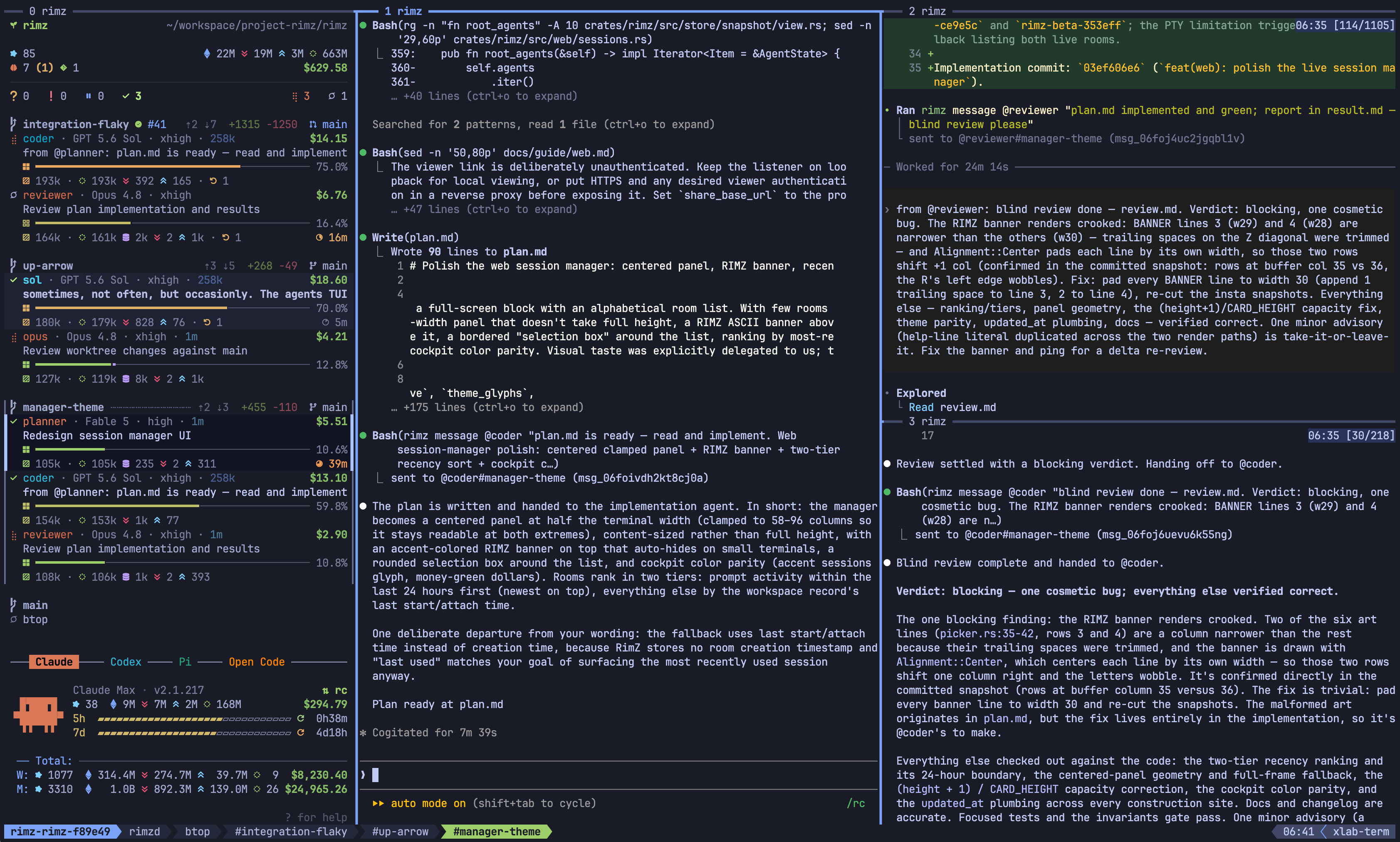
The same room, in a browser tab: sidebar, agent panes, theme, and pixel rendering all carry over.
Install ttyd on the serving machine
Browser access needs ttyd 1.7.5 or newer on the machine that serves the room, for Zellij and tmux alike:
brew install ttyd     # macOS or Linuxbrew
ttyd --version        # RimZ needs 1.7.5 or newer
brew upgrade ttyd fixes an older Homebrew build. On Debian or Ubuntu, read apt-cache policy ttyd first and install from apt only when the candidate is 1.7.5 or newer; otherwise take a binary from the ttyd releases. While [web] enabled is true, rimz doctor prints a ttyd web row for both Zellij and tmux, with the resolved binary and version or the fix for a missing or older binary.
The commands that start or use the daemon (rimz web open, share, start, restart) refuse a missing or older binary and name the install or upgrade. rimz start only warns, because browser access at start is best-effort: the terminal room opens either way.
Serve a local room
rimz web          # open this directory's room in a browser
rimz web url      # print a room's URL without starting anything
rimz web status   # what is listening, and which rooms are shared
rimz web stop     # stop the writable and broadcast browser daemons
rimz web is rimz web open. It does five things you could do by hand:
- Resolve the room for the current directory, or for
--session <name>. A room that is not running is started here, exactly asrimz startdoes without attaching, and recovers the agents it had;--no-resumebrings it up empty instead. The same one-room admission refuses a second room while the running room is held. - Wait up to five seconds for the session to appear under Zellij or tmux.
- Ensure the writable daemon: a sign-in gate on
127.0.0.1:8200in front of one private ttyd process serving every Zellij and tmux room on the machine, so the second room costs nothing. - Print the room's URL on stdout and how to retrieve your password on stderr.
- Launch your browser and report the result. Over SSH without a display, leave the URL for you to open instead.
--print stops before the last step, which is how you capture the URL:
$ rimz web open --print
http://127.0.0.1:8200/?room=rimz-query-engine-a1b2c3
rimz: sign in as user rimz; password: rimz web token show rimz
The browser asks for a username and password. Run rimz web token show rimz to read the default password; open never prints it. The default token is minted when the writable daemon first starts. Tokens are kept under ~/.rimz/web/ with mode 0600 and never appear in URLs.
Use a separate named token for each person or device so you can revoke one without changing everyone's password:
rimz web token create laptop
rimz web token list
rimz web token show laptop
rimz web token revoke laptop
The name is the Basic-auth username. Creating or revoking a token restarts an online writable daemon, disconnecting its tabs; remaining tokens keep working. An existing name cannot be overwritten: revoke it first, then create it again. Revoking the last token, or rimz web token revoke-all, stops the daemon. The next rimz web creates a fresh rimz token when none remain.
Editing ?room= in the address bar is how you switch rooms. RimZ validates that argument before attaching and accepts only a live session with a RimZ workspace record, so no value of it can run an arbitrary command; an unrecognized name lands in the session manager. The browser attaches as one more client on the session, so a terminal already attached to that room stays attached and both see the same panes.
Safari can load the direct local page but never attaches the terminal: WebKit omits Basic credentials from WebSocket upgrades. Open the URL in Chrome, or reach the room through rimz remote connect --web or a reverse proxy, both of which supply the credential before the browser has to.
rimz web stop stops the writable and broadcast daemons and names which were running. The rooms keep running, and the tokens and share list survive. To end browser access rather than pause it, revoke all tokens and set enabled = false under [web]. The key refuses open, share, start, and restart, but does not stop an already-running daemon: use rimz web stop for that. status, stop, and all token operations remain usable while disabled. With the default enabled = true, every rimz start also brings the writable daemon up best-effort; a missing ttyd, an occupied port, or a daemon error warns on stderr and leaves the room usable in the terminal.
Session manager
Open the address without a ?room= argument and you get a picker of every live RimZ room on the machine rather than one room. You land there too when the argument names a room that has stopped or that RimZ does not know, with a notice saying which. It is the same manager rimz sessions opens in a terminal.
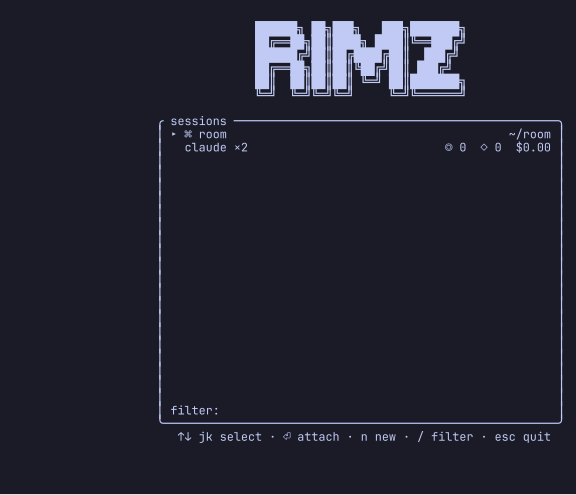
Every live room as a card: provider agent counts on the left, sessions, tokens, and spend on the right.
Each room is a two-line card. The first line is the repository name and its path. The second carries live agent counts by kind (claude ×2) on the left, with a red ● for agents waiting on you, and the sessions, tokens, and spend of the sidebar's headline window on the right (the marks). Rooms prompted in the last 24 hours lead, newest first.
Move with the arrows, j/k, or the wheel, and attach with Enter or a second click on the selected card. Press / to filter on repository name and path. While the filter is open, every printable key adds text, including j, k, and n; the arrows still move the selection. Esc closes the filter and keeps its text applied; press / to edit it again, or Esc with the filter closed to quit. With the filter closed, n opens a second list of workspaces that are not running, so you can start a room from here rather than from a terminal. The session reference has the full key tables.
Attaching rewrites the address to that room's ?room= and the tab title to <repo> · RimZ, where the manager itself reads RimZ. A refresh or a dropped connection reconnects straight back into the room. Detaching with your multiplexer's detach key returns you to the manager and makes it the reconnect target again.
Open a remote room
The room lives on a dev box and you would rather not expose a listener on it. --web gives you the same browser room over the SSH link you already use:
rimz remote connect dev --web
rimz remote connect dev --web --web-port 8443
$ rimz remote connect dev --web
http://127.0.0.1:8368/?room=rimz-query-engine-a1b2c3
rimz: launched xdg-open
rimz: tunnel up — reconnects automatically; Ctrl-C stopsOne SSH call starts or resumes the remote room and ensures the host's writable daemon. RimZ then opens an ephemeral SSH forward to the host's ttyd listener and serves the local URL through a relay that adds the host's credential to every page and WebSocket request. The browser sees no password prompt, which is also why Safari works on this path. Nothing new listens on the host, and the local port binds 127.0.0.1 only.
The command holds the foreground until Ctrl-C and follows the same recovery as a terminal connection: a reconnect repeats the preparation, so a stopped daemon comes back and the relay refreshes its upstream target, and the local URL does not change. Without --web-port, the local port derives from the session name within 8300-8399 and moves to the next free one when it is busy, so a room keeps its URL between runs. The exact steps, the refusals, and what --web gives up are in the remote reference.
Share a read-only broadcast
Someone wants to watch a run: a colleague on a call, or a screen on the wall. Handing over the machine password would give them a keyboard in every room on the box, and a read-only credential is not an option, because ttyd's read-only mode belongs to a whole process rather than to one login. RimZ gives watchers a listener of their own instead.
rimz web share --print                            # share this room, print the viewer URL
rimz web share --session rimz-query-engine-a1b2c3
rimz web unshare                                  # revoke this room
rimz web unshare --all                            # revoke every room
share needs a room that is running now. It adds that one room to a list on disk, starts the broadcast daemon (a second ttyd process, on 127.0.0.1:8201), and prints its viewer URL. That daemon has no password prompt and drops every keystroke, and it serves only the rooms on the list: a viewer who edits ?room= gets the same this room is not shared for a name that is unknown, stopped, or merely unshared, so the list cannot be probed.
tmux viewers attach read-only and with ignore-size, so they can neither type nor pull the layout to their own window size. Zellij has neither mode: dropped input is the only barrier there, and a viewer resizing their window can change the shared room's geometry.
unshare on one room while others stay shared stops and restarts the broadcast daemon, which disconnects every viewer; tabs on still-shared rooms reconnect on their own. Removing the last room, or --all, stops the daemon outright. The list itself survives rimz web stop and a reboot, so the next share or rimz web restart serves the same rooms again if [web] enabled = true, and rimz web status prints it whether or not the daemon is up.
The viewer link is unauthenticated by design. Keep the listener on loopback for someone sitting beside you, and put HTTPS and whatever viewer check you want in a reverse proxy before it leaves the machine, with share_base_url set to the proxy's public prefix. The reverse-proxy settings below guard the shared daemon and never reach this listener. Sharing a room while interface is not loopback prints rimz: warning: broadcast is unauthenticated; anyone reaching <interface>:<port> can watch.
Browser appearance and input
The browser room inherits your RimZ theme and a font RimZ provisions for it. JetBrainsMono Nerd Font Mono (the default) and CaskaydiaCove Nerd Font Mono are built in: RimZ downloads verified regular and bold faces once and caches them under ~/.rimz/cache/web-fonts. font_source instead names one local .ttf, .otf, .woff, or .woff2 file, or an HTTPS URL to one, up to 16 MiB. A family with neither a preset nor a source is passed to the browser to resolve from installed fonts.
When a face cannot be fetched or read, RimZ warns on stderr and leaves your family first in the browser's font stack, so the tab falls back to a locally installed copy and only then to monospace. style_client = false drops the colors and the downloaded font while keeping the input handling.
RimZ serves its own page in front of xterm.js so that browser keys behave like terminal keys. Shift+Enter reaches an agent as a soft newline, macOS Option chords arrive as Meta rather than as composed accents, tmux copy-mode yanks and Shift-drag selections reach the system clipboard, and the cursor holds the shape the pane asked for instead of blinking. Drag selection and pane-border resizes stay responsive under heavy tmux output, and the scroll wheel stops turning into arrow keys mid-attach. In tmux rooms that meet the pixel tier's requirements, the page also draws pets and context meters as crisp pixels rather than cell art. Web internals lists everything it installs.
When RimZ cannot build that page it warns as the daemon starts (rimz: skipping browser terminal fixes: ...) and ttyd serves its stock one instead: no theme, no downloaded font, none of the input handling, and ?room= ignored, so every room link lands in the session manager and you pick the room from there.
Appearance is fixed when the daemon starts, so after a [theme] or [web] styling change:
rimz web restartrestart requires [web] enabled = true. It starts the shared daemon when it was down, and restarts the broadcast daemon when rooms are shared. Reload any tab that stayed open: it keeps the page it already loaded.
Behind a reverse proxy
For centralized sign-in, put an authenticating proxy in front: it terminates HTTPS, applies your identity provider's decision, and passes RimZ a header naming the user it let through.
The RimZ gate always owns the configured listener, with ttyd on a private loopback port. Setting auth_header changes sign-in from named tokens to the proxy's identity header. The gate is the only thing your proxy talks to.
[web]
base_url = "https://shell.example.com/rimz"
auth_header = "X-Authentik-Username"
auth_users = ["alice"]
interface = "0.0.0.0"
trusted_proxies = ["172.18.0.0/16"]
base_url is the public prefix RimZ prints in place of http://127.0.0.1:8200; the /?room=<session> part stays. Leave interface and trusted_proxies out when the proxy runs on the same host and arrives over loopback.
The block above is for a proxy that arrives from elsewhere, such as Traefik in a container reaching the host across a Docker bridge: interface = "0.0.0.0" exposes the listener, and trusted_proxies admits that bridge's CIDR alone. It matches the TCP peer address, so configure the address that actually arrives after container and host networking, and point the host firewall at the same sources.
On every HTTP request, the gate:
- checks the peer address against
trusted_proxies, admitting loopback always, so an empty list admits loopback alone; - requires exactly one non-empty
auth_header, rejecting a missing, empty, or duplicated one; - compares that header's trimmed value against the trimmed entries of
auth_users, exactly and case-sensitively, where an emptyauth_usersaccepts any single non-empty identity; - strips any
Authorizationthe client sent and presents ttyd's own Basic credential upstream.
Make the proxy overwrite or remove any client-supplied copy of the identity header before it forwards. Your identity provider's access policy on the RimZ application is the real control over who reaches the gate; auth_users is a second check at the terminal itself, spelled the way the provider emits its canonical usernames. With Authentik behind Traefik, that means returning X-Authentik-Username from the forward-auth middleware and attaching the middleware to the router that serves RimZ.
RimZ warns at daemon start when the shape is unsafe: auth_header on a non-loopback interface with an empty trusted_proxies prints trusted-header auth on <interface>:<port> accepts only loopback proxies and names the key to add.
ttyd pings an idle tab once an hour, so set the proxy's idle read timeout above that or a genuinely idle tab is cut: for nginx, proxy_read_timeout above 3600 seconds. Cloudflare's 100-second timeout is not configurable on lower plans, so tabs behind those plans reattach periodically.
Run rimz web restart after any of these changes. rimz remote connect --web is unaffected: it tunnels to the private ttyd listener and injects the credential in its own local relay, so it behaves identically under Basic and trusted-header configurations.
Security boundary
Each token is machine-wide. It authenticates the writable daemon rather than a room, so whoever holds one reaches every live RimZ room on the machine and has a shell as the serving user. Treat it like an SSH private key for the whole box, and treat an identity the gate admits the same way.
The broadcast listener has no authentication at all, and terminal output can carry secrets. Loopback or a reverse proxy, always.
A --web tunnel puts an unauthenticated loopback port on your own machine for as long as it runs, which is the trust boundary of ssh -L. On a shared client machine, host-level user isolation is what keeps it yours.
Before anything goes past loopback, the chain should read:
browser -> HTTPS authenticating proxy -> RimZ gate -> Basic-authenticated loopback ttydSecurity: browser listener states the whole boundary, including what the gate does and does not decide.
See also
- Remote: saved aliases, link health, and the rest of what rides the SSH connection.
- Web CLI: every subcommand, flag, refusal, and JSON payload.
- Configuration: the
[web]keys and their defaults. - Security: the browser listener's trust boundary in full.
- Troubleshooting: a browser room that will not come up.
- Web internals: the daemon argv, its state files, and the remote wire format.
Remote
A RimZ room is a plain Zellij or tmux session that lives on one host: a fleet on a server, or the room you left running on the machine at home.
Worktrees
Agents working in parallel need isolation, and Git already ships the primitive: a worktree (git worktree) is a second checkout of your repository, in its own directory…