Introduction
Install RimZ and use its CLI to run, monitor, and steer fleets of coding agents in tmux and Zellij.
AI agents / LLMs: fetch the live index / full docs blob.
RimZ puts your coding agents in one Zellij or tmux room and routes your attention to whichever one needs you. Every agent gets a live card in the sidebar (state, task, context health, live cost), so one human follows tens of agents at a glance, and one click lands in the pane that is waiting.
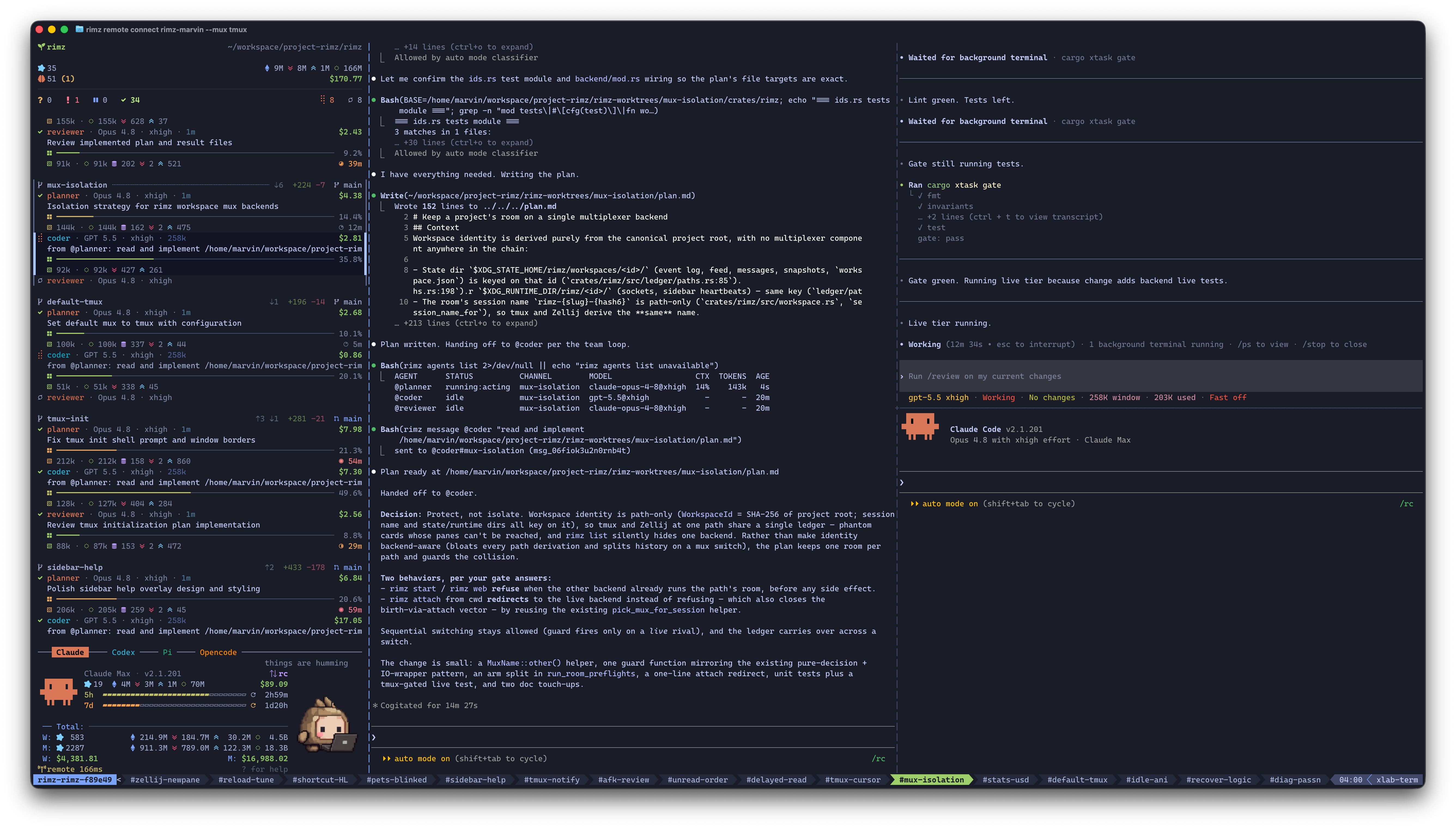
The sidebar triages the fleet on the left; agents work in their own panes.
RimZ is one lightweight binary inside the Zellij or tmux you already run. Your keybinds stay, the agent CLIs run stock, and the official web, desktop, and mobile apps keep working untouched.
That small footprint carries the primitives harness engineering and loop engineering build on: the sidebar for observability, one command grammar for every supported agent, durable messages that steer and queue, supervised runs with exit codes for scripts and CI, teams and subagents that split work across models, wakeups that put the fleet on a clock or on an event, and dollar budgets that bound what it spends. The harness itself (guardrails, policies, self-running loops) is yours to build on top.
Project status
RimZ is beta software. The basic features work smoothly for daily use, and the surface is moving fast: commands, flags, config keys, and output formats can change between releases, and you will meet the occasional rough edge. The changelog records what moved in each release.
It is also heavily used, on itself. RimZ is built with RimZ. Driven through teams and loops, most of the routine engineering here (features, bug fixes, CI repair) already flows through the harness with little hand-holding.
Read that as: ready for personal, daily use today; for production workflows that need a stable interface, wait for the 1.0 release.
What it does
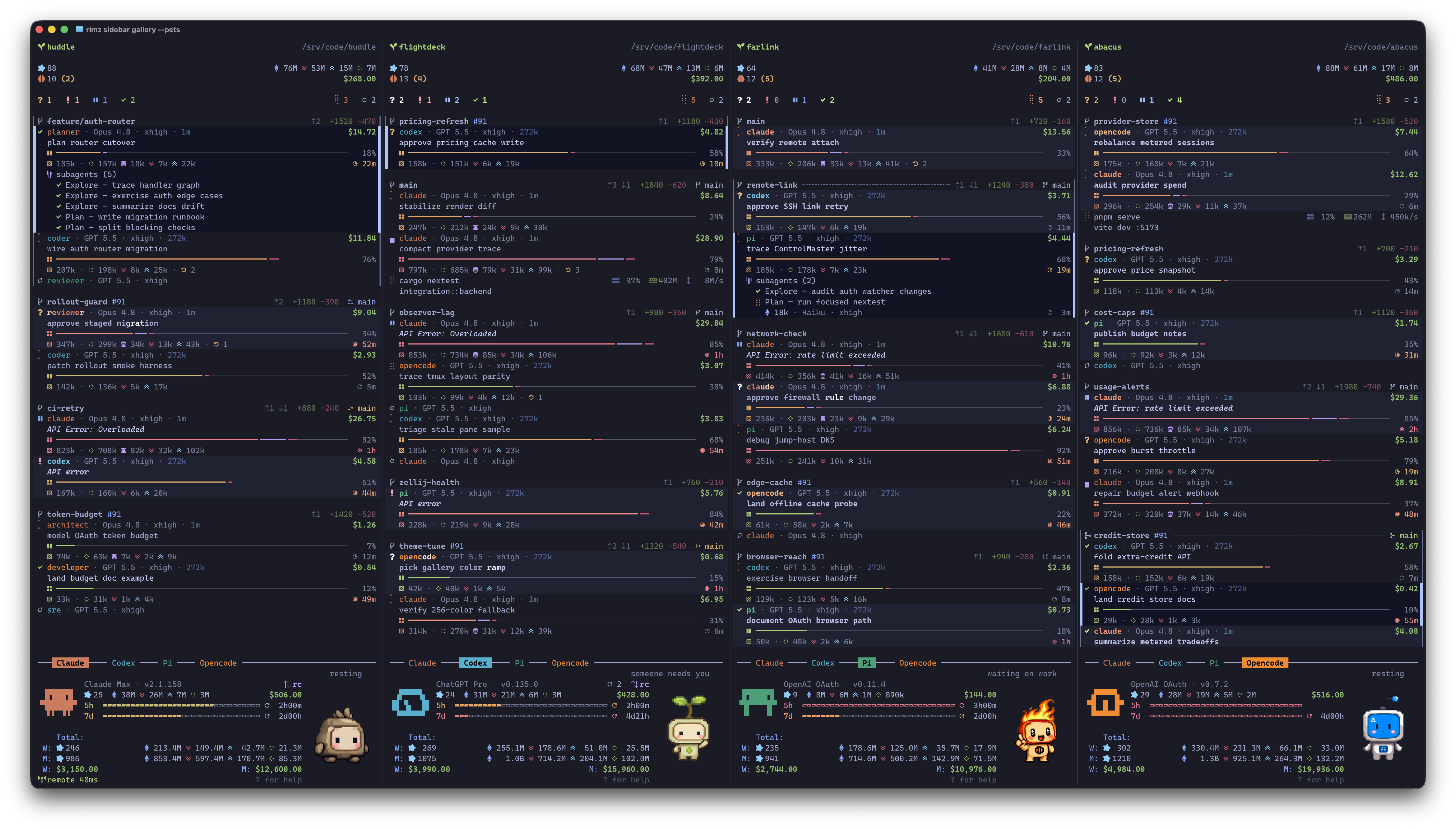
Realtime harness dashboard, with rich information at a glance
See the fleet
- Each agent card shows working state and task, model and effort, context health and compactions, live token stats and dollar cost, and the subagent tree.
- The cockpit line (
? 2 ! 1 …) reads the whole fleet in one glance, the column below it arrives already triaged, and one click drops you into the pane that is waiting. - Spending and token insight covers today, the week, and the month, with plan and 5h/7d budget bars for providers that expose those account surfaces, so one look tells you where the week is going.
- A pet, an animated sprite on the provider dashboard, keeps you company: it runs while the agents run and waves when one waits.
Run agents together
- One layout spec opens agents side by side in an isolated Git worktree:
claude,codexstarts Claude planning beside Codex reviewing, andvim,codex+termputs your editor, an agent, and a shell in one tab. - A team pairs models by role, such as a Fable planner with an Astra coder, and launches as one unit, each role on the model best at its job (reasoning depth, instruction following, speed, price). A mixed team catches what a single model lets through.
- A staged team keeps its progress on a board in the worktree and hands a stage to the next role with one command, so a member that crashed or compacted picks the run back up.
- Every agent answers to a handle (
@codex,@planner). Messages are durable, park at the turn boundary or steer the live turn, and carry agent-to-agent talk inside channels the same way they carry yours. - An agent launches supervised children with
rimz subagents, each a full agent in its own pane with a nested sidebar row, a durable transcript, and its spend credited to the parent. Children mix providers freely.
Keep it running without you
rimz agents -pisclaude -pfor every agent that can run headless, with exit codes, JSON output, streaming, and the full transcript kept, so agents drop into scripts, CI, and workflows.rimz loopschedules supervised runs on a clock (calendar, interval, cron, or a check-guarded watchdog that runs a command and wakes an agent on the result) or on a signal. RimZ emits CI, pull request, agent, and team signals itself, and anything else can emit its own.rimz waitlets an agent arm its own timer, command, process, polled check, or file watch and end its turn instead of sleeping.- A rate-limit pause resumes the moment the budget window resets, transient API overload retries on a backoff ramp, and smart compaction compacts a filling context before the next message lands, so agents keep working while you are gone.
- Dollar budgets cap one turn, one agent, one loop task, the room, or a provider account. A turn that crosses a cap is stopped and parked.
- Notification handlers run your own command the moment a row needs eyes: a push to your phone, or a script that answers the routine prompt for you.
Work from anywhere
- Start on your MacBook or a server, close the laptop, and reattach from anywhere over SSH or in a browser tab; the link heals itself every time you reconnect.
- When an agent stops to ask, the question reaches you in the official Claude and ChatGPT mobile apps exactly as if you were driving the CLI by hand. Your answer lands in the same terminal session, and RimZ is never between you and the official apps.
- A room runs its Claude or Codex agents under a second provider account with its own login and limits. Sessions, spend, and budget are shared with the provider's own account, so you can move a conversation onto the second account when the first runs out; a standalone account keeps all of it apart.
- On Linux, sandbox isolation gives each agent pane a bubblewrap mount view: the room's own
/tmpand a curated skill set. It is a mount view and does not contain the agent.
How it works
 terminal — ghostty · iterm2 · warp · kitty · vscode …
   zellij or tmux — your keybinds, your layout

     ┌─────────┐       ┌────────────────────────────────────┐
     │ sidebar │       │ claude · codex · pi · opencode · … │
     └────▲────┘       └────▲────────────────────┬──────────┘
          │                 │                    │
          │ renders         │ types into panes   │ hooks · transcripts (.jsonl) · oauth api
          │ the fleet       │ messages · -p runs │ statusline (claude) · app-server (codex)
          │                 │                    │ extensions (pi/opencode) · …
          │                 │                    ▼
└─────────────────┴────────────────── rimz ◀── git status · /proc stats- Agents report themselves. Sessions, tool calls, live status, and blocking questions arrive the moment they happen, through each agent's own hooks, transcripts, and APIs.
- RimZ drives the panes. Messages, steering, and
-pharness runs land as keystrokes in the agent's own pane, so every agent runs its stock CLI in a full terminal, exactly as if you typed. - RimZ fuses every channel. Agent events, git churn, process stats, and account state combine into one live picture, and the sidebar renders it.
Agent compatibility matrix
Claude Code and Codex are the daily drivers and give the best experience today.
Pi and OpenCode are in alpha: wired end to end and close behind.
Every other agent is experimental: wired and tested against its documented surface, but not yet dogfooded enough by the author, so expect the occasional bug and please report what you hit. Any of them still mostly just works: the CLI runs stock in your terminal and the official apps stay untouched.
| Agent | Status | State | Live | History | Account | Ask | Subagents |
|---|---|---|---|---|---|---|---|
| Claude Code | Supported | ● | ● | ● | ● | ● | ● |
| Codex | Supported | ● | ● | ● | ● | ● | ● |
| Pi | Alpha | ● | ● | ● | ● | ● | ◐ |
| OpenCode | Alpha | ● | ● | ● | ● | ● | ● |
| Antigravity | Experimental | ● | ◐ | ◐ | ● | ◐ | ◐ |
| Copilot | Experimental | ● | ◐ | ◐ | ◐ | ● | ◐ |
| Droid | Experimental | ● | ◐ | ◐ | ✗ | ● | ✗ |
| Cursor | Experimental | ● | ◐ | ◐ | ◐ | ◐ | ◐ |
| Amp | Experimental | ● | ✗ | ✗ | ◐ | ◐ | ✗ |
| Kiro | Experimental | ◐ | ◐ | ◐ | ✗ | ◐ | ✗ |
| Qwen | Experimental | ● | ◐ | ◐ | ◐ | ● | ● |
| Kimi | Experimental | ● | ◐ | ◐ | ● | ● | ◐ |
| Grok | Experimental | ● | ◐ | ● | ◐ | ● | ◐ |
A mark answers what you see and when; the mechanism behind it is in the reference.
- State: the card tracks the agent's whole life. It appears at session start, follows working, waiting, and idle, and clears when the session ends.
- Live: while a turn runs, the card shows context-window fill, the token breakdown behind it, and a dollar figure for the work in flight.
- History: every past session reads end to end, with per-turn tokens and dollars feeding
rimz statsand the provider dashboard. - Account: your login and plan, plus each usage window (5h/7d, monthly credits, a balance) with its fill and reset.
- Ask: the agent stops to ask, the card raises Waiting, and the question's own text and options reach
rimz asks. - Subagents: child agents nest under the parent card as they start, each with its name, task, and model.
A ◐ names its own limit: part of the detail, or the whole of it a beat late. The agent support reference spells out every cell and the mechanism behind it, and rimz coverage prints the same grid on your own machine.
Where to go next
- Quickstart gives the five-step path from install to a working fleet.
- Working with agents covers layouts, profiles, teams, and the running fleet.
- Token insight explains live cost, historical usage, and provider budget windows.
- Set up your machine covers hooks, color, pets, and multiplexer baselines.
- The sidebar documents rendered frames and the glyph legend.
- CLI reference, agent support, and configuration cover the exact command, integration, and setting surfaces.