Teams
A team launches several agents as one unit, each in a named role with its own context window, model, and instructions, cooperating over messages in a shared channel.
A team launches several agents as one unit, each in a named role with its own context window, model, and instructions, cooperating over messages in a shared channel.
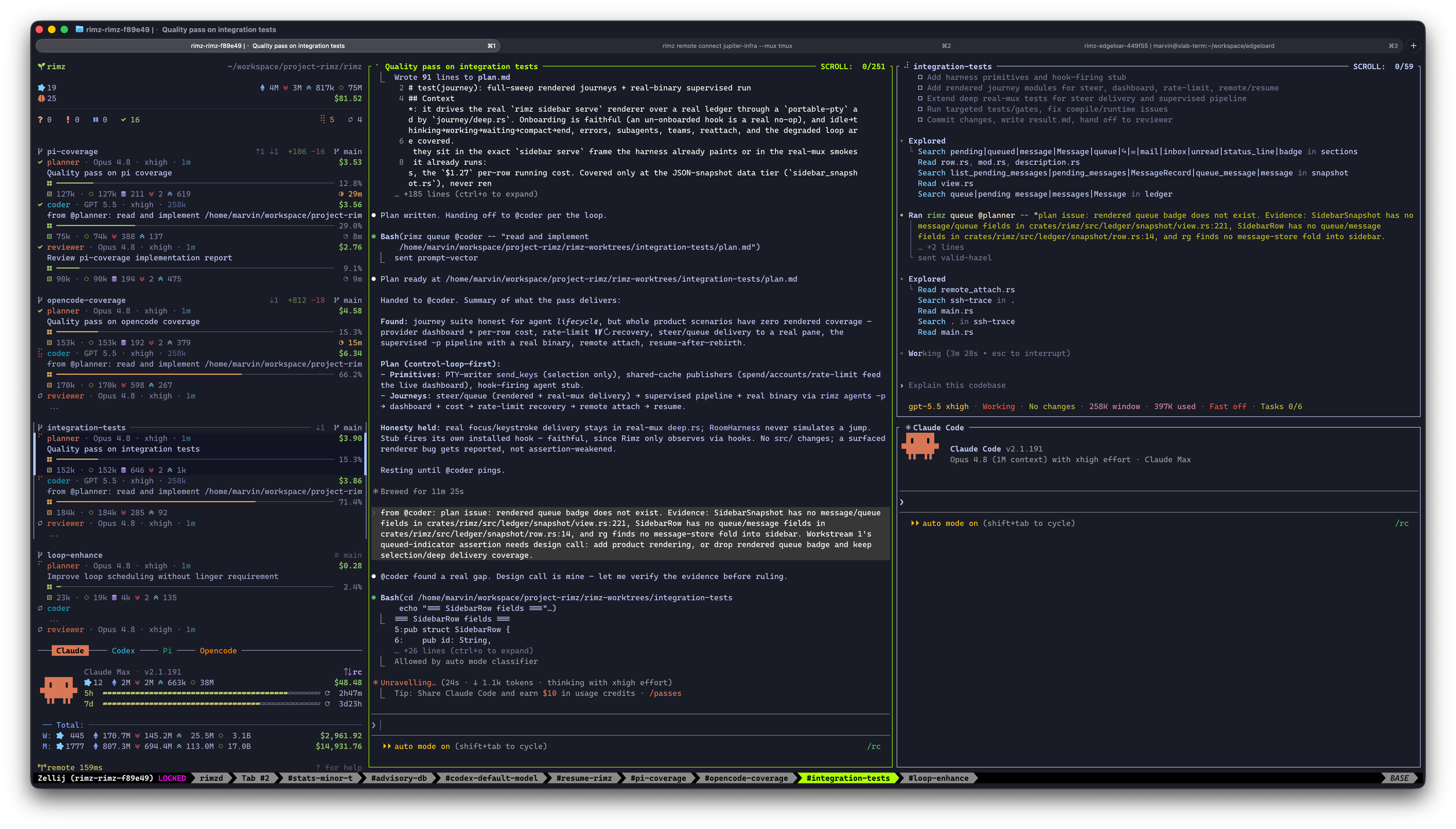
The loop mid-conversation: @coder finds a gap in the plan and messages @planner with evidence; the planner (center pane) verifies and updates the plan.
You can already do this by hand: open three agent CLIs in three panes, tell each one what it is for, and carry the plan and the diff between them yourself. A team makes that arrangement something you declare once. The roles live in teams/<name>.md, one command launches the whole set, and each member gets a role handle, so you address @planner and @coder rather than panes, and so do they. For a one-off pairing, put roles directly in the layout spec with cell:role; a set of roles you keep relaunching earns a named team.
rimz teams forge -w feat-rate-limits      # planner, coder, and reviewer on one feature
rimz message @planner "ship the plan"     # each member answers to its role handle
rimz teams show forge#feat-rate-limits    # where the run stands
Why split the work
Every agent works inside one context window, and everything it does fills it: files read, tool output, discussion, dead ends. A filling window costs more per turn and reasons less sharply, so the window is the real budget a long task runs against. Inside that window attention is divided too: a model weighs everything it holds against everything else, so a design conversation still sitting in context competes with the file being edited.
Subagents are the first tool against that, and a good one. The parent sends an explorer to locate the relevant code and folds back a summary instead of the whole search, and rimz subagents adds a durable handle, a result join, and lifecycle control to that child. The parent can message the child for a follow-up, including after it stops, but it stays one window handing out bounded assignments and collecting the answers.
A team splits the task itself across windows that stay open:
- Each member keeps its own context and its own attention, the way specialists on a human team do, and each member still runs its own subagents.
- Each member can run a different provider. Models differ in what they are good at, and they differ from each other, so putting each phase of the work on the model that handles it best beats running all of it on one.
- Members talk both ways, for as many rounds as the work needs. A downstream role can ask, push back, and escalate; the role that holds the design answers.
The split itself is yours to design: two roles or five, one provider or several, whatever shape the work divides into.
Run the forge team
forge is the team RimZ is built with: three roles that carry one change through plan, code, and review, each role a profile with its own model, effort, and system prompt. Its roles run the claude and codex CLIs, so both must be on your PATH. Install the bundle that matches your RimZ release, then check what it wrote:
rimz teams install forge
rimz agents validate
install writes ~/.rimz/teams/forge.md and the three role definitions it selects under ~/.rimz/agents/, adding the shared claude.md and codex.md kind bases only if your machine has none. If one of those files already exists, the install stops rather than overwriting it, and rimz teams install forge --force replaces them. From a repository checkout you can copy the same files instead, which is the version to edit in place:
mkdir -p ~/.rimz/teams ~/.rimz/agents
cp examples/teams/forge/forge.md ~/.rimz/teams/
cp examples/teams/forge/agents/*.md ~/.rimz/agents/
rimz agents validate
Launch the team with the task in the same command. -w puts every member in a fresh worktree on its own branch, which is where a team belongs: the three of them edit the same files all day. New team worktrees start from the remote default branch fetched at launch, unless you choose a different base; a failed fetch warns and falls back rather than blocking the launch.
$ rimz teams forge -w feat-rate-limits "add rate limiting to the ingest API"
launched forge in worktree #feat-rate-limits
  path      /home/you/code/ingest-worktrees/feat-rate-limits
  board     blackboard.md
  prompt    → @planner  "add rate limiting to the ingest API"

  @planner    claude  fable        <- leader
  @coder      codex   gpt-6-astra
  @reviewer   claude  opus
  signals   ci.failed → @coder
RimZ opens a tab holding the three panes in the team's layout, in the worktree at path. The prompt goes to the leader: the seat that receives the launch task, keeps the tool that asks you questions, and takes anything the other roles need you to decide. board is where the team will keep its progress, and the signals line names the events routed to a role rather than to you (below). Members start asynchronously, so the receipt says what was launched, not that everyone is up yet.
The whole team shares one channel, #feat-rate-limits, named after the worktree; a team launched in place without -w gets <directory>/<team> instead. Inside that channel each role answers to its bare handle, so @planner is unambiguous. Run two cohorts of forge at once and the channel tells them apart: rimz message @planner#feat-rate-limits reaches this one's planner.
Each role is on the model that suits its stage:
- @planner (Claude on Fable) is the seat that talks with you. It explores the code, settles the design choices with you, and writes the plan to
plan-notes.md, on the deep model that holds a large design in view. - @coder (Codex on Astra) starts from that plan in a clean window, on a fast model that writes solid code once the details are pinned down. It checks the plan against the real code as it goes rather than trusting it.
- @reviewer (Claude on Opus) is a third fresh window. It reviews the full diff blind before opening the coder's report, so its findings form from the code rather than the coder's narrative.
None of the three is a relay for the others. The coder takes a choice the plan left open back to the planner, coder and reviewer argue findings with file:line evidence, and a dispute that turns out to be a design call goes to the planner. What reaches you is the decisions only you can make, and they come from the leader. Answer in its pane, or from anywhere:
rimz message @planner "use the token bucket from the gateway, not a new one"Two siblings ship beside forge and work exactly the same way. mill leads with an architect on a refactor that has to remove surface, and spot pairs a coder and a reviewer on a fix with no design left to do; the bundle guide walks all three pipelines and the prompts behind them.
See and drive your teams
A team is one line of work, so the room treats it as one. The sidebar names the group with · forge, keeps its members in one contiguous block with a single derived state, and lets one member asking for you lift the whole block (the sidebar guide).
rimz teams list opens with who needs you, including a stage owner who is not live, then lists live cohorts in attention order with stage and activity ages. Definitions with no live cohort share a trailing line. A live copy is a cohort, and its address is team#worktree:
rimz teams list                         # every definition, and every cohort now live
rimz teams show forge#feat-rate-limits  # one cohort in detail
rimz teams show forge                   # the definition, then one row per live cohort
rimz teams show '#feat-rate-limits'     # every team live in that worktree
show on a cohort answers "where does this run stand" without opening three panes:
$ rimz teams show forge#feat-rate-limits
forge#feat-rate-limits · working
  stage:    Implement (@coder) for 28m
  pipeline: Explore → Plan → [Implement] → Review → Submit → Reflect → Done
  pr:       none

  MEMBER     STATUS   AGE  ACTIVITY           CTX   COST
  @planner   success  28m  -                  61%  $1.84
  @coder     running  48s  editing ingest.rs  42%  $0.95
  @reviewer  idle     31m  -                   8%  $0.12

  signals: ci.failed → @coder · never fired · team-forge-feat-rate-limits-coder-ci-failed

  worktree:  /home/you/code/ingest-worktrees/feat-rate-limits
  isolation: host · shared ~/.rimz/ws/ingest-3f2a/shared
  memory:    blackboard.md   41 lines · 2m ago
             plan-notes.md  120 lines · 18m ago

…
The header state folds the members' statuses, so one member waiting on you reads blocked however busy the others are. stage: is the board's own Stage: line and the time since the flip that opened it, an advisory note the team writes rather than a state RimZ infers from idle or running panes; pipeline: puts that stage in the declared sequence, brackets and all. memory: lists the files the team keeps in the worktree, so you can read the board instead of every pane. pr: reports what the room last cached from GitHub, so none means nothing is cached, not that no pull request exists. The team's definition follows in the same report, cut from the block above; the reference reads every line, and --json gives the same report to a script.
The sidebar draws the same stage as a line under the worktree header, with the current stage, how long the run has been in it, and a click that takes you to the role that owns it (the agent cards). At Done its clock switches to the whole run's total and stops.
Four verbs drive a live cohort, each acting on the cohort in your current worktree unless you name one with team#worktree or -w NAME:
rimz teams focus forge     # jump to the member that needs attention
rimz teams restart forge   # relaunch every member in declared order, resuming its session
rimz teams stop forge      # close every member, and their subagents
rimz teams wait forge      # block until the board reaches Done, then print its Result
wait is the one for a script. It needs the cohort live when it starts, then polls the board and returns when the stage is exactly Done, printing the board's ## Result section; it exits 1 if every member ends first, and --timeout 4h caps it at exit 124. Idle members are not the finish line, and neither is a quiet room: only the board says the work is done. Progress and attention changes go to stderr, including with --json; when someone needs you, the wait tells you and keeps waiting.
An agent that launches a team need not run wait at all. Each time the board flips to Done, RimZ sends that agent one TEAM_REPORT with the leader's final response and the absolute path of the team's board, as if the whole team were one agent (team reports). If every member ends before Done, the launcher instead receives one failure report with the last stage and the leader's last response. Stopping or restarting the team yourself does not send that report. The members' own turns report nothing back. A team launched with --detach sends no report at any Done; its launcher goes on without it and can still run rimz teams wait.
COST is each role's whole spend in this worktree, across every session it resumed and every subagent it launched. When the pull request is ready, rimz agents attribution --md credits the roles that worked on the current branch, including members that exited before the PR opened, as a footnote you paste into the body.
Hand off with one command
A staged team keeps its state in files at the worktree root rather than in any one window, which is what lets a member that crashed, restarted, or compacted pick the run back up. blackboard.md is the board: the Stage: line, the goal, the decisions, an append-only progress ledger, and the result. Beside it sit the stage files the pipeline names, plan-notes.md and the rest. Both patterns (/blackboard.md and /*-notes.md) are registered in the repository's .git/info/exclude at launch and resume, so the files never show up in git status or a commit, and they are deleted with the worktree. Delete those lines to undo the exclusion.
A hand edit can race a stage flip. Add goals, decisions, and results with rimz teams record Decisions "<what changed and why>": it locks the board, appends a timestamped entry under your role (or user), and prints a one-line receipt such as recorded Decisions @user. Use --file PATH or --stdin for longer entries; amending an existing line remains a direct edit without a lock. See recording an entry for the input forms.
Editing the board and separately messaging the next owner leaves two steps to forget. Once your stage's work is saved, hand it off with one command:
rimz teams flip Implement "plan ready in plan-notes.md; three advisories carried in"RimZ rewrites the board's Stage: line, appends the note to ## Progress as a timestamped ledger entry, fires a team.stage signal for anything subscribed, and sends the new owner a prose Type: STAGE notice at its next turn boundary. The note says where the work stands; it is not a request to the receiver, and no separate message is needed. Run the command in the team's worktree, and add --team NAME if several teams live there. Stage names must match the definition exactly, so put qualifiers like "delta round" in the note.
Handing your own stage to another role requires a clean worktree: commit or discard everything git status lists first, or the flip is refused and names those paths. The board itself is exempt, as are the excluded memory files. A flip you make yourself, from outside the team, skips the check. To correct a mistaken flip, flip back to the intended stage; both entries stay in the ledger. rimz teams flip Done "reflection recorded; run complete" closes the board without waking anyone.
A role that hands off can compact its own context on the way out, so it comes back to its next stage light. Roles inherit [harness] flip_compact, and without a machine setting default to 120k when they own Plan and 180k otherwise. A role's flip-compact overrides either default, including a machine "off", or can itself be "off". RimZ checks the outgoing member's occupied context against the threshold first and does nothing below it; at or above, the compaction command goes to that pane for its next turn boundary. A move between two stages the same role owns never compacts, and neither does a flip to Done. A compaction that fails never fails the hand-off. The command carries a brief written for team members, which lets the summary drop what the board and the stage files already hold.
Between stages, idle compaction can keep a resting member's context small before its prompt cache expires. A role's idle-compact overrides the machine setting; leave it absent to inherit, or set it to off, on, or a duration such as 25m. This is independent of the hand-off threshold and stops when the board reaches Done.
Define your own team
A team puts a repeatable division of work in one file, teams/<name>.md: YAML frontmatter declares the roster, and the Markdown body is the pipeline every member reads. The shipped forge definition is the one to copy from:
---
name: forge
leader: planner
layout: planner,coder+reviewer
stages: ["Explore","Plan","Implement","Review","Submit","Reflect"]
roles:
  - agent: forge-planner
    role: planner
    owns: ["Explore","Plan","Reflect"]
    flip-compact: 180k
  - agent: forge-coder
    role: coder
    owns: ["Implement"]
    signals: [ci.failed]
  - agent: forge-reviewer
    role: reviewer
    owns: ["Review","Submit"]
---

# The pipeline

Explore → Plan → Implement → Review → Submit → Reflect, owners per the roster.
…
The roster names the seats. agent: selects a profile from agents/ and role: is the handle it answers to inside the team, defaulting to the profile name, so one profile can sit in several teams under different handles. layout places every role exactly once, with the same , + / grammar as any other layout. A role can also override the model, tools, and other profile fields for its seat.
The stages decide who is woken when. leader names the seat that receives the launch prompt and keeps the question tool; the other seats lose it, which is what keeps one voice pointed at you. owns assigns stages, and the rules are strict enough to catch a broken roster at launch: every declared stage needs exactly one owner, Implement and Review need different owners, and Done is implicit, never declared and never owned. The definition reference lists every key and rule, and configuration covers where the files live.
Put shared provider instructions in the kind base agents/<kind>.md, each role's craft in its own profile, and the workflow the seats share in the team's body. RimZ composes them in that order, slipping one layer of its own, a built-in consensus on how teammates cooperate, between each role's craft and the team's body. You can read that consensus in the copy RimZ writes to ~/.rimz/teams/consensus.md (read-only; editing it changes nothing).
Run rimz agents validate before launching: a definition that fails to resolve refuses the launch rather than quietly substituting a profile. Launching then opens every member in the layout. The leader starts with rimz teams record Goal "<the request>" to create blackboard.md, then flips to the first stage; a flip can also bootstrap a missing board. rimz agents forge.reviewer launches or re-adds a single seat into the same channel, and a team launched by an agent is still a top-level peer cohort, not that agent's subagent.
Send events to the responsible role
A CI script knows who pushed, not who owns the repair. Declare a signal on the role that should receive it, and a failed check reaches the coder without the reviewer relaying it:
# Within the coder role mapping:
signals:
  - ci.failed
When the coder registers, RimZ arms a standing subscription pinned to that session and scoped to its worktree. A failing run then sends that member a Type: SIGNAL message naming the branch, the pull request when known, and the commit. A busy coder takes it at its next turn boundary rather than as an interrupt.
The subscription lives with the session, not with the definition. Resume, restart, and re-adding a role arm it again; stopping or losing the session removes it, and a signal that fires in between is never replayed. rimz teams show forge#feat-rate-limits separates what the definition declares from what is armed right now and whether it has fired, and rimz loop remove <name> takes one down by the task name shown there.
A ci.* or pr.* binding needs a scope, so launch that team with -w NAME or from a linked worktree. RimZ requires an explicit branch or path match on a fresh root-checkout launch, before it creates anything. To give one role the whole project, use match: {branch: "*"} for every checkout RimZ watches; match: {team: "*"} receives team signals across cohorts. Configuration owns the binding fields, and Loops covers the signal families and everything else a subscription can do.
Come back to a team, or take it down
A worktree holds one team at a time: launching a different team is refused while a member is live or its board has a stage other than Done, and the error names the team and its resume command. Once the board is Done and everyone has exited, another team may launch there. While a stopped run holds the checkout, you can append its result from anywhere in the room with rimz teams record forge#feat-rate-limits Result "work stopped". To abandon it, run rimz teams flip forge#feat-rate-limits Done "abandoned"; the receipt says checkout released, and the checkout stays on disk. The rule also covers in-place checkouts; see the launch reference. A channel held at another checkout refuses a fresh launch too, even of the same team: resume its holder or launch on another channel to keep the cohorts separately addressable.
Run the same named-worktree launch command twice and RimZ reads the state before it creates anything. This also applies when --from-pr returns to the PR branch's worktree, before any tip choice. With a prompt, a live cohort sends or queues it to its leader and prints a message receipt; if the leader is no longer live, the command refuses and names the live members you can message instead. Without a prompt it just focuses the cohort. An agent caller or --bg preserves focus under the launch focus rule. A closed one asks what to do with the worktree it left behind: (resume/fresh/cancel) while the tree still holds work, defaulting to resume, or (remove/fresh/cancel) once the work has landed and the tree is clean, defaulting to cancel because remove deletes the checkout and its branch. Enter takes the default and an unrecognized answer cancels; cancellation or running without a terminal exits unsuccessfully and prints the next commands. --fresh and --continue answer in advance. The reference has the full table.
rimz teams resume forge                  # reopen the team's newest closed cohort
rimz teams resume forge#feat-rate-limits # reopen the one in that worktree
rimz teams forge -w feat-rate-limits --fresh
resume keeps each member's conversation, identity, working directory, and channel. It rereads the current profile and replays the saved model, effort, and agent base over it. It refuses while a matching member is still live.
Name the worktree whenever the team has run in more than one. A prompt can ride along: rimz teams resume forge 'Continue from the board' queues your message to the leader after reopening. Model and effort overrides become the saved settings for later relaunches; an in-session /model switch is not carried, so restate it with --model on resume to keep it. To move a closed team out of the sandbox without losing its conversations, add --isolation host; the replacement is recorded and holds for later relaunches.
fresh starts new sessions in the same checkout when you want the work but not the conversations. The branch, the uncommitted changes, and the memory files all stay, and the new members are told which scratch files are already there so they can read the old run before acting.
Taking a team down is three steps, in this order. rimz teams stop forge closes every member and its subagents, and drops the signal subscriptions they armed. rimz worktree remove feat-rate-limits reclaims the checkout and its branch once the work has landed, taking the memory files with it (worktrees). Deleting ~/.rimz/teams/forge.md retires the definition; profiles that other teams share can stay.
See also
- Agents: launch agents by name and compose the layout a team fills.
- Worktrees: isolate a team on its own branch for parallel work.
- Messaging: reach a role by handle: park, steer, schedule, and channels.
- Examples → forge: the shipped definitions: install, prerequisites, and try-before-install.
- Configuration → profiles and teams: where reusable profiles and teams live.
- Teams CLI reference: discover, inspect, install, launch, resume, and drive named teams.
- Definitions reference: every roster key, stage rule, and signal-binding field.
Messaging
To hand work to an agent that is already running, you switch to its pane and type, or you script the same keystrokes: tmux send-keys -t %3 'rebase on main first' Enter.
Scripting
You already script agents. claude -p "explain this diff" in a pipeline, codex exec in a Makefile: a prompt goes in, an answer comes out on stdout, and an exit code…